
Repeating Background Patterns: Why the File Size Stays Tiny
Contents
When you want a dense dot or grid pattern on a site background, making a screen-sized PNG in an image editor quickly pushes the file past several hundred KB — and every time the screen size changes, the pattern stretches or gets cropped. The repeating patterns actually used on the web aren't one big image drawn at full screen size. They're a single small tile that CSS repeats to fill the area. Once you understand that, one dot or one grid line's worth of file can fill a screen of any size.
Summary ① Dot and grid backgrounds on the web are made from a single small tile a few dozen pixels wide and tall, not from a full-screen image ② That tile is repeated with background-repeat to fill an area of any size ③ One tile weighs a few hundred bytes, so the file size stays the same no matter how big the screen gets
Why does a background pattern take up so much space as an image?
When you build a dot background in something like Photoshop, you set the canvas to your screen resolution (say 1920×1080px) and stamp dots. Every dot's pixel data is stored in the file as-is. The result is a single PNG that runs from several hundred KB to several MB.
Open it on a device with a different screen size and the problems get worse. On a narrow phone screen the pattern gets cropped. On a large monitor you have to stretch the image, so the dots blur and bleed. Unless you prepare a separate image for every screen size, it won't look clean everywhere.
The root cause is the approach itself: "full screen = one image." A pattern where the same shape repeats on a regular rhythm — dots, grids — doesn't need to be drawn at full screen size. One minimal repeating unit is enough.
Repeat a single tile: the way to cut file size
Filling a background with one small tile relies on the default behavior of CSS background-repeat. The image set in background-image is displayed at the size set by background-size, then tiled horizontally and vertically to fill the element. You don't even have to set background-repeat — the default value is repeat, so no extra configuration is needed.
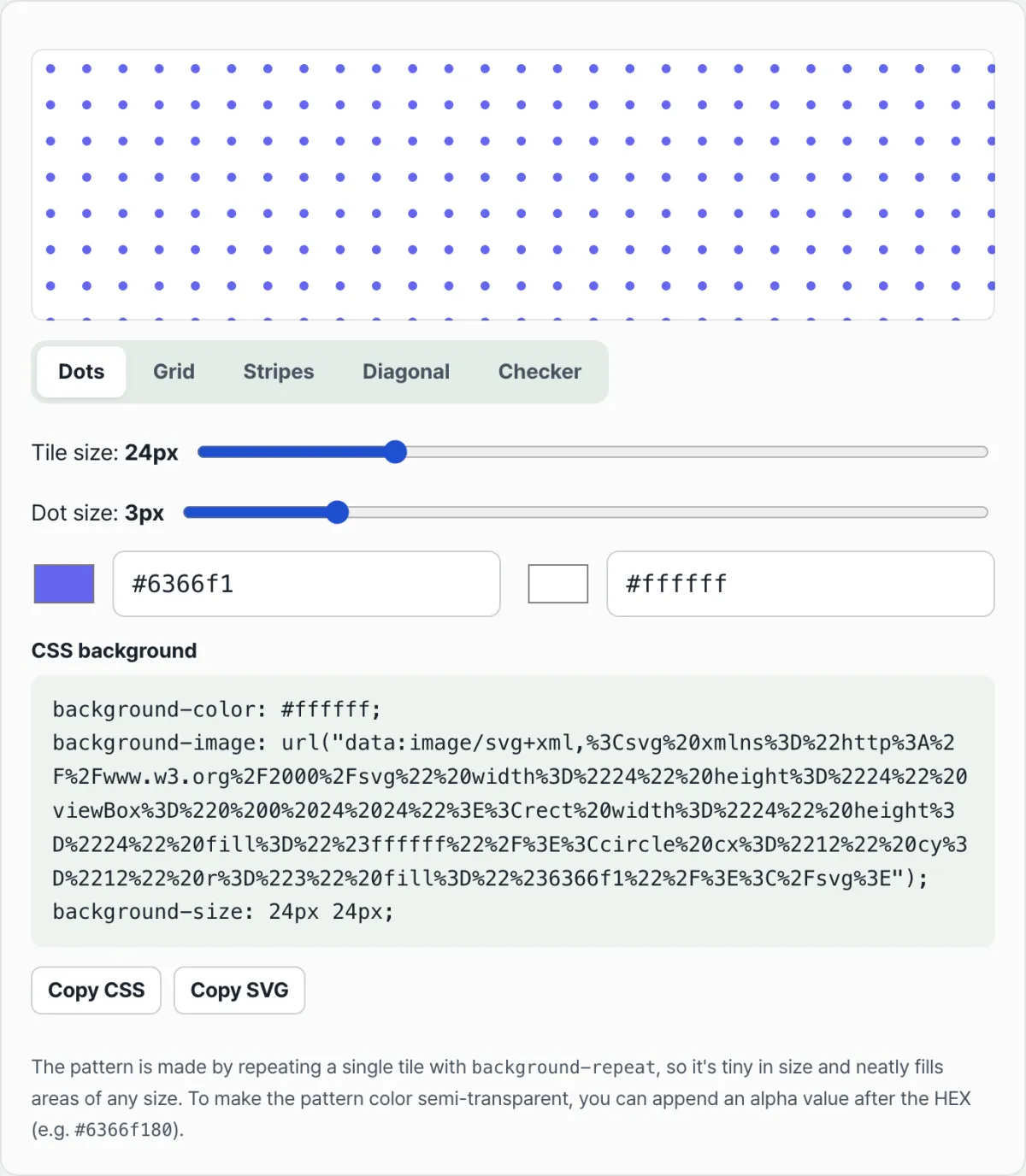
You can draw the tile itself directly in SVG. For example, draw one circle with a 3px radius inside a 24×24px square, encode it as a data:image/svg+xml data URI, and put it in background-image. That single circle now repeats every 24px and becomes a dot background. The same principle covers grids (two lines, one horizontal and one vertical), stripes (a single rectangle), diagonals (a slanted path), and checkers (two rectangles).
A file made this way isn't a real image — it's text (SVG markup), so its size stays fixed at a few hundred bytes regardless of screen size. And because the shapes are vectors, they don't break into pixels when zoomed in.
Check it with our tool. Instead of hand-writing SVG code for the tile's shapes, spacing, and colors, you can adjust five pattern types — dots, grid, stripes, diagonals, and checker — with sliders and get CSS and SVG code ready to paste.
Free · No sign-up · Copy the CSS or SVG code right away
Where people get stuck
| Situation | Cause |
|---|---|
| Tile seams look misaligned | The tile size set by background-size doesn't match the shape's coordinates |
| Dots or lines overlap the neighboring tile | The dot radius or line thickness is more than half the tile size, so it spills into the next tile |
| The background doesn't show up at all | Special characters in the data URI weren't encoded, so the browser can't read the value |
| You want a semi-transparent pattern | Use an 8-digit alpha value by adding two more digits after the HEX color |
Most of the problems in this table come down to two things: the relationship between tile size and shape size, and URL encoding. Adjust it with sliders instead of calculating it yourself, and you don't have to worry about either one.
The takeaway
Background patterns like dots and grids aren't one big image drawn at full screen size. They're a single small tile a few dozen pixels wide and tall, repeated with background-repeat. Build the tile as a vector like SVG and it won't break when scaled up, and the file stays at a few hundred bytes no matter the screen size.
Instead of matching tile size to shape size and handling color encoding by hand, adjust sliders and copy the finished code — that saves you time.
Free · No sign-up · Copy the CSS or SVG code right away
Frequently asked questions
Does a background made from a repeating tile look worse than an image file?
No. Because shapes like dots, lines, and rectangles are drawn as SVG vectors, pixels never break no matter how far you zoom in. You actually avoid the blur you get from stretching a pixel-based image.
How does changing the tile size change the pattern?
Tile size is the spacing at which the pattern repeats. A larger tile spreads the gaps between dots and lines; a smaller tile makes the pattern denser.
I want the background pattern color to be semi-transparent. Is there a way?
Add two digits for transparency after the HEX color code. For example, #6366f1 is an opaque color, and #6366f180 shows the same color semi-transparent.
This article was adapted from our Korean original. Read the Korean original