
Why You Shouldn't Use Real Customer Data as Test Data
Contents
When you need data to put into a dev or QA environment, the fastest way is to copy a few records from the production database. But from that moment on, real people's names and contact details start spreading outside production.
Short answer: test data should use values that don't exist. The good news is that the rules for making "values that look real but never exist" are largely standardized, so you can just follow them instead of making things up.
Summary ① Real data gets copied along through staging DBs, logs, bug reports, and CI artifacts, and once it spreads, it's hard to trace how far it went. ② For emails and domains, use the names RFC 2606 reserves.
example.com,example.net,example.org, and.test,.example,.invalid,.localhostare not assigned to anyone. ③ Names and addresses can be randomly combined from candidate lists, and UUIDs can be generated with the browser'scrypto.randomUUID().
Where copied production data ends up
The problem is that it doesn't stop at "I copied it into the dev DB." That data keeps getting duplicated through paths the developer never intended.
The five most common paths are:
- Staging DB dump files
- Bug reports with attachments for reproduction
- Screenshots taken locally and posted in a chat
- Test artifacts left behind by CI
- Seed files committed to the repo
And there's one more thing on top of that. These are values that actually connect. If test code accidentally sends an email or text, the recipient is a real customer.
How much personal data you're allowed to handle depends on the country, industry, and contract. This article doesn't make that call for you. It only covers how to check whether real values got mixed in and how to create values that never do.
How to check whether your test data has real values mixed in
It's quicker to start with the seed files already lying around. Some checks don't even require opening a file.
1) Collect every email domain. CSV or JSON, it's one line in the terminal.
grep -oE '@[A-Za-z0-9._-]+' seed.csv | sort -uIf you see your company's domain or a real email service domain, those values are addresses that can reach someone. Only reserved domains should be left.
2) Check whether phone numbers look real. Even a randomly generated number can collide with one that's active with a carrier. If you're testing sends, blocking the send path itself is more reliable than changing the number.
3) Check whether the combination points to one person. Even if you mask the name, a birth date, address, and employer together can narrow it down to a specific individual. Masking is column-by-column deletion, and it doesn't erase combinations.
4) Check whether you can answer where it came from. If you can't immediately answer "where did this file come from?", there's a good chance it came from a production dump.
Rules for creating values that don't exist
From here, it's about creating. You can do all of it by hand, no tools needed.
Emails and domains use reserved names
RFC 2606 reserves three second-level domains for documentation and examples: example.com, example.net, and example.org. These are names you can use in examples without any special arrangement.
Four top-level domains are reserved too. .test is for DNS-related code testing, .example is for documentation and examples, .invalid is for names that must not be valid, and .localhost is for loopback.
So a test account's email can be something like user001@example.com. If it's sent by mistake, there's no real recipient.
Names, phones, and addresses are assembled from candidate lists
There's no standard here. Just put surname, given name, city/district, and street name candidates in arrays, pull them at random, and stick them together. Paste the code below into the browser dev tools console (usually F12) and they come right out.
const SUR = ["김", "이", "박", "최", "정"];
const GIV = ["민준", "서연", "도윤", "하은", "지우"];
const pick = (a) => a[Math.floor(Math.random() * a.length)];
const p4 = () => String(Math.floor(Math.random() * 10000)).padStart(4, "0");
const rows = Array.from({ length: 10 }, (_, i) => ({
  id: i + 1,
  name: pick(SUR) + pick(GIV),
  email: "user" + String(i + 1).padStart(3, "0") + "@example.com",
  phone: "010-" + p4() + "-" + p4(),
}));
console.log(JSON.stringify(rows, null, 2));
There's one thing you should not create: ID numbers whose validation rules are public, like national ID numbers or card numbers. If you generate them to match the format, they can collide with numbers that were actually issued, and the moment they do, it's no longer fake data.
The browser makes UUIDs for you
If you need an identifier, a UUID is convenient. Run crypto.randomUUID() in the console and you get one version 4 UUID at a time.
This API is only available in secure contexts. It works on https pages and on localhost, but on an http address served over an internal IP, you may find the function doesn't exist.
A UUID is 128 bits total, and for version 4, 122 of those bits are random. The other 6 bits are fixed by the version field and the variant field (RFC 9562). That version field is why the third group always starts with 4.
The catch is that you have to stitch these methods together every time. Add one more field or switch to CSV, and you're back in the code.
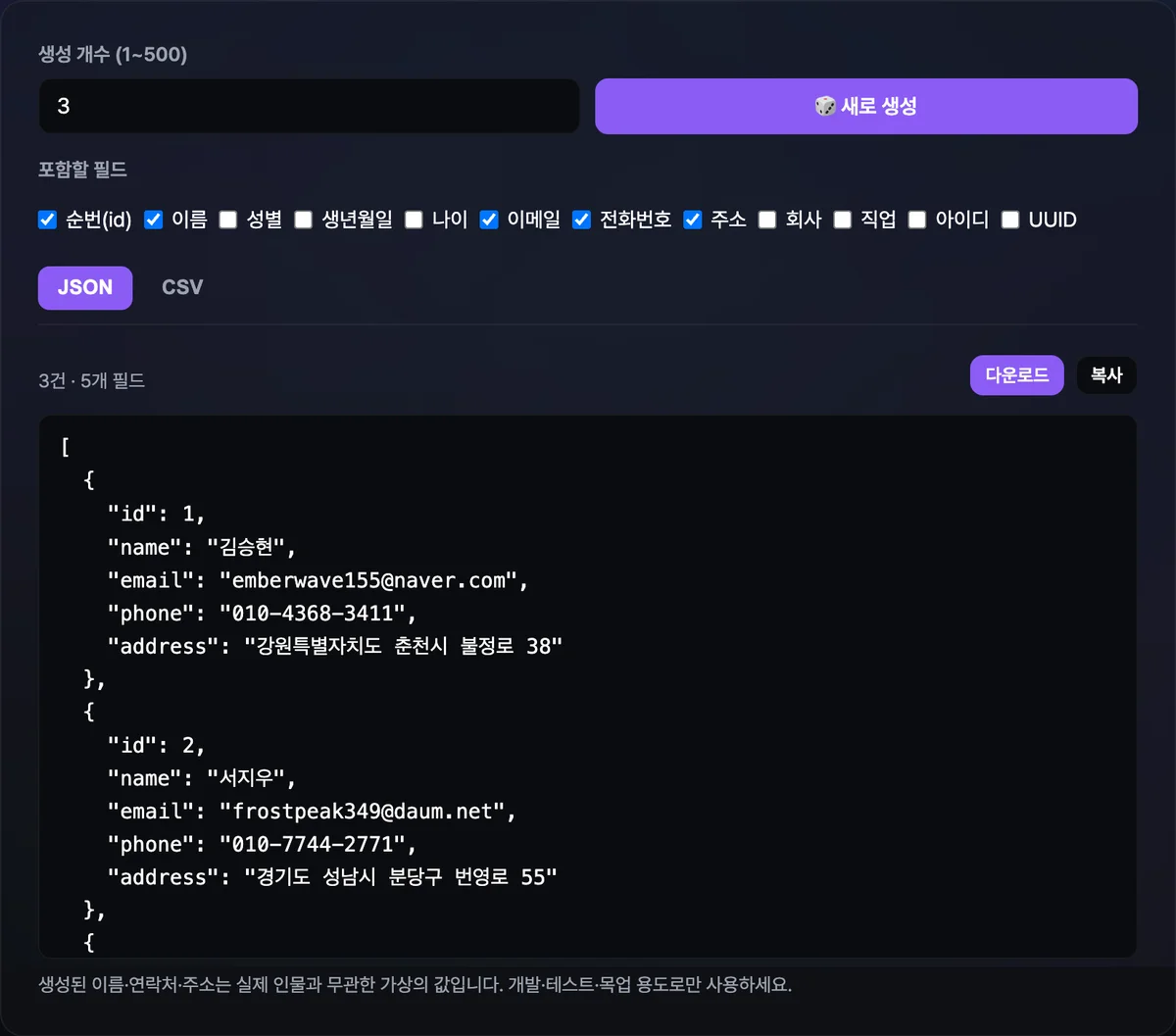
Try it with our Fake Data Generator. Set how many records you want (1 to 500), check the fields to include, and it outputs straight to JSON or CSV, with copy and file download buttons right there.
It generates right in your browser, with no install and no sign-up, and the data you create never gets sent to a server.
The tool generates 12 fields: ID, name, gender, date of birth, age, email, phone, address, company, job, username, and UUID. Five are on by default: ID, name, email, phone, and address.
Every time you hit the "🎲 Generate new" button, you get a completely different set. National ID and card numbers aren't in the list, for the reason covered above.
Where things commonly go wrong
| Situation | What to do |
|---|---|
| Testing real sends (email, SMS) | Change the email domain to example.com or .invalid, and block the send path itself |
| Replacing real data with masked data | It can be re-identified through combinations, so generating values that never existed is simpler from the start |
| When you need secure randomness | UUIDs for dummy data are for display. For tokens and secrets, use a cryptographic API like crypto.randomUUID() |
| Seed files you commit to the repo | Note in a file comment whether it was made by hand or came from a production dump |
| Screenshots and presentation decks | Double-check by eye that the values on screen are generated ones |
The email addresses the tool generates use real service domains like gmail.com and naver.com. For purposes where things need to "look plausible," like screen mockups, that's the right choice.
That said, if it's a test where a real send could happen, it's safer to swap just the domain part for a reserved domain before using it. Download the CSV and replace everything after the @ in the email column in one pass.
The takeaway
- Moving production data into tests means it keeps getting copied through DB dumps, logs, reports, and artifacts, and it can reach real recipients.
- Check existing seed files on four points: the list of email domains, phone number formats, field combinations, and where the file came from.
- Use the RFC 2606 reserved domains
example.com,example.net,example.orgfor email, and.test,.example,.invalid,.localhostfor domains. - Random combinations from candidate lists are enough for names and addresses, and use version 4 UUIDs for identifiers.
- Don't generate numbers whose validation rules are public, like national ID numbers or card numbers, to match the format.
It generates right in your browser, with no install and no sign-up, and the data you create never gets sent to a server.
Frequently Asked Questions
Can't I just mask real data instead?
Masking works column by column, so it doesn't erase the combination of the columns you leave behind. Even if you hide the name, a birth date, address, employer, and signup date left in place can still narrow things down to one person. If you build the values so they never belonged to anyone from the start, you don't have to make that call at all, and you end up doing less work.
Is it okay to send real text messages to the generated phone numbers?
We don't recommend it. A random number starting with 010- has the same format as a real number, so it can collide with an active one. When you test your sending logic, the safer approach is to swap in a test implementation of your sending adapter instead of changing the number, or block outbound sending entirely in staging.
Why bother using example.com for the email domain?
Because RFC 2606 reserves example.com, example.net, and example.org for documentation and examples. No one can be assigned these names, so even if a message goes out by mistake, it won't reach a real user. If you need a value that must never be valid, use the .invalid top-level domain.
Does the generated data get sent to a server?
No. Fake Data Generator creates all of its data inside your browser, and the records it produces are never sent to or stored on a server. Copy and download just export the values the browser has already built on screen.
This article was adapted from our Korean original. Read the Korean original