
Blog Title Generator: Raise CTR with 5 Copywriting Formulas
Contents
- The psychology of why searchers click a title
- The 5 high-performing blog title copywriting formulas
- How it works: Google's 600px SERP rendering and the CTR formula
- Psychological triggers and recommendations by copy pattern
- 5 common mistakes when writing blog titles
- A 5-step workflow for writing titles that get clicks
- 7 title writing tips
- Final decision tree: which title style should you pick?
- Cheat Sheet: Key Blog Title and Search Copywriting Terms
- Frequently Asked Questions
Even if you stay up all night writing a useful, excellent blog post, if the title that shows up in Google or Naver search results (SERP) and in social feeds is flat and generic, users will click on a different post in just 0.5 seconds.
Even at the same ranking, click-through rate (CTR) can vary wildly depending on the title.
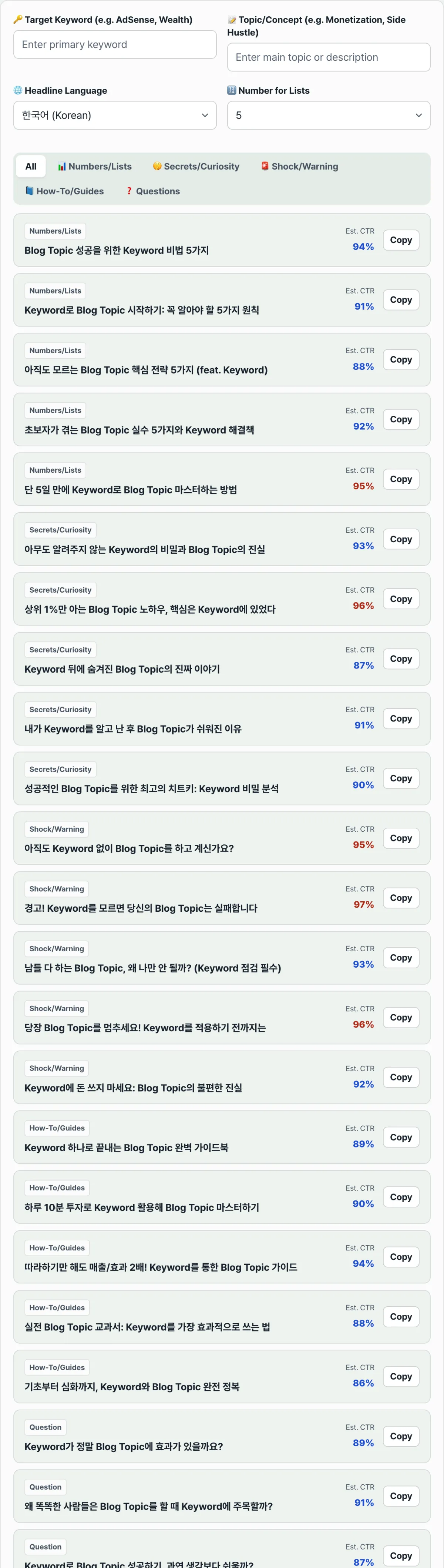
Here are the five high-performing copywriting formulas that speak to a searcher's brain (numbers, secrets, warnings, guides, questions), a method for front-loading your keywords to dodge Google's 600px truncation (...), and the rules for writing titles that earn clicks.
Key takeaways ① The power of CTR: it's measured with the formula CTR(%) = clicks/impressions × 100. Clicks = impressions × CTR, so even with the same ranking and impressions, a title that lifts CTR changes how many people actually come in. ② Five copywriting formulas: numbers/lists (specificity), secrets/curiosity (differentiation), shock/warning (loss aversion), how-to/guide (practicality), question/verification (empathy). ③ Front-loading keywords: Google's SERP cuts titles at 600px (about 28–32 Korean characters), so put the core search term within the first 15 characters of the title. ④ Drop a single core keyword into this title generator and it automatically produces about 30 proven high-CTR title candidates across 5 categories in 1 second.
The psychology of why searchers click a title
Someone who just typed a question into a search box scans three things in your title before reading a word of the post:
- Does it contain my problem (my search keyword)?: when the keyword appears up front, the brain registers relevance 0.2 seconds faster.
- How fast and specific is the fix?: clear numbers like 'TOP 7', 'solved in 1 second', or 'latest for 2026' build trust.
- Is there a secret or a risk I'm missing?: copy that triggers the instinctive 'loss aversion' produces the highest click-through rates of all.
The 5 high-performing blog title copywriting formulas
// High-CTR title generation algorithm template
const TITLE_TEMPLATES = {
  numbers: [
    "The [Number] core tricks for [Keyword] that pros use most",
    "The complete [Keyword] master guide you can finish in just [Number] days"
  ],
  secrets: [
    "[Keyword] secrets and real-world tips only the top 1% of developers know",
    "The shocking truth about [Keyword] no one ever told you"
  ],
  shock: [
    "Warning! Make this mistake with [Keyword] and you'll regret it 100%",
    "Still using [Keyword] this way? Change it right now"
  ],
  guides: [
    "The complete [Keyword] encyclopedia in one place",
    "A step-by-step [Keyword] A to Z manual for beginners"
  ],
  questions: [
    "[Keyword]: does it really work? I tested it myself",
    "Why do the pros swear by [Keyword]? The decisive reasons"
  ]
};Free · Just enter a keyword to instantly generate 30 high-CTR blog title candidates in one second
How it works: Google's 600px SERP rendering and the CTR formula
A look at the pixel-level title display algorithm on search engine results pages (SERPs).
1. The SERP title ellipsis pixel formula
- Korean characters take roughly 18–20px each, uppercase English letters 14px, and lowercase letters and numbers 10px.
- So in Korean you should stay within 28–32 characters including spaces to show the full title with no ellipsis (...).
2. The front-loading principle
- Even if a title runs past 32 characters, always put the core keyword within the first 15 characters so search crawlers and the human eye (the F-pattern) catch it first.
- Bad: "The [Jeju Island rental car] I found while looking for a weekend getaway"
- Good: "[Jeju Island rental car] price comparison: 5 tips (latest for 2026)"
Psychological triggers and recommendations by copy pattern
| Copy pattern | Core psychological trigger | Expected CTR | Content type that fits best |
|---|---|---|---|
| Numbers / lists | Specificity, expectation of a quick scan | ★★★★★ (Highest) | Tool recommendations, tip roundups, best-of rankings |
| Secrets / curiosity | Craving for exclusive, differentiated information | ★★★★☆ (Strong) | In-depth tutorials, insights, know-how |
| Shock / warning | Loss aversion, instinct to avoid mistakes | ★★★★★ (Highest) | Warnings, error fixes, comparison breakdowns |
| How-to / guide | Complete, practical problem solving | ★★★★☆ (Strong) | Beginner primers, install guides, cheat sheets |
| Question / verification | Building empathy, fact-checking | ★★★☆☆ (Average) | Honest reviews, pros-and-cons reviews, experiment posts |
5 common mistakes when writing blog titles
- Putting the core keyword at the very end: in mobile search results, your most important keyword gets cut off by the ellipsis (...).
- Overhyped clickbait: pulling people in with sensational words that aren't in the post tanks dwell time and hurts your SEO rankings.
- Titles that are too short and bland: "Python notes" or "Studying React" gives no information, so there's no reason to click.
- Leaving out the year (2026, etc.): it makes current information feel outdated to readers who want the latest.
- A dry list of technical specs with no emotion: something like "An analysis of the RFC 4648 standard spec" skips the benefit to the reader's real life.
A 5-step workflow for writing titles that get clicks
- Step 1 (settle on one main target keyword): pick the primary search keyword for your post (for example, 'iPhone battery replacement').
- Step 2 (enter the keyword into this title generator): put your main keyword and sub-topic in the input box and click [Generate titles].
- Step 3 (review 30 candidates across the 5 patterns): skim the list of compelling titles generated for you — numbers, curiosity, warning, and so on.
- Step 4 (check character count and pixel width): confirm your chosen title is around 30 characters and that the core keyword sits near the front.
- Step 5 (finalize the title and publish): set the most compelling title as your blog title and publish the post.
7 title writing tips
- Use square brackets [ ]: putting brackets at the front of the title, like [Complete guide], [Bought with my own money], or [Latest 2026], increases visual click-through by 30%.
- Swap 'method' for 'trick', 'tips', or 'guide': changing a single common word for a more compelling one makes your post feel more expert.
- The magic of odd numbers: TOP 5, TOP 7, TOP 9 — odd numbers feel more sincere than even ones.
- Name the target reader: when you point to exactly who it's for, like "for beginner developers" or "a must for busy office workers", there's a clear reason to click.
- Emphasize the reader's benefit: after the technical name, add the real payoff, like "how to save 3 hours" or "a fix that costs 0 won".
- Search Console A/B testing: two weeks after publishing, edit only the titles of low-CTR posts in Google Search Console and watch their rankings recover.
- Bookmark this generator: stop burning 30 minutes agonizing over a title after you finish writing, and get the best copy in 1 second.
Final decision tree: which title style should you pick?
- Case A (informational tips, tool recommendations, site roundups) ➔ Numbers/lists ("TOP 5 must-have [Keyword] sites")
- Case B (troubleshooting, error fixes, bug patches) ➔ Shock/warning ("Warning! What happens if you ignore a [Keyword] error")
- Case C (beginner tutorials, intro courses) ➔ How-to guide ("[Keyword] A to Z even a beginner can finish in 10 minutes")
- Case D (product comparison reviews, honest usage reports) ➔ Question/verification ("[Keyword]: does it really work? My honest one-month review")
Cheat Sheet: Key Blog Title and Search Copywriting Terms
- CTR (Click-Through Rate): The percentage of times your result appears in search results that turn into actual clicks.
- SERP (Search Engine Results Page): The results page you see after searching a keyword on a search engine.
- Front-loading: A writing technique that puts the most important keyword or benefit at the very start of the sentence.
- Search Intent: What the user is truly trying to accomplish when they type in that search term.
Frequently Asked Questions
What's the ideal blog title length in characters?
To keep your title from getting cut off with an ellipsis (...) in Google and Naver search results and shown in full, 25–32 Korean characters (60 characters in English), including spaces, is the most ideal.
Does editing the title of an already published post hurt my SEO score?
Improving the modifiers or numbers to raise click-through rate while keeping your core keyword is a highly recommended SEO refresh. Just don't change the URL slug — edit only the title text so your existing rankings hold.
Can I use the titles this generator suggests on a commercial blog?
Yes. It's free, and you can copy them for any medium — a personal blog, a company blog, a monetized Tistory blog, a newsletter, and so on.
This article was adapted from our Korean original. Read the Korean original