
How to read a cron expression: the 5 fields explained
Contents
Real situations where cron expressions get confusing
Server crontab files and CI/CD schedule settings often leave behind nothing but a five-slot row of numbers and symbols like '0 3 1,15 * 3', with no explanation. If the person who wrote it is long gone, or your team simply inherited the config from another team, there's no one to ask exactly which days that one line runs.
It gets worse when both the day-of-month field and the day-of-week field hold values. '1,15' means the 1st and 15th of every month, and '3' means Wednesday.
Read those together and the run count for a month swings wildly depending on which way you go: narrow it to "the 1st, but only if it's also a Wednesday," or widen it to "the 1st, or any Wednesday." Without knowing the field rules, the notation alone won't tell you which one applies.
How to read one by hand, no tool needed
You can work out a cron expression on paper, in order, without any tool.
Step 1 — Split the five fields by order and range. Whitespace-separated fields always go 'minute hour day month weekday', and each one has a fixed value range.
Field
Position
Value range
Minute
1st
0–59
Hour
2nd
0–23
Day (day-of-month)
3rd
1–31
Month
4th
1–12 (JAN–DEC)
Weekday (day-of-week)
5th
0–7 (SUN–SAT; both 0 and 7 mean Sunday)
If there aren't exactly five fields (a macro like '@daily', for example, or input with a different field count), it isn't the standard five-field format.
Step 2 — Split each field on commas and interpret each part. If a field contains commas (,), the values it matches are the union of the values each part stands for. Each part takes one of the four forms below.
- '*' — the field's entire range
- 'a-b' — the range from a to b, both ends included
- a single number 'a' — just that one value
- 'a/n' or '*/n' — values that step by n from a starting point. '*/n' starts at the field's minimum; 'a/n' starts at a and steps by n up to the field's maximum.
Step 3 — Convert the month and weekday names to numbers. Months run JAN=1 through DEC=12, weekdays SUN=0 through SAT=6. The weekday field accepts the range 0–7, and both 0 and 7 point to Sunday. Sunday written as 0 and Sunday written as 7 are the same day.
Step 4 — Check whether day and weekday are both set. If neither the day-of-month nor the day-of-week field is '*', the two fields are evaluated with OR (union), not AND (intersection).
The job runs if that date is one of the listed days or falls on one of the listed weekdays. Conversely, if either field is '*', that field drops out of the condition and the remaining fields alone decide.
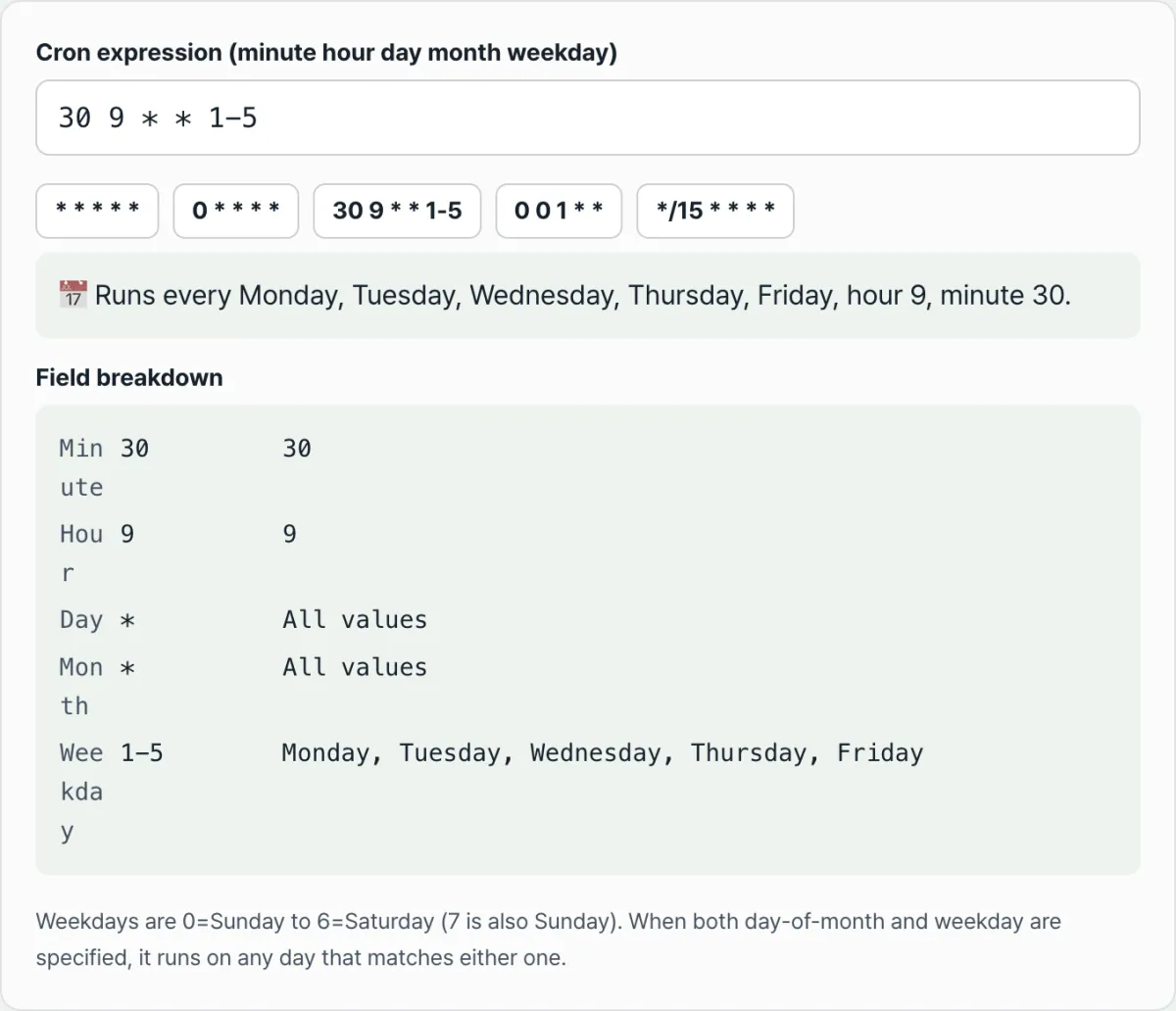
For example, here's '30 9 * * 1-5' worked out in order:
- Minute: 30 → minute 30
- Hour: 9 → 9 o'clock
- Day: * → every date
- Month: * → every month
- Weekday: 1-5 → Monday through Friday
Day and month are '*' and only the weekday holds a value, so this expression runs at 9:30 every Monday through Friday.
When day and weekday both hold values, it plays out differently. Work '0 3 1,15 * 3' the same way:
- Minute: 0, hour: 3 → 3:00
- Day: 1,15 → the 1st and 15th of every month
- Month: * → every month
- Weekday: 3 → Wednesday
Day (1, 15) and weekday (Wednesday) are both not '*', so they're joined with OR. So this expression runs at 3:00 on the 1st of the month, on the 15th, or on any day that happens to be a Wednesday. That's not just two dates a month — it's also every Wednesday in that month.
Check it with our free Cron Expression Generator.
Type an expression and it's parsed field by field right in your browser. Your input never gets sent to a server.
Commonly confused notation
A few rules, learned exactly, clear up most cron confusion. These five are the ones people trip over again and again.
Where people get confused
The actual rule
Weekday '0' and '7'
Both are Sunday. They are not different days.
Setting day and weekday together
It's OR (union), not AND (intersection). Matching either one is enough to run.
Weekday '1-5'
There's no separate "weekdays" notation. It's a range written from Monday (1) to Friday (5).
'*/15' vs '5/15'
'*/15' steps by 15 starting at 0 (0, 15, 30, 45). '5/15' steps by 15 starting at 5 up to the field's maximum (5, 20, 35, 50). Different starting points.
Macros like '@daily'
These aren't written out as the five minute/hour/day/month/weekday fields, so they're handled differently from the standard five-field format.
If a field value falls outside its allowed range (60 in the minute field, say) or the field count isn't five, the expression won't parse as valid.
Summary
Reading a cron expression comes down to these five things.
- The fields are always five, in the order 'minute hour day month weekday'.
- '*', ranges (a-b), lists (a,b), and steps (a/n, */n) each expand into a set of values by a fixed rule, and comma-separated parts are merged as a union.
- The weekday field accepts 0–7, and both 0 and 7 mean Sunday.
- When day and weekday are both set, the result is OR, not AND.
- You can work the rules out by hand, but once several fields overlap, laying them out in a table is faster and more accurate.
Type an expression and it's parsed field by field right in your browser. Your input never gets sent to a server.
FAQ
Can I use both 0 and 7 for the weekday?
Yes. The weekday field takes values from 0 to 7, and both 0 and 7 are treated as Sunday. 6 is Saturday, and 1 through 5 are Monday through Friday.
If I set both day and weekday, do both conditions have to match?
No. When both day-of-month and day-of-week are filled with something other than '*', they're evaluated with OR (union). For example, with '1,15' for day and '3' (Wednesday) for weekday, the job runs on the 1st and 15th of every month and also on every Wednesday of that month.
Conversely, if one of the two is '*', that field drops out of the condition and only the remaining field applies.
Do '*/15' and '5/15' mean the same thing?
No. '*/15' starts at the field's minimum (0 for minutes) and steps by 15, giving 0, 15, 30, 45. The 'a/n' form '5/15' starts at 5 and steps by 15 up to the field's maximum, giving 5, 20, 35, 50. Different starting values, so different sets of results.
Is the expression I type sent to a server?
No. All parsing happens inside your browser, and what you type is never sent to or stored on a server.
This article was adapted from our Korean original. Read the Korean original