
SHA-256 Hash Generator: How to Verify Data Integrity
Contents
You don't have to be a developer to have run into the term "hash value." It shows up as a string like "SHA-256: a3f5..." next to a download link, or as the phrase "encrypted with a hash" in an explanation of how passwords are stored. But many people nod along without ever really knowing how that string is produced or what it actually proves.
Summary ① A hash function takes input of any size and always returns a result of fixed length, and it's a one-way function that can't be reversed. ② Change even a single character or one space in the input and the resulting hash changes completely. That's the avalanche effect, and it's why hashes are used to detect tampering. ③ Apply the same principle to the bytes of a file and you get the SHA-256 checksum on a download page, which you can verify yourself with built-in OS commands like certutil and shasum.
What exactly does a hash function do?
A hash function returns a string of a fixed length no matter how long the text you feed it is — even if that text is a single character. With SHA-256, the result is always 64 hexadecimal characters, whether the input is one word or an entire novel. The length is 256 bits, which is where the 256 in the name comes from.
Two properties matter most. The first is determinism: the same input always produces the same result, no matter when or where you compute it. The second is one-wayness: from the result alone, you can never work backward to the original input. People often say they're going to "decrypt a hash," but that's not accurate. A hash isn't encryption, so the very idea of decryption doesn't apply.
The avalanche effect: why one character changes everything
Hashes are used to verify integrity because of the avalanche effect. Change one letter or one space in the input, and the resulting hash becomes a completely different string with no resemblance to the original. You won't even get a few matching characters at the start.
Thanks to this property, you can check whether two pieces of text or two files are truly identical by comparing a single hash instead of reading through the content line by line. If even one value differs, something in the original changed.
Why SHA-1 is no longer considered secure
Hash algorithms have generations, too. SHA-1 was once widely used, but it's no longer recommended for anything security-sensitive. Known collision vulnerabilities let two different inputs produce the same hash, and the industry moved to SHA-256 and above long ago.
If all you're doing is a quick check that text or a file hasn't changed, SHA-1 still works. But when reliability matters, you're safer with SHA-256 or higher.
What you learn by computing a hash yourself in the terminal
The most honest way to see the theory for yourself is to open a terminal and compute a hash by hand. On macOS, pass some text to the shasum -a 256 command, then compute it again for a version with one period removed, and compare the two results side by side.
The problem is that this gets tedious fast. You have to open a terminal, remember the exact options, and worry about whether a trailing newline got added, since that alone changes the result. Commands differ by operating system, and for non-developers there's a real barrier to entry.
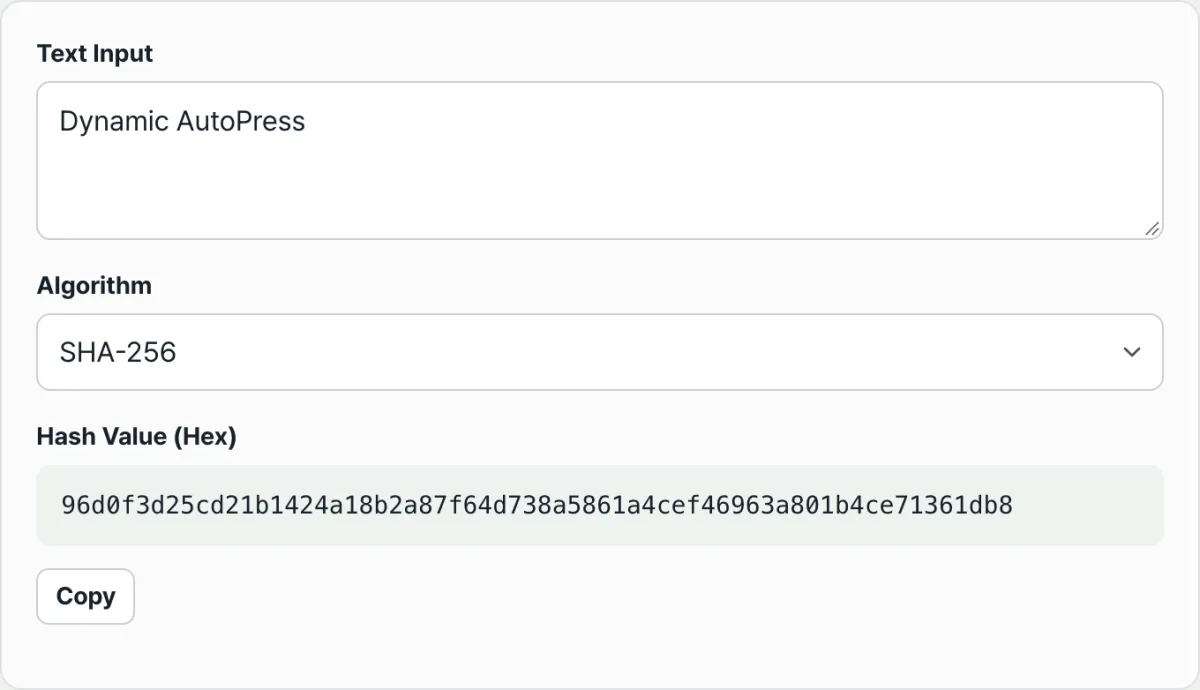
Paste your text and calculate its SHA-256 hash right in your browser.
In the browser, you just paste your text into the input field and pick an algorithm — SHA-1, SHA-256, SHA-384, or SHA-512 — and the hash is computed right there on the spot. The calculation runs through the Web Crypto API built into your browser, so the text you enter is never sent to a server, and you can see the avalanche effect for yourself immediately.
Check checksums for downloaded files with OS commands, not this tool
One thing needs to be clear here. This tool hashes text; it does not let you upload a file and hash it. The SHA-256 checksum on a download page is computed over the file's actual bytes, so copying the file's contents into a text box and hashing them won't give you the same value.
If you actually want to verify file integrity, the standard approach is to use a command built into your operating system. Each OS provides one:
| Operating system | Example command |
|---|---|
| Windows (Command Prompt) | certutil -hashfile file path SHA256 |
| macOS (Terminal) | shasum -a 256 file path |
Then compare the result by eye with the checksum listed on the download page. If the values match exactly, the file wasn't corrupted or tampered with during download. If even one character differs, that's a sign something is wrong with the file.
Frequently asked questions
If two files have the same hash, does that mean they're exactly identical?
Yes. With a secure hash algorithm like SHA-256, the odds of two different files accidentally producing the same hash are effectively negligible. If two hashes match exactly, you can treat the contents of the two files as identical down to the bit.
Can I turn a SHA-256 hash back into the original text?
No. A hash is a one-way function, not encryption, so there's no such operation as decryption in the first place. People do guess the original by comparing a hash against precomputed tables of hashes for common short words, but that's a different process from reversing the hash itself.
Can I use this tool to verify the integrity of a downloaded file?
Not directly. This tool hashes text input and has no file upload option, and copying a file's contents into text and hashing them won't produce the file's actual SHA-256 checksum. To verify a file itself, run shasum -a 256 on macOS or certutil -hashfile on Windows against the file path.
Why use SHA-256 instead of SHA-1?
SHA-1 has known collision attacks in which two different inputs produce the same hash, so it's considered unreliable for security-sensitive uses. SHA-256 has no known practical collisions, which is why it's now the industry standard.
Takeaways
- A hash function always returns a fixed-length result regardless of input size, and it's deterministic and one-way.
- Because of the avalanche effect, changing even one character of the original changes the hash completely, which makes hashes useful for detecting tampering.
- A hash isn't encryption, so there's no such thing as decrypting one.
- SHA-1 is being replaced by SHA-256 and above for security purposes because of collision vulnerabilities.
- This tool is for hashing text only. To verify a file checksum, use a built-in OS command like certutil or shasum.
Paste your text and calculate its SHA-256 hash right in your browser.
This article was adapted from our Korean original. Read the Korean original