
Meta Description vs og:description: What Goes Where
Contents
It's easy to assume that if you write one careful meta description for search engines, the same text will show up when you share the link on KakaoTalk or Facebook. But <meta name="description">, og:description, and twitter:description are separate tags that different crawlers read on their own. Fill in only one of them and the description field on the other platforms may be empty or filled with a sentence you didn't expect.
Summary ①
<meta name="description">is the tag Google and other search engines read as a candidate for the snippet in search results. ②og:descriptionis the tag used only by platforms that follow the Open Graph spec, like KakaoTalk and Facebook. ③ Iftwitter:descriptionis empty, Twitter (X) falls back to theog:descriptionvalue.
Why the description looks different in search results and on share cards
When you publish a blog post or a product page, it's common to fill in <meta name="description"> and move on. The text you wanted shows up in Google results, so it feels like the description work is done.
But paste the same link into a KakaoTalk chat and the description field is completely blank, or some random sentence from the body is cut off and dropped in. You look at the code again and <meta name="description"> is sitting there just fine.
The reason is simple. Google reads <meta name="description">, but Open Graph consumers like KakaoTalk and Facebook don't look at that tag at all — they only look for og:description. The names are similar, but the values are completely independent.
How to check all three tags yourself: view the page source
The most reliable check doesn't need any tools. Open the page in question, right-click, and choose View Page Source (Windows Ctrl+U, Mac Cmd+Option+U), then search for description with Ctrl+F.
Inside the <head>, look for three separate lines: name="description", property="og:description", and name="twitter:description". If the name and value are there but a particular platform still shows no description, that means the tag that platform reads isn't there at all.
If you have a terminal, one line gets you the same answer faster: curl -s 주소 | grep description.
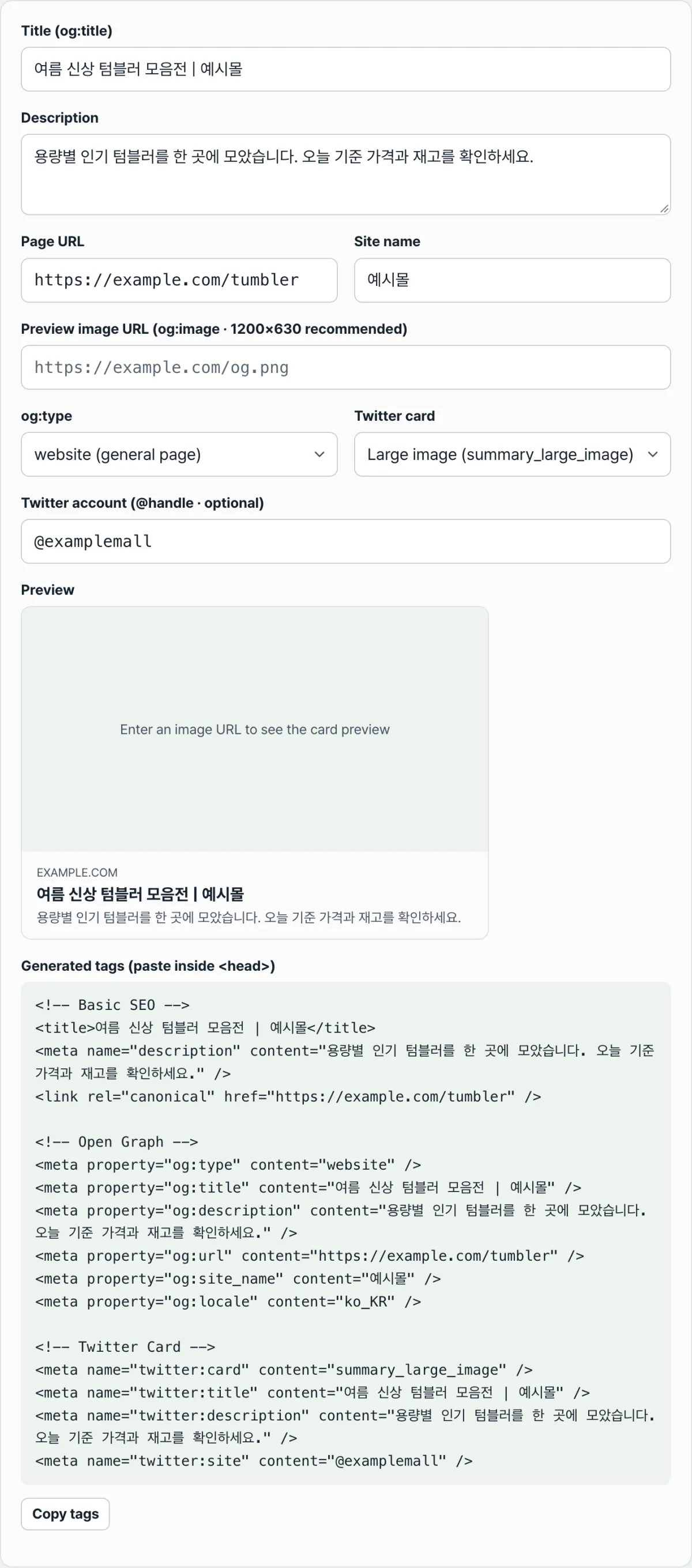
Checking with our tool. Hand-matching three tags is error-prone — one missing quote and the tag breaks. It's faster to enter the description text once and have it split into all three tags for you.
Free · No sign-up · Enter your title and description once, and get SEO, Open Graph, and Twitter tags together
Enter the title and description once, and you get code with the same text filled into all three lines: <meta name="description">, og:description, and twitter:description. You only need to fill in the items that differ per tag, like the site name and the Twitter account.
Where people get stuck
| Symptom | Cause |
|---|---|
| Google results look fine, but the description on KakaoTalk is blank | The og:description tag doesn't exist at all |
| Sharing on Twitter shows a different sentence | twitter:description is filled in with a value different from og:description |
You deleted og:description, but the Twitter card still shows a description | twitter:description is still there, so it's used as is |
| All three tags exist, but each platform shows different text | Normal case — each tag actually contains a different value |
The short version
<meta name="description"> is for search engines, and og:description is for Open Graph platforms — separate tags that never see each other. If twitter:description is empty, og:description is used instead, but if og:description is missing too, the search engine tag won't be picked up for you.
Putting the same text in all three isn't a spec violation — in fact, most sites do exactly that. When text differs from platform to platform, start by checking the page source to tell whether the tag is missing entirely or whether the values are actually different.
Free · No sign-up · Enter your title and description once, and get SEO, Open Graph, and Twitter tags together
Frequently asked questions
Is it really a problem if I skip og:description?
If you leave it empty, Open Graph platforms like Facebook and KakaoTalk will guess a replacement on their own. They usually pull some of the page's body text, so it's hard to predict which sentence you'll get. If you want specific text shown, setting it yourself is safer.
Do I need to write three completely different descriptions?
No. Most sites repeat the same sentence across all three tags. That said, if you want the search result sentence and the share card sentence to serve different purposes, writing them separately is fine by the spec.
What happens on Twitter (X) if I don't include twitter:description?
If an og:description value exists, it uses that instead. The Twitter Card spec itself is designed to fall back to the Open Graph tag of the same name when the twitter:-specific tag is empty. If og:description is missing too, the description area on the card may appear blank.
How many characters should a meta description be?
Google search results are commonly truncated somewhere around 150–160 characters. The real limit isn't the character count, though — it's how wide the text renders on screen, so a short description can still get cut and a long one sometimes doesn't.
This article was adapted from our Korean original. Read the Korean original