
Invoice vs. Quote: When to Send Each One
If you've ever sent a quote and gotten a reply like "we haven't even signed a contract yet — why are you asking for money already?", the problem was probably the type of document, not the price. Invoices and quotes look nearly identical, but they're issued at different points and for different purposes. One rule clears up the whole difference: what you send, and when.
Summary ① A quote is a proposal you send before the contract — "this is roughly what it will cost." An invoice is the document that bills the actual amount after the work is done. ② A quote needs a valid-until date; an invoice needs a due date. Swap them and the other party gets confused. ③ Let a tool handle totals with tax and discounts. Tax paperwork, like issuing a tax invoice, has to be checked separately.
The Problem
For freelancers and small business owners, most documents exchanged with clients come down to two: quotes and invoices. In practice, the two names get mixed up all the time.
If you send an amount on an invoice form before the work even starts, your client may read it as "you're demanding payment first." On the flip side, if the delivery is finished and you keep sending quotes, the person handling it may decide "this isn't a final amount yet," and payment processing drags.
Real problems happen because of a document's name: misunderstandings during negotiation, delayed billing. Set a clear rule for how the two differ and you cut most of that confusion.
The Solution
There's exactly one rule that separates the two: when you issue them. Before the contract (work confirmed), it's a quote. After, it's an invoice.
- Quote/Estimate: sent before work begins, proposing "under these terms, the cost comes to about this much." It's a negotiating document with little legal force, and since material or labor costs can change, it usually includes a "valid until" date.
- Invoice/Bill: sent after the contract is signed and the work or delivery is finished, billing the actual amount. It includes a "due date" so the client knows when to pay.
If you write these yourself, both documents should share the following:
- Document number and issue date
- Supplier (issuer) info: name or business name, contact details, and a business registration number if needed
- Customer info: name or business name, contact details
- Quantity, unit price, and amount per line item, tax rate, discount amount, total
- A valid-until date for a quote or a due date for an invoice — whichever applies
One caution here. This distinction is a practical, everyday-business standard. A tax invoice, the document used for VAT filing, is something else entirely, issued through a separate system such as Hometax from the Korean National Tax Service. No matter how carefully you write a quote or invoice, it can't replace a tax invoice. If a transaction needs tax handling, check that part separately.
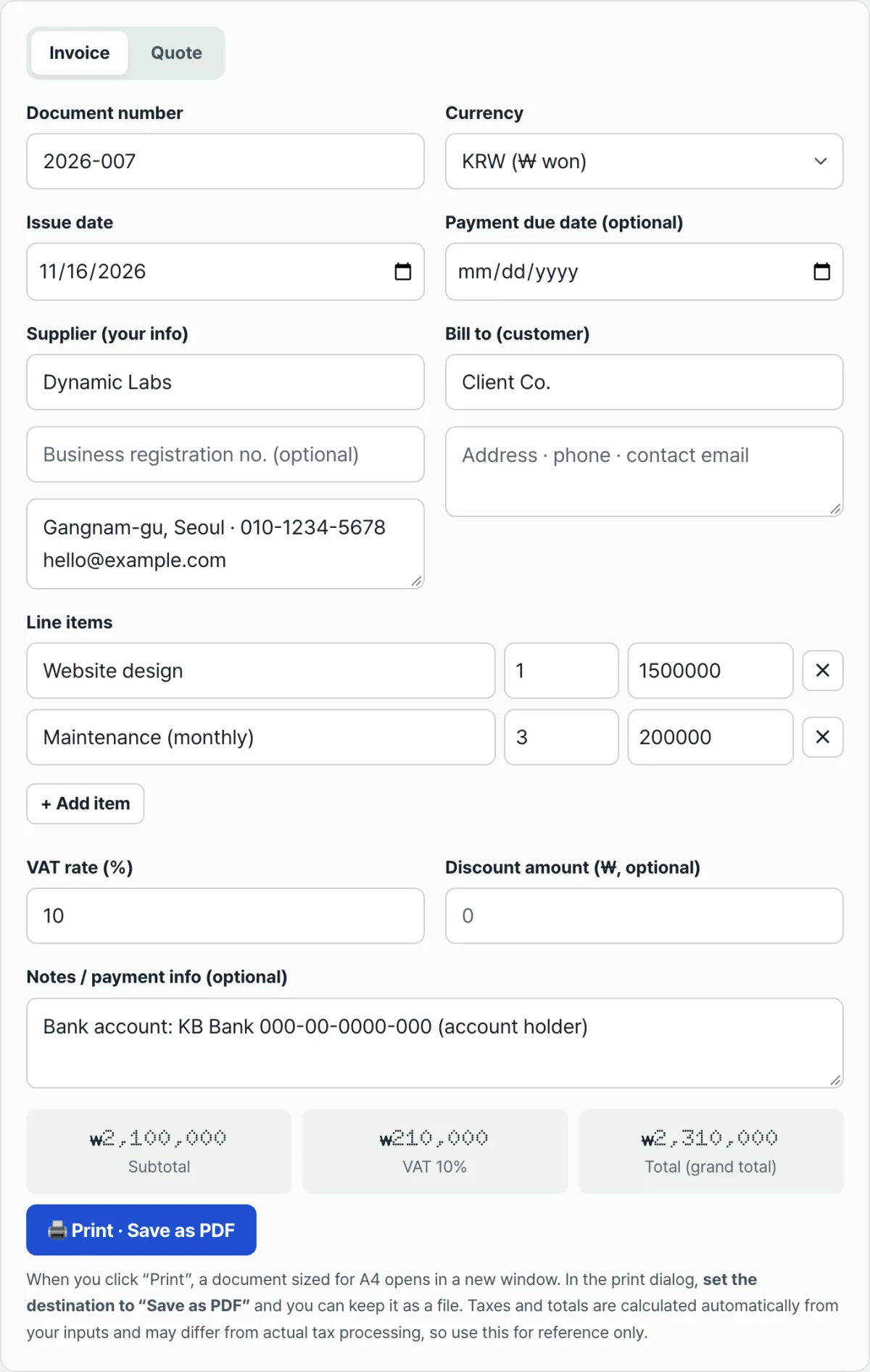
If you have several line items, or you're tired of hand-calculating tax and discounts every time, try our free tool.
Just enter your line items and the tax and total calculate automatically.
The Invoice & Quote Generator starts with a tab at the top where you pick Invoice or Quote. The second date field renames itself to "Due Date" or "Valid Until" depending on the tab, so you never lose track of which document you're building.
Add a few line items and quantity × unit price is calculated automatically for each row, with the subtotal, tax, and discount rolled into a total shown right at the bottom of the screen. When you're done, the "Print / Save as PDF" button opens a new A4-sized window, and you pick "Save as PDF" in the print dialog to keep a file.
Common Sticking Points
| Situation | Cause and what to check |
|---|---|
| Not sure whether a quote should have a "due date" | A quote gets a valid-until date, an invoice gets a due date. The tool swaps the label automatically based on the tab you pick. |
| Wondering if the tax rate can stay as is | It shows a default of 10%, and you need to adjust it yourself depending on the situation, such as tax-exempt transactions. |
| The total looks wrong after entering a big discount | The discount is automatically capped so it can't exceed the subtotal. Enter more than the subtotal and only the subtotal amount is applied. |
| The amount doesn't change when I switch currencies | The currency selector only changes the symbol (₩, $, €, ¥). It doesn't convert at exchange rates, and the numbers you entered stay as they are. |
| I clicked "Print" and no new window opened | Your browser is blocking pop-ups. Allow pop-ups and click again. |
The Bottom Line
Invoices and quotes are told apart by when you issue them, not by their layout. A proposal before the contract gets a valid-until date on the quote; a bill after the work gets a due date on the invoice. Automate the totals with tax and discounts with a tool, and check separately whether the transaction needs a tax invoice.
Just enter your line items and the tax and total calculate automatically.
Frequently Asked Questions
Are "invoice" and "bill" different documents?
In practice, they mean almost the same thing. One is the everyday word and the other is the term used in trade and international business, so only the name differs — the purpose is the same: billing for payment after a contract. This tool treats both as a single document type (Invoice).
Can I use this instead of a tax invoice?
This tool creates reference invoices and quotes for everyday business transactions. A tax invoice, the document used for VAT filing, must be issued through a separate system such as Hometax from the Korean National Tax Service, so for transactions that need tax handling, this document can't replace it.
It won't save as a PDF: I just get a blank window
Your browser is probably blocking pop-up windows. If you see a "Pop-ups are blocked" notice on screen, turn on the allow-pop-ups option near your browser's address bar, then click "Print / Save as PDF" again.
This article was adapted from our Korean original. Read the Korean original