
What Is a MAC Address? Random MACs and Wi-Fi Tracking
Contents
A MAC address is a 48-bit unique value burned into each network device—like a Wi-Fi card or Ethernet adapter—at the manufacturing stage. Originally, this value was designed to stay the same for the life of the device.
The problem is that "never changes" property. A cafe's Wi-Fi, a public Wi-Fi outside a convenience store, and a subway station's Wi-Fi may each keep their own separate connection logs. But if the MAC address in those logs is identical every time, then placing the three records side by side reveals that it's the same device.
Summary ① A MAC address is a 48-bit hardware identifier assigned to each network device at manufacture, and it's originally designed so it never changes. ② Because it never changes, the same value gets recorded over and over as you move between Wi-Fi networks and public places, so the movement of the same device can be linked even without login information. ③ The "random MAC address" feature that recently appeared on smartphones and laptops sends a fake address that follows the rules instead of the real one on each connection, breaking that link.
Why a MAC address is designed never to change
The first half of the 48 bits of a MAC address is a unique number assigned by an international organization to the manufacturer that made the device. The second half is closer to a serial number that the manufacturer assigns to each individual device in sequence.
The original intent of splitting it this way is that no value is duplicated anywhere in the world, no matter where the device was made. Because it serves as the most basic name tag that distinguishes devices from each other within the same network, it was never designed as something the user changes. It's a value that gets stamped in at the factory once and that's it.
Why a value that never changes becomes "tracking material"
A smartphone with Wi-Fi turned on periodically broadcasts a signal containing its own MAC address to look for nearby Wi-Fi networks it can connect to. Even if it never actually connects to that Wi-Fi, that signal can be picked up just by being nearby.
If the value captured each time is the same real MAC address, then simply comparing records from different locations later links together when and where the same device was. Even knowing nothing about personal information like a name or phone number, that single unique value is enough to identify that it's the same device.
The feature that came out of this: how a fake address is shown on every connection
To prevent this problem, smartphones and laptops gained a feature called "random MAC address" or "private Wi-Fi address." The core principle is simple. Instead of sending out the real hardware address when connecting to Wi-Fi, the device sends out a temporary address it has just generated instead.
So that this temporary address isn't confused with a real manufacturer address, the MAC address standard has always had designated flag bits for the purpose. One bit in the first octet (8 bits) of the address is set to mean "this address is not a value registered by a manufacturer, but a value generated locally at random." Most fake addresses produced by random MAC features are generated with this flag turned on.
To check by hand how such a random address is put together, you'd have to randomly generate six groups of two hexadecimal digits and then work out those two flag bits by hand—setting and clearing them. Paper and a calculator will do it, but once you want to make several and compare them, it gets tedious fast.
Set the format, transmission type, and administration scope (UAA/LAA) to instantly generate up to 1,000 random MAC addresses.
Seeing what the "locally administered address" flag actually means with this tool
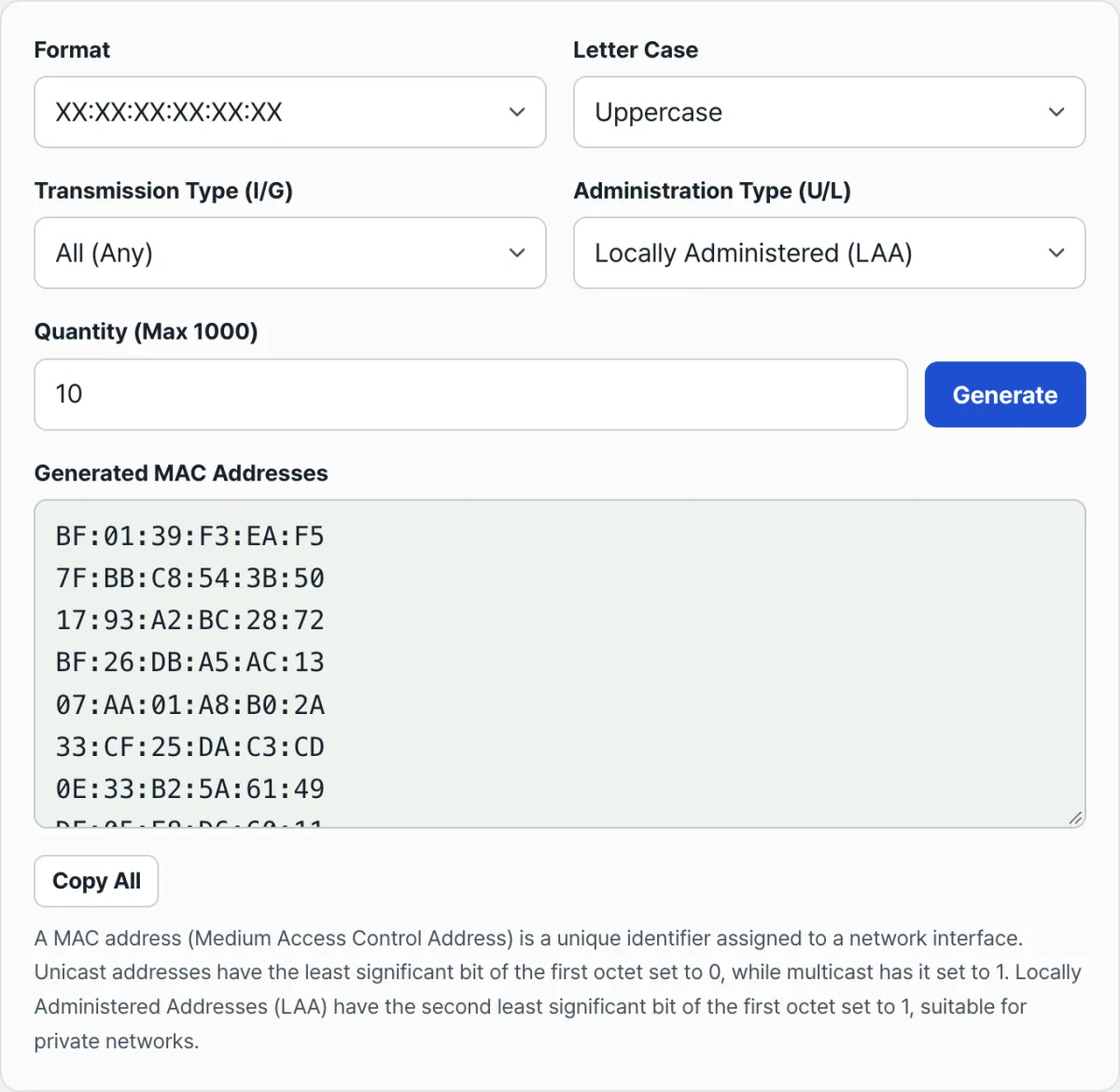
The MAC Address Generator exposes those two flag bits directly as options. When you choose unicast or multicast under "Transmission type (I/G)," the last bit of the first octet is set to the value you want. When you choose globally unique (UAA) or locally administered (LAA) under "Management scope (U/L)," the bit next to it is set accordingly—and the addresses are generated that way.
In other words, if you select Locally Administered (LAA) as the management scope, you get addresses with the "not a value given by a manufacturer, but generated locally at random" flag turned on. You can see for yourself values that follow the same rules as the temporary addresses real random MAC features produce, without doing the bit math by hand.
You can also set the format (colon, hyphen, dot, no separator), the letter case, and the number to generate (up to 1000). Press Generate and the results appear immediately as a list, and you can grab them all at once with the Copy All button. The Locally Administered (LAA) option is also what you use when you need a value that won't collide with a real manufacturer address in test environments that genuinely need an arbitrary address—like MAC settings for a virtual machine or a router's MAC clone feature.
One caveat: the values this generator creates are sample and test addresses. Generating one on this screen does not change the address your own smartphone or laptop actually uses when it connects. That feature is turned on and off separately inside each device's Wi-Fi settings.
Summary
- A MAC address is a 48-bit unique value stamped into each network device at manufacture, and it's originally designed never to change for the life of the device.
- Because it never changes, comparing connection records from multiple Wi-Fi networks and public places can link the movement of the same device without any login information.
- The random MAC address feature sends a temporary address that follows the rules instead of the real one on each connection, breaking that link.
- That temporary address turns on the flag bit meaning "generated locally at random," which distinguishes it from a real address registered by a manufacturer.
- This generator lets you set that flag bit yourself as an option and create random addresses, but it does not change the actual connection address of your device.
Set the format, transmission type, and administration scope (UAA/LAA) to instantly generate up to 1,000 random MAC addresses.
Frequently asked questions
What exactly is a MAC address?
It's a 48-bit unique identifier assigned at the manufacturing stage to each device that connects to a network (a Wi-Fi card, an Ethernet adapter, and so on). It serves as the most basic name tag that distinguishes devices from each other within the same network, and unlike an IP address, it's originally designed to be set once when the device is made and stay the same from then on.
Will using a random MAC address make my internet connection unstable?
This feature only changes the outer address the device sends out when connecting, so it's separate from the internet connection itself. That said, if you're on a corporate network or a router with per-device access restrictions that identify and allow specific devices by MAC address, the value changes each time—so you may need to register that device again.
Can someone find out my name or location from a MAC address alone?
A MAC address itself contains no name or location information. However, if the same value shows up repeatedly in connection records from multiple locations, simply comparing those records side by side can reveal that the same device moved between them. This tool shows the flag bits that create that principle—it does not actually track a specific device or person.
Can I use an address generated here on real network hardware?
You can use it for testing and experiments that need an arbitrary value, such as a virtual machine or a router's MAC clone setting. But using it to replace or impersonate a genuine hardware address registered by a manufacturer may violate the access policy of the network you're on, so check first whether it's within what your administrator allows.
This article was adapted from our Korean original. Read the Korean original