
Instagram Username Special Characters: Why They Don't Work
Contents
If you've ever tried to change your Instagram username to special characters or fancy fonts and hit a wall, the cause isn't a bug. Instagram sets specific rules for which characters the username field accepts. The characters fancy fonts produce may look like letters, but they're actually completely different Unicode characters, so the username field's character check filters them out. The name and bio fields, on the other hand, are free text with no character-type restrictions, so the same characters go through just fine.
Summary ① The Instagram username field allows only lowercase English letters, numbers, periods, and underscores, so any character outside that range gets filtered out. ② Fancy fonts don't produce letters. They produce completely different Unicode characters, so they fail the username field's character check. ③ The Name and bio fields don't restrict character type, so pasting the same text there is reflected as-is.
Why text disappears or won't save in the username field
In Instagram settings, if you paste bold or cursive text into the username field, the characters disappear as you type, or nothing happens when you press Save. Paste the same text into the name or bio field, and it stays without a problem.
The difference is that Instagram checks character types only in the username field. Usernames allow only lowercase English letters, numbers, periods (.), and underscores (_). Characters outside those four categories are filtered out during entry or blocked when you save. You also can't use a period at the beginning or end, or use consecutive periods.
How to verify it: why fancy fonts use different characters
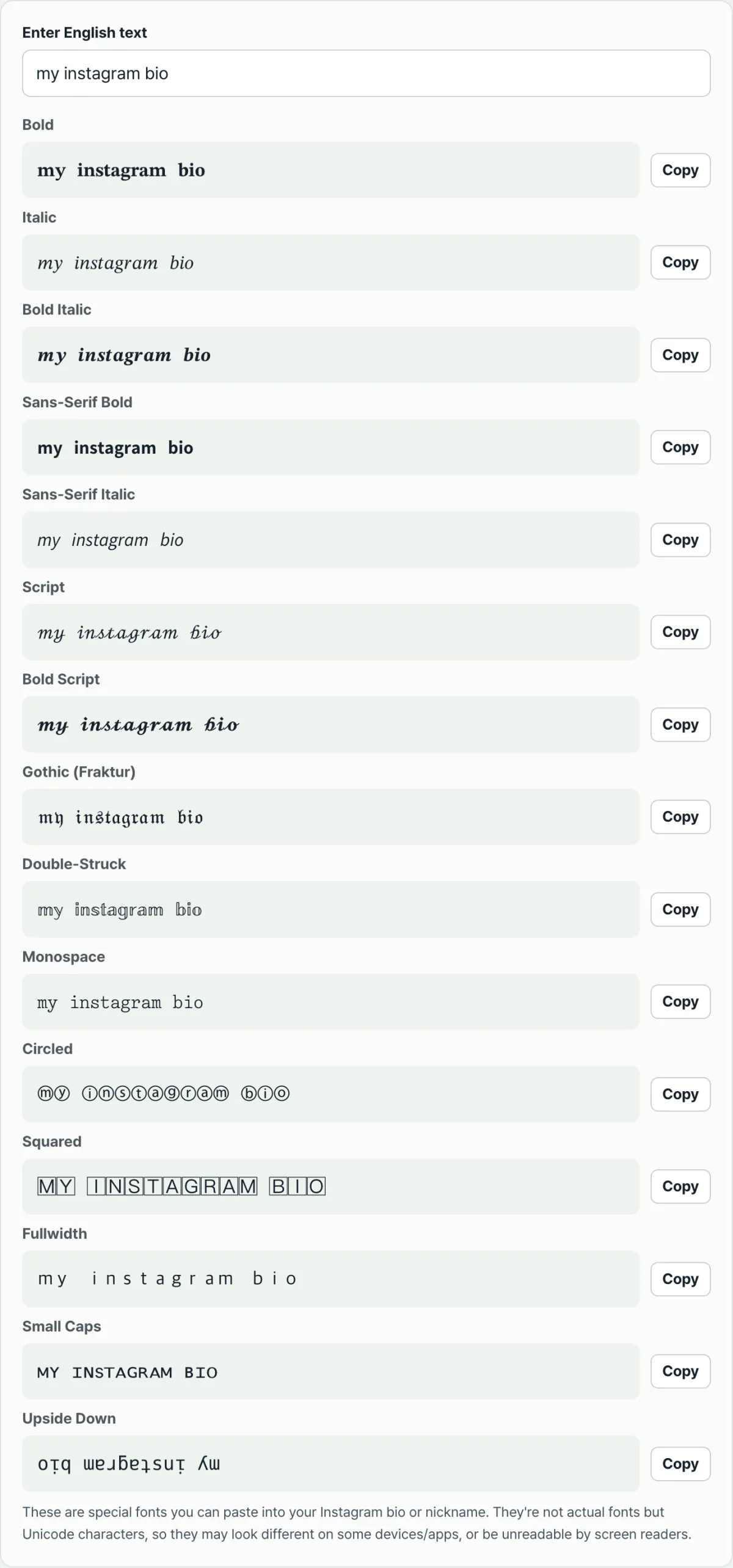
The bold, italic, and cursive styles this tool produces don't change the font file. They swap each letter A–Z, a–z, and digit 0–9 for a different character that already exists in Unicode. For example, a bold "A" isn't the ordinary letter A. It becomes "𝐀," a completely separate character from the Unicode block for mathematical symbols.
The character check in the username field looks at exactly this code value. Even if a character looks similar, the username field won't accept it if its code value falls outside lowercase a–z, digits 0–9, periods, and underscores. The name and bio fields have no such restriction, which is why the same text goes through there.
How to check and make these characters yourself without a tool
To check without a tool, open the username change screen in the Instagram app and enter any special character or emoji. Most of the time, it disappears immediately, or you get a message when you press Save that it can't be used as a username. Put the same character in the name or bio field to compare, and the difference becomes clear.
To create these characters yourself for your name or bio, you'd have to find the code range in the Unicode character table where the style you want begins and copy the matching code point for each letter one by one. Each style starts at a different code, and some letters aren't in the standard at all and have to be handled as exceptions, so matching them by hand is easy to get wrong.
Check it with our tool. Type your English text once, and it converts to several styles at once — bold, italic, cursive, and more. Then use the copy button on the line you want.
Free · no sign-up · converts instantly in your browser, and the text you enter is never sent to a server
Where people get stuck
Even text made with the same tool turns out differently depending on which field you paste it into.
| Field | Allowed characters | Fancy fonts |
|---|---|---|
| Username | Lowercase English letters, numbers, periods, and underscores only | Not applied (filtered out as you type) |
| Name | Free text with no restrictions | Applied as-is |
| Bio | Free text with no restrictions | Applied as-is |
Sometimes text pasted into the Name or bio field shows up as squares (□) or question marks. The conversion worked fine. This is a display issue that happens when the device or app viewing it doesn't have a font that can draw these Unicode characters.
Korean isn't part of this tool's conversion. Only letters A–Z, a–z, and digits 0–9 are swapped for other characters. Korean text, spaces, and punctuation stay exactly as you typed them.
Screen readers can handle these characters differently, too. They look like the alphabet but are actually different characters, so a screen reader may not read them as the original letters. It might read them differently or skip them entirely.
The bottom line
- The Instagram username field allows only lowercase English letters, numbers, periods, and underscores, so fancy fonts get filtered out there.
- Fancy fonts aren't fonts. They're the result of swapping letters for other Unicode characters, so they fail the username field's character check.
- The Name and bio fields don't restrict character type, so the same text is reflected as-is when pasted.
- If text shows up as squares or question marks, the conversion didn't fail. It's a font issue on the viewer's device. Korean isn't part of the conversion in the first place.
Free · no sign-up · converts instantly in your browser, and the text you enter is never sent to a server
Frequently asked questions
I've seen accounts that supposedly have special characters in their username. What's going on?
The actual username after @ is still made up only of lowercase English letters, numbers, periods, and underscores. If it looked like it was decorated with special characters, it was most likely the Name field that was decorated and displayed prominently on the profile, not the username.
Can I use this tool to style Korean text?
No. This tool is built to convert only English letters A–Z, a–z, and digits 0–9 into other Unicode characters. If you enter Korean, it won't be converted and will stay exactly as it is.
Could converted text look different or not show up on someone else's screen?
Yes, it can. The result is a Unicode character itself, not a font. On a device or app that doesn't support that character, it may show up as a square or another shape, and a screen reader may not read it as the original letter.
Is the text I enter sent to a server?
No. This tool swaps characters only in your browser. It doesn't send or store the nickname or bio text you enter on a server.
This article was adapted from our Korean original. Read the Korean original