
Change of Base Formula: Find Any Log Without a Log Button
Contents
Engineering calculators and smartphone calculators give you only an ln button and a log button (the base-10 common log). But when you need a log value like log₅(100), where the base is neither 2 nor 10, the calculator has no button for it and you're stuck. That's what the change-of-base formula is for.
Summary ① You can find logs with bases your calculator doesn't have using only the ln or log10 button (the change-of-base formula). ② Natural log (ln), common log (log10), and binary log (log2) differ only in base — they express the same calculation against a different reference. ③ The base of a log can't be 1, and the argument must be greater than 0 for a value to exist.
Where you get stuck when your calculator has no log_b button
A log, log_b(x), is the value that answers "how many times do I raise b to get x?" But off-the-shelf calculators don't give you a log_b button that takes the base directly. They offer only ln, fixed at base e, and log, fixed at base 10. To get a log with an arbitrary base like 2, 5, or 7, you have to work around it with just those two buttons.
How to get there with the change-of-base formula
The change-of-base formula looks like this.
log_b(x) = ln(x) / ln(b)
Switching to a different base gives the same result. You can use log10 instead of ln.
log_b(x) = log10(x) / log10(b)
For example, to find log_2(10), use the ln button to get ln(10)≈2.302585 and ln(2)≈0.693147, then divide.
log_2(10) = ln(10) / ln(2) ≈ 2.302585 / 0.693147 ≈ 3.321928
Cross-check with the log10 button and you get log10(10)/log10(2) = 1 / 0.301030 ≈ 3.321928, the same value. If the two methods don't match, that means rounding error or a data-entry mistake crept into the intermediate steps — which makes this cross-check a handy way to catch calculation errors.
Check it with our free tool. Instead of dividing the base and the argument yourself, just type in the values and it shows both calculation paths at once.
Set any base and value, or enter a natural log (ln) value, and get the logarithm instantly.
The values and the graph the tool shows
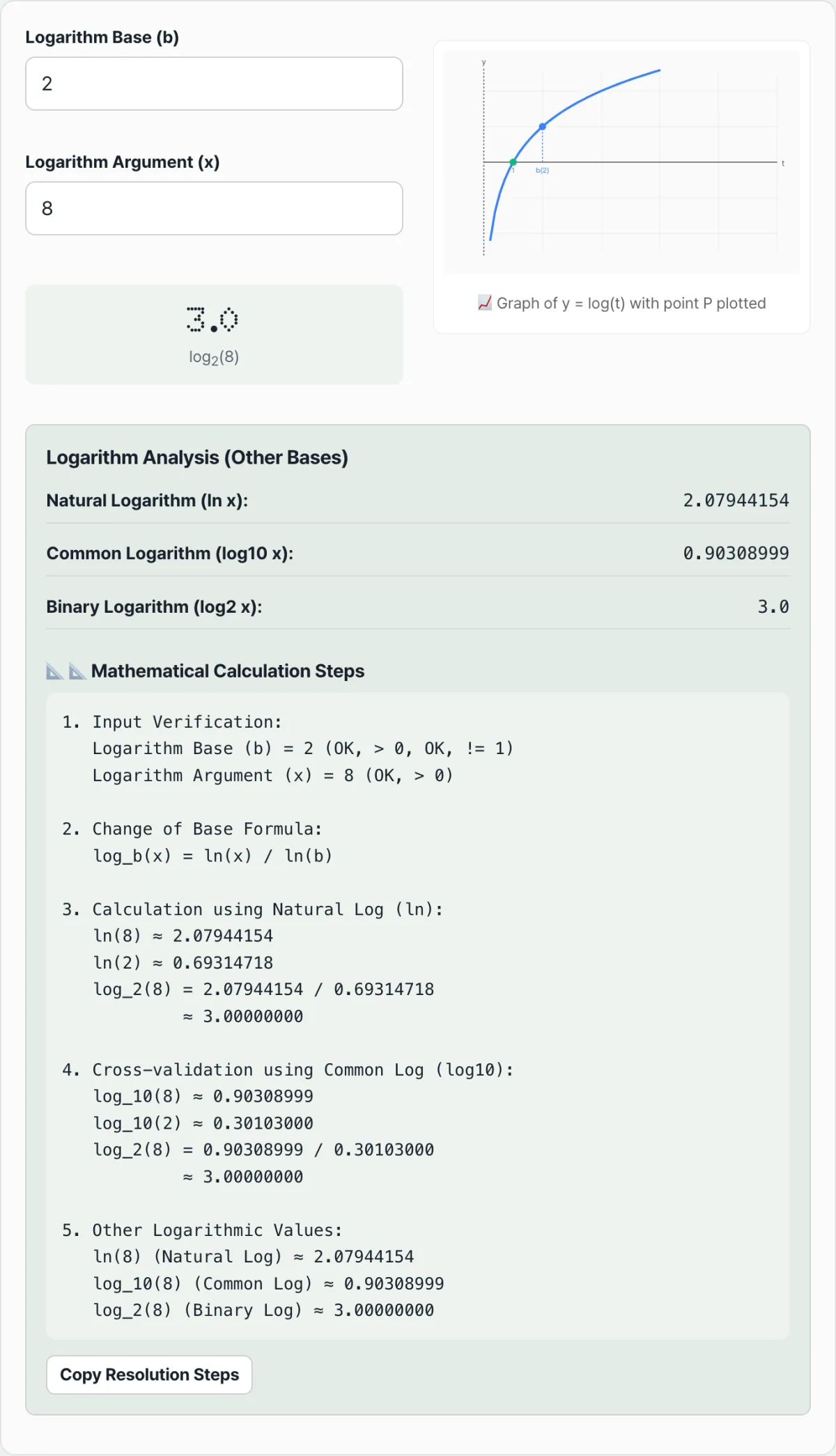
Enter the base (Base b) and the value (Value x), and it computes log_b(x) along with the natural log (ln x), the common log (log10 x), and the binary log (log2 x). Take the defaults, base 2 and value 8: log₂(8) = 3.0, and the natural log of that same 8 is about 2.07944154, while the common log is about 0.90308999.
The graph plots the curve y = log_b(t) with reference points marked. (1, 0) is the point the curve always passes through, whatever the base, and (b, 1) is the point you get when the base itself is the argument.
The value you entered, (x, log_b(x)), shows up as a red dot when it falls inside the y-range displayed in the graph. With the defaults (base 2, value 8), log_b(x) is large enough to fall outside that range, so you see only the curve and the two reference points. The curve flattens out as the argument gets larger.
The "Detailed calculation steps" section below lays out the ln-based computation and the log10-based computation side by side, so you can see how both arrive at the same value. You can copy the whole calculation and paste it into notes or homework.
Why use natural log, common log, and binary log separately
All three logs work the same way and differ only in base, but each field has a base that comes naturally.
- Natural log (ln, base e≈2.71828): the reference for calculus and for any calculation involving continuous growth.
- Common log (log10, base 10): maps directly to the number of digits, so it's used for measures that span a huge range, like earthquake magnitude, sound level (dB), and the acidity of a solution (pH).
- Binary log (log2, base 2): used for search time complexity (O(log n)) in computer data structures that use only 0 and 1, and for calculating information content (bits).
Common places to get stuck
| Situation | Result |
|---|---|
| Entering 1 as the base (b) | Can't compute. Any power of 1 is always 1, so the log is undefined |
| Entering 0 or a negative number as the argument (x) | Can't compute. Over the real numbers, a log is defined only for positive real numbers |
| The ln result and the log10 result differ | You're treating logs with different bases as if they were the same. Convert one to the other with the change-of-base formula before comparing |
The takeaway
- You can get a log with a base your calculator doesn't have using the change-of-base formula log_b(x) = ln(x) / ln(b).
- Compute it both ways, with ln and with log10, to cross-check that you get the same answer.
- The base must be greater than 0 and not equal to 1, and the argument must be greater than 0 for a value to exist.
Set any base and value, or enter a natural log (ln) value, and get the logarithm instantly.
Frequently asked questions
Why can't the base of a log be 1?
Because no matter how many times you raise 1 to a power, it's always 1. If the argument is 1, there are infinitely many solutions, so it isn't a function; if the argument is anything else, there's no answer at all.
What happens if I put a negative number or 0 as the argument?
You can't compute it over the real numbers. The log function is defined only for positive real arguments.
What's the difference between log and ln?
By convention, log means the common log with base 10, and ln means the natural log with base e. You can convert between the two with the change-of-base formula.
This article was adapted from our Korean original. Read the Korean original