
Split group expenses: how to settle up in the fewest transfers
Contents
When a group trip or a team dinner wraps up, someone still has to figure out who paid what and who owes whom. This post explains how to split expenses among several people so that the number of transfers comes out as low as possible.
Summary ① Take each person's share of the bill and subtract it from what they paid, and you get the money they should receive (+) and the money they owe (-). ② Settle up by having the biggest payer send to the biggest recipient first — that keeps the number of transfers to a minimum. ③ If you set different participants for each expense, people who joined from round two onward are still counted correctly.
Why settling each expense separately means more transfers
Say three people share two expenses at a gathering. For the first round at the barbecue place, 120,000 won paid by Chulsoo Kim, and all three ate. For the second round at the coffee shop, 30,000 won paid by Younghee Lee, and only Younghee Lee and Minsoo Park drank.
If you settle these two separately, Minsoo Park has to send 40,000 won for the barbecue to Chulsoo Kim and 15,000 won for the coffee to Younghee Lee. The more expenses there are, the more transfers you have to make.
Start with each person's net balance
Each person's net balance is the total they paid minus the total of their shares. A share is the expense amount divided by the number of people who took part in that expense.
Running the numbers on the example above:
- Chulsoo Kim: paid 120,000 won - share 40,000 won (barbecue) = +80,000 won (to receive)
- Younghee Lee: paid 30,000 won - share 40,000 won (barbecue) - 15,000 won (coffee) = -25,000 won (to pay)
- Minsoo Park: paid 0 won - share 40,000 won (barbecue) - 15,000 won (coffee) = -55,000 won (to pay)
Add up the three net balances and you get exactly 0. That always holds, because whatever one person overpaid, someone else underpaid.
How to keep the number of transfers to a minimum
Once you have the net balances, have the person who owes the most send to the person who is owed the most — an amount equal to whichever is smaller, what they owe or what the other person is due. When one side hits 0 won, that person is settled, and you repeat the same step with whoever is left.
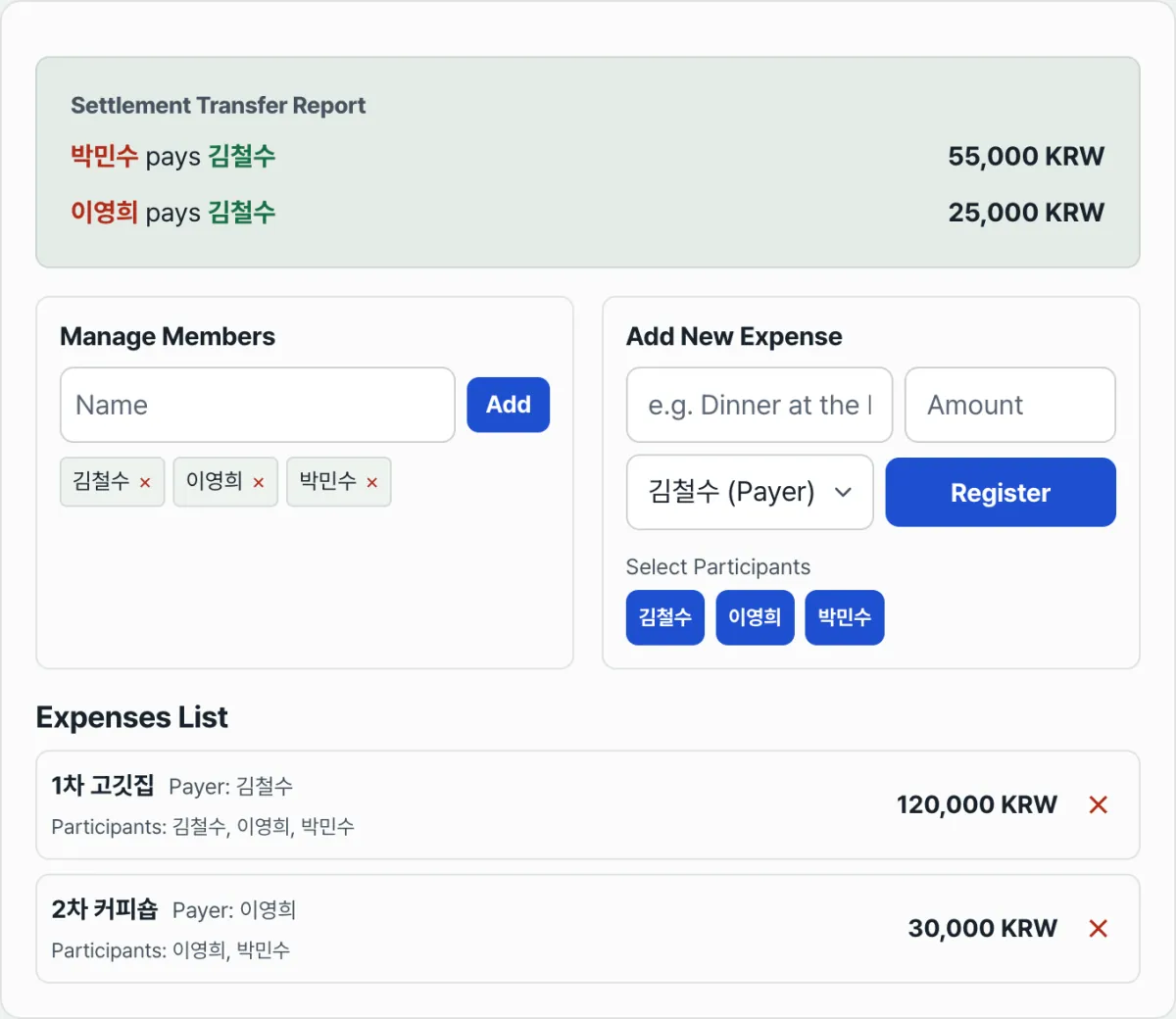
Applied to the example, Minsoo Park, who owes the most (-55,000 won), sends 55,000 won to Chulsoo Kim, the only person owed money, and drops to 0. Then Younghee Lee (-25,000 won) sends 25,000 won to Chulsoo Kim, who has +25,000 won left, and all three end at 0. Two expenses, two transfers.
Doing this by hand means re-sorting the net balance table and re-pairing people every time an expense is added, which gets tedious fast.
Check it with our tool. Just enter the participants' names and the expenses (who paid and who took part), and it runs the math above automatically and shows you exactly who should send how much to whom.
Enter the members and their expenses to see the simplest set of bank transfers, with no back-and-forth payments.
When the participants differ by expense
If someone joined from round two or skipped a particular expense, just leave them off the participant list when you enter that expense. You can set participants per expense, as with the coffee shop in the example, so uneven headcounts work the way they do in real life.
One thing it doesn't do is split a single expense by ratio instead of by headcount — for example, "I only drank half, so I'll cover half." In that case, split the expense into two separate items by share and you'll get the same result.
Common sticking points
| Situation | What to do |
|---|---|
| Someone skipped a particular expense | Leave them out of the participants when you enter that expense |
| You entered the wrong payer | Delete that expense and enter it again |
| You remove a participant from the list | They're also removed as participant or payer from expenses already entered |
| The shares aren't based on headcount | Split it into separate expense items that match the ratio |
Wrapping up
Work out each person's net balance (paid minus share), then pair the biggest payer with the biggest recipient and repeat — that gives you the fewest transfers. Setting participants per expense keeps people who joined from round two accurate, but ratio-based splits aren't supported, so split the expense into separate items when you need one.
Enter the members and their expenses to see the simplest set of bank transfers, with no back-and-forth payments.
FAQ
What happens if the split leaves a decimal?
Dividing an expense by the number of participants can leave a fraction of a won. In that case the amount is rounded and shown in whole won, and the won or so of difference from rounding doesn't meaningfully change the result.
Can it handle groups bigger than three?
There's no limit on the number of people. Add participants and set the payer and participants for each expense, and it works out the minimum transfer path the same way no matter how large the group is.
How should I share the results?
All anyone needs to know is who sends how much to whom, so a screenshot of the results screen posted in the group chat is plenty.
This article was adapted from our Korean original. Read the Korean original