
1RM Calculator: Estimate Your Max and Plan Training Weights
Contents
In weight training, the measure of your limit is 1RM (one-rep max — the heaviest weight you can lift for a single rep).
But loading a barbell to your absolute limit just to find that number puts your spine and joints at real risk of acute injury. That's why exercise physiology uses formulas instead: you plug in a submaximal weight (something you can lift for at least 2 reps) and the number of reps you did, and the formula estimates your 1RM for you.
Why Calculate With a Formula Instead of Maxing Out
Testing your 1RM directly (a maximal test) means adding weight until you fail, so by the time you reach your top single, your nervous system and muscles are already carrying fatigue from the warm-up sets. If your warm-up was too short or your form broke down, that limit attempt is an easy path to injury.
So in practice, most people log a weight they can lift for about 5–10 reps and then work backward to 1RM with math.
How to Calculate 1RM With Formulas
If you lifted a weight (W) for r reps (keep it to 10 reps or fewer to lower injury risk), these are the two standard formulas for estimating 1RM.
The Epley Formula
Widely used in powerlifting circles.
1RM = W × (1 + r ÷ 30)
The Brzycki Formula
This one tracks measured values closely in the low-rep, heavy-weight range of 10 reps or fewer.
1RM = W ÷ (1.0278 − 0.0278 × r)
With both formulas, the more reps you use, the bigger the error gets compared with your true 1RM, so it's best not to calculate from anything above 10 reps. There are other variations too, like the Lander formula, which bends the curve to fit higher rep ranges (8–12 reps), but no formula matches a real measurement exactly.
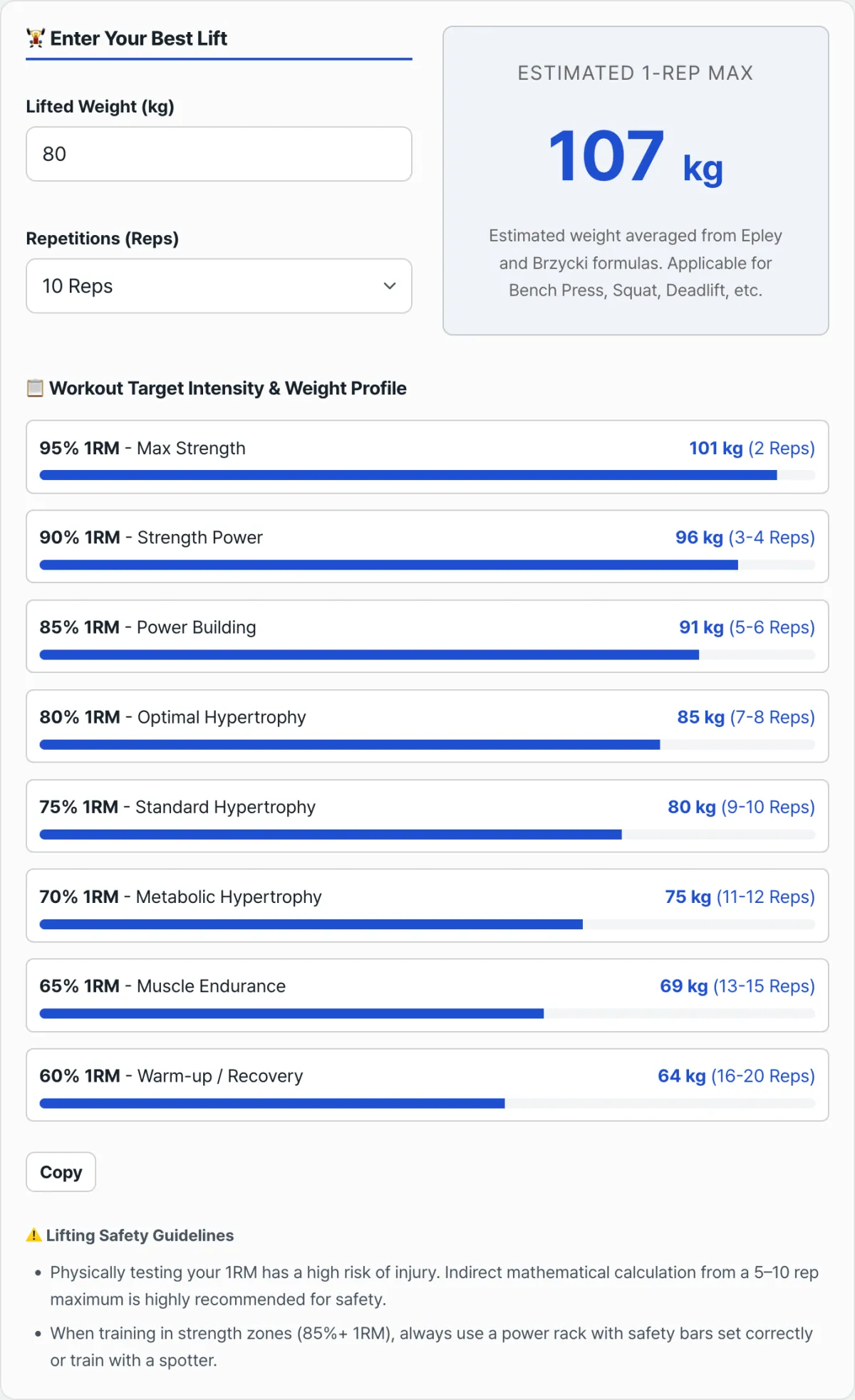
Check it with our tool. Instead of doing both formulas by hand every time, just enter your weight and reps and it shows you the average of the Epley and Brzycki results right away.
Enter a weight you can repeat and your rep count to estimate your 1RM, then see training weights tailored to your goal.
Designing Training Weight by Goal
Once you know your 1RM, you can set training weights for hypertrophy, strength, or muscular endurance. These are the ranges most commonly used.
| Goal | Intensity (% of 1RM) | Reps |
|---|---|---|
| Strength gain | 85% or more | 1–6 reps |
| Hypertrophy | 65–85% | 6–15 reps |
| Muscular endurance | 65% or less | 15+ reps |
This calculator breaks those ranges down further, into 8 zones from 95% down to 60%, and shows you the target weight for each one.
Note: An estimated 1RM is an approximation based on an average statistical model. Your actual 1RM can differ from person to person depending on muscle fiber composition, sleep and how you feel that day, and how skilled you are with the movement. When you train in the strength zone (85% or more), it's safer to have a spotter with you or set the safety bars on a power rack.
Common Sticking Points
| Situation | What to check |
|---|---|
| The estimate comes out higher than what I actually feel | Past 10 reps, both formulas drift further off. Try recalculating from a set of 5–8 reps. |
| Should different lifts give me different numbers? | These formulas are general models based on nervous system and strength characteristics, so they apply equally to the bench press, squat, and deadlift. |
| How should I pick my warm-up weights? | A common approach is to work up from 40% → 60% → 80% of your calculated 1RM as your warm-up. |
The Takeaway
- Estimating 1RM indirectly from a submaximal weight and rep count lowers your injury risk compared with testing it directly.
- The Epley and Brzycki formulas are the most widely used, and they stay accurate when you base them on 10 reps or fewer.
- Your training intensity (% of 1RM) depends on your goal: strength, hypertrophy, or muscular endurance.
- The result is an approximation, so train heavy with a spotter or safety equipment.
Enter a weight you can repeat and your rep count to estimate your 1RM, then see training weights tailored to your goal.
Frequently Asked Questions
Which is more accurate, the Epley or the Brzycki formula?
The two work differently, so the same inputs give slightly different results. Epley is generally considered closer to measured values at higher rep counts, while Brzycki is closer in the low-rep range of 10 or fewer. This calculator averages both to reduce the error from leaning on just one.
How many reps should I use for the most accurate estimate?
Aim for 5 to 10 reps. Too few reps (1–2) puts you nearly as close to a true 1RM test in terms of risk, and too many (15 or more) mixes in muscular endurance and increases the formula's error.
This article was adapted from our Korean original. Read the Korean original