
Random Dare Picker Algorithm: Fair Picks, Smooth Roulette
Contents
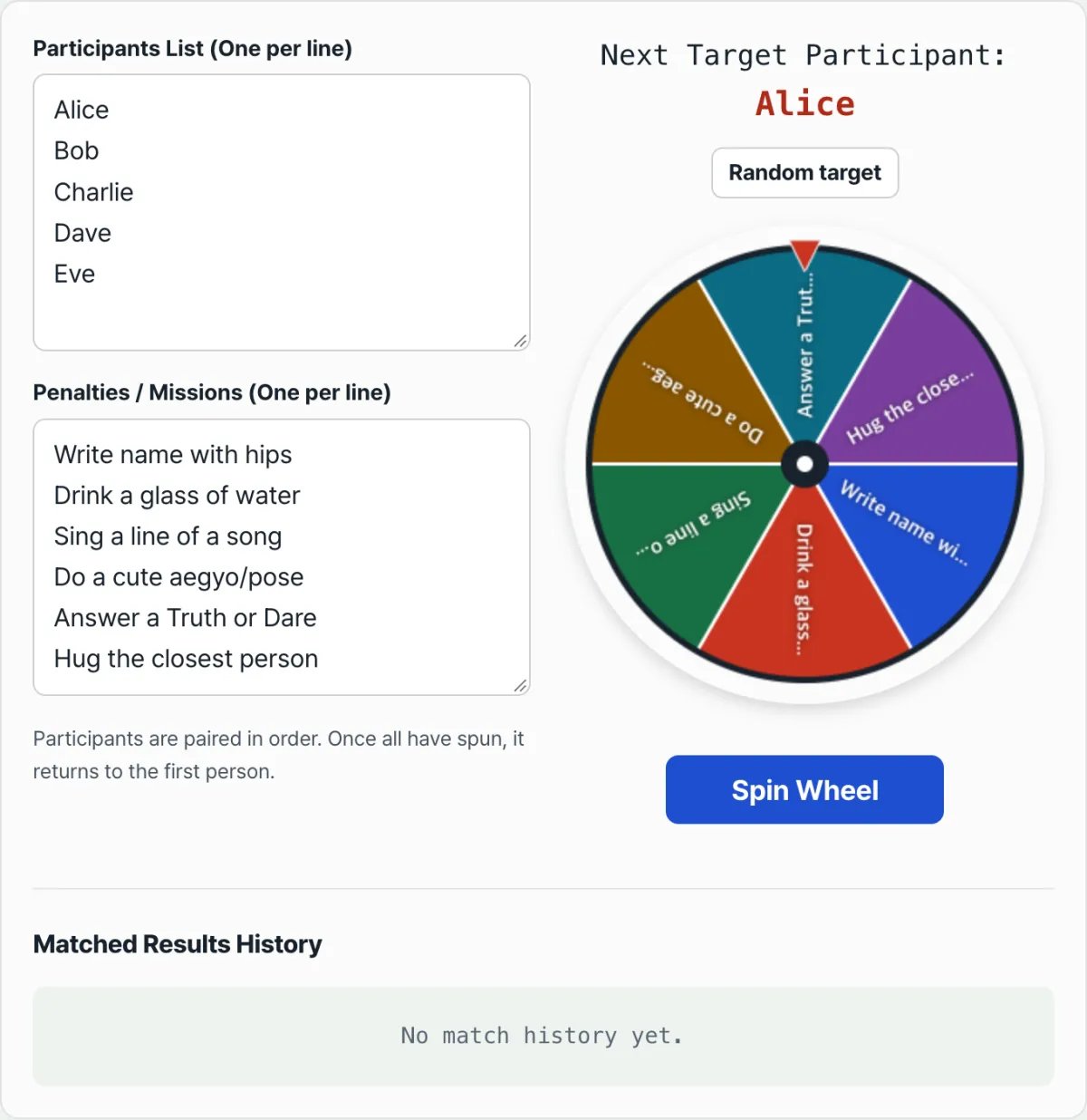
At a club meeting, a company dinner, or a party, setting up penalties and missions is a hassle. You fold a paper ladder or set out a drawing box. Do it by hand and it is common for one participant to get picked several times by mistake or for the order to get tangled. The Random Dare and Punishment Spinner takes a list of participants and a list of dares. It calls participants one at a time, in order, with a spinning roulette animation, and draws a dare at random on every spin to pair with that participant. This post explains that matching logic and how to build a canvas-based deceleration spin animation yourself.
Summary ① Participants are called exactly once each, in the order you entered them. They are never removed from the array — only the index moves forward. ② Dares are drawn fresh from the full dare list on every spin (sampling with replacement), so the same dare can come up again for a different participant. ③ With the spinner tool, you just enter your participant and dare lists, spin the wheel, and see the result right away.
Fairness and duplicate picks in penalty draws
When you draw lots by hand or draw a paper ladder, the person doing it can slip up or bias the result. And if you pick participants purely at random, someone who already got a penalty can easily get picked again. One way to avoid that is to skip random participant picks and call people one at a time in the order you entered them. Dares are different: drawing them again each time does not hurt the fun, so the dare side re-draws from the full list on every spin and leaves repetition on the table.
For example, with 8 participants and 5 dares registered, participants are called exactly once each in the order entered, so everyone gets a dare once within 8 spins. Dares, on the other hand, are drawn fresh from the full list of 5 on every spin. The chance of any given dare is always 1/5 (20%), and it is never removed from the array, so the same dare can come up again for a different participant.
Building sequential participant calls, random dare matching, and the roulette deceleration animation yourself
If you build it yourself, step through the participant array by increasing the index one at a time (and back to index 0 after a full lap), and pick a new random index from the dare array on every spin to make the match. You never remove items from the dare array, so it works without splice.
JavaScript example for sequential participant calls and random dare matching
Here is example JavaScript that calls participants in order and picks a random dare each time to pair with them:
function drawNextMatch(participants, penalties, targetIndex) {
  if (participants.length === 0 || penalties.length === 0) {
    return null;
  }

  // 1. Participants are never removed from the array — only the index in order is used
  const selectedParticipant = participants[targetIndex];

  // 2. The dare is pulled from the full list by random index each time (the array is unchanged)
  const penaltyIdx = Math.floor(Math.random() * penalties.length);
  const selectedPenalty = penalties[penaltyIdx];

  // 3. Only the participant index moves forward for the next call (back to the start after a full lap)
  const nextTargetIndex = (targetIndex + 1) % participants.length;

  return {
    participant: selectedParticipant,
    penalty: selectedPenalty,
    nextTargetIndex
  };
}
Rotation angle math and the canvas deceleration animation
Let K be the number of roulette sectors (the number of dares). You draw K wedges on the canvas and re-render every frame with a recomputed rotation angle. Instead of a CSS transition, requestAnimationFrame updates the angle about every 30ms, and a hand-written 5th-degree polynomial ease-out function starts the wheel fast and slows it down gradually. Total spin time is not fixed — it is randomized between 3 and 5 seconds each time (Math.random() * 2000 + 3000) — and when the wheel stops, the final angle is used to work out which dare sector it landed on and show the matched result.
Instead of building sequential participant calls, random dare draws, rotation angle math, and the canvas deceleration animation yourself, just enter your participant list and dare list and see the same matching logic and the same roulette animation in action. Check it with our tool.
Add your players and penalties, spin the wheel, and pick a fair, fun random winner.
Core matching logic at a glance
| Element | Description |
|---|---|
| Participant call order | Participants are called one at a time in the order entered. Nothing is removed from the array — only the index moves forward. |
| Dare draw | Math.random() draws from the full dare list again on every spin, so the same dare can repeat. |
| Rotation angle | The deceleration angle comes from a 5th-degree polynomial ease-out function and a spin time that changes between 3 and 5 seconds each time. |
Wrapping up
The Random Dare and Punishment Spinner calls participants one at a time in list order and picks a new random dare on every spin to match with them. Participant order is fixed, so nobody is called twice until everyone has had a turn, but dares are never removed from the array, so the same dare can come up again for a different participant. Enter your participant and dare lists, spin the wheel, and you will see the matched result right away along with the canvas deceleration animation.
Add your players and penalties, spin the wheel, and pick a fair, fun random winner.
Frequently asked questions
Can I reuse my participant and dare lists later?
No. The lists you enter are not saved anywhere — they only live on the current page. If you refresh or come back later, they reset to the sample default lists, so enter your participants and dares again each time you use it.
How does the roulette animation work?
When you press the "Spin" button, the wheel showing the dares spins fast, slows down, and stops. The dare in the sector where it stopped appears paired with the participant shown at the top of the screen.
How do I check and share the result?
When the spin ends, the participant and dare are shown as a pair right on screen and added to the match history table below. Individual result cards do not have their own copy button, but the "Copy All Results" button at the top of the history table copies every match recorded so far in one go, so you can paste it into a group chat.
This article was adapted from our Korean original. Read the Korean original