
Best Time to Post on Social Media: Day-by-Day Golden Hours
Contents
People reach for their phones at different times depending on the channel—Instagram, YouTube, or a blog platform such as Naver Blog—so the same post can get different early engagement depending on when you publish it. This post covers how to estimate posting times by channel and audience, and introduces a tool you can use to check them right away without doing the math yourself.
Summary ① Instagram, YouTube, and blogs each have different times when users are on their phones, so the best posting time differs by channel. ② The speed of engagement in the period right after posting is said to affect later reach, so scheduling for when your audience is active helps. ③ With Best Time to Post on Social Media, choose a platform and audience to see recommended time slots by day of week.
Why Posting Time Matters
A post published at a random time may not generate enough early engagement—comments, likes, and clicks right after posting—for the recommendation algorithm to use. The groups you're targeting, such as office workers, students, and homemakers, check their phones at different times, and even the same person consumes content at different times depending on the platform. Text-heavy blog posts tend to get search traffic on weekday mornings and midday, while content that takes time to watch, like long-form YouTube videos, tends to be consumed on weekday evenings or weekends.
How to Estimate Your Best Posting Time
You can estimate engagement for a given time slot by multiplying metrics such as reach rate, click-through rate, and bounce rate by weights, then adding and subtracting the results. For example, score each time slot with "engagement score(t) = weight1 × reach rate(t) + weight2 × click-through rate(t) − weight3 × bounce rate(t)," then use the slot with the highest score as that day's recommended posting time.
If you map out reference time slots for each channel and audience combination in advance, you won't have to rethink it every time. The following JavaScript example returns a reference schedule for a combination of target persona and channel.
const SCHEDULE_DATABASE = {
  "instagram": {
    "worker": { bestDays: ["수", "목", "금"], bestHours: ["12:00", "19:00", "21:00"], tip: "퇴근길 스마트폰 확인 시간에 반응이 늘어나는 편" },
    "student": { bestDays: ["금", "토", "일"], bestHours: ["17:00", "22:00", "23:00"], tip: "하교 후 및 야간 취침 전 반응이 늘어나는 편" }
  },
  "youtube": {
    "worker": { bestDays: ["목", "금", "토"], bestHours: ["18:00", "20:00"], tip: "금요일 저녁 롱폼 영상 시청이 늘어나는 편" },
    "student": { bestDays: ["금", "토"], bestHours: ["16:00", "19:00"], tip: "주말 전 짧은 영상 연속 시청이 늘어나는 편" }
  }
};

function getOptimalPostTime(platform, persona) {
  const platformData = SCHEDULE_DATABASE[platform];
  if (!platformData || !platformData[persona]) {
    return { bestDays: ["평일"], bestHours: ["19:00"], tip: "일반적인 저녁 시간대를 참고해보세요." };
  }
  return platformData[persona];
}
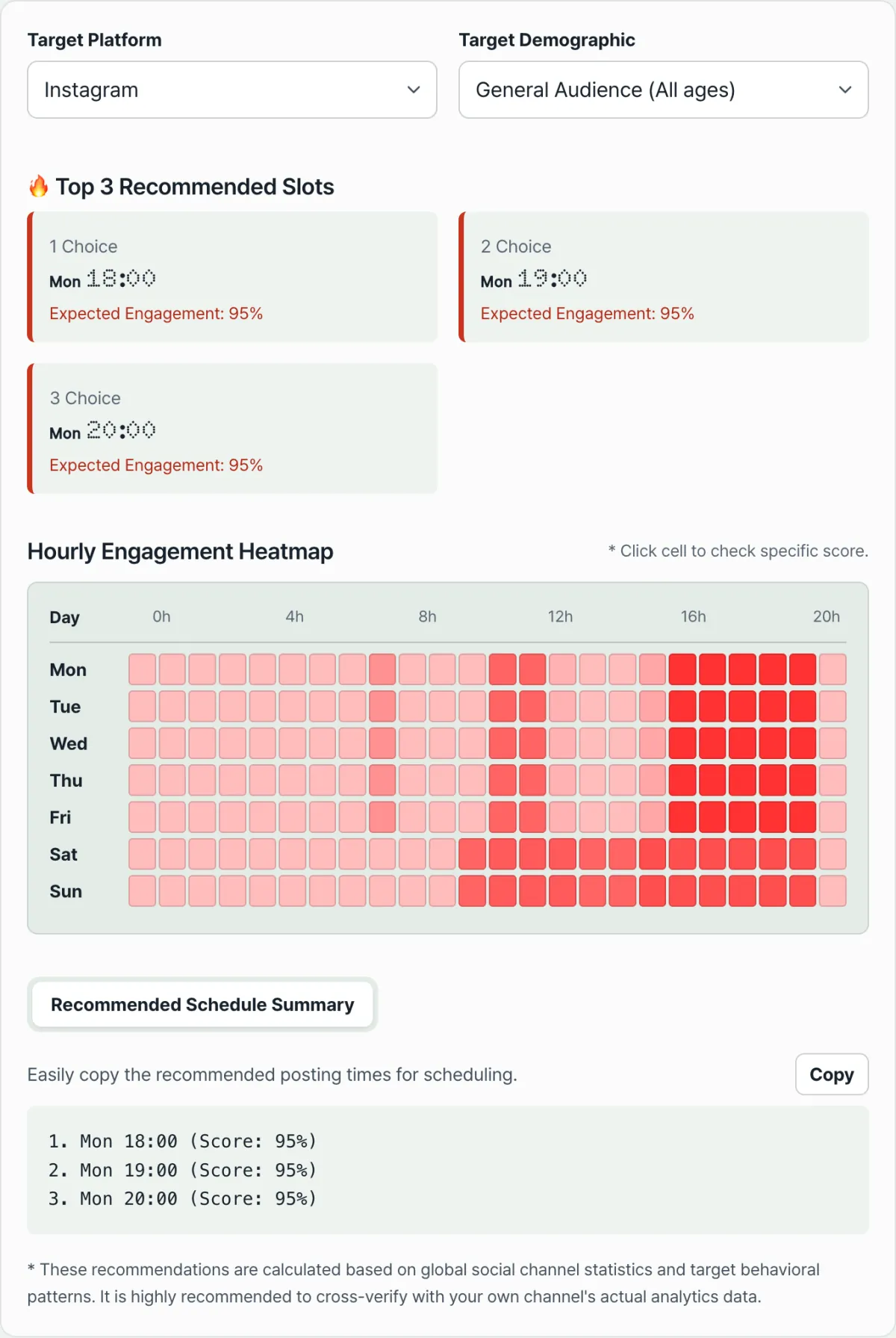
Note Early engagement such as comments and likes right after posting is said to affect later reach, so it can help to schedule your post a little earlier than the recommended time. If you'd rather skip the calculations and code and just pick a channel and audience, check it right away with our free tool, Best Time to Post on Social Media.
Pick your social platform and target persona, then check the recommended upload times by day of week and golden hour tips.
Reference Times by Audience
Below are examples of reference days and times by audience that you can put together using the method above. Actual engagement can vary by account and content, so use these as a guide.
| Audience | Reference days | Reference times | Notes |
|---|---|---|---|
| Office workers and commuters | Weekdays | Around 8:00, 12:00, 18:00–19:00, and 21:00–23:00 (on the hour) | Phone use tends to rise during commutes, lunch, and before bed (there is a brief dip around 20:00) |
| Students in their teens and 20s | Weekday evenings, weekends | A broad stretch from 16:00 to 23:00 (on weekends it climbs sharply from 11:00 and stays somewhat high right after midnight) | Activity runs continuously from after school until bedtime, and on weekends it picks up from late morning |
| All ages (when choosing the blog platform) | Weekdays | Lunch hour, 12:00–13:00 | Search and information-seeking engagement tends to be higher during lunch than before the workday starts |
Final Thoughts
There is no single absolute right answer for posting time. It's more of a guideline to match your channel and audience's daily routine. You can use the table and formula above to build your own schedule, or if you just want to pick a platform and audience and see a reference schedule, use Best Time to Post on Social Media. If you run scheduled posts regularly, it's a good idea to review how they perform after publishing and adjust your reference times as you go.
Pick your social platform and target persona, then check the recommended upload times by day of week and golden hour tips.
Frequently Asked Questions
Why are the recommended times different for YouTube and Instagram?
Instagram tends to get more engagement when people check their phones briefly on the commute or before bed. YouTube tends to perform better for views and reach when you upload on weekday evenings (18:00–21:00) or weekend mornings, when people have time to watch.
How do I use the tool?
First choose the platform you plan to publish on (Instagram, YouTube, blog, or TikTok), then select your target audience (students, office workers, homemakers, or all ages). The 24-hour heatmap by day of week shows the time slots with the highest engagement. Use those slots to set your scheduled posting times.
What should I do when posting to several platforms at once?
Reference times differ by platform, so look up each platform separately and set a different scheduled time for each channel. If you apply one schedule to every channel, you may end up posting at a low-engagement time on some of them.
This article was adapted from our Korean original. Read the Korean original