
SVG background patterns: tile with CSS background-repeat
Contents
When you want a repeating background pattern on a web page — the soft grid behind a SaaS dashboard or the dot pattern on a card border — you often start by preparing a heavy PNG image file. But a single small SVG tile plus CSS background-image repetition (background-repeat) is enough to build an infinitely repeating tile background that stays sharp when scaled up and weighs far less. This article covers how SVG pattern tiles are laid out, how to code dot and grid patterns yourself, and how to build them faster with a tool.
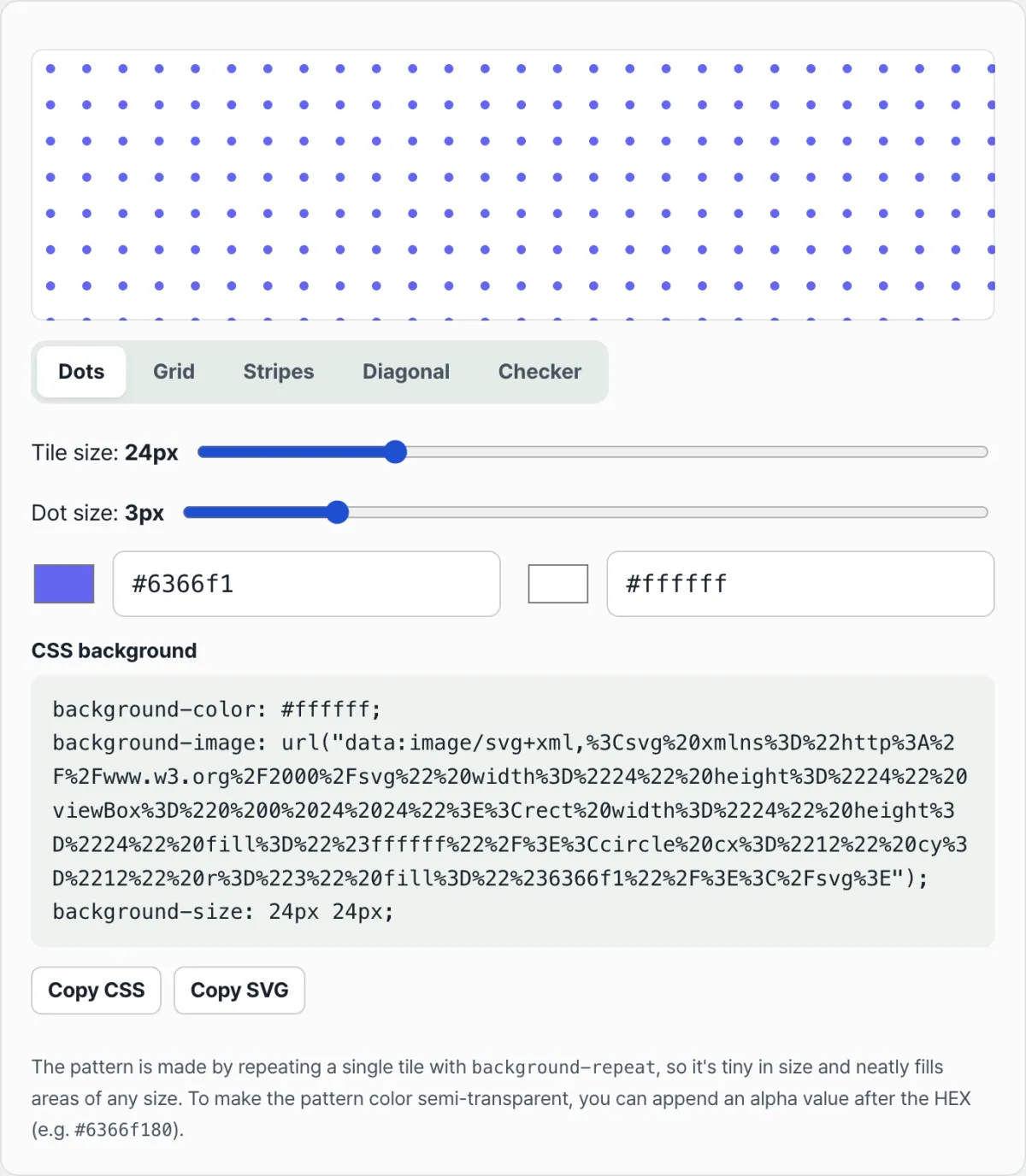
Summary ① Create one small SVG tile and repeat it horizontally and vertically with CSS background-repeat to get an infinite tile background. ② Encode the SVG code as a data URI and drop it straight into background-image to fill the background with no separate file request. ③ If you'd rather compare patterns right away instead of coding coordinates and colors by hand, try the SVG Background Pattern Generator.
Why Build Background Patterns with SVG
Grid tiles that repeat are common in web design: background grids on modern SaaS dashboards, dot backgrounds on portfolios, zigzag borders on form cards. Prepare these backgrounds as a raster image like PNG and the file gets large, and when you scale up on a high-density display such as a Retina screen, the pixels can look blurry.
A vector-based approach works differently. Create one small SVG tile and repeat it with background-repeat, and you get a background tile that scales up and down sharply at any resolution, built from lightweight code of a few hundred bytes or so. The catch is that you have to work out the shape coordinates, tile size, and data-URI encoding by hand every time, which gets tedious.
Building an SVG Pattern Tile Yourself
To build an SVG tile background, first decide the width and height (w, h) of a single tile, then draw one shape on it — a dot or a grid line. Turn that tile into an SVG file (or a data URI) and let CSS background-repeat and background-size handle the rest: the browser automatically repeats the same tile at positions shifted by the horizontal index i and vertical index j, at x = i × w and y = j × h.
Core Tile Repetition Components
- background-repeat / background-size: CSS properties that repeat the tile image horizontally and vertically (repeat) and fix the size of one tile cell in pixels so the tiles connect squarely with no distortion.
- Tile size (usually 6px to 80px, default 24px): Defines the width and height of one tile cell. Smaller values give a denser pattern; larger values give a looser one.
- Graphic elements inside the tile (Dot / Grid Line / Stripe / Diagonal / Checker): Shapes such as circle, path, and rect placed inside the tile to create dots, grids, stripes, diagonals, checkers, and whatever else you want.
Here's a 24px Grid tile SVG — a common choice for modern dashboard backgrounds — and the CSS that encodes it as a data URI and repeats it as a background.
<!-- 1. One 24px Grid tile SVG (no patternUnits; just draw a single tile cell) -->
<svg xmlns="http://www.w3.org/2000/svg" width="24" height="24" viewBox="0 0 24 24">
  <rect width="24" height="24" fill="#0f172a" />
  <path d="M0 0H24" stroke="rgba(255,255,255,0.15)" stroke-width="1" />
  <path d="M0 0V24" stroke="rgba(255,255,255,0.15)" stroke-width="1" />
</svg>
/* 2. Encode the tile above as a data URI and fill the background by repeating it with background-repeat */
.grid-pattern-bg {
width: 100%;
padding: 48px;
background-color: #0f172a;
background-image: url("data:image/svg+xml,%3Csvg xmlns='http://www.w3.org/2000/svg' width='24' height='24' viewBox='0 0 24 24'%3E%3Crect width='24' height='24' fill='%230f172a'/%3E%3Cpath d='M0 0H24' stroke='rgba(255,255,255,0.15)' stroke-width='1'/%3E%3Cpath d='M0 0V24' stroke='rgba(255,255,255,0.15)' stroke-width='1'/%3E%3C/svg%3E");
background-repeat: repeat;
background-size: 24px 24px;
border-radius: 16px;
}Note Instead of calculating and testing SVG tile coordinates, sizes, and data-URI encoding by hand, you can use the SVG Background Pattern Generator to adjust pattern shapes — dots, grids, stripes, diagonals, checkers — along with colors and sizes, and get CSS and SVG code you can copy right away.
Rather than editing coordinates and colors in code one at a time, compare them instantly in a live preview with our tool.
Set the tile spacing and color for dots, grids, stripes, and more in real time, then grab ready-to-use data-URI and SVG code.
Things to Keep in Mind When Applying Background Patterns
| Item | Details |
|---|---|
| Network requests | Inlined as a data URI, it renders from CSS alone with no separate file request. |
| Color contrast | If the pattern color is too strong against the background, it can hurt body text readability, so lower alpha values are a good idea. |
| Transparency | Add an alpha value after the pattern color HEX to make a semi-transparent pattern. Example: #6366f180. |
| Pattern types | Five repeating patterns — dots, grids, stripes, diagonals, and checkers — can be adjusted by color and size. |
Wrapping Up
An SVG tile background works like this: once you set the size and shape of one small tile, CSS background-repeat and background-size handle the coordinate math and place the repeats for you. Inline it as a CSS data URI to keep the page light with no separate file requests, and adjust the alpha value of the pattern color to get a semi-transparent tone. If you'd rather compare five patterns live instead of calculating coordinates and colors yourself, using the tool is faster.
Set the tile spacing and color for dots, grids, stripes, and more in real time, then grab ready-to-use data-URI and SVG code.
Frequently Asked Questions
Why use SVG instead of an image file?
SVG is vector, so it stays sharp when scaled up. Put it in a data URI and it repeats right inside your CSS with no separate file request, keeping the page light.
How do I make the pattern semi-transparent?
Add an alpha value after the pattern color HEX. For example, #6366f180 is indigo at about 50% transparency. It blends naturally with the background color for a subtle texture.
Is it safe to use the generated code as-is?
It uses only standard SVG and CSS background properties, so it works fine in modern browsers. Just keep in mind that too-strong color contrast can hurt body text readability, so use it as a reference and check it on the actual screen.
This article was adapted from our Korean original. Read the Korean original