
Base Conversion Guide: Binary, Octal, Decimal, Hex Math
Contents
- The Four Core Base Systems in Computer Science
- The Math Behind Base Conversion
- The Core Mechanism: Direct Binary-to-Octal-to-Hex Conversion (Bit Grouping)
- 1:1 Comparison Matrix for the Four Bases, 0 Through 15
- 5 Common Mistakes When Working With Bases
- A Flawless 5-Step Workflow for Base Arithmetic
- 7 Base Conversion Tips
- Final Decision Tree: Which Base Should You Use?
- Cheat Sheet: Key Base Conversion and Digital Logic Terms
- Frequently Asked Questions
If you study computer science, or work in systems programming, embedded systems, or web development, you handle binary (0101), octal (755) for Linux permissions, everyday decimal, and hexadecimal (0x7FFF, #FF5733) for memory addresses and color codes every single day.
Adding two numbers written in different bases (say, binary 1010 + hex 0x1F), or converting a decimal number freely into binary, octal, and hex, is the most basic skeleton of computer architecture and bitwise operations.
Here is the complete breakdown: the math behind converting between bases using place-value powers and the remainder division method, how two's complement expresses negative numbers, and the step-by-step work for arithmetic across mixed bases.
Key takeaways ① The four core bases: binary (a computer transistor's 0/1), octal (3-bit groups, file permissions), decimal (the human standard), and hexadecimal (4-bit nibbles, memory addresses). ② To decimal: multiply each digit by a power of the radix and add them up (N = ∑ di × Bi). ③ To another base: divide the decimal number by the target base repeatedly until the quotient hits 0, then assemble the remainders in reverse order. ④ Our base calculator handles arithmetic (+, -, *, /) between different bases instantly and shows the full step-by-step math at a glance.
The Four Core Base Systems in Computer Science
A radix (or base) is the number of distinct symbols (digits) you can use:
1. Binary (Base 2)
- Symbols used: 0, 1
- What it is: The raw form of machine code, directly representing the ON (1) and OFF (0) voltage states of a semiconductor transistor.
2. Octal (Base 8)
- Symbols used: 0 ~ 7
- What it is: Compresses exactly 3 bits (23=8) of binary into one character. Widely used for Linux file permissions (chmod 755: r=4, w=2, x=1).
3. Decimal (Base 10)
- Symbols used: 0 ~ 9
- What it is: The standard number system of daily life, derived from counting on ten fingers.
4. Hexadecimal (Base 16)
- Symbols used: 0 ~ 9 plus A(10), B(11), C(12), D(13), E(14), F(15)
- What it is: Expresses 4 bits of binary (one nibble, half a byte, 24=16) as a single character. The standard for memory addresses (0x7FFEE4) and web color codes (#FFFFFF).
The Math Behind Base Conversion
1. Any Base ➔ Decimal (Sum the Place-Value Polynomial)
- Example (hex 0x2F ➔ decimal): (2 × 161) + (15 × 160) = 32 + 15 = 47
2. Decimal ➔ Any Base (Divide and List the Remainders in Reverse)
Divide the decimal number by the target base B, collecting remainders until the quotient reaches 0:
- Example (decimal 47 ➔ binary):
- 47 ÷ 2 = 23 ... remainder 1 (least significant bit, LSB)
- 23 ÷ 2 = 11 ... remainder 1
- 11 ÷ 2 = 5 ... remainder 1
- 5 ÷ 2 = 2 ... remainder 1
- 2 ÷ 2 = 1 ... remainder 0
- 1 ÷ 2 = 0 ... remainder 1 (most significant bit, MSB)
- Assembling the remainders in reverse gives 101111 (Base 2).
Free · Choose your bases and enter your numbers to get the result and step-by-step work in one second
The Core Mechanism: Direct Binary-to-Octal-to-Hex Conversion (Bit Grouping)
Here's how bit grouping lets you convert binary straight to octal and hex in a second, without going through decimal.
1. Binary ➔ Hex (Group by 4 Bits, 1 Nibble)
- Binary: 1 1 0 1 0 1 1 0
- Split into 4-bit groups: [1101] [0110]
- Convert to hex: 11012 = 1310 = D, 01102 = 610 = 6 ➔ 0xD6
2. Binary ➔ Octal (Group by 3 Bits)
- Binary: 0 1 1 0 1 0 1 1 0 (pad with a leading 0)
- Split into 3-bit groups: [011] [010] [110]
- Convert to octal: 0112 = 3, 0102 = 2, 1102 = 6 ➔ 326 (Base 8)
1:1 Comparison Matrix for the Four Bases, 0 Through 15
| Decimal (Dec) | Binary (Bin, 4-bit) | Octal (Oct) | Hexadecimal (Hex) | Bit weight (8 · 4 · 2 · 1) |
|---|---|---|---|---|
| 0 | 0000 | 0 | 0 | 0+0+0+0 |
| 1 | 0001 | 1 | 1 | 0+0+0+1 |
| 2 | 0010 | 2 | 2 | 0+0+2+0 |
| 3 | 0011 | 3 | 3 | 0+0+2+1 |
| 4 | 0100 | 4 | 4 | 0+4+0+0 |
| 5 | 0101 | 5 | 5 | 0+4+0+1 |
| 6 | 0110 | 6 | 6 | 0+4+2+0 |
| 7 | 0111 | 7 | 7 | 0+4+2+1 |
| 8 | 1000 | 10 | 8 | 8+0+0+0 |
| 9 | 1001 | 11 | 9 | 8+0+0+1 |
| 10 | 1010 | 12 | A | 8+0+2+0 |
| 11 | 1011 | 13 | B | 8+0+2+1 |
| 12 | 1100 | 14 | C | 8+4+0+0 |
| 13 | 1101 | 15 | D | 8+4+0+1 |
| 14 | 1110 | 16 | E | 8+4+2+0 |
| 15 | 1111 | 17 | F | 8+4+2+1 |
5 Common Mistakes When Working With Bases
- Mistaking a leading 0 for a decimal in programming languages: Reading 075 as the decimal 75 (a 0 prefix means octal).
- Confusing the decimal values of hex letters (A~F): Mixing up A=10, B=11, C=12, D=13, E=14, F=15 and botching the calculation.
- Skipping the two's complement step in binary subtraction: Ignoring how computers add negatives and doing borrows by hand until the sign bit breaks.
- Not aligning hex grouping to the right: Grouping 11011 from the left as [1101][1] — a disaster (always group 4 bits at a time starting from the LSB on the far right).
- Not converting to a common base for mixed-base arithmetic: Trying to add binary and hex directly without first bringing both to decimal.
A Flawless 5-Step Workflow for Base Arithmetic
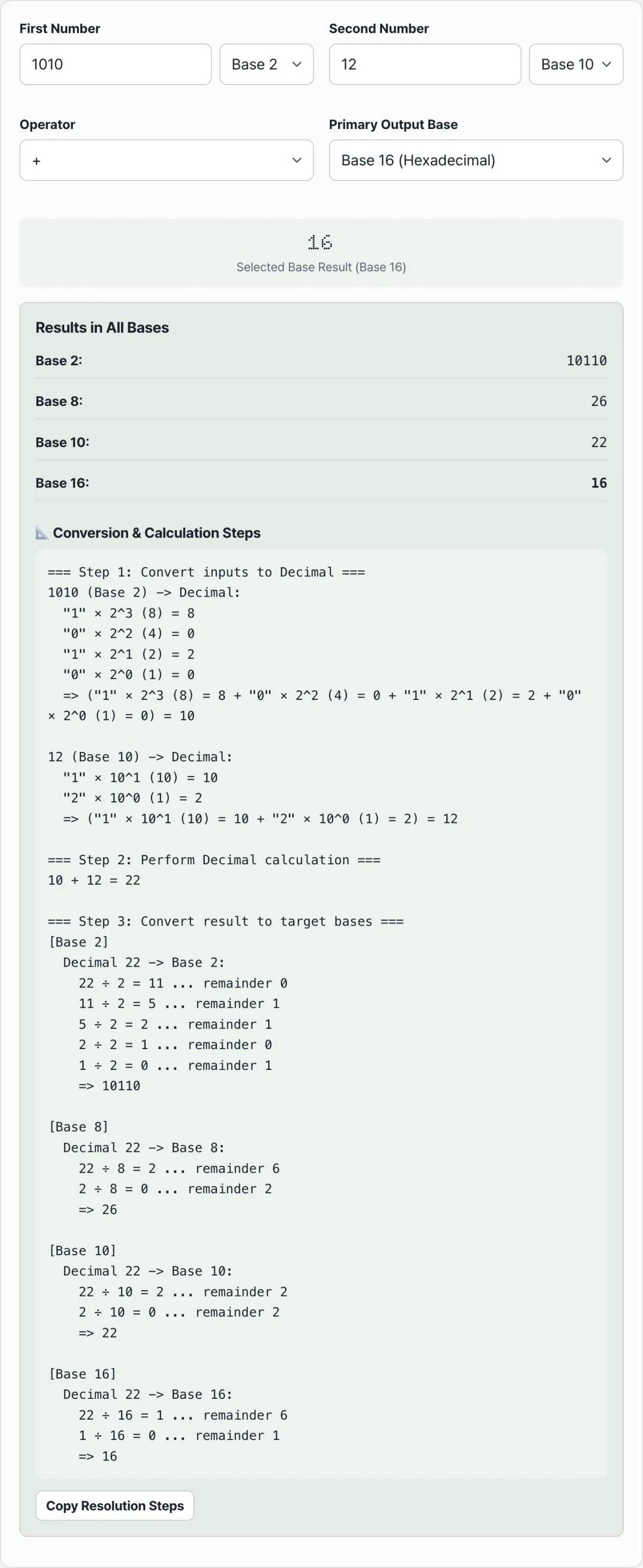
- Step 1 (Enter the numbers and pick their bases): Choose the base for the first number (say, binary 1101) and the second number (say, hex A).
- Step 2 (Pick the operator): Click the operation you want: addition (+), subtraction (-), multiplication (*), or division (/).
- Step 3 (Choose the output base): Decide whether you want the final result in binary, octal, decimal, or hex.
- Step 4 (Instant math and side-by-side comparison): The result appears on the main card, with the converted value in all four bases listed right below it.
- Step 5 (Check the full step-by-step work): In the "Detailed Calculation Steps" box, verify the intermediate decimal conversion and the quotient/remainder division steps as if you'd worked them out by hand.
7 Base Conversion Tips
- Memorize bitmask hex values: 0xFF means all 8 bits are 1 (11111111), and 0x0F masks the lower 4 bits (00001111).
- Group binary digits in fours: For long binary numbers, space them in groups of four like 1010 1100 0011 and you can swap them straight to hex (0xAC3).
- JavaScript base conversion functions:
- Parse a base: parseInt("1010", 2) ➔ 10
- Convert to a base string: (255).toString(16) ➔ "ff"
- Memorize the powers of 2: 1, 2, 4, 8, 16, 32, 64, 128, 256, 512, 1024 (the weight of each position where a binary 1 is set).
- What bit shifts (<<, >>) mean arithmetically: A left shift (x << 1) multiplies by 2, and a right shift (x >> 1) gives the quotient when dividing by 2.
- Adding Unix permission rwx as 3 bits: r(4) + w(2) + x(1) = 7 (read, write, and execute all allowed).
- Bookmark this calculator: Keep it handy as an essential tool when you prep for coding tests, work on CS coursework, or do systems engineering work.
Final Decision Tree: Which Base Should You Use?
- Case A (digital logic circuit design, bit flag operations) ➔ Binary
- Case B (Linux file permission settings, legacy mainframes) ➔ Octal
- Case C (everyday number crunching, financial and accounting data) ➔ Decimal
- Case D (memory address pointers, color codes, binary dumps) ➔ Hexadecimal
Cheat Sheet: Key Base Conversion and Digital Logic Terms
- Radix (base): The number of digits a positional number system uses as its foundation (2, 8, 10, 16, and so on).
- Nibble: A unit of data made up of 4 bits (one hex digit).
- LSB / MSB: The Least Significant Bit and the Most Significant Bit.
- Two's Complement: The standard way computers represent negative numbers — flip every bit (one's complement) and then add 1.
Frequently Asked Questions
Why do hex numbers use the letters A, B, C, D, E, and F for 10 through 15?
Because the decimal value 10 takes two digits, we agree that A means 10, B means 11, C means 12, D means 13, E means 14, and F means 15, so each of these values fits in a single character.
What's the easiest way to add numbers that are in different bases?
Convert both numbers to decimal first, do the addition, then convert the decimal result to your target base by repeated division (reading the remainders in reverse). That's the most accurate way with no rounding errors. The Binary, Octal, Decimal, and Hex Calculator handles this whole process for you automatically.
Does the calculator save what I enter to a server?
Not at all. Every base conversion and arithmetic solution is computed locally and instantly by the JavaScript engine inside your web browser.
This article was adapted from our Korean original. Read the Korean original