
Cron Expression Format: Read the 5 Fields in the Right Order
Contents
- The five fields always follow the same order
- Know just the asterisk, asterisk/N, and plain numbers, and you can read everything
- When you write them by hand, this is what happens
- The trap that comes with using day-of-month and day-of-week together
- A different time zone means a completely different run time
- Summary
- Frequently asked questions
The five fields always follow the same order
A cron expression is made of five fields separated by spaces, and the order is always minute, hour, day, month, weekday. This order holds for any crontab and any CI scheduler, so once you memorize it, you can keep using it.
Position
Meaning
Value range
1st
Minute
0~59
2nd
Hour
0~23
3rd
Day of month (day-of-month)
1~31
4th
Month
1~12
5th
Day of week (day-of-week)
0~6 or 0~7 depending on implementation
The number range for the weekday field differs slightly from one implementation to the next. Treating both 0 and 7 as Sunday is common, but this varies a bit by cron, so rather than memorizing numbers, it's safer to check against the weekday names (Mon/Tue/Wed, etc.) that your tool shows you.
Know just the asterisk, asterisk/N, and plain numbers, and you can read everything
The symbols that go in each field fall into three broad types.
- Asterisk (*) — means every possible value for that field. An asterisk in the minute field means every minute; an asterisk in the weekday field means every day, regardless of weekday.
- Asterisk/N (*/N) — a step that repeats every N. Writing */15 in the minute field runs at 0, 15, 30, and 45 minutes.
- A specific number — runs only when the value matches. Writing 9 in the hour field runs at exactly 9 o'clock.
There's also a way to list several values with commas. Putting 1,3,5 in the weekday field runs only on Monday, Wednesday, and Friday, and putting 3,6,9,12 in the month field runs only in the first month of each quarter. With just these four combinations, an expression like "0 9 * * 1-5" reads straight away as "every day at 9:00, weekdays only."
When you write them by hand, this is what happens
Even a simple requirement like "run at 9 a.m. on weekdays" gets confusing once you actually write it out. You swap the order of minute and hour, or you end up digging through the docs again every time to remember whether weekday numbers start at 0 or 1. And once you've written an expression, there's no good way to verify when it will actually run, so it's common to register it in crontab and only find out the next day from the logs whether you got it right.
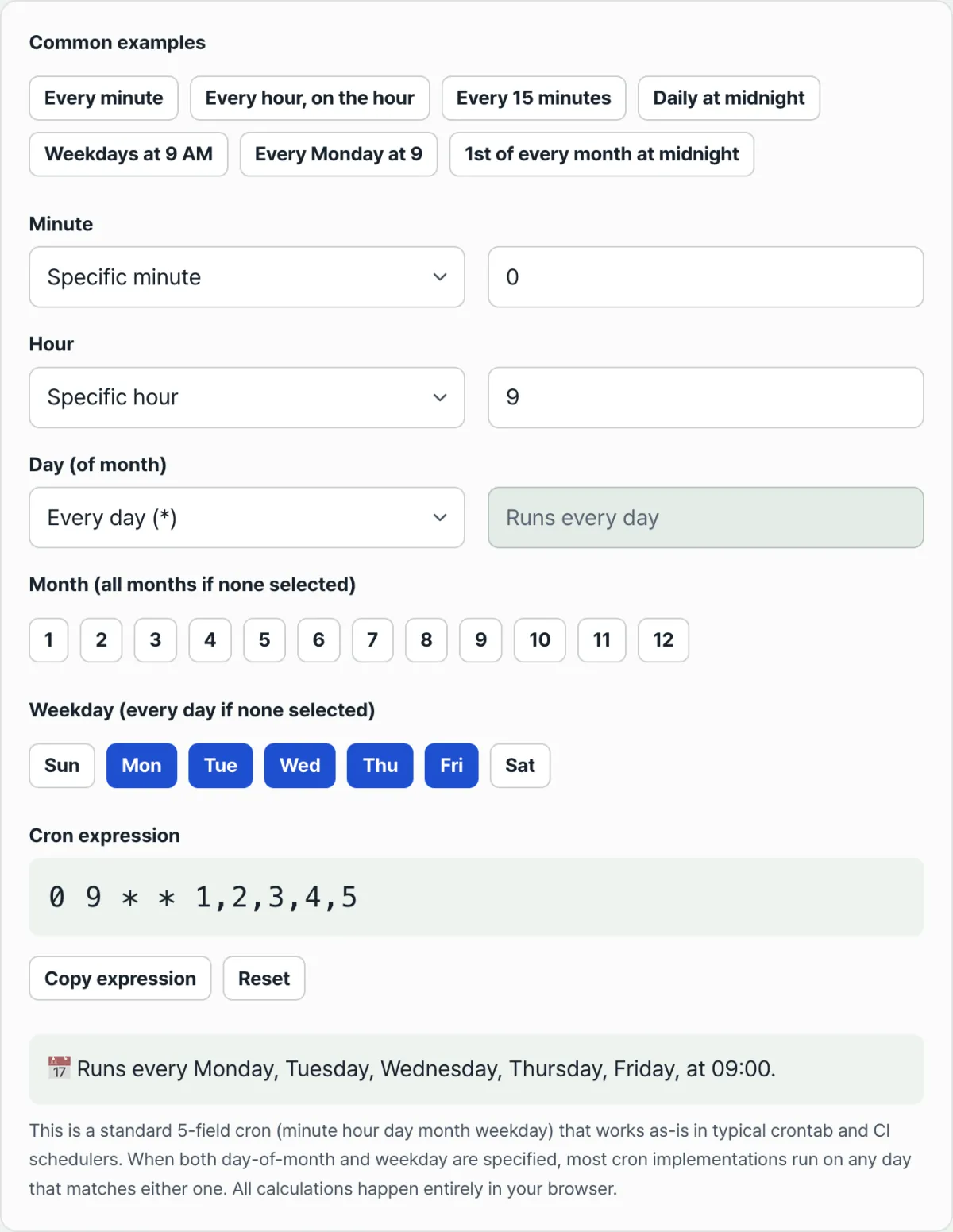
Pick minute, hour, day, month, and weekday from dropdowns, and this tool builds the standard 5-field cron expression along with a plain-English description at the same time.
Because picking each field from a dropdown instantly gives you the expression plus a plain-English description, you can see for yourself whether the time is what you intended before you register it. Common patterns are available as presets too, so you don't have to build every expression from scratch.
The trap that comes with using day-of-month and day-of-week together
The most commonly misunderstood part of cron is what happens when you specify day-of-month and day-of-week at the same time. Someone who wants "run only on the 15th of the month when that day is a Monday" puts 15 in the day field and 1 in the weekday field, but most cron implementations treat the two as OR, not AND.
In other words, the job runs whenever either "the 15th of the month" or "any Monday in that month" applies. In a month where the 15th isn't a Monday, it still runs unconditionally on the 15th, and it also runs every Monday. This behavior applies whenever either of the two fields isn't an asterisk (*), so if you want to narrow day and weekday together into an intersection, keep in mind that cron syntax alone can't express it.
If you really need that condition, the usual workaround is to drop the scheduler-level condition and check today's date and weekday inside the script that runs, exiting when it doesn't match.
A different time zone means a completely different run time
A cron expression itself carries no time zone information. The expression is just a set of numbers, and which time zone those numbers are read in depends entirely on the server, scheduler, or CI runner that the cron runs on. So even an expression you build for "9 a.m. every day" will actually run at a completely different local time if whatever executes it is set to another time zone.
Every scheduler sets time zones differently and has its own default, so if the exact run time matters, the only safe approach is to check that scheduler's time zone setting yourself before you register the expression. It's best not to assume it matches your local clock.
Summary
- A cron expression is always five fields in the order minute, hour, day, month, weekday, and that order doesn't change in any implementation.
- Each field is filled with one of the following: an asterisk (*, all values), asterisk/N (a step), a specific number, or a comma list (several values).
- If you specify day and weekday together, they're read as OR, not AND, so the job can run more often than you intended.
- The run time is determined by the time zone of the server or scheduler the cron runs on, so check the time zone before you register.
- Weekday number ranges vary by implementation, so it's safer to check with weekday names rather than numbers.
Pick minute, hour, day, month, and weekday from dropdowns, and this tool builds the standard 5-field cron expression along with a plain-English description at the same time.
Frequently asked questions
In a cron expression, is weekday 0 Sunday or Monday
It depends on the implementation. It's common to treat 0 as Sunday and also have 7 mean Sunday separately, but this is one of those details that varies a bit from cron to cron. Rather than memorizing a number, it's safer to check against the weekday names your tool or scheduler displays.
How do I run something on the 15th of the month only when it's a Monday
With standard cron syntax alone, you can't narrow the day-of-month and day-of-week fields at the same time to build an intersection condition. If you specify both fields, they're read as OR, so it runs unconditionally on the 15th and unconditionally on Mondays. If you truly need an intersection condition, the usual approach is to check today's date and weekday inside the script that runs and exit when it doesn't match.
I registered a cron expression but it doesn't run at the time I expected
The first thing to check is the time zone. A cron expression itself carries no time zone information, and it's read using the time zone set on whatever executes it (server, scheduler, CI runner), so that may differ from your local clock. Next, check whether you specified both the day and weekday fields, and whether it's inadvertently running more often on an OR condition.
What exactly is the difference between an asterisk (*) and asterisk/N (a step)
An asterisk (*) means every possible value for that field, so in the minute field it means the condition is met every minute. Asterisk/N means picking only the values that repeat in steps of N, so */15 in the minute field meets the condition only at 0, 15, 30, and 45 minutes. In other words, asterisk/N adds a fixed interval on top of the full range that asterisk (*) creates.
This article was adapted from our Korean original. Read the Korean original