
CSS Specificity Calculator: Check Selector Priority (A-B-C)
Contents
- Why this problem happens
- How to calculate it by hand
- Common points of confusion
- Summary
- How It Works Under the Hood: The Cascade and A-B-C Vector Weights
- CSS Architecture Methodologies and a Specificity Comparison Matrix
- 5 Critical CSS Specificity Architecture Mistakes
- The 5-Step Clean CSS (Low-Specificity) Workflow
- 7 CSS Cascade Tips from the Trenches
- Decision Tree: A Complete Strategy for Resolving CSS Override Conflicts
- Terminology Cheatsheet
- Frequently Asked Questions
When two CSS selectors point at the same element, which one actually applies is decided by a three-slot score called specificity: A-B-C. This post covers only the math — how that score is calculated and why a style you clearly wrote later sometimes doesn't win. It's for front-end developers and publishers who want to check the score of their own selectors.
Summary ① Specificity is three digits — A (IDs), B (classes, attributes, pseudo-classes), C (tags, pseudo-elements) — and comparison goes digit by digit, A first, then B, then C. ② Inside
:not(),:is(), and:has(), only the single most specific selector in the parentheses counts, and:where()always counts as 0. ③!importantisn't part of specificity at all; it's a separate priority layer, and when specificity ties, the rule declared later wins.
Why this problem happens
Here's a situation that comes up all the time in real work. Say #hero .cta a { color: crimson; } sits near the top of your stylesheet, and you add .button-primary { color: royalblue; } below it.
By the order you wrote the code, .button-primary comes later, so you'd expect that color to apply. But the screen still shows crimson.
That's because the browser doesn't follow "the rule written later" first — it follows "the rule with higher specificity." #hero .cta a includes an ID selector, so its A value is 1. .button-primary has only one class selector, so its A value is 0. A rule with A = 0 can never beat a rule with A = 1, no matter what order the code is in.
How to calculate it by hand
You can work out specificity by hand without any tool. Just break the selector into its parts and line them up as the three digits A-B-C.
Filling in the A-B-C slots
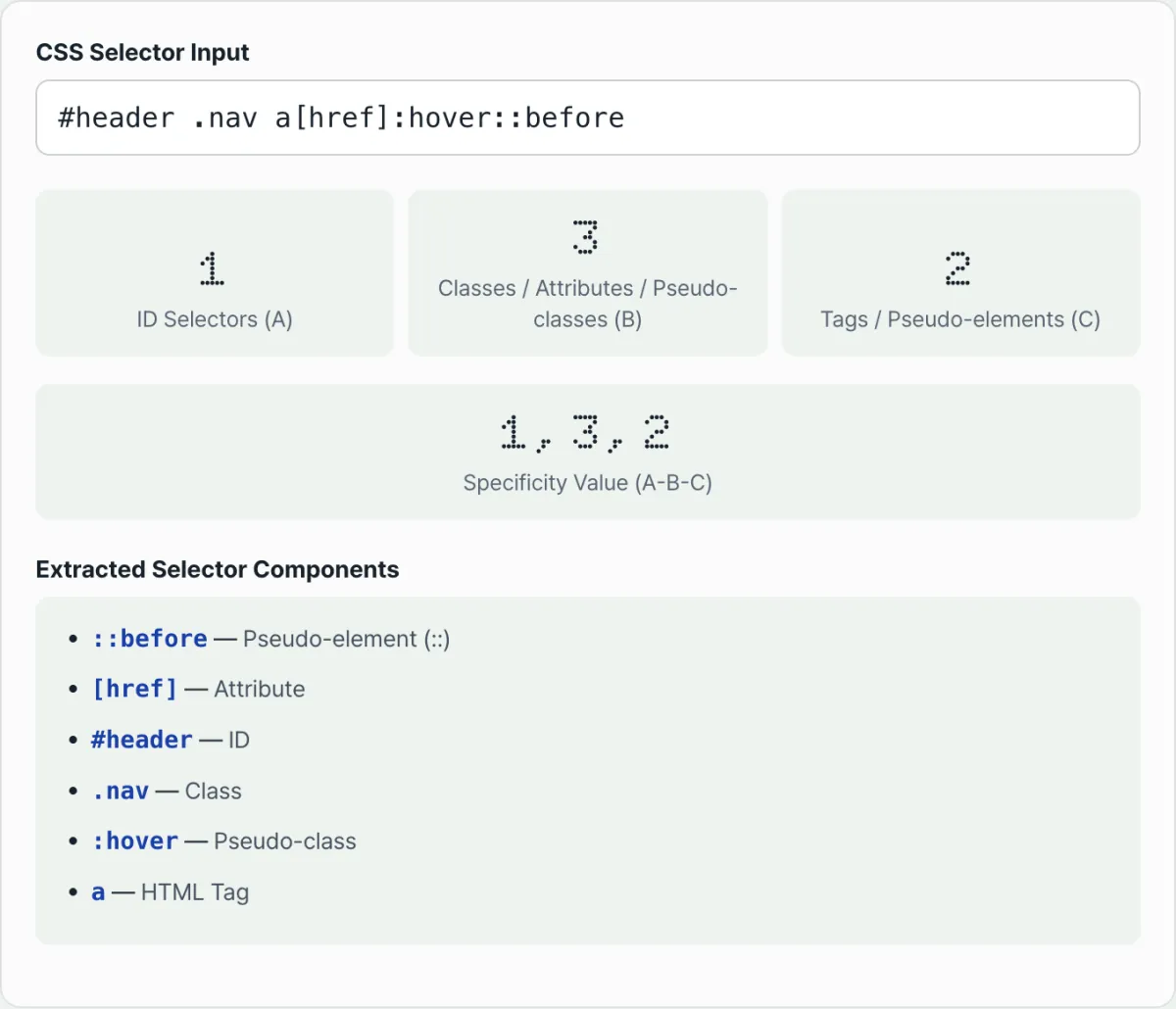
A — ID selectors. Count the selectors written as #id.
B — Classes, attributes, pseudo-classes. Add up all .class, [attr], and pseudo-classes like :hover, :focus, and :nth-child().
C — Tags, pseudo-elements. Add up tag names like div, a, and p, plus pseudo-elements like ::before and ::after. Combinators (spaces, >, +, ~) and the universal selector (*) don't go in any slot.
Check it with an example
Take #main .nav > a:hover and count it out.
#main→ one ID selector → A = 1.nav→ one class selector → B = 1>→ combinator, not counteda→ one tag selector → C = 1:hover→ one pseudo-class → B = 1 (B now totals 2)
Add it up and you get A=1, B=2, C=1, so the specificity is 1, 2, 1.
How to compare specificity
To compare two selectors, compare each of the three slots separately. The higher A wins outright. If A ties, compare B. If B ties too, compare C.
No matter how large B gets, it never carries over into A the way it would in base 10. A selector with B=13 will never beat a selector with A=1.
Functional pseudo-classes count differently
Functional pseudo-classes that take other selectors in parentheses — :not(), :is(), :has() — are calculated differently. Only the single most specific selector in the comma-separated list inside the parentheses gets added to the overall value.
For example, with a:not(#nav, .btn), only the higher of #nav (A=1) and .btn (B=1) counts, so #nav is reflected. Combined with the tag a (C=1), the final specificity is 1, 0, 1.
:where() is the exception. Whatever is inside the parentheses, its specificity contribution is always 0. Change the same selector to a:where(#nav, .btn) and, regardless of the contents, only C=1 from the tag a remains, making the final specificity 0, 0, 1.
Doing this by hand for every selector is tedious, and the longer the selector gets — or the more :not() calls you nest — the easier it is to slip up. Check it with our tool.
Enter a selector and the A (ID), B (class), and C (tag) values plus the final specificity are calculated instantly. Nothing you type is sent outside your browser.
Common points of confusion
Here are three places beginners trip up most often.
!important is not a specificity slot. It doesn't go in A, B, or C — it's a completely separate priority layer. A declaration marked !important beats one without it regardless of specificity.
Source order and specificity are two different things. The "later code wins" rule only applies when specificity ties. If specificity differs, the higher-specificity rule wins no matter what order the code is in.
When specificity ties, the rule declared later wins. For example, .a.b and .c.d both come out to A=0, B=2, C=0 — the same specificity. In that case, whichever rule appears later in the stylesheet is the one that applies.
| Item | Counted in specificity (A-B-C)? | When it decides the winner |
|---|---|---|
!important | No — a separate priority layer | Applied before specificity is compared |
| Source code order | No | Only decides when specificity is exactly equal |
Inline styles (style="") | Has no selector, so it isn't part of the A-B-C calculation | A separate layer applied before normal selector rules |
This calculator only analyzes the selector string you enter, so the priority of inline styles themselves isn't part of the calculation.
Summary
- Specificity is three digits — A (IDs), B (classes, attributes, pseudo-classes), C (tags, pseudo-elements) — and comparison only ever goes A → B → C.
- No matter how large B or C gets, it can't beat a higher A.
:not(),:is(), and:has()count only the most specific selector inside the parentheses, and:where()always counts as 0.!importantisn't specificity; it's a separate priority layer. Source order only breaks ties when specificity is equal.- If counting by hand gets confusing, paste the selector in and see the A-B-C values right away.
Enter a selector and the A (ID), B (class), and C (tag) values plus the final specificity are calculated instantly. Nothing you type is sent outside your browser.
How It Works Under the Hood: The Cascade and A-B-C Vector Weights
Why does this happen? To understand it, you need a solid grasp of the order in which a browser's style computation engine applies styles, along with the math behind it and the W3C spec.
The W3C Specificity Vector Formula
According to the W3C CSS Cascading and Inheritance Level 4 spec, specificity isn't simple base-10 addition. It's defined as a vector S = (A, B, C) with three independent dimensions.
- A (ID selectors):
#main,#user-profile, and so on (specificity: 1, 0, 0) - B (Classes, attribute selectors, pseudo-classes):
.card,[type="text"],:hover,:focus,:nth-child(2n)(specificity: 0, 1, 0) - C (Type selectors, pseudo-elements):
div,h1,p,::before,::after(specificity: 0, 0, 1) - Not counted (specificity 0, 0, 0): the universal selector
*, child and sibling combinators (>,+,~, whitespace), and the:where()pseudo-class.
The Non-Carryover Vector Comparison Rule
The single most important rule in specificity comparison is no base-10 carryover. Here's how two vectors S1 and S2 are compared.
Following that logic, the browser compares values in order, starting with A on the left. Even if B1 = 1000 and A2 = 1, B2 = 0 — that is, when S1 = (0, 1000, 0) goes up against S2 = (1, 0, 0) — S2 always wins. It works exactly like Olympic medal tables, where no number of silver medals beats a single gold.
How Modern Functional Pseudo-Classes Compute Specificity
The functional pseudo-classes added to modern CSS come with their own specificity rules for whatever selectors you put inside the parentheses.
:is(s1, s2),:not(s1, s2),:has(s1, s2): the whole parenthesized group takes on the specificity of the most specific selector passed in. That is, max(S(s1), S(s2)). So:is(.btn, #header)jumps to an overall specificity of (1, 0, 0).:where(s1, s2): always has a specificity of (0, 0, 0), no matter the arguments. Put ten ID selectors inside and the rule still holds.
The Full Cascade Hierarchy
A common misunderstanding is thinking specificity is everything. Specificity is just one step in the cascade algorithm. The priority for applying an actual property is decided strictly in this order.
- Origin and importance
!important(user agent / browser default styles)!important(user custom styles)!important(author / website styles)- Normal author / website styles
- Context: encapsulation boundaries such as Shadow DOM
- Cascade layers: the order defined by
@layerrules (a layer defined later wins) - Specificity: the A-B-C vector we've been working with (S)
- Order of appearance in the source: when two rules have exactly the same specificity, the one parsed later (written further down) wins
CSS Architecture Methodologies and a Specificity Comparison Matrix
The CSS architecture you bring into a project can drastically change its average specificity and how hard styles are to override. Picking an architecture is the core of your specificity management strategy.
| Architecture / CSS methodology | Average specificity (A-B-C) | Override maintainability | Collision risk | Chance of a specificity war | Refactoring friction |
|---|---|---|---|---|---|
Flat BEM (.block__element--mod) | (0, 1, 0) | Highest (single class) | Low (namespaced) | Very low | Low |
| Tailwind (Utility-First) | (0, 1, 0) | High (relies on class combinations) | Lowest (styles encapsulated) | Close to zero | Medium (HTML templates get bulky) |
| CSS Modules / Scoped CSS | (0, 1, 0) | High (hashes generated at compile time) | Lowest (fully unique identifiers) | Low | Low |
Cascade layers (@layer) | (0, 1, 0)* | Highest (separation between layers) | Low | Very low | Very low (modern CSS standard) |
Heavy ID-Chaining (#app #nav a) | (2, 0, 1) or higher | Lowest (ID-dependent structure) | Very high (global pollution) | Very high (inevitable) | Highest (beyond repair) |
(Note:
@layerdoesn't change the specificity score itself. It creates an absolute priority tier at the layer level before specificity is compared, which stops specificity wars at the source.)
5 Critical CSS Specificity Architecture Mistakes
You must avoid these five common anti-patterns that turn a stylesheet into unmaintainable spaghetti code. These mistakes snowball until they eventually collapse your entire frontend architecture.
- Using ID selectors (
#id) directly for styling: This is the worst anti-pattern of all. Once a component is styled with an ID, reusing it elsewhere or overriding its styles based on state changes becomes nearly impossible. Leave IDs to HTML and JS, not CSS. - Chaining descendant selectors more than five levels deep (
.sidebar .nav ul li a span): Specificity climbs unnecessarily to (0, 4, 2). Later, if you try to change the color of one specific item with a single.nav-item-active(0, 1, 0) class, it gets outranked and never applies. Write your classes flat. - Deadlock from
!importantabuse: Once you start slapping!importanton styles because they "don't work right now," you trigger a terrifying arms race: to override that!importantlater, you need another!importantplus higher specificity (ID chaining). That is the death of CSS. - Ignoring the "highest-specificity infection" of
:is()and:has(): Take the selector:is(#hero, .banner) p. Even if the style actually applies to a.banner pelement, the specificity is set by the highest value in the parentheses,#hero, and spikes to (1, 0, 1). As a result, all the well-behaved class styles around it are rendered useless. - Ignoring and never adopting cascade layers (
@layer): When a third-party UI framework (for example, Bootstrap or Material UI) mixes with your custom styles, trying to win priority on specificity alone makes the code very messy. Not separating sources with layers means throwing away modern CSS's most powerful weapon.
The 5-Step Clean CSS (Low-Specificity) Workflow
This is a five-step, real-world CSS pipeline that keeps specificity flat and predictable so anyone can maintain it easily.
- Step 1: Lean on
:where()or@layer resetfor global CSS resets: When resetting/normalizing browser default styles, always write things like:where(ul, ol) { list-style: none; }so specificity stays at a complete 0-0-0. That way, any developer on the team can override the style later with a single class, effortlessly. - Step 2: Apply a strict single-class BEM methodology to UI components:
Instead of nesting selectors like
.card-container .card-title, flatten to standalone single classes (specificity 0-1-0) like.card__title. Make every component fight at a fair 0-1-0. - Step 3: Reserve priority for state modifiers at 0-2-0 specificity:
Control dynamic states such as active, disabled, and error only by combining two classes at a 0-2-0 level, like
.card.is-activeor.card[aria-expanded="true"]. That way, state classes can always safely override the 0-1-0 base component styles. - Step 4: Separate third-party overrides and external library control with
@layer: Declare@layer framework, components, overrides;at the top of your CSS. Instead of fighting over specificity numbers, you set the ranking at the cascade layer level, so custom styles easily beat framework code no matter how high its specificity is. - Step 5: Make constant selector weight checks and automated audits a habit: Use the specificity calculator tool from this post to check the A-B-C weight of any complex selector you write during code review, in real time. During review, hunt down and refactor any ID rule that spikes to (1, 0, 0) or higher, and any deep chaining that exceeds (0, 4, 0).
7 CSS Cascade Tips from the Trenches
Here are seven absolute principles senior frontend engineers follow after leading hundreds of large-scale global projects.
- The perfect specificity is flat specificity: Make it your top priority to keep every component's base selector specificity at exactly (0, 1, 0), no exceptions. Shorter selectors also improve rendering performance.
- Defensive styling and the philosophy of
:where(): When you ship an in-house design system or an open-source UI library, wrap every default theme in:where()to give consumers a 0-0-0 zero-gravity base they can easily override. - Forever yield IDs to HTML and JavaScript: The
#idsymbol is a complete taboo inside a CSS file. Keep ID attributes only for connecting HTML Formlabel for, web accessibilityaria-labelledbyreferences, and JavaScript'sdocument.getElementById()or URL hash anchor navigation. - Look for the right modern alternative to
!important: Instead of reaching for!importantwhen a style won't apply, move the declaration lower in the file or wrap that module in a higher-priority@layerso the cascade algorithm itself works in your favor. - Beware the poisoned apple: the trap of
:is()::is()is sweet and dramatically cuts repetitive typing, but remember the scary truth: the moment you carelessly drop a#idinside the parentheses, the specificity of everything combined with that block gets badly infected, jumping past the 100-point range. - Precision strikes with CSS variables (Custom Properties): The best way to dramatically change the style of a deeply nested child element without raising specificity is to reassign a CSS variable (
--theme-color: blue;) on the parent. Variable inheritance and evaluation aren't affected by specificity, which makes for very elegant theme switching. - Build a regular code smell screening system: Long selectors nested four or more levels deep (for example,
ul li div a span.icon) are a critical signal that CSS is too tightly coupled to your HTML structure and the architecture has gone wrong. Open the calculator tool above right away to visually diagnose the weight and refactor toward flat selectors.
Decision Tree: A Complete Strategy for Resolving CSS Override Conflicts
When you face a frustrating conflict where a style is not being applied, don't panic and reach for !important. Instead, use the following decision tree to work out a logical solution.
- Question 1: Do your rule and the original rule have exactly the same specificity score in the source code?
- Yes ➔ Change the Cascade Order (declaration order): Move the code lower, or adjust the file load order so the browser parses or loads it later, and win the cascade.
- No ➔ Go to Question 2.
- Question 2: Is the powerful original style you need to override coming from a third-party library or external framework such as Bootstrap?
- Yes ➔
@layerstrategy: Put the external library in a lower layer and your custom styles in a higher top-level layer (@layer overrides) to easily neutralize the external framework's overpowering specificity. - No ➔ Go to Question 3.
- Yes ➔
- Question 3: This is an internal component you fully control, but is the specificity of base styles written in the past abnormally high?
- Yes ➔ Incremental
:where()refactor: Immediately wrap the original base styles in:where(.component-wrapper)to lower their specificity and let them breathe. This frees up the child elements. - No ➔ Add a Single State Class Strategy: When you override an element, don't chain tags together. Add one clean dynamic state class (
.is-modified,.theme-dark) and honestly raise the B value by 1 to gain priority.
- Yes ➔ Incremental
- Last-Resort Extreme Measure: Only when you truly cannot apply any of the elegant methods above (layers, order, specificity adjustments)—for example, a conflict with inline styles (
style="...") injected by an external script—should you press theNuclear !importantbutton, in a limited way and only inside a very tightly isolated scope.
Terminology Cheatsheet
These are eight core terms every developer must know precisely to master specificity and cascading.
- Specificity: A strict weighted scoring system that determines which CSS rule the browser declares the winner and applies first when multiple CSS selectors compete for the same HTML element.
- A-B-C Vector Weights: A metric made up of three completely independent dimensions (orders): A is the number of IDs, B is the number of classes, attributes, and pseudo-classes, and C is the number of tags and pseudo-elements.
- No Carryover Principle: Unlike number bases in math or computer science, this is an absolute mathematical rule of the CSS engine: no matter how many hundreds of items pile up in the lower places (B and C), a carryover to the higher place (A) never occurs.
- Cascade: The W3C's core algorithm that determines the final rendered style by filtering through not only specificity but also stylesheet layers, origin, importance, source order, and more—step by step, like water falling down a cascade.
- BEM Methodology (Block, Element, Modifier): A CSS naming architecture created by Yandex in Russia that strongly avoids tag nesting and uses long, intuitive block-structured class names to flatten every element's specificity in a project to a one-dimensional (0, 1, 0), maximizing maintainability.
- Functional Pseudo-classes: Advanced modern CSS features such as
:is(),:where(),:has(), and:not()that take other complex selectors as arguments inside parentheses and evaluate them. (Be extremely careful: each has different rules for how specificity is aggregated.) - Cascade Layers (
@layer): A paradigm changer in modern CSS that lets you group absolute layers and priority among style groups as a whole, exactly as you intend, regardless of the old hellish battles over specificity scores. - Important (
!important): A special, destructive reserved keyword that completely bypasses and breaks the normal A-B-C specificity vector pipeline and forcibly seizes the highest rendering priority. (When abused, a major cause of system collapse.)
Frequently Asked Questions
These three in-depth questions and answers are for senior engineers who want a deep understanding at the level of browser internals, beyond simple knowledge.
Q1. I chained 15 classes (B) in a row. Why can they never beat a single ID (A) selector? Is this a browser bug?
A: It is not a bug. This is the mathematical philosophy the W3C intended when designing CSS specificity. CSS specificity is not a base-10 or hexadecimal number like the ones we use every day. According to the spec, A, B, and C are stored and evaluated in completely isolated integer buckets in memory. Imagine an Olympic medal count. Even if Country B wins 15 silver medals (classes)—or 10,000—if Country A wins just one gold medal (ID), Country A, the gold medal holder, always wins the overall ranking. In other words, the carryover operation itself is hardcoded at the C++ language level so that it does not exist in the browser engine.
Q2. How exactly does the :where() pseudo-class make specificity zero, and why is this called a revolution that changed the history of CSS resets?
A: Since the days of Eric Meyer's CSS Reset, reset code such as ul, ol { list-style: none; } inherently carried a specificity of (0, 0, 1) or higher. This tiny bit of specificity residue always got in the way when you later wanted to bring back the browser's default bullet styles deep inside a specific component. But the moment you wrap the selector in :where(ul, ol) from the latest spec, the browser's parser forces the final specificity vector for that rule set down to a perfect zero (0, 0, 0) in memory, regardless of what elements are inside. It sits quietly at an extremely low base, like the browser's default User-Agent styles, yet a working developer can later declare just one class or even a single tag and override it immediately and smoothly. You can build what amounts to a "zero-gravity base infrastructure."
Q3. I joined a company and found a horrific specificity battlefield: years of legacy code with thousands of !important declarations slapped on top. How can I escape without collapsing the system?
A: Unfortunately, styles protected by layer upon layer of !important cannot be broken through with normal specificity (A-B-C) vector math. The only lifeline and the newest weapon is cascade layers (@layer). First, wrap all existing legacy code wholesale in a @layer legacy { ... } block. Surprisingly, for properties with !important, the cascade spec is intentionally designed so that—paradoxically—an !important in an earlier-declared lower layer beats an !important in a later-declared higher layer. Using this advanced reversal mechanism, you can gradually weaken the legacy layer's dominance and build new, clean BEM-based code in the normal unlayered space. This enables gradual, peaceful refactoring and migration in the style of the Strangler Fig pattern.
This article was adapted from our Korean original. Read the Korean original