
Instagram caption limits: 2,200 characters, 30 hashtags
Contents
This post is for anyone who wrote a long Instagram caption and had it cut off, or piled on a pile of hashtags and found that some of them just didn't apply. Here's the short answer: the limits in Meta's official documentation are 2,200 characters per caption, 30 hashtags, and 20 @ tags.
The problem is that the Instagram app doesn't count characters while you're writing. So to know "how many characters is this right now," you have to count somewhere else — and when you post the same text to other social networks, every platform has a different limit, which makes it even more confusing.
Summary ① Instagram captions allow up to 2,200 characters, 30 hashtags, and 20 @ tags (per Meta's publishing API documentation). ② Hashtags count toward the caption character count. They're counted inside the 2,200, # symbol included. ③ Instagram has never officially said how many characters show before the feed folds the caption with "more." The widely quoted 125 is a number with no primary source.
There are two limits, and the app shows neither
Two different limits apply to a caption at the same time. One is the character count. The other is the hashtag count.
In the publishing API documentation Meta publishes, the caption parameter is spelled out as "maximum 2,200 characters, 30 hashtags, 20 @ tags." Those three numbers are everything you can confirm from a primary source about Instagram captions.
This is where people often go wrong. Hashtags are not a separate item counted apart from the character count. The hashtag string sits inside the caption, so # symbol and all, it eats into the same 2,200 characters.
So if you attach close to 30 hashtags, the characters you have left for the body shrink by that much. That's why you can't manage the two limits separately — you have to look at them together.
How to count it yourself without a tool
The Instagram app has no character counter, so you need a way to count somewhere else before you post. Two methods are the simplest.
1) Your word processor's character count. Most word processors and online document tools include a character count. Just make sure you're looking at characters including spaces, not the word count, and you'll still have to count the hashtags separately.
2) One line in the browser console. Paste the following into the console in your developer tools (usually F12) and you'll get the character count and the hashtag count together.
const s = prompt("캡션을 붙여넣으세요") || "";
console.log("글자 수", [...s].length);
console.log("해시태그", (s.match(/#[^\s#]+/g) || []).length);
The reason for counting with [...s].length is that s.length counts a character that takes up two slots, like an emoji, as 2. Counting by code point gets you closer to the number of characters a person actually sees.
The catch is that you have to run this again every time you change a single character of the caption, and if you're posting the same text to Instagram, X, and Threads, you're comparing against three limits every time.
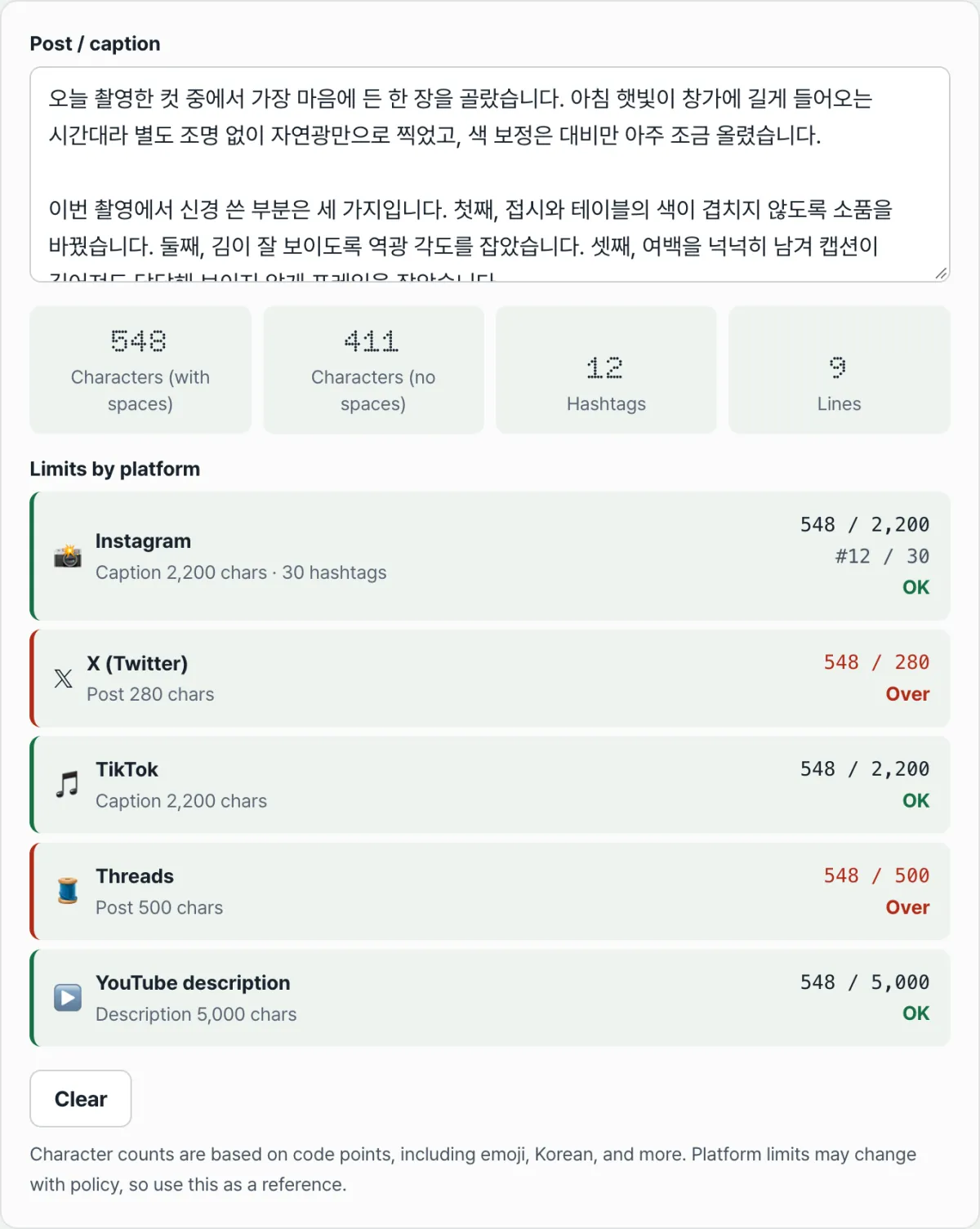
Check it with our tool. Paste in your caption and you'll immediately see the character count (with and without spaces), the hashtag count, and the line count, with a status below showing over or OK against the limits for five platforms.
It runs right in your browser with no install and no sign-up, and the caption you paste is never sent to a server.
There's no official number for where "more" cuts in
Everyone can confirm that the feed shows only the first part of a caption and hides the rest behind "more." But at how many characters it cuts off is a different matter.
People often say "it cuts off at 125 characters," but that number doesn't appear in any official Instagram or Meta documentation. It's closer to a figure that marketing outlets and tool vendors have cemented by citing one another.
The cutoff point isn't determined by character count alone, either. How much shows depends on screen width, font size, and line breaks, and Korean characters are wider per character than English letters, so the same count cuts off sooner.
So instead of memorizing a number, it's more reliable to handle it this way.
- Put your conclusion in the first sentence. Whatever device people are on, the first line survives.
- Move your hashtags to the very end. If they're up front, the tags take up the space before the cutoff.
- Post it and check. Looking at your own account's feed to see where it gets cut is the most accurate method.
Limits by platform: the documented values
If you're posting the same text to several social networks, the safest approach is to write to the shortest limit. Here are the values listed in each platform's official documentation.
| Platform | Documented limit |
|---|---|
| Instagram caption | 2,200 characters · 30 hashtags · 20 @ tags |
| X (Twitter) | 280 (weighted) |
| TikTok caption | 2,200 |
| Threads post | 500 characters |
| YouTube description | 5,000 characters (title is 100) |
The Instagram and TikTok values come from Meta's and TikTok's publishing API documentation, Threads from the Threads developer documentation, and YouTube from the upload guidance in YouTube Help. You can find X's on the character counting rules page in its developer documentation.
One thing to watch: platform limits can change with policy, so if a post really matters, it's safer to check the platform's official documentation one more time rather than relying on memorizing the numbers above.
Common sticking points
The same sentence can produce different character counts in different tools. That's because each platform counts by its own rules.
The biggest difference is X's weighting. X assigns a weight to each character and won't let the total go over 280, and Korean, Chinese, Japanese, and emoji carry a weight of 2. In other words, if you write only in Korean, your effective ceiling is 140 characters.
This tool shows the code point count as-is, so for a Korean post, double the number shown on the X row and compare it to 280. For the other rows, such as Instagram and Threads, read the number as it is.
It also helps to know how hashtags are counted so you can read the results. This tool counts the characters after a # as one tag until it hits a space, punctuation, or the next #.
| Input | Counted as |
|---|---|
#여름 #바다 | 2 |
#여름#바다 (no space) | 2 |
#여름.바다 | 1 (up through #여름) |
#여름 #여름 (duplicate) | 2 |
The reason duplicates are counted separately is to show exactly what went into the input box: that's how many tag strings are there. Write the same tag twice and it takes up character space twice.
Emoji are worth a look too. Because the count runs by code point, emoji built from several code points, like flags or family emoji, count as more than 1. They may look like a single character on screen, but in the data they're several characters.
The short version
- Per Meta's publishing API documentation, the Instagram caption limit is 2,200 characters · 30 hashtags · 20 @ tags.
- Hashtags aren't a separate item outside the caption character count — # symbol and all, they fit inside the 2,200.
- There's no official number for where the feed cuts off. Put your conclusion in the first sentence, push hashtags to the end, and post to check — that's more accurate.
- If you're posting to several social networks, match the shortest limit (Threads 500, X 280) and the rest will pass too. The 30-hashtag limit is separate from the character count, so check it on its own.
- X counts each Korean character as 2, so the effective ceiling for a Korean post is 140 characters.
It runs right in your browser with no install and no sign-up, and the caption you paste is never sent to a server.
Frequently Asked Questions
What happens if I go over 30 hashtags?
Meta's posting API documentation lists 30 hashtags as the caption limit. How the app handles it when you post directly can vary by version and policy, so the safe move is to count ahead of time and stay at or under 30. Putting the extra tags in the first comment is a common approach, but the official documentation doesn't confirm how captions and comments are combined, so I won't state that as fact.
Do line breaks in a caption count toward the character count?
Line breaks are characters, so they count. This tool's "Characters (with spaces)" includes both line breaks and spaces, while "Characters (without spaces)" leaves them out. Which one you should look at depends on the limit you're comparing against, but for platform limits, use the count with spaces.
Can't I see the character count in the Instagram app?
As of this writing, the caption field in the Instagram app has no indicator showing how many characters you have left. So the usual approach is to count longer captions somewhere else and then paste them in. You can check with the one-line browser console command above, or use this tool to see where you stand against each platform's limit on a single screen.
Is the caption I enter sent to a server?
No. All character and hashtag counting in this tool happens inside your browser. The text you enter is never sent to or stored on a server. You can paste in an unpublished caption draft as-is and it won't leave your device.
This article was adapted from our Korean original. Read the Korean original