
SQL INSERT to CSV: Keep NULL and Empty Strings Apart
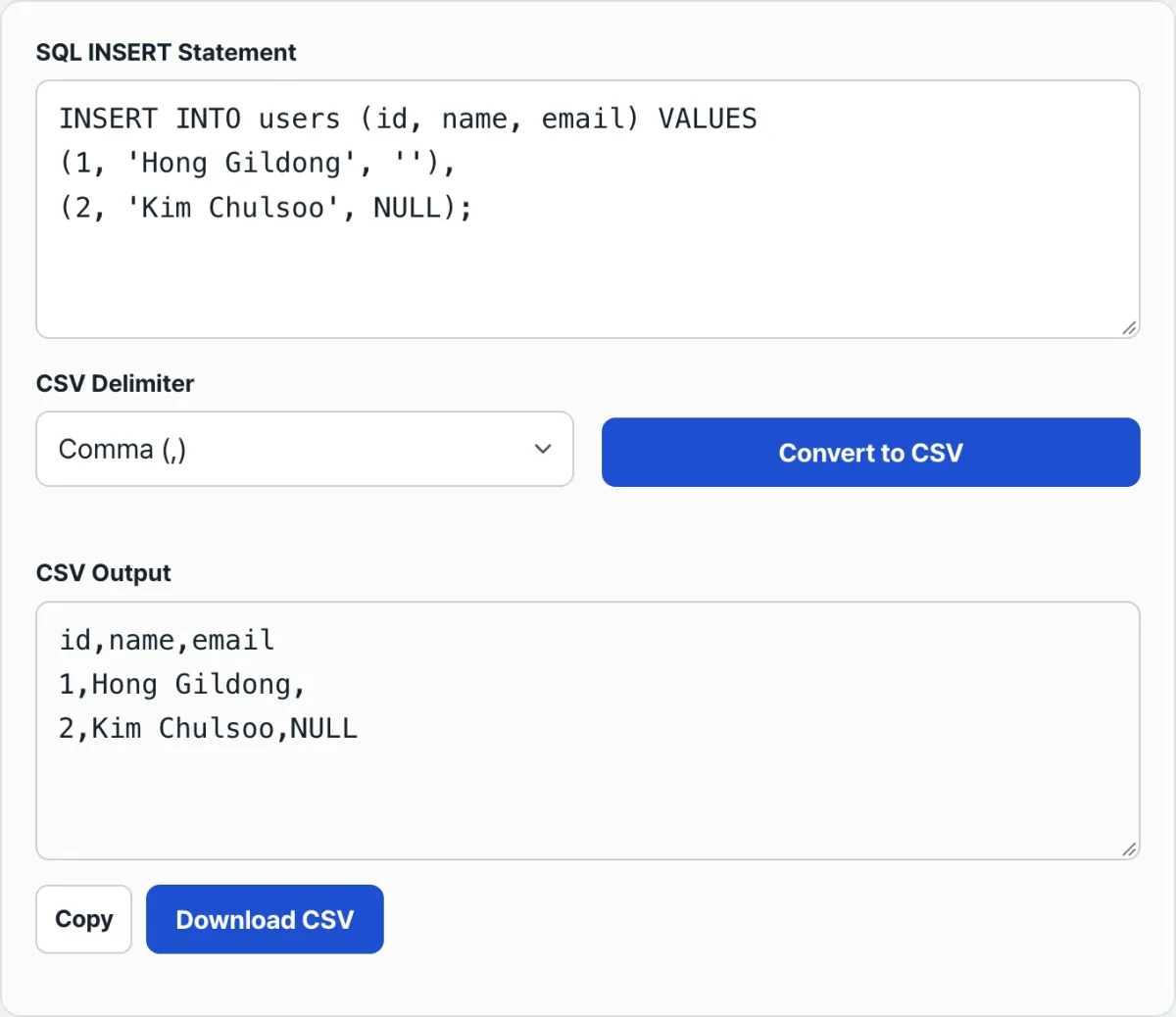
When you move SQL INSERT statements into CSV, NULL and the empty string ('') often both show up as the same "blank cell." That creates a problem later: you can't tell which value was never there and which one was intentionally stored as an empty string. In SQL, these are clearly two different values, but if you move them without a rule, that information disappears at the CSV stage. Below are the rules for telling them apart by hand, plus how to check that the distinction survives the conversion.
Summary ① In SQL, an unquoted NULL and an empty string '' with only quotes around it are different values to begin with. ② When you move them, leave NULL as the literal text and leave the empty string as a truly blank cell, so you can tell them apart later. ③ Also check the missing-value settings in the program you use to load the converted CSV back in.
The problem
Suppose you export a members table to CSV. One member never entered an email at signup, so the value stayed NULL. Another member's email was saved as an empty string '' because of the app logic. Both look similar in that "there is no email," but from the database's point of view, one is "no value at all" and the other is "there is a value, and it's an empty string."
If you treat both as blank cells when you move them to CSV, there's no way to tell from the CSV alone which member was NULL and which was an empty string. That's information loss you can't undo unless you open the original SQL again.
This distinction matters especially when you move data to another system, create sample data for testing, or filter for only the rows where a particular value is empty. Without it, you can't even set your filtering criteria.
The solution
In SQL syntax, the two values aren't even written the same way. A bare NULL with no quotes is a keyword meaning there is no value, while ''—just two quotes—is an actual value: a string of length 0. If you preserve that difference when moving to CSV, the distinction doesn't disappear.
To do it by hand, follow these steps.
- Split the values inside the parentheses after VALUES on commas (ignore commas inside quotes).
- If a value is written as NULL with no quotes, leave the literal text
NULLin the CSV cell. - If a value has just two quotes around it (
''), leave the CSV cell truly empty, with no characters at all. - In the result, count the commas and check that there is one fewer than the original number of columns. If a blank cell disappears in the middle, the comma count drops.
For reference, MySQL's LOAD DATA / SELECT ... INTO OUTFILE defaults to exporting NULL as a separate marker, \N. The rule that NULL should stay as a visible, separate marker rather than a blank cell is already standard practice in the SQL ecosystem.
Check that your conversion follows these rules with our free tool.
Paste a SQL INSERT statement and get a CSV that keeps NULL and empty strings apart.
Common stumbling blocks
| Situation | What to check |
|---|---|
| No column list after INSERT INTO | Values are converted without a header row, so you can't tell which column each position belongs to |
A string value happens to be 'NULL' (quotes included) | The quotes are stripped, so it looks like the literal text NULL, the same as a real NULL |
| Pasting multiple INSERT statements at once | Everything after the first VALUES is read in parentheses, so the column-list parentheses from the next statement can be misread as a data row |
| Choosing a delimiter other than a comma | If a value contains the same character as the delimiter, it is automatically wrapped in double quotes in the output |
| Loading the converted CSV back into Excel, pandas, etc. | The program's default settings may treat both blank cells and the text NULL as missing values, so you need to check the import options separately |
Wrapping up
NULL and empty strings are different values in SQL, and you need to carry that difference through to CSV so you can tell them apart later. If you follow the rule of leaving NULL as literal text and empty strings as truly blank cells, you can verify it by hand. And if you also check the missing-value settings in whatever program loads the result back in, the information stays intact all the way through.
Paste a SQL INSERT statement and get a CSV that keeps NULL and empty strings apart.
Frequently asked questions
What if I want to turn NULL into a blank cell?
This tool copies the literal text NULL from the SQL into the CSV cell. If you want it as a blank cell, download the converted CSV and use find-and-replace in a text editor or spreadsheet to delete just the NULL text. Just keep in mind that you won't be able to tell it apart by eye from a string that was originally wrapped in quotes as 'NULL', so for rows you're unsure about, compare them against the original SQL.
Can it convert INSERT statements saved without column names?
Only the values are converted. Without a header, though, you can't tell which column each position belongs to, and it's easy to get confused about which column a NULL or empty string came from. When possible, add the column list to the original INSERT statement before converting.
Can I paste multiple INSERT statements at once?
We recommend converting them one at a time. If you paste several INSERT statements together, the tool scans all the text after the first VALUES and reads values by parentheses, so the column-list parentheses from the second statement can get mixed in as a data row.
This article was adapted from our Korean original. Read the Korean original