
Public APIs Still Use XML: How to Convert XML to JSON
Contents
You've probably opened the API docs for a public data portal or an old internal system and found that the sample response was XML, not JSON. It can be hard to understand why these systems insist on XML when almost every new API uses JSON. This post explains why, and shows how to turn the XML you receive into JSON that's easier to work with.
Summary ① Public agencies and legacy systems still use XML because they run on structures designed when XML was the standard, such as SOAP and the e-Government Standard Framework. ② XML attributes are represented by "@attributeName" keys in JSON, while text that appears alongside attributes goes under a separate "#text" key. ③ An element with the same name becomes an object when it appears once and an array when it appears twice or more, so you can't easily tell how many values there are just from the JSON's shape.
Why do some APIs still return XML?
There was a time when XML was the de facto standard for web APIs. In the early to mid-2000s, SOAP-based web services were the default way for corporate and public-sector systems to communicate, and systems designed then still use the same structure today.
Many public-sector systems in Korea were built on the e-Government Standard Framework. That standard took hold when XML and SOAP were the norm, so even after JSON became popular, many systems kept their XML response structure rather than overhauling the existing system.
Open APIs from Korea's Public Data Portal work the same way. Some APIs still return XML by default if you don't specify a response format in the request parameters, and you often need to add a separate parameter to get JSON.
Unless a system is completely redesigned, changing just the response format isn't easy. As a result, the practical approach is for the client to take the XML and convert it to JSON.
How to convert XML to JSON: start with attributes and repeated tags
The rules for converting XML to JSON are well defined. Let's use one XML document with book information as an example. At the top is a book element with an id=1 attribute. Inside are one title element, one price element, and the tags element appears twice.
3 rules for converting XML to JSON
Rule 1 — Element names become keys unchanged. For an element with no children, like title or price, the element name becomes the key and the text inside becomes the value.
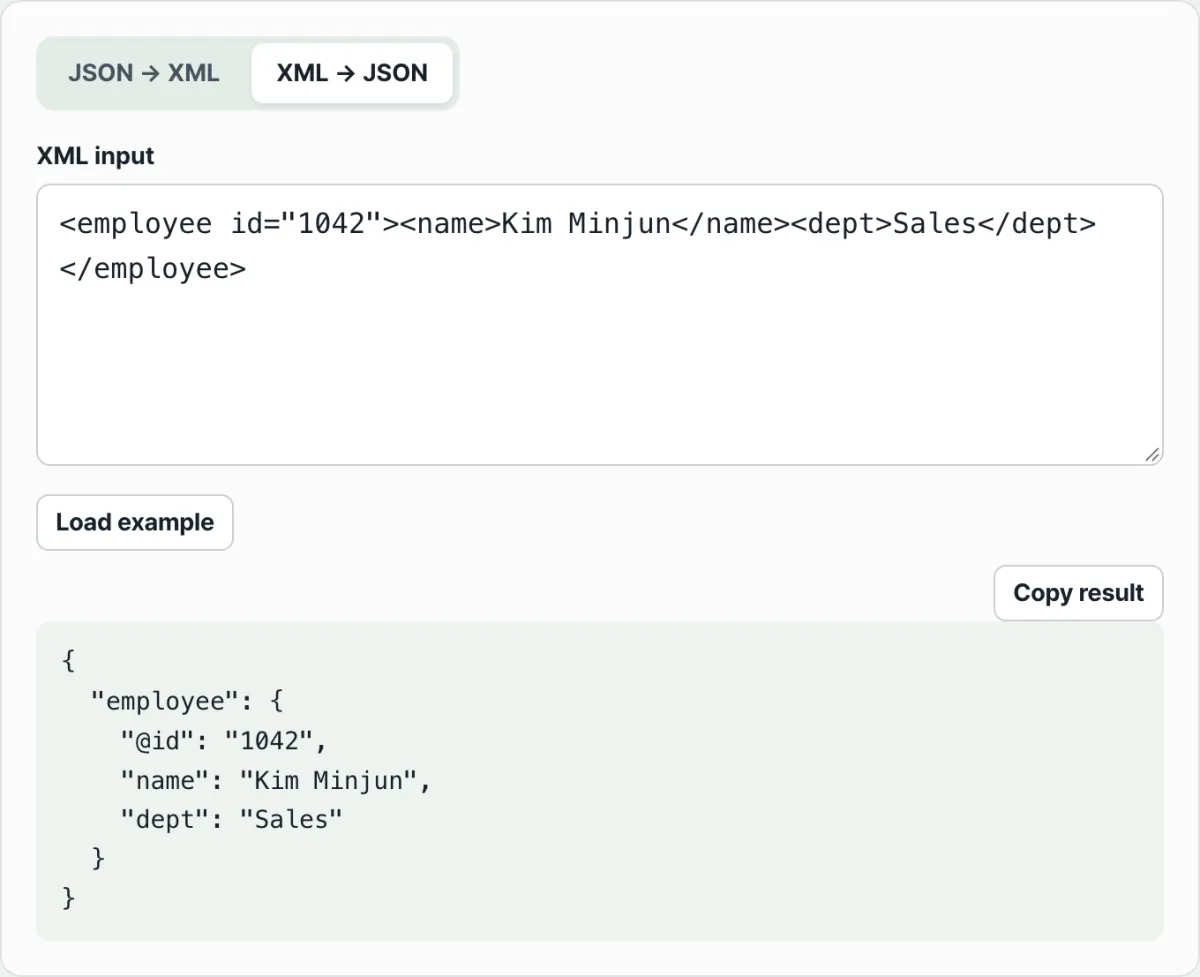
Rule 2 — Attributes are kept separate from the element's value and placed under an "@attributeName" key. The id attribute on book goes under "@id". If an element also has text, that text goes under a separate "#text" key.
Rule 3 — When elements with the same name appear as siblings more than once, they become an array. Since tags appears twice, its value becomes an array containing "SEO" and "Blog". If it appeared only once, it would be a single string value instead of an array.
Apply the three rules and the book key holds an "@id" value of "1", a title of "Automation Basics", a price of "18000", and tags as an array containing "SEO" and "Blog".
Converting JSON back to XML
Objects are nested as child elements, and arrays repeat an element with the same name once for each value. You also need a root element name to wrap the whole JSON. Even when there's just one key, like book, that key doesn't become the top-level tag itself. Instead, it's wrapped one more level under the root element name you specify.
The rules aren't hard, but when elements are nested and attributes and repeated elements are mixed in, it's easy to lose track of where an array should appear when converting by hand. Counting how many times the same element appears is especially hard by eye as the source gets longer.
Check it in our free JSON ↔ XML Converter. Choose the conversion direction with the tabs and paste in the source. You'll see the result immediately, with attributes and repeated elements handled according to the rules.
Free · No signup · Convert JSON ↔ XML right in your browser
Common stumbling blocks
| Situation | Why it happens |
|---|---|
| An element has attributes | Attributes are kept separate from the text value and placed in their own "@attributeName" key |
| The same element appears once vs. several times | It becomes a single value if it appears once and an array if it appears twice or more, so the code that handles it downstream has to be different |
| Converting JSON to XML | The original top-level key does not become a tag. It is wrapped one more level under the root element name you specify |
| Empty objects or arrays | They show up in self-closing form, with only a name and no closing tag, which can make it hard to tell whether the value is empty |
Ultimately, the situations in the table come down to two questions: "Does it have attributes?" and "Does the same element repeat?" Check those two things first when you look at XML, and it's easier to predict the conversion result.
The bottom line
Public agencies and legacy systems still return XML because they keep structures designed when XML was the standard, such as SOAP and the e-Government Standard Framework. Unless you rebuild the system itself, it's more practical for the client to take XML and convert it to JSON.
The core conversion rules are to move attributes into "@attributeName" keys and group repeated elements into arrays. With just these rules, you can convert by hand, but the more elements there are, the more tedious it gets to count repeats by eye.
Free · No signup · Convert JSON ↔ XML right in your browser
Frequently asked questions
How are XML attributes represented in JSON?
Attributes go into separate keys in the form "@attributeName" so they're distinct from the element's text value. If an element has both attributes and text, the text goes under its own "#text" key, so the attributes and text don't get mixed into a single value.
Does a tag always become an array when it appears more than once?
When an element with the same name appears as a sibling twice or more, it becomes an array. If it appears only once, it's treated as a single value (a string or an object) rather than an array, so your code should check whether the value is an array before handling it.
Why do I need a root element name when converting JSON to XML?
An XML document has to start with a single top-level element. Even if the source JSON has only one key, that key doesn't become the top-level tag. The root element name you specify becomes the outer tag, and the original key goes inside it as a child element.
This article was adapted from our Korean original. Read the Korean original