
Web Audio API latency: why a drum pad sounds instantly
Contents
The moment you press a drum pad on screen with your mouse, the sound bursts out. There's almost no gap between the click and the sound, so it feels like the button is wired straight to the speaker.
That's not a coincidence. From the instant the browser takes in a click to the instant it puts out sound, how the audio gets prepared makes a huge difference in the time in between — the latency.
Summary ① Latency mostly comes from the "getting it ready to play" step slipping in after the click. ② The Web Audio API treats sound as a graph of small processing nodes, and at click time it only does parameter math and sends a play instruction. ③ This virtual instrument player doesn't use recorded audio files at all. It synthesizes the waveform in code at the moment of the click.
Where does latency come from between click and sound?
Latency is the time between an input (a click, a keypress) and the moment the resulting sound actually comes out. When audio feels late on the web, it's usually because a "getting it ready to play" step is sitting in between.
Say you load and play a sound file on demand. Now the download time, plus the decoding time to unpack compressed audio into a waveform people can hear, both land in a row right after the click. Sound can't start until that finishes, so you get a gap between the click and the sound that a person can actually notice.
How the Web Audio API handles this differently
The Web Audio API doesn't treat sound as a single finished file. It treats it as a graph of small processing units (nodes) wired together — an oscillator, a filter, a volume control — and that graph runs on an audio-only clock called AudioContext.
Even instrument apps that do use recorded samples usually decode every sample ahead of time when the page loads and keep it in memory, ready to play. By click time all they have to do is connect that already-decoded data to a node and send a play signal, so there's nothing left to decode at that moment.
What if it loaded the file again on every click?
Now imagine the opposite: a design that reads and decodes the audio file from scratch on every click. Each click kicks off a new async read and a new decode, so the delay repeats every single time.
If you're hitting several beats in quick succession, that delay stands out even more. When the next click lands before the previous one is ready, the sound can lag behind or play in the wrong order.
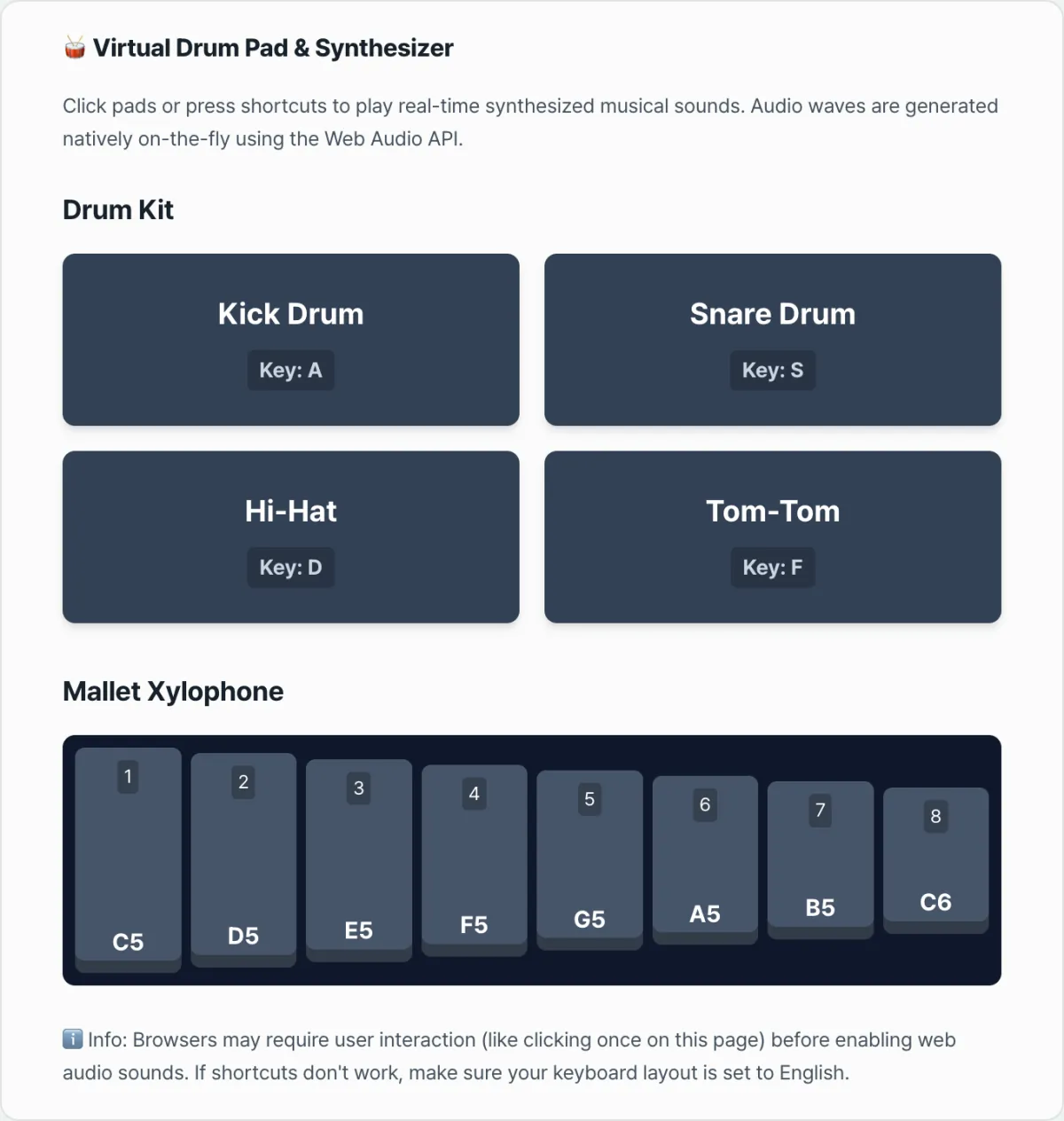
A virtual instrument player: click a pad or press A, S, D, F or 1–8 and the drum and xylophone sounds are synthesized right there as you play
How this virtual instrument player actually makes sound
This tool goes a step further and doesn't use recorded audio files at all. The kick drum, snare, hi-hat, tom-tom, and all eight xylophone notes are built by code the moment you click or press a mapped key, with the waveform computed right there.
The kick comes from combining, at click time, an oscillator whose frequency drops from 150Hz in a flash with a control that brings the volume down along with it. The snare and hi-hat are made by running a short noise waveform filled with random values through a filter. The xylophone takes a waveform at a fixed frequency per note and stacks overtones on it to get that struck-bar sound.
This calculation isn't reading a file or unpacking a compressed format. It's light arithmetic: set a few numbers, fill a short array. It finishes almost at the same instant as the click, leaving no window for a person to feel the difference.
The audio context itself is also created only once, on the first click, and every click after that reuses the context that already exists. One caveat: browser autoplay policies keep playback locked until the user provides input, so in some browsers you may need to click anywhere once before you hear the first sound on the page.
Recap
- Latency is the felt delay that shows up when a "getting it ready to play" step lands after the click.
- The Web Audio API treats sound as a node graph, and at playback time it only does parameter math and issues instructions.
- Instrument apps that use recorded files usually pre-decode their samples at page load, which removes that delay.
- This virtual instrument player goes a step further: no audio files at all — it synthesizes sound from oscillators and noise at the moment of the click.
- Creating the audio context once and reusing it also removes an initialization cost that would otherwise repeat on every click.
A virtual instrument player: click a pad or press A, S, D, F or 1–8 and the drum and xylophone sounds are synthesized right there as you play
Frequently asked questions
What exactly does latency mean?
It's the time between an input arriving and the result of that input actually happening. In this article it means the gap between the moment you click a pad and the moment you actually hear the sound from the speaker. The shorter that gap, the more it feels like the click and the sound happen at the same time.
Does the Virtual Drum Pad & Online Instrument Player play recorded drum sounds?
No. The kick drum, snare, hi-hat, tom-tom, and xylophone notes don't load recorded audio files. The moment you click or press a key, the code computes changes in oscillator frequency and random noise waveforms and synthesizes the sound on the spot. So there's no file-loading step at all.
Why do I have to click somewhere once after landing on the page before I hear anything?
That's because of browser autoplay policies. Browsers require one user interaction, like a click, before they allow audio to play. This tool creates or resumes the audio context on that first interaction, then keeps reusing the same context to make sound from then on.
I pressed the shortcuts (A, S, D, F, 1–8) but I don't hear anything.
This usually happens when your keyboard input isn't in English mode. The tool figures out which pad to trigger by comparing the character value of the key you pressed directly against English letters and digits, so if the input registers as a different character — Korean input mode, for example — the mapping won't fire. Switch your input to English and try again.
This article was adapted from our Korean original. Read the Korean original