
Memory Card Game: Fisher-Yates Shuffle and CSS Card Flip
Contents
- Why Shuffling and Card Flips Are Trickier Than They Look
- Building It Yourself: Fisher-Yates Shuffle and CSS Card Flips
- Card Counts by Board Size
- Recap
- Core Technical Mechanics
- Shuffle Algorithm Performance Comparison Table
- 5 Memory Game Development Mistakes You Must Avoid
- A 5-Step Workflow for a Flawless Card Game Architecture
- 7 Tips for Card Game Development
- Decision Tree for Difficulty and Board Size
- Terminology Cheatsheet
- Frequently Asked Questions
The Memory Match card game has simple rules: flip two cards and match the pairs. But once you try to build it yourself, two things can stop you cold — how to shuffle the cards fairly, and how to make a flip animation that actually works. This post walks through the Fisher-Yates shuffle, which randomizes card order, and a CSS flip technique that switches based on each card's state. I'll also show you a tool you can play right away to measure your own results.
Summary ① Fisher-Yates shuffle walks the array from the end and swaps each item with a random position, so every card layout is equally likely. ② You don't need separate front and back elements. Flip the
transform: rotateYvalue and the visible content of the same element based on card state (isFlipped,isMatched), and you get a card flip animation. ③ If you'd rather not build it, you can play the Memory Match Card Game tool right now and track your moves and time.
Why Shuffling and Card Flips Are Trickier Than They Look
The first thing that trips people up when building a matching game is shuffling the cards fairly. A naive "randomly rearrange the array" approach creates a bias that clusters cards in certain positions, and that drains the fun out of the game. You also have to handle two more things: a flip animation that looks natural when a card is clicked, and state management that stops the player from clicking a third card before the match check finishes.
Building It Yourself: Fisher-Yates Shuffle and CSS Card Flips
1. Fisher-Yates Shuffle and Match Checking
Fisher-Yates starts at the last index of the array and walks backward one step at a time, swapping the current position with an index picked at random from the range it has covered so far.
For array index i, looping backward from N-1 down to 1, compute an integer j between 0 and i by flooring Math.random() × (i + 1), then swap A[i] and A[j].
Each index gets processed exactly once, so the time complexity is O(N), and every possible card layout comes out with the same probability. That's the whole point of this algorithm.
Here are the conditions that decide the game state:
- Comparing the two selected cards:
If the two cards have the same
emojivalue (firstCard.emoji === secondCard.emoji), lock inisMatched = trueafter 0.5 seconds. If they don't match, resetisFlippedtofalseafter 1 second so the cards render face down again. - Moves and Timer: Recording the number of turns and the time it took to match all pairs gives you a metric for comparing players' short-term memory.
2. Rendering the Flip Transform Based on Card State
Here's the rendering code that shows the emoji when a card is flipped (isFlipped) or matched (isMatched), and shows a question mark otherwise. Instead of splitting the front and back into separate elements, it uses a single button and the span inside it, switching only the visible content and the transform value.
const isRevealed = card.isFlipped || card.isMatched;

<button
  onClick={() => handleCardClick(index)}
  style={{
    transform: isRevealed ? "rotateY(0deg)" : "rotateY(180deg)",
    transition: "transform 0.3s ease, background-color 0.3s ease",
    backgroundColor: card.isMatched ? "#0f172a" : isRevealed ? "#38bdf8" : "#475569"
  }}
>
  <span style={{ transform: isRevealed ? "rotateY(0deg)" : "rotateY(180deg)" }}>
    {isRevealed ? card.emoji : "❓"}
  </span>
</button>
Based on isRevealed, the button and the inner span both switch their transform between rotateY(0deg) and rotateY(180deg), with just a 0.3-second ease transition. You don't need 3D properties like perspective or backface-visibility. Changing the visible content and the rotation angle together from a single state value is enough to get the flip interaction.
3. State Management Rules for Real-World Puzzle Development
- Block the double-click bug:
After the player picks a second card, the match result isn't final until 0.5 seconds pass for a correct pair or 1 second for a wrong one. A third click in that window can corrupt the game state. Use an
isLocked = trueflag to temporarily block click input until the match check completes. - When to check the win condition:
Call
every(...)on the freshly updatedmatchedCardsarray inside thesetTimeoutcallback to check whether everything is matched. That way you don't read a stale React state that hasn't re-rendered yet and miss the win condition.
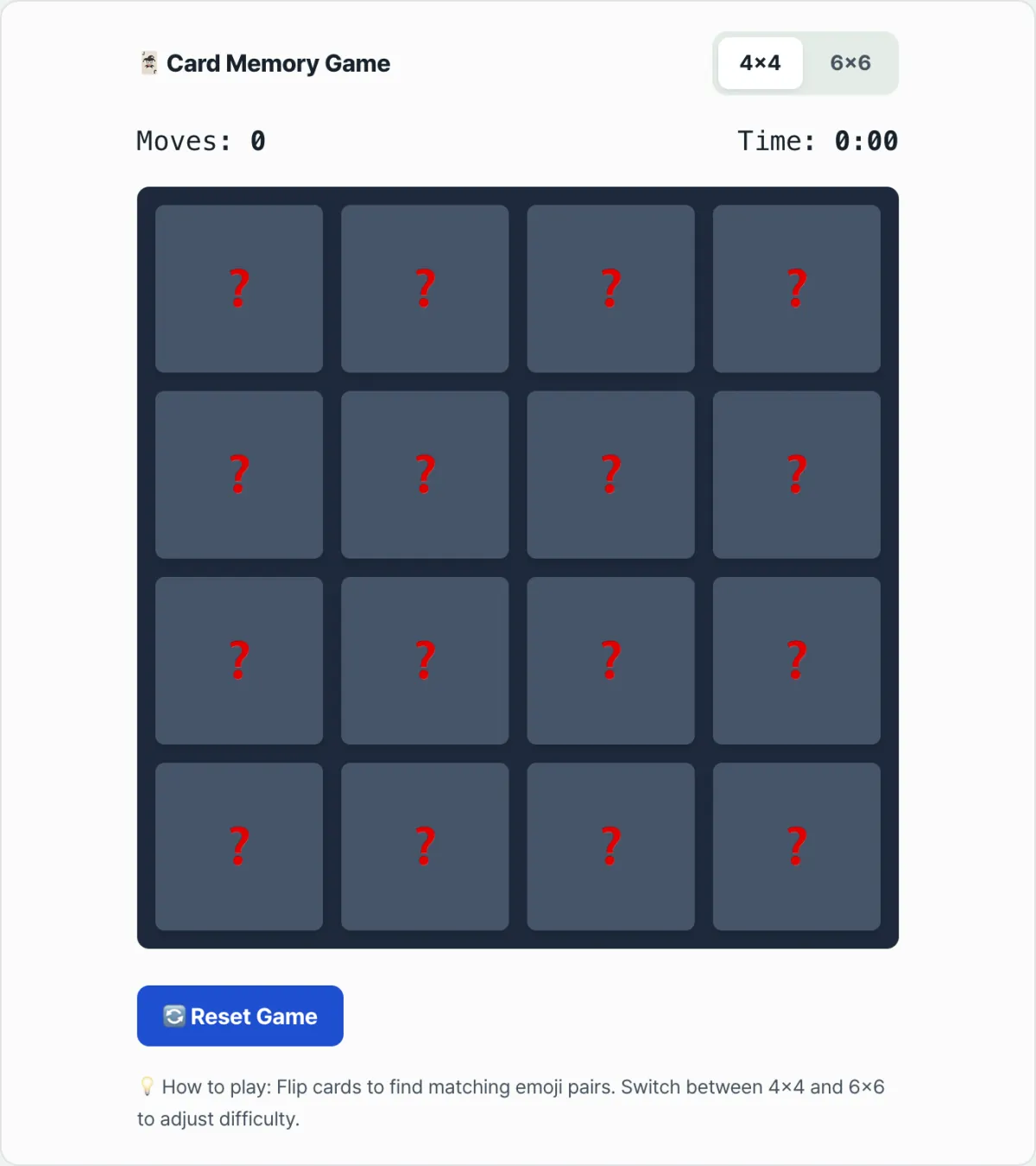
Note You don't have to build any of this to try it. Play the Memory Match Card Game tool directly. Pick the 4x4 or 6x6 difficulty and watch your moves and time update in real time to test your working memory.
If you'd rather see the shuffle algorithm and flip code working than write them yourself, try it with our free tool.
Flip hidden emoji cards on a 4x4 or 6x6 board, match every pair, and have fun testing your short-term memory and personal move-count record.
Card Counts by Board Size
| Board size | Total cards | Pairs |
|---|---|---|
| 4x4 | 16 cards | 8 pairs |
| 6x6 | 36 cards | 18 pairs |
Recap
- Fisher-Yates shuffle walks the array from the back and swaps each item with a random position, so the cards are shuffled fairly.
- You can build a card flip animation by switching only the visible content and
transform: rotateYvalue based on card state (isFlipped,isMatched). - Without a lock that blocks extra clicks before the match check finishes, the game state can get corrupted.
- Instead of building it yourself, you can use the Memory Match Card Game tool to measure your moves and time right away on 4x4 and 6x6 boards.
Flip hidden emoji cards on a 4x4 or 6x6 board, match every pair, and have fun testing your short-term memory and personal move-count record.
Core Technical Mechanics
Building a flawless card game takes more than simple coding. It requires a multifaceted understanding of algorithms, rendering engines, and cognitive psychology.
1. The Mathematical Proof Behind the Fisher-Yates Shuffle
The key to a truly random shuffle is that all N! (factorial) possible permutations must appear with exactly the same probability of 1/N!. In an array of size N, the Fisher-Yates algorithm walks through the indices from the end to the beginning, picks one at random from the remaining range, and swaps it.
If you calculate the probability that a particular card lands in a particular position, the first card has a 1/N chance of going to a given spot, and the next card has a 1/(N−1) chance. Multiplying them all together naturally yields 1/N × (N−1) × ... × 1 = 1/N!, which guarantees a perfectly uniform distribution.
By contrast, <pre>sort(() => Math.random() - 0.5)</pre> depends heavily on how the internal sorting algorithm works, such as Timsort in the V8 engine, so the distribution is uneven and produces unpredictable bias.
2. CSS 3D Transform Architecture
To make a card look like it is actually flipping in three-dimensional space, you need to control the browser's rendering pipeline.
: Gives the 3D space a sense of depth, creating perspective during rotation.perspective
: Lets child elements share the parent's 3D space.transform-style: preserve-3d
: Hides an element when its back is facing the viewer, so overlapping front and back elements create a natural transition.backface-visibility: hidden
: Flips the card by rotating it 180 degrees around the Y-axis. These properties are hardware-accelerated by the GPU, ensuring smooth animation at 60 frames per second (60FPS) even on mobile devices.rotateY(180deg)
3. Designing a React State Machine
In a game where asynchronous animations and user interactions overlap, a strict finite state machine (FSM) is essential.
- IDLE: Waiting state with no card selected.
- ONE_SELECTED: The first card has been clicked and flipped.
- TWO_SELECTED (LOCKED): The state immediately after the second card is clicked, strictly blocking any additional clicks (isLocked).
- CHECK_MATCH: The state where the two card values are compared.
- RESET / MATCHED: If they match, the cards are locked in place; if not, they turn back face down.
- CHECK_WIN: Checks whether every card has been matched and triggers the win.
4. Cognitive Psychology: Working Memory and Visuospatial Memory
This game is more than entertainment; it hides principles from neuroscience. According to the model of cognitive psychologist Nelson Cowan, human working memory is limited to about 4 ± 1 chunks, while George Miller's traditional theory sets the limit at 7 ± 2. The card game heavily stimulates the "Visuospatial Sketchpad" from Baddeley's working memory model, providing a brain-training effect that binds spatial locations and visual images (emoji) in short-term memory.
Shuffle Algorithm Performance Comparison Table
Here is a comparison of various array shuffle methods from a mathematical and engineering perspective, covering performance and efficiency.
| Algorithm | Time Complexity | Space Complexity | Uniformity (Bias Score) | Implementation Difficulty | Practical Suitability |
|---|---|---|---|---|---|
| Fisher-Yates (Knuth) Shuffle | O(N) | O(1) (In-place) | Perfect (1/N!) | Intermediate | Best (Recommended) |
| Naive Random Sort | O(N log N) | O(N) (extra memory) | Very poor (severe bias) | Beginner | Worst (Do Not Use) |
| Random Index Extraction | O(N2) (with splice) | O(N) | Good | Intermediate | Low (Performance Hit) |
| Sattolo's Algorithm | O(N) | O(1) | Cycle permutations only | Intermediate | Medium (Not Suitable for Games) |
As this table makes clear, in a card game where every element must be shuffled perfectly at random, the Fisher-Yates algorithm is the only real answer, with its O(N) processing speed, memory efficiency, and mathematically proven fairness.
5 Memory Game Development Mistakes You Must Avoid
- Overusing Math.random() - 0.5 sorting: Depending on the browser engine, randomness can be seriously compromised, and for arrays of length 10 or more, the sort itself may not work correctly.
- Missing a click lock during the animation delay: If you do not ignore extra clicks during the 0.5 to 1 second when the cards flip and the result is shown, your state variables get corrupted and the game cannot continue.
- Not cleaning up setTimeout memory leaks: If you do not clear timers when a React component unmounts, callbacks run in the background and try to update state that no longer exists, which can cause a crash.
- Hardcoding grid coordinates: Even though mobile and desktop screens have different aspect ratios, using fixed pixels such as 800px will completely break the responsive layout.
- Using heavy, high-resolution images: If you use unoptimized PNG/JPG images to represent card pairs, loading slows down and the card fronts appear late, causing a flicker (FOUC). Lightweight SVG or native emoji are strongly recommended.
A 5-Step Workflow for a Flawless Card Game Architecture
- Step 1: Design the data model and create emoji pairs Define card objects with a unique ID and a matching value. For example, prepare 8 emoji and duplicate each one to make an array of 16 cards.
- Step 2: Apply the Fisher-Yates algorithm Run the prepared 16-card array through the Fisher-Yates shuffle logic to build a perfectly random deck.
- Step 3: Build the 3D flip card component
Combine CSS <pre>
perspective</pre> and <pre>transform: rotateY()</pre> to design a UI component with a physical feel that smoothly flips between front and back. - Step 4: Connect the state machine and lock protection
Set a global <pre>
isLocked</pre> flag to control click events, then connect asynchronous logic that waits 1 second after two cards are open before deciding whether they match. - Step 5: Add a stopwatch, move counter, and win dialog Start a timer that counts up in seconds as soon as the game begins, and increment a counter each time a card is flipped to build the final score screen.
7 Tips for Card Game Development
- Optimize hardware acceleration: Add the <pre>
will-change: transform</pre> property to card elements that animate, and the browser will reserve GPU resources ahead of time to prevent stutter. - Pause the timer on tab switches with the Page Visibility API: To avoid the mess of a timer that keeps running while the user jumps to another browser tab, detect the <pre>
document.hidden</pre> property and pause the stopwatch. - Clean sound rendering with the Web Audio API: Instead of HTML5 audio tags, use Web Audio API oscillators or buffers to play effect sounds with no latency, exactly matching the moment of the click.
- Use smart grids: With CSS Grid's <pre>
repeat(auto-fit, minmax(...))</pre> feature, card rows and columns automatically reflow to fit the screen size without media queries. - Keep high scores permanently with LocalStorage: Save the player's fewest moves and fastest time as JSON in browser storage, so the goal stays in mind on their next visit.
- Support keyboard play and accessibility (A11y) with ARIA: So that visually impaired players can enjoy it too, place <pre>
aria-label</pre> and <pre>tabindex</pre> appropriately and map Enter/Space key events so the game plays comfortably without a mouse. - Play a finished web tool right now: Seeing is believing. Before you write any code, get inspiration for your design by playing the game right away with the Memory Match Card Game tool at the bottom of this page!
Decision Tree for Difficulty and Board Size
The best game balance depends on your target audience and the devices they use.
- 4x4 board (16 cards, 8 pairs)
- Who it's for: young children, older adults, and casual players looking to kill time
- Best devices: older smartphones with small screens
- Traits: short play sessions of about 1–2 minutes on average, low cognitive stress.
- 6x6 board (36 cards, 18 pairs)
- Who it's for: adults who want brain training, puzzle enthusiasts
- Best devices: tablet PCs and desktop monitors
- Traits: demands complex spatial memory, high engagement with 5 minutes or more on average.
- Timed Challenge mode
- Who it's for: hardcore gamers who enjoy competition
- Conditions: clearing the board within a time limit, or an endless mode where the board keeps expanding, triggers a strong dopamine rush.
Terminology Cheatsheet
- Fisher-Yates Shuffle: The standard random permutation algorithm that shuffles array elements perfectly with no mathematical bias within its time complexity.
- Working Memory: The short-term brain function that temporarily holds information and uses it for cognitive operations.
- State Machine: A software architecture that defines the finite states a system can be in and designs state transitions to happen clearly in response to events.
- backface-visibility: The key property that decides whether the back side is rendered on screen during a CSS 3D rotation.
- transform: rotateY: The property that rotates a flat 2D HTML element around the Y axis to create a three-dimensional feel.
- Time complexity O(N): A measure of a highly efficient algorithm whose operation time grows linearly in proportion to the input size N.
Frequently Asked Questions
Q1. How do I prove that my shuffle logic is mathematically fair (provably fair)?
A1. Run about 100,000 simulations and measure how often each element lands in each position. If you shuffle a 3-element array [A, B, C] 100,000 times and the probability of A landing in the first position converges on exactly 33.333%, the algorithm is fair. Fisher-Yates passes this test perfectly, but with a naive random sort based on subtraction you can immediately see a particular card staying in a particular position more than 60% of the time.
Q2. How do I keep the timer from going haywire when the user leaves to check another app on their phone?
A2. JavaScript's async timers get throttled when a browser tab becomes inactive, so they slow down or stop. To prevent that, you must remember the timestamp at the start, and implement logic that saves the accumulated time and pauses the timer when the screen is left, using <pre>document.addEventListener('visibilitychange')</pre>.
Q3. Does playing a card flip game every day actually make your brain better?
A3. According to cognitive neuroscience research, this kind of spatial memory training promotes activation of the prefrontal cortex. Rather than simply raising your IQ, it improves the efficiency of the neural synapse networks that hold fleeting visual information in working memory and retrieve it quickly, which can genuinely help with everyday short-term memory.
This article was adapted from our Korean original. Read the Korean original