
Chess notation coordinates: read e4 and Nf3 at a glance
Contents
- The problem
- The solution: coordinate rules in algebraic notation
- Common sticking points
- The bottom line
- Core technical mechanics: FIDE chess rules and the secrets of algebraic notation
- Chess Notation Systems Compared
- The 5 Most Common Chess Notation Mistakes
- The 5-Step Master Coordinate Visualization Workflow
- 7 Tips for Practicing Chess Notation
- Decision Tree for Writing Notation
- Key Terminology Cheat Sheet
- Frequently Asked Questions
In chess notation, labels like e4 and Nf3 aren't random symbols—they point to exactly one square on the board. Algebraic notation gives each of the 64 squares a unique name by combining a file (a–h) and a rank (1–8), and the capital letter in front shows which piece moved to that square. Once you can read this coordinate system accurately, you can follow any notation without a board.
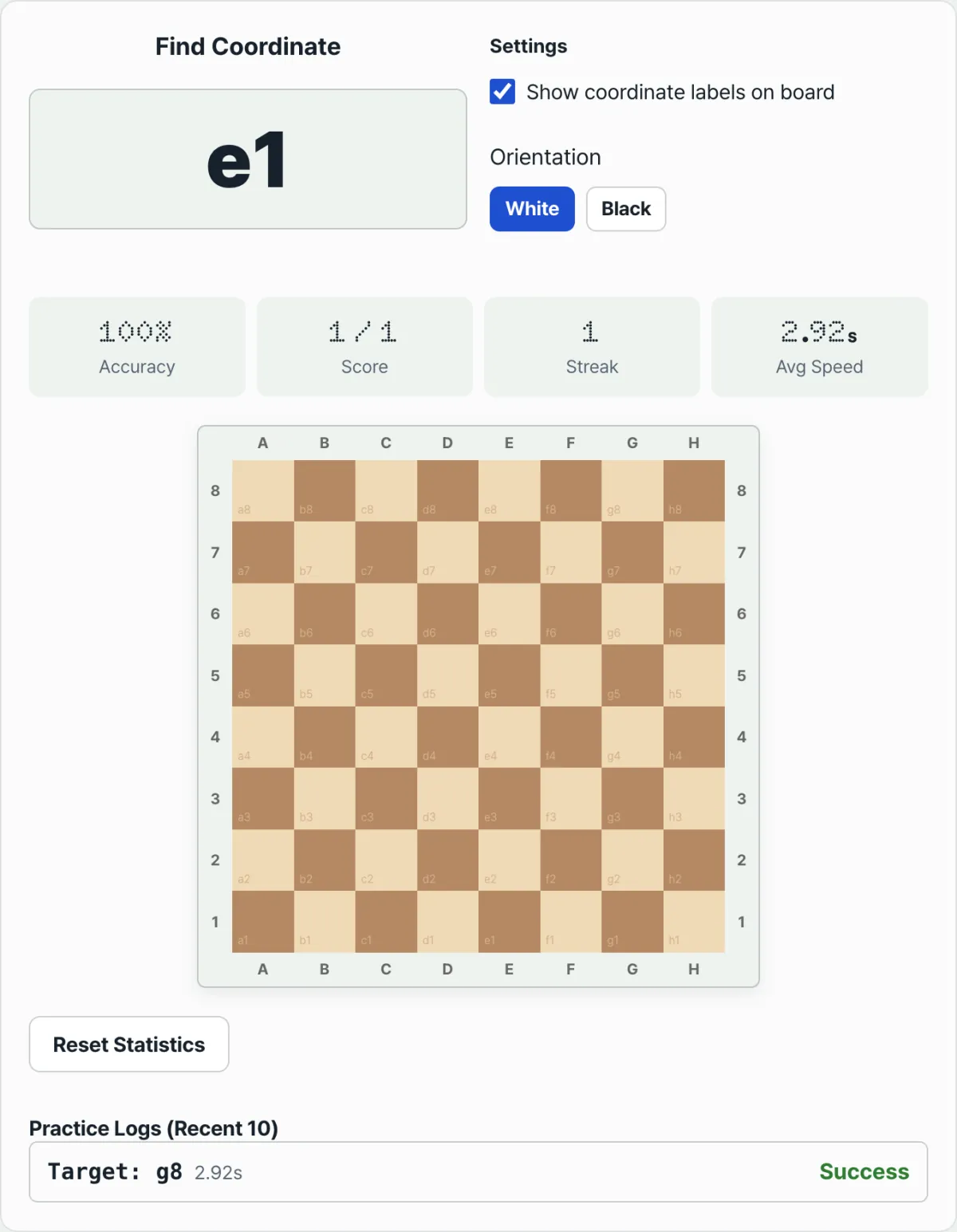
Summary ① The board's files run a–h from left to right, and the ranks run 1–8 from White's side toward Black's side. Each square is uniquely identified by its file-plus-rank combination. ② A coordinate by itself, like e4, means a pawn move. A capital letter in front, like Nf3, means that piece (K, Q, R, B, or N) moved to that square. ③ With the Chess Square Notation Trainer, you can practice seeing a random coordinate and immediately clicking the right square, then check your accuracy, streak, and reaction time in the stats.
The problem
On broadcasts or in notation, coordinates keep coming at you—"1.e4 e5 2.Nf3 Nc6"—and without a board, the notation alone doesn't immediately show you which piece moved where. If you've just started learning chess, it takes time to connect the string "e4" to an actual square in your head.
The problem is that every time you see a coordinate, you're manually counting "how many files over, how many ranks up." In a real game, the square needs to pop into your head the moment your opponent announces a move; if counting takes too long, you have less time to think about the move itself.
Also, when you play White and when you play Black, you view the board from opposite directions. The coordinate system stays the same, but it's common to get confused and wonder, "Which side was e4 on again?"
The solution: coordinate rules in algebraic notation
Chess algebraic notation is built on a single rule for assigning coordinates to an 8×8 board.
'Square name = file (a–h, left to right from White's perspective) + rank (1–8, from White's side to Black's side)'
Name the eight vertical columns, from left to right, a, b, c, d, e, f, g, h (files). Name the eight horizontal rows 1 through 8, starting with White's first row and ending with Black's last row (ranks). For example, e4 is the single square where the fifth file from the left (e) meets the fourth rank from White's side.
Adding piece notation
Putting a capital letter in front of a coordinate shows which piece moved to that square. The king is K, queen Q, rook R, and bishop B. The knight uses N because K is already taken by the king. Pawns have no letter of their own; you write only the destination square.
- 'e4' — a pawn moves to e4 (no capital letter)
- 'Nf3' — a knight moves to f3
- 'Bxc6' — a bishop captures an opponent's piece on c6 (x = capture)
- 'O-O' / 'O-O-O' — kingside / queenside castling
Check is shown with +, checkmate with #, and when a pawn reaches the 8th rank (or 1st rank) and promotes, you add the promoted piece after it, like =Q.
Once you understand the rules, that's it—but to make a square pop into your head the moment you see a coordinate in a real game, you need repeated practice. With our Chess Square Notation Trainer, look at the random coordinate that appears and click the matching square to check yourself.
Free · no sign-up · random square-click practice with accuracy, streak, and reaction time stats
Common sticking points
| Situation | Cause |
|---|---|
| I know e4 right away, but a letter in front like Nf3 throws me off | The capital letter only indicates the piece (N = knight); you read the coordinate after it the same way |
| Many moves in notation show only coordinates in a row, like e4 e5 | Pawn moves leave out the piece letter and show only the destination square |
| I'm comfortable practicing from White's side, but coordinates get confusing when I play Black | The coordinate system (a1–h8) is fixed, but you're viewing the board from the opposite direction, so the visual position looks different. You can practice both with the trainer's view-switch button |
| I can't remember whether a1 is a light or dark square | In the standard setup, each player has a light square on their right, so a1 is always a dark square |
The bottom line
Chess coordinates give each of the 64 squares a unique name by combining a file (a–h) and a rank (1–8), and the capital letter in front (K, Q, R, B, or N) shows which piece moved. The rules themselves are simple, but making a square pop into your head the moment you see notation takes repeated practice. If you practice reading a coordinate and clicking the matching square, you can see in the stats how both your accuracy and reaction time improve.
Free · no sign-up · random square-click practice with accuracy, streak, and reaction time stats
Core technical mechanics: FIDE chess rules and the secrets of algebraic notation
Algebraic notation is a systematic recording system specified in Appendix C of the official FIDE (International Chess Federation) Laws of Chess.
Piece symbols and the special case of pawns
- K: King
- Q: Queen
- R: Rook
- B: Bishop
- N: Knight. K is reserved for the king, so N is used.
- Pawn: Pawns have no piece letter. You write only the coordinate of the destination square.
Telling identical pieces apart (Disambiguation Rules)
When two identical pieces (for example, two rooks or two knights) can move to the same square, you must make clear which one moved.
- By file: If the pieces are on different files, write the file of the piece that is moving. (Example: 'Rad1' vs 'Rfd1')
- By rank: If the pieces are on the same file, write the rank of the piece that is moving. (Example: 'R1d4' vs 'R8d4')
- Full square: In rare cases where neither the file nor the rank alone is enough (for example, when promotion gives you three or more identical pieces), write the full starting square. (Example: 'Qh4e1')
Special notation symbols
- x: Capture. Used when you take an opponent's piece. (Example: Nxd4)
- e.p.: En passant. A special pawn capture rule.
- O-O: Kingside castling. Castling with the rook closer to the king.
- O-O-O: Queenside castling. Castling with the rook farther from the king.
- +: Check. Added when you threaten the opponent's king.
- #: Checkmate. Means the game is over.
- =Q: Promotion. Added when a pawn advances all the way and promotes to a queen. (Example: e8=Q)
PGN and the computer standard
Computer chess programs use a text format called PGN (Portable Game Notation). PGN stores the entire game in algebraic notation as described above, along with metadata such as event name, site, date, round, White and Black player names, and result (the Seven Tag Roster).
Cognitive spatial processing and the square-color formula
When you picture the 64 squares of a chess board in your head, there's a way to calculate each square's color on the spot. $ (file_index + rank_index) % 2 = 0 $ According to this formula, the a-file is 1, the b-file is 2... the h-file is 8. For example, square a1 is (1+1)=2 (even), so it is a dark square. Square e4 is (5+4)=9 (odd), so it is a light square. Square h1 is (8+1)=9 (odd), so it is a light square. With this method, you can quickly infer a square's color without a board.
Chess Notation Systems Compared
Several chess notation systems exist, each with its own strengths, weaknesses, and history.
| Notation system | Example syntax | Readability | Software use | Historical context |
|---|---|---|---|---|
| Standard Algebraic Notation | e4, Nf3, O-O, exd5 | Very high. Concise and intuitive | The default PGN format; supported by all modern software | Adopted as the official FIDE standard in the 1980s |
| Descriptive Notation | P-K4, N-KB3 | Low. White and Black read squares from different sides, which causes confusion | Rarely used | An older system widely used in the English-speaking world until the mid-20th century |
| Long Algebraic Notation | e2-e4, Ng1-f3 | Medium. Friendly to beginners but long and cumbersome | Mostly used for internal engine calculations and debugging | Used to some extent in correspondence chess and early computer chess |
| FEN (Forsyth-Edwards Notation) | rnbqkbnr/pppppppp/8/8/8/8/PPPPPPPP/RNBQKBNR w KQkq - 0 1 | Machine-friendly; very hard for humans to read | Essential for saving and sharing a specific position, and for setting up chess problems | Represents the current state of the board as a single string |
| UCI (Universal Chess Interface) | e2e4, g1f3 | Only for engine communication | The protocol used between chess engines (such as Stockfish) and GUIs | A standard language for chess programs, not for humans |
The 5 Most Common Chess Notation Mistakes
- Using K instead of N for the knight: The king already owns the letter K. If knights used K too, then whenever you saw a K in the notation you'd have no way of telling whether the king moved or a knight moved — a fatal error. The knight is always N.
- Ignoring the disambiguation rule: When two rooks or two knights can move to the same square, leaving out the file or rank means that later, when you go back over the notation, you can't tell which piece moved.
- Mixing up rank numbers from Black's point of view: Forgetting that White's back rank is rank 1 and Black's back rank is rank 8, and instead assuming the row closest to Black is rank 1. The coordinate system stays fixed no matter which side you're looking from.
- Leaving out the 'x' on a pawn capture: When a pawn captures an enemy piece, some people write only the destination square. If a pawn on the c-file captures a piece on d5, you must write cxd5, not d5.
- Getting the O's in castling wrong: Confusing the number of O's between kingside castling (O-O) and queenside castling (O-O-O), or typing the digit 0 instead.
The 5-Step Master Coordinate Visualization Workflow
A structured training method for recognizing coordinates instantly.
- Memorize the four center squares cold: Burn the locations of d4, d5, e4, and e5 — the most important squares on the board — firmly into your mind.
- Learn the four corners and their colors: Memorize the position and color of the four corners — a1 (dark), h1 (light), a8 (light), h8 (dark) — and use them as anchor points.
- Trace the long diagonals: Picture the dark diagonal running from a1 to h8 and the light diagonal running from h1 to a8 to sharpen your feel for diagonal coordinates.
- Internalize the color formula: Practice the square-color formula from earlier, $ (file_index + rank_index) % 2 = 0 $, until you can work out a square's color in under a second.
- Five minutes of random coordinates every day: Use the Chess Square Notation Trainer on this page: look at the random square called out on screen and click it right away, and repeat that drill consistently every day.
7 Tips for Practicing Chess Notation
- Visualize coordinates with your eyes closed: With your eyes shut, try to recall the color of a given square and the coordinates of the squares around it — that's blindfold training.
- Practice from Black's side every day: Use the trainer's flip-board feature to look at the board from Black's point of view and find coordinates, until it becomes a habit.
- Know the e-file and d-file cold: Get to the point where you can rattle off every square on the e-file and d-file, rank 1 through rank 8, the way you recite a multiplication table.
- Follow score-sheet timing at tournaments: In a real tournament, you must write the move on your score sheet right after making it on the board. Writing moves down in advance can be ruled illegal as note-taking.
- Memorize the bishop color rule: Bishops only ever move on squares of one color. So if you know the color of the square a bishop is on, you can easily work out the color of the squares it can reach.
- Replay PGN games without a physical board: Look at the PGN of a grandmaster's masterpiece and follow the pieces in your head only, with no board in front of you, to max out your visualization skill.
- Lean on the web coordinate trainer: Rather than plain rote memorization, the interactive coordinate trainer on this site lets you practice like it's a game and build up your reaction speed — which works far better.
Decision Tree for Writing Notation
An algorithm for writing notation correctly.
- Did a pawn move?
- Yes: leave out the piece letter ➔ go to 2
- No: write the piece letter (K, Q, R, B, N) ➔ go to 2
- Did it capture an enemy piece? (capture)
- Yes: put an 'x' before the destination square (for a pawn capture, add the starting file) ➔ go to 3
- No: leave out the 'x' ➔ go to 3
- Can another identical piece move to the same square? (same-type pieces)
- Yes: write the starting file or rank to tell them apart ➔ go to 4
- No: go to 4
- Did a pawn reach the far end? (promotion)
- Yes: add the promoted piece letter, such as '=Q' or '=N' ➔ go to 5
- No: go to 5
- Does it attack the enemy king? (check/checkmate)
- Yes: add '+' or '#' as the situation calls for ➔ notation complete
- No: the notation is complete as is
Key Terminology Cheat Sheet
- Algebraic Notation: The international standard for showing the position of each square by combining the board's columns (files) and rows (ranks) with letters and numbers.
- File: A vertical column on the chess board, labeled with the letters a through h.
- Rank: A horizontal row on the chess board, numbered 1 through 8 from White's side toward Black's side.
- Disambiguation: The rule of writing the starting file or rank when two or more identical pieces can move to the same destination square, so it's clear which piece moved.
- En Passant: French for "in passing." When an enemy pawn advances two squares on its first move and passes right by your pawn, you may capture that pawn on the very next move only — a special pawn capture rule (written e.p.).
- Pawn Promotion: The rule that when a pawn reaches the last rank (rank 8 for White, rank 1 for Black), it promotes to a queen, rook, bishop, or knight (written with an = sign).
- Castling: A special rule in which the king and a rook that has never moved swap places at the same time, hiding the king in a safe corner and bringing the rook toward the center.
- PGN (Portable Game Notation): A text storage format for chess games that computer programs can read and write.
- FEN (Forsyth-Edwards Notation): A single line of string data that records a specific situation on the chess board (the position, whose turn it is, whether castling is available, and so on).
Frequently Asked Questions
Q1. Why is the knight's symbol N instead of K for Knight?
A1. Because the king, the most important piece in chess, already claims the symbol K. If the knight also used K, a notation reading K would be hopelessly ambiguous — you could not tell whether the king moved or the knight did. So the second letter, N, became the agreed symbol for the knight.
Q2. When several pawns promote and there are three or more queens on the board, how do you tell identical pieces apart?
A2. It is very rare, but with three or more queens you can run into a position where writing only the file or only the rank is not enough to identify which queen moved. In that case you write both the file and the rank of the starting square to pin it down. For example, if queens sit on h4, e1, and a5 and the queen on e1 moves to e4, you write the full coordinates as 'Qe1e4' to avoid confusion.
Q3. Is there a trick to knowing whether a square is light or dark in one second without looking at the board?
A3. Yes — drill the even/odd rule until it becomes automatic. Convert the files a through h into the numbers 1 through 8, then add the rank number. If the sum is even, the square is dark; if it is odd, the square is light. (This assumes the standard chessboard setup.) If you consciously repeat this formula ($ (file_index + rank_index) % 2 = 0 $ means a dark square), you will eventually recall the color by instinct, with no calculation at all.
Q4. When did algebraic notation become the standard?
A4. The foundations of algebraic notation were already laid down by scholars in the Middle East around the 12th century, but it took its modern form at the hands of Philipp Stamma in the 19th century. For a long time afterward, the English-speaking world used descriptive notation in forms like P-K4 and N-KB3, but the rules were complicated and the language barrier was high. In the end, FIDE (the International Chess Federation) adopted intuitive, language-independent algebraic notation as the only official notation system around 1980. Descriptive notation is now a relic you only find in old books.
Q5. Why do some moves in notation come with '!!' or '?' symbols?
A5. These are annotation symbols that rate the quality of a move, not the move itself.
- '!': good move
- '!!': brilliant move
- '?': mistake
- '??': blunder
- '!?': interesting move
- '?!': dubious move
Engine analysis and grandmaster commentary use these symbols universally to tell the reader quickly how good a move is.
This article was adapted from our Korean original. Read the Korean original