
SQL INSERT Quote Escaping: Why Apostrophes Break CSV Inserts
Contents
Sometimes you move a CSV file into SQL INSERT statements and suddenly get a syntax error. When you dig into it, most of the time the cause is nothing more than a single apostrophe inside one value. If a product name contains an apostrophe, like "Women's Shoes", the moment you drop that value into your SQL statement as-is, the rest of the statement falls apart.
This isn't a problem caused by bad data. It comes directly from how SQL represents strings. Once you understand the mechanics, it becomes clear why escaping is necessary — and why you should handle it automatically during conversion instead of fixing values one at a time by hand.
Summary ① SQL wraps text values in a pair of single quotes to mark "text starts here and ends here." ② If a value contains a single quote, the SQL parser mistakenly thinks the string ended at that point. ③ So a single quote inside a value has to be written twice, which tells the parser "this is a literal character, not the end-of-string marker."
Why SQL wraps strings in single quotes
In a SQL statement, text values are always wrapped in a pair of single quotes. If you want to put a name like monitor into a name column, you write 'monitor' with single quotes on both sides so the database knows this is literal text, not a number or a command.
These single quotes aren't decoration — they're the delimiters that mark where a string starts and ends. When the parser hits an opening single quote, it reads "text starts here." The moment it hits the next single quote, it decides "the text ends here." That rule applies no matter which SQL dialect you use.
What happens when a value contains a single quote
The problem comes up when the value itself contains a single quote. Say the product name is "Women's Shoes" and you move it over as-is. You end up with this statement: VALUES ('Women's Shoes').
The parser reads that statement differently than you intended. The string starts at the first single quote. Then it hits the second one — the one right after Women — and decides "the string ends here." What's left, s Shoes', is now a stray chunk of characters sitting outside the string. The parser expected a comma or a closing parenthesis at that spot instead, so it throws a syntax error.
Why you have to double the quote
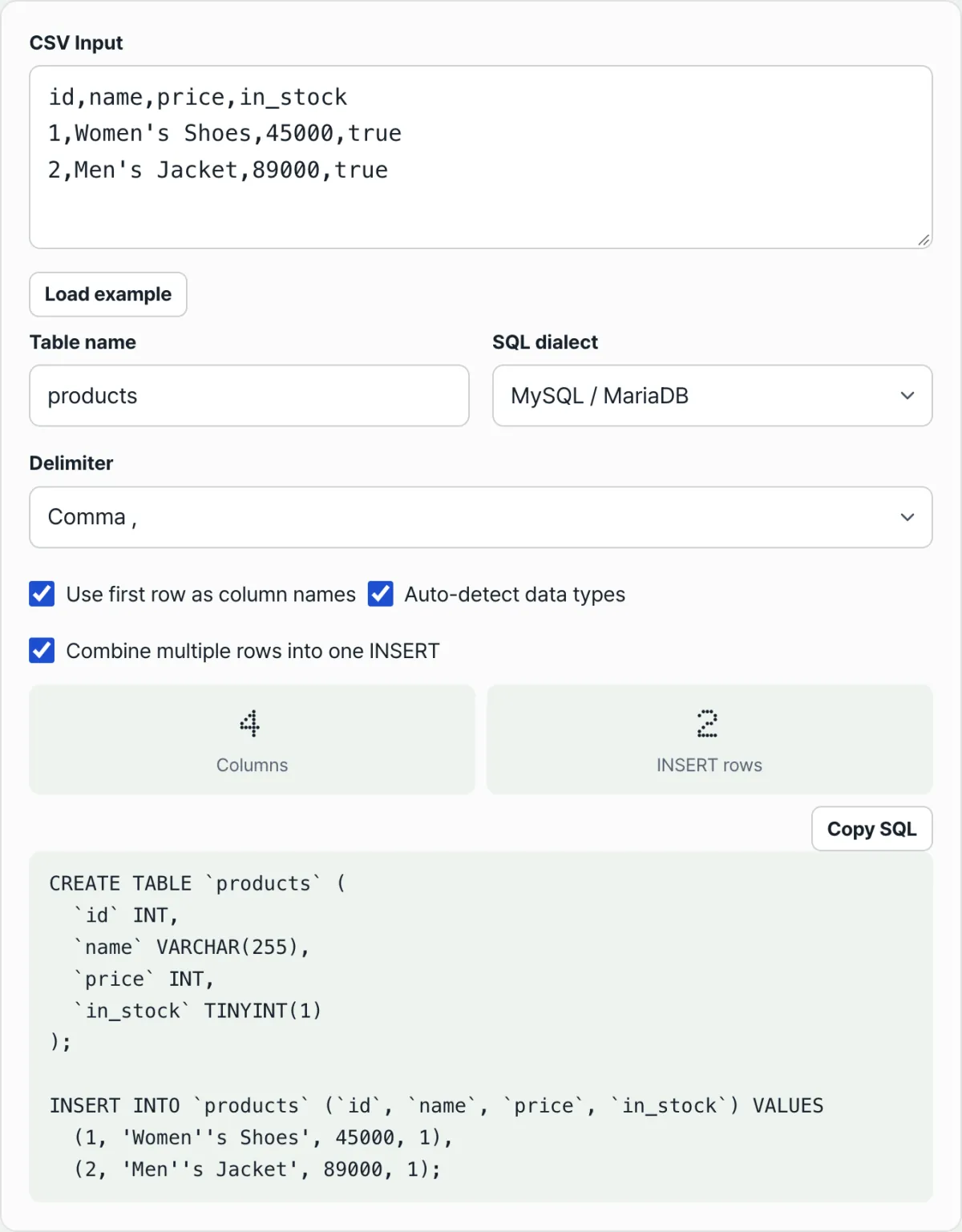
The fix is to write the single quote inside the value twice in a row. So instead of 'Women's Shoes', you write 'Women''s Shoes'. When two quotes appear back to back, the parser doesn't read them as "the string ended." It reads them as "one literal single quote character inside the string."
This isn't a trick specific to one program — it's the escape rule defined by the SQL standard. That means before you put a value into a SQL statement, you always have to check "how many single quotes are in this value, and did I double each one?" otherwise the syntax breaks. If your CSV has hundreds of rows and only a few of them contain apostrophes, repeating that check by hand for every value is easy to miss and easy to get wrong.
Paste your CSV and the tool generates CREATE TABLE and INSERT statements with apostrophes inside values already escaped.
How the tool makes that call for every value
The CSV to SQL Generator rewrites the single quotes inside each value as doubled quotes before putting it into the SQL statement. It doesn't matter how many apostrophes a CSV row has, or which row or column they're in — the same handling applies during conversion. So the moment you paste your CSV, the resulting INSERT statements already contain escaped values. This is where you stop having to open values one by one and hunt for quotes by eye.
Not every column gets wrapped in quotes
One caveat: this handling only applies to columns judged to be text. Each column's values are checked, and if they're all numeric the column is treated as an integer or decimal; if they're all true/false or yes/no, it's treated as boolean. Columns judged to be non-text values are never wrapped in single quotes in the first place — the values go into the SQL statement as-is. The single quote problem only exists for string literals, so numeric and boolean columns have nothing to escape. Conversely, only columns judged as text because they contain letters get wrapped in quotes, and only the single quotes inside them become escape targets.
Recap
- SQL wraps text values in a pair of single quotes to mark where the text starts and ends.
- If a value contains a single quote, the parser mistakes that spot for the end of the string, and the rest of the statement turns into a syntax error.
- The fix is to write the single quote inside the value twice in a row, which is the escape method defined by the SQL standard.
- This problem only affects values treated as text. Columns judged numeric or boolean are never wrapped in quotes, so it doesn't apply to them.
- The more rows your CSV has, the safer it is to escape automatically during conversion rather than hunting for apostrophe values by hand — nothing gets missed.
Paste your CSV and the tool generates CREATE TABLE and INSERT statements with apostrophes inside values already escaped.
Frequently asked questions
If I wrap strings in double quotes instead of single quotes, does the problem go away?
It depends on the dialect. Some databases allow double quotes around strings, but in dialects like PostgreSQL and SQL Server, double quotes wrap identifiers — table and column names — not strings. So switching to double quotes isn't a real fix, and it can create different syntax errors. Escaping on the premise that string literals use single quotes is the approach that works most broadly across dialects.
Can I escape with a backslash (') instead of doubling the quote?
Some databases recognize backslash escapes, but that isn't part of the SQL standard — it's closer to an extension in particular dialects. Depending on your settings or dialect, the backslash may be treated as a literal character, which can actually store a mangled value. Doubling the single quote is the standard escape method that works across dialects.
If I skip escaping, will I always get a visible error?
Not always. When a single quote ends the string earlier than expected, the leftover characters usually don't fit the statement structure, so you get a syntax error. But if the leftover characters happen to line up with the rest of the statement, it's theoretically possible for the statement to run without an error and store a value different from what you intended. What exactly you'd get depends on the rest of the statement and the database, so it's hard to generalize. It's safer to escape up front and eliminate that uncertainty entirely.
Do I need to worry about escaping values in numeric or boolean columns?
No. Wrapping values in single quotes is a notation that applies only to string (text) values, and numeric or boolean values go into the SQL statement without quotes at all. Since the value isn't wrapped in quotes, there's no quote inside it that can cut the string short. The CSV to SQL Generator does the same: when it judges a column to be numeric or boolean, it writes the values without quotes, and only wraps and escapes columns it judges to be text.
This article was adapted from our Korean original. Read the Korean original