
Excel to JSON Date Shows as a Number: Serial Date Formula
Contents
If you converted an Excel file to JSON and the "signup date" column shows a number like 46037 instead of 2026-01-15, your file isn't broken. Excel never stored dates as the string you see on screen — it stored them as a serial number, and the JSON conversion pulled out that stored value as-is.
Here's where that number comes from, the formula that turns it back into a real date, and how to stop it from showing up in the first place.
Summary ① Excel cells have no separate "date" data type. The actual stored value is an integer (a serial number), and the date you see is only formatting. ② The serial number counts days starting from January 1, 1900 as 1, so a single formula can turn it back into a real date. ③ If you use Excel's TEXT function to turn dates into strings and then paste them back as values, you'll get strings instead of numbers from the moment you convert.
The problem: JSON has five-digit numbers instead of dates
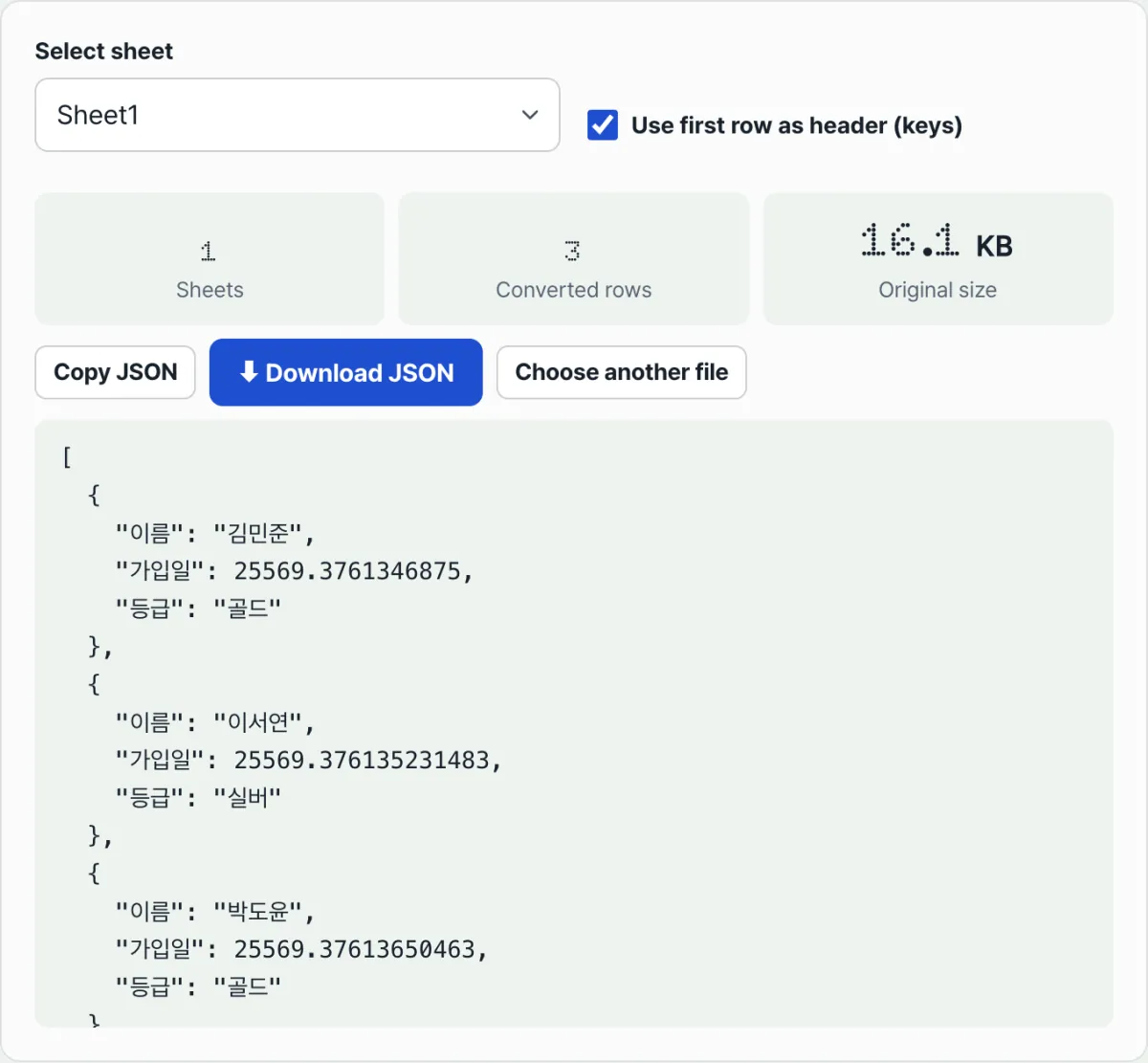
When you convert an Excel sheet with a date column — signup date, order date, anything like that — to JSON, the name and amount columns come out fine, but the date column shows up as integers like 44562 or 45678. There's no error message and the JSON is perfectly valid, which makes it even more confusing.
On screen, that cell clearly showed a date like 2022-01-01. But that display is just formatting applied to the cell. The value actually stored inside was an integer from the start.
The JSON conversion reads the cell's stored value, not the way it's drawn on screen. So the formatting gets stripped away and the raw integer underneath is exposed.
The fix: a formula that turns a serial number into a real date
Excel (with the Windows default) stores January 1, 1900 as serial number 1, adding 1 for each day after that. Cells that include a time treat one day as 1 and put the fraction of the day in the decimal part.
Here's the formula that turns that value back into a real date.
Unix milliseconds = (Excel serial number − 25569) × 86400 × 100025569 is the number of days between Excel's epoch (December 30, 1899) and January 1, 1970 (the Unix epoch). Subtract that, convert days (86400 seconds each) to milliseconds, and you have a value you can pass straight into JavaScript's new Date(...).
Numbers alone don't mean much, so let's do the math.
| Serial number from JSON | Result (actual date) |
|---|---|
| 44562 | 2022-01-01 |
| 45678 | 2025-01-21 |
| 46037 | 2026-01-15 |
If there's a decimal point (for example 46037.5), that cell also has a time stored in it. Multiply the decimal part 0.5 by 24 hours and you get 12 o'clock — noon on that day.
This calculation walks the number back after you've received the JSON, but you can also stop the number from appearing at all. In Excel, add a new column next to the original date column with the formula =TEXT(A2,"yyyy-mm-dd"), copy that column, and paste it back into the same place as values. The cell's actual value becomes a string like "2022-01-01". If you only add the formula and skip the paste-as-values step, the original date cells remain and you'll still get numbers, so don't skip that last step.
A column converted to strings is text by value, not by formatting, so no matter how you build the JSON you'll get "2022-01-01" instead of a number. Let's check the actual conversion result with our tool.
No install and no sign-up. Convert Excel to JSON right in your browser, and the files you upload are never sent to a server.
Where people usually get stuck
| Symptom | Cause |
|---|---|
| Date column comes out as 4–5 digit integers | That's normal. These are Excel date serial numbers, and the formula above turns them into real dates |
| The integer has a decimal point (e.g., 46037.5) | The cell stores both a date and a time. The decimal part is the time of day |
| Still getting numbers after using the TEXT function | You only added the formula. You have to paste as values for the cell value to be pinned as a real string |
| The result turned into arrays after unchecking "Use first row as header" | Without a header, each row becomes an array, and the title row is included as part of the data |
| A row has an empty date cell, but JSON shows an empty string | This tool doesn't skip empty cells — it fills them with empty strings so every row has the same keys |
Recap
- Excel cells have no separate "date" data type. The actual stored value is an integer (a serial number); the date you see is just formatting.
- The serial number counts days starting from January 1, 1900 as 1. Use
(serial number − 25569) × 86400 × 1000to get Unix milliseconds. - For example, 44562 is 2022-01-01, 45678 is 2025-01-21, and 46037 is 2026-01-15.
- A value with a decimal point means the cell also stores a time, and the decimal part × 24 hours gives you the time of day.
- To avoid numbers altogether, convert dates in Excel with
=TEXT(original,"yyyy-mm-dd"), then paste as values to pin them as strings.
No install and no sign-up. Convert Excel to JSON right in your browser, and the files you upload are never sent to a server.
Frequently asked questions
Does this formula work for dates before 1900 or old Macintosh files?
Windows Excel uses the "1900 date system," with January 1, 1900 as its epoch, by default. Older versions of Excel for Macintosh used the "1904 date system," with January 1, 1904 as its epoch, and the serial numbers in the two systems differ by exactly 1462 days.
If you open a very old Excel for Mac file and the calculated dates are off by a few years, check which date system the file was saved in first. Most modern Excel files use the 1900 date system.
Is the file I upload to Excel sent to a server?
No. Reading the file, parsing the sheets, and building the JSON all happen inside your browser, and the file never goes to a server. Even a sheet with internal data like signup dates and revenue never leaves your machine.
When should I uncheck "Use first row as header"?
Turn it off when the original sheet has no title row, or when the title row itself should be treated as part of the data. With the box unchecked, each row comes out as an array like [46037, "김민준", 15000] instead of an object like {"signup date": 46037}, and the original title row is included as one more array.
This article was adapted from our Korean original. Read the Korean original