
ICS File Explained: Why Email Attachments Open in Your Calendar
Contents
You've probably clicked an .ics file attached to a meeting invitation, only to have your calendar app open and the event appear right away. The short answer: an .ics file is just a plain text file with event details written in a set format.
It's not a file that needs a special app. Open it in Notepad and you'll see the contents plain as day. The format is set by an internet standard called iCalendar (RFC 5545), and there are only a few rules you need to know.
Summary ① .ics is a UTF-8 text file. It's registered under the media type
text/calendar, so opening it hands it off to your calendar app. ② The structure is aBEGIN:VEVENTinside aBEGIN:VCALENDAR, and one event is one VEVENT block. ③ If the time looks off, check howDTSTARTis written. If it ends inZ, it's UTC. If it has aTZID=parameter, it's the specified time zone. If neither is there, it's the local time on the device that opens it.
Why opening the file is enough to add an event
.ics doesn't contain executable code. Yet double-clicking it opens a calendar because the extension and the text/calendar media type are registered as a standard, and operating systems and email apps have associated that type with calendar apps.
In other words, the file isn't running anything. The calendar app reads the file and interprets it as an event. That's why opening the same file in Notepad does nothing but show you text.
The problem is that this interpretation step can make times look off or dates appear shifted by a day. The cause is almost always in two lines inside the file: DTSTART and DTEND.
How to open it in Notepad and check for yourself
You don't need any special software. Right-click the .ics file you received and open it with Notepad (Windows) or TextEdit (Mac). If the extension gets in the way, rename the file to .txt and open it; the contents are the same.
When you open it, it looks like this. It's all just lines of names and values joined by colons.
BEGIN:VCALENDAR
VERSION:2.0
PRODID:-//example//ko
BEGIN:VEVENT
UID:20260813-meeting@example.com
DTSTAMP:20260720T010000Z
DTSTART:20260813T140000
DTEND:20260813T150000
SUMMARY:팀 회의
LOCATION:본사 3층 회의실
END:VEVENT
END:VCALENDAR
What each line means
| Line | Meaning |
|---|---|
BEGIN:VCALENDAR … END:VCALENDAR | The outer box that wraps the whole file |
VERSION · PRODID | Two entries every iCalendar object must have: the version and the name of the program that created it |
BEGIN:VEVENT … END:VEVENT | One event. If there are multiple events, this block repeats |
UID · DTSTAMP | Two entries every VEVENT must have: the event's unique identifier and the time it was created |
DTSTART · DTEND | Start and end times. How they're written is the heart of this post |
SUMMARY | The event title shown in your calendar |
LOCATION · DESCRIPTION | The location and detailed description |
Dates and times are written without separators, like 20260813T140000. The first eight characters are the year, month, and day, and the six characters after the T are hours, minutes, and seconds. This example is August 13, 2026, 14:00:00.
If you want to make one yourself, paste the content above into Notepad, save it as UTF-8, and set the extension to .ics. But when you write it by hand, duplicate UIDs or malformed lines can cause calendar apps to silently ignore the event, so check each value.
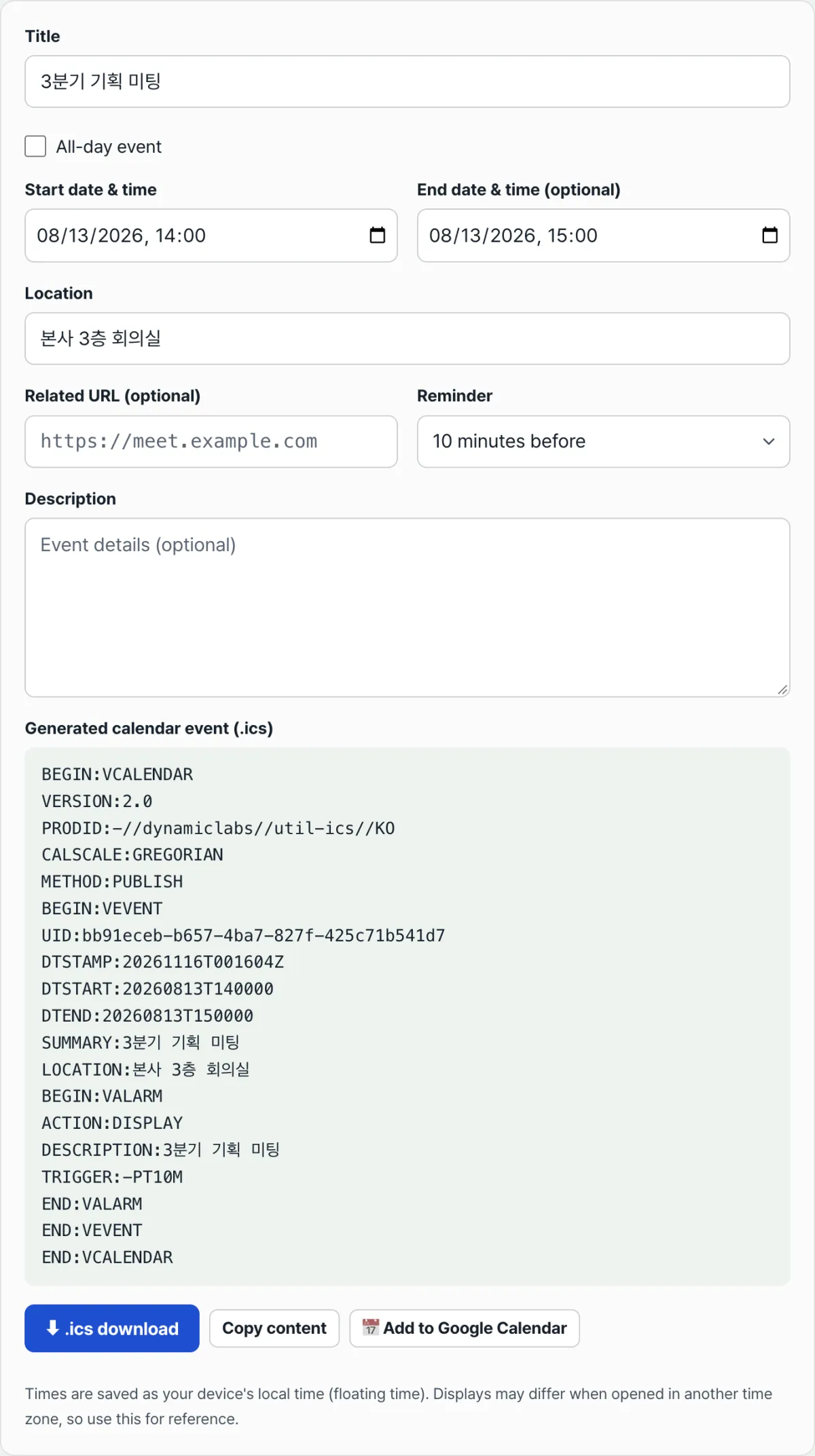
Try it with our free ICS Calendar Generator. Enter a title and start time, and the .ics text shown above appears right on the screen. You can download it or copy the contents from there.
The .ics text is generated right in your browser, with no install and no sign-up, and what you enter is never sent to a server.
Why the time looks off by several hours
An event you received may appear nine hours off, or an event you sent may show up at a different time on someone else's screen. The cause is the time zone notation in DTSTART. iCalendar defines three ways to write a date and time, and they all mean different things.
The three notations and what each one means
| Notation | Example | Meaning |
|---|---|---|
| No suffix | DTSTART:20260813T140000 | 14:00 in the local time of the device that opens it |
Z at the end | DTSTART:20260813T050000Z | An absolute time of 05:00 UTC |
TZID= parameter | DTSTART;TZID=Asia/Seoul:20260813T140000 | 14:00 in the Seoul time zone |
The first is what's called floating time. With no time zone information, it shows as 14:00 whether you open it in Seoul or Paris. It means "2 PM wherever you are," so it isn't a good fit for events where the absolute time matters, like a remote meeting.
The second is the opposite. With a Z, it's an absolute UTC time, so opening it in Korea (UTC+9) displays it converted to 14:00. Everyone sees the same moment in their own local time, which is safer when attendees are in multiple countries.
The third pins the time zone by name. Even when local rules change, such as for daylight saving time, the time is recalculated against that region's rules, which makes it especially good for recurring events.
So when a time looks off, the order of checks is simple. Open the file and look at the DTSTART line. If there's a Z at the end or a TZID=, you can tell right away which interpretation was applied.
For reference, the DTSTART that ICS Calendar Generator adds to timed events uses the first method, floating time (all-day events use the date-only VALUE=DATE form). A note at the bottom of the screen also says, "Times are saved in your device's local time (floating time)."
When an all-day event looks one day too long
All-day events list only dates, with no times. The notation changes to include VALUE=DATE, like DTSTART;VALUE=DATE:20260813.
Here's the rule that trips up the most people. DTEND is the end that isn't included, an exclusive end. For a one-day all-day event on August 13, the end isn't the 13th. You need to write DTEND;VALUE=DATE:20260814.
If you write the 13th as the end, you violate the standard's rule that "DTEND must come after DTSTART," and apps may show it differently or ignore it. On the other hand, if the person who made the file followed the rule and wrote the 14th, but the reader mistakes that number for the end date, the event looks like it spans an extra day.
If an all-day event has only a date and no DTEND or DURATION, the standard treats it as a one-day event. ICS Calendar Generator does the same: if you leave the end date blank, it adds the day after the start date as DTEND, making it a one-day all-day event.
Common sticking points
| Situation | What to check |
|---|---|
| A Korean title comes out garbled | Whether you saved the file as UTF-8. The standard's character set is UTF-8 |
| The value gets cut off when you put a comma or semicolon in the title | Commas, semicolons, backslashes, and line breaks must be escaped with a backslash. Colons are not escaped |
| A line breaks in the middle with a single space | This is normal line folding for long lines. The recommendation is not to exceed 75 octets, excluding the line break |
| You opened the same file twice, but there's only one event | Whether the UID is the same. Many calendar apps treat the same UID as an update to an existing event |
| No attendee response buttons appear | Whether METHOD is PUBLISH or REQUEST, and whether ATTENDEE is present |
To unpack the last item a little more: a separate standard (iTIP) uses the METHOD value to distinguish how event files are exchanged. PUBLISH is a simple publication that doesn't ask for a response, while REQUEST is an invitation that asks attendees to respond.
So even with the same .ics, if it has METHOD:PUBLISH and no attendee list, it's normal for only "Add to calendar" to appear and no accept or decline buttons. Files created by ICS Calendar Generator also use METHOD:PUBLISH.
Summary
- An .ics file is a UTF-8 plain text file. Open it in Notepad and you'll see the contents as-is.
- The structure is a
BEGIN:VEVENTinside aBEGIN:VCALENDAR, and one event is one VEVENT block. - Every VEVENT must have
UIDandDTSTAMP, and the file as a whole needsVERSIONandPRODID. - There are three ways to write a time. With no marker, it's the local time of the device opening the file.
Zmeans an absolute UTC time.TZID=means a specified time zone. DTENDfor an all-day event is exclusive, so a one-day event ends on the next date.- If a time or date looks off, open just the
DTSTARTandDTENDlines and the cause will show up.
The .ics text is generated right in your browser, with no install and no sign-up, and what you enter is never sent to a server.
Frequently Asked Questions
Is it okay to open an .ics file in Notepad?
Yes. An .ics file is a text file, not an executable, so simply opening it doesn't do anything. In fact, it's the most reliable way to check the contents before adding the event to your calendar. If you change the extension to .txt and open it, the content is the same, and changing it back to .ics lets you add it to your calendar as usual.
If I open the same .ics file twice, will I get two events?
Usually not. The UID in each VEVENT acts as the event's unique identifier, so opening a file with the same UID again updates the existing event instead of creating a new one. On the other hand, if the content is the same but the UID is different, it comes in as a separate event. If you end up with duplicates, compare the UID lines in the two files.
How should I write the time to make sure the time zone is right?
If attendees are in different regions, it's safer to use a UTC time with a Z at the end of DTSTART, or a TZID= parameter. A value with no time zone marker is read as the local time of the device opening it, so it means "2 p.m. in each person's own local time." If you're only sharing the event within a single region, a value with no marker will stay in sync.
How are reminders written in the file?
A separate block starting with BEGIN:VALARM goes inside the event, and the TRIGGER line inside it says when to notify. For example, TRIGGER:-PT10M means 10 minutes before the start. When you pick "10 minutes before" for the reminder in our tool, this line is generated exactly as shown, and when you pick "None," the VALARM block is left out entirely. Whether a reminder actually pops up depends on how each calendar app handles it, so it's more accurate to add one and check.
This article was adapted from our Korean original. Read the Korean original