
JSON vs YAML: Indentation Rules and Common Mistakes
Contents
- JSON marks boundaries with brackets, YAML with line breaks
- Why YAML is chosen more often for config files
- Why that "convenience" causes the most common mistakes
- How this tool handles the boundary-marking rules for you
- The same boundaries apply in the other direction (YAML → JSON)
- Recap
- Frequently asked questions
When you open a config file, sometimes you'll find one packed with braces, double quotes, and commas, and another where the structure is visible from line breaks and indentation alone, with no punctuation at all. The first is JSON and the second is YAML. Both can express the same data — so why is there such a difference in the amount of punctuation?
That difference isn't a matter of taste. It comes from a fundamentally different way of marking where data "boundaries" are — where one value ends and the next begins. And that design choice is exactly why YAML is preferred for config files, and also why YAML files break so unusually often.
Summary ① JSON marks data boundaries with braces, brackets, commas, and quotes; YAML marks them with line breaks and indentation levels. ② Because it minimizes punctuation, YAML is easy for people to read and write, which is why it's widely adopted for config files. ③ For the same reason, if the number of indentation spaces is off by even one, or if a tab character gets mixed in, the entire structure of a YAML file breaks.
JSON marks boundaries with brackets, YAML with line breaks
In JSON, an object starts and ends with braces, and each item inside is separated by commas. String values must be wrapped in double quotes, and so must keys. Only with this punctuation can a parser know exactly where the boundary is — "this is where one value ends."
YAML replaces that punctuation with line breaks and indentation. Lines with the same number of indentation spaces belong to the same level, and a more deeply indented line becomes a child item of the line directly above it. It's a way of expressing hierarchy using nothing but the number of spaces — no braces, no commas.
Why YAML is chosen more often for config files
A config file is a file people frequently open themselves to change a single value. For that purpose, YAML — where the structure is visible at a glance from indentation alone — is far easier to scan than JSON, where braces and commas repeat on every line.
The gap widens as values multiply and the hierarchy gets deeper. With JSON you also have to worry about matching up where the closing brackets go, while with YAML you only need to get the indentation depth right, which makes adding items or reordering them relatively painless. That's why YAML tends to be preferred for config files that people edit by hand often.
Why that "convenience" causes the most common mistakes
But the very thing that makes YAML convenient — expressing structure through the number of spaces — is also the source of its most common errors. JSON's brackets and commas are explicit, so it parses fine even if your indentation is sloppy. In YAML, indentation is the syntax, so if the number of spaces is off by even one, the line is read as belonging to a different level, or it throws an error outright.
Tab characters are the same story. The YAML spec does not allow tab characters for indentation. That's because editors differ in how many columns wide they display a tab, so a parser can't decide how many spaces a tab equals. A line indented with spaces and a line with tabs mixed in may look perfectly aligned on screen, but the parser treats them as different indentation.
A JSON ↔ YAML Converter that converts both ways instantly and automatically matches indentation and quote rules for you
How this tool handles the boundary-marking rules for you
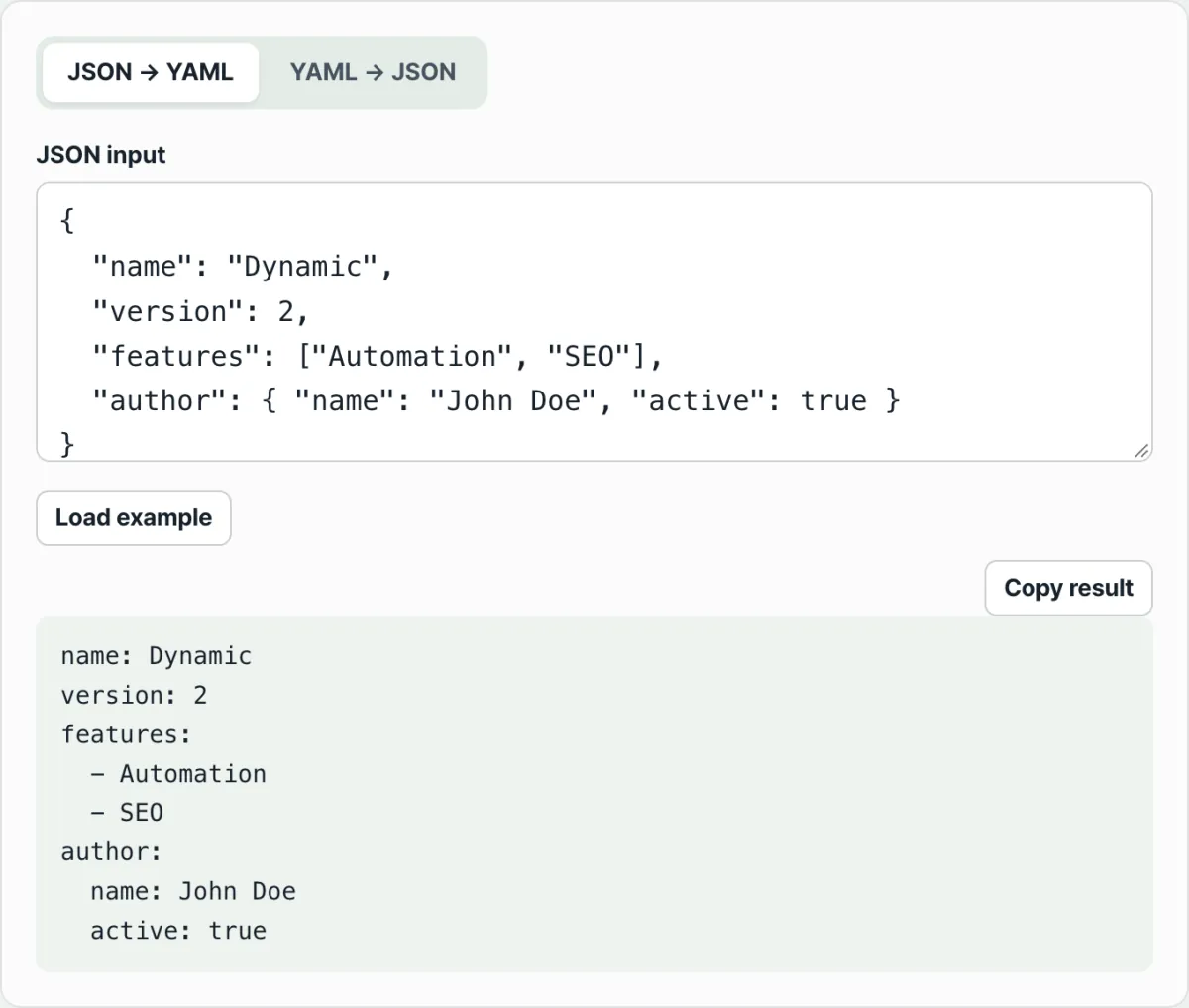
In the JSON ↔ YAML Converter, when you paste JSON into the input box on the "JSON → YAML" tab, it automatically applies the boundary-marking rules described above and shows you the result as indentation-based YAML. You don't have to line up indentation spaces by hand or tell tabs apart from spaces.
The interesting part of this conversion is which strings keep their quotes and which get stripped. If a string value looks like a reserved word such as true, false, null, yes, or no, or looks like a number, leaving it unquoted could make the YAML parser mistake it for a boolean or a number. The tool keeps double quotes in those cases and in cases where special characters like colons or brackets are mixed in, while outputting ordinary strings without quotes to preserve YAML's characteristic brevity.
The same boundaries apply in the other direction (YAML → JSON)
Switch to the "YAML → JSON" tab to check the reverse operation. When you put YAML written with indentation into the input box, the tool reads the indentation level of each line and expands the hierarchy back into braces, brackets, and commas.
What's especially helpful in this direction is that you don't have to count by eye how many spaces the indentation actually slipped. Even if the indentation looks similar to you, if the tool read the hierarchy differently, you can look at the resulting JSON structure and immediately see which line's indentation was handled differently from what you intended.
Recap
- JSON marks data boundaries with braces, brackets, commas, and quotes; YAML marks them with line breaks and indentation levels.
- Indentation-based syntax is easy for people to read and write, but for the same reason it has a weakness: if the number of spaces is off by even one, the structure breaks.
- By spec, YAML does not allow tab characters for indentation, and if tabs and spaces are mixed, the parser interprets the hierarchy differently.
- Quotes are only needed when a string value looks like a reserved word or a number; everything else can be written without quotes. That's the YAML way.
- If you want to move between the two formats and check that the structure converted correctly, running it through a converter is more accurate than counting spaces by eye.
A JSON ↔ YAML Converter that converts both ways instantly and automatically matches indentation and quote rules for you
Frequently asked questions
Why does using tab characters in YAML cause an error?
The YAML spec allows only spaces for indentation and does not allow tabs. Because editors differ in how many columns wide they display a tab, a parser has no consistent way to decide how many spaces of indentation a tab represents. It may look aligned on screen, but if tabs are mixed into the file, parsing can fail.
Why do I always have to put quotes around strings in JSON?
JSON marks value boundaries with punctuation — braces, brackets, commas — not with indentation. Without quotes around a string, the parser can't tell where that value ends, or whether a following comma or colon is part of the string or a piece of syntax. That's why string values and keys must be wrapped in double quotes, no exceptions.
Do indentation levels in YAML really have to be consistent?
Yes. Items at the same level must use the same number of indentation spaces. If even one item has a different count, it may be interpreted as having moved to a different level, or the parser may fail to read the structure at all and throw an error. Even alignments that look similar can produce different results if the actual space counts differ.
Does converting JSON to YAML always make it shorter?
Not always. For simple structures with only a few values, the difference in line count between the two formats may not be large. But the deeper the hierarchy and the more items in your config data, the more YAML — which expresses structure with indentation alone — tends to be shorter and easier to read than JSON, where you have to repeat braces, commas, and quotes.
This article was adapted from our Korean original. Read the Korean original