
Markdown Line Break Not Working? How to Fix It
Contents
When you press Enter once in a Markdown editor to break a line, that line break sometimes disappears in the converted output and the text runs together into a single line. This isn't a bug — it's how the Markdown standard (CommonMark) defines it. Here's when line breaks vanish, and how to split lines reliably.
Summary ① Inside a Markdown paragraph, a single Enter press (a soft break) is treated as one space, not a line break, by default. ② To break a line reliably, separate paragraphs with a blank line, leave two spaces at the end of the line, or use a converter with the breaks option turned on. ③ Check the converted HTML for
<br>tags to see which method was applied.
Why pressing Enter doesn't change the line
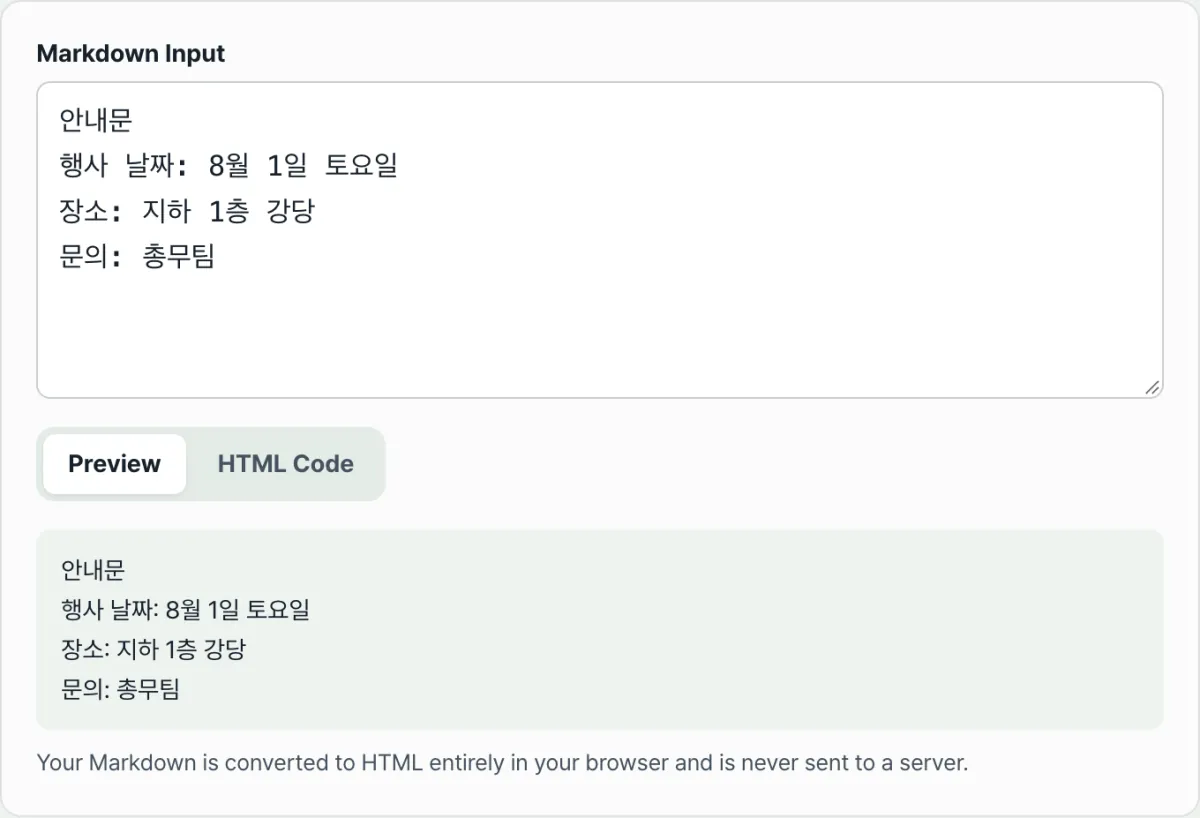
When you write notices in Notepad or a Markdown editor, you often separate items by just pressing Enter on each line. You might list an event date, location, and contact one line at a time.
If you convert that text to HTML and post it on a blog or message board, the lines you carefully separated collapse into one sentence with only single spaces between them. It looks like your Enter presses were ignored.
This isn't a broken editor or converter. Markdown was designed from the start not to treat a single newline inside a paragraph as a line break.
How to add line breaks reliably
In the Markdown standard (CommonMark), a paragraph wraps multiple lines of text into one rendered block. A single Enter press (a soft break) inside it becomes one space instead of a line break.
There are three ways to add a line break reliably. First, put a blank line between lines to split them into separate paragraphs (<p>). Second, leave two spaces at the end of a line to turn just that line into a hard break (<br>).
Third, screens where a single Enter press immediately breaks the line — like chat windows or comment boxes — are using the converter's "breaks" extension option. When it's on, every newline inside a paragraph becomes <br>.
To see which method actually applied, open the converted HTML and check with your own eyes whether there's a <br> tag between the lines.
Check it with our tool. You don't have to insert blank lines by hand or count out two spaces, because you can see exactly how your text breaks in the live preview and the HTML code. This converter has the breaks option on, so a single Enter press inside a paragraph shows up immediately as <br>.
Free · No sign-up · Converts in your browser only (nothing sent to a server)
Common stumbling blocks
| Situation | Cause |
|---|---|
| You separated lines with Enter, but the result is one line | Soft breaks are treated as a single space by default (the CommonMark base rule) |
| Two trailing spaces don't work | The editor or messenger strips trailing spaces automatically when saving or sending |
| You can't break lines inside a table cell | Table syntax parses each row as a single line of text, so newlines inside cells aren't possible |
| Line breaks inside code blocks stay intact | Code blocks preserve the source text as-is, so the soft break rule doesn't apply |
The short version
Inside a Markdown paragraph, a single Enter press is treated as one space rather than a line break — that's the standard rule. To break a line reliably, separate paragraphs with a blank line, leave two trailing spaces at the end of the line, or use a converter with the breaks option turned on.
The same text can produce different results depending on your converter's settings, so the most accurate check is to look for <br> tags in the converted HTML.
Free · No sign-up · Converts in your browser only (nothing sent to a server)
Frequently asked questions
How do I add a line break reliably in Markdown?
Adding a blank line to split text into separate paragraphs is the most reliable way. If you want to keep the paragraph together and just break the line, leave two spaces at the end of the line — but many editors strip those spaces on save, so it's safer to check visually.
What's the difference between a converter with the breaks option on and one with it off?
With breaks on, a single Enter press inside a paragraph immediately becomes a <br> tag. With it off, CommonMark's default rule applies: a single Enter is merged into a space, and you need a blank line to start a new paragraph.
Why can't I add a line break inside a table cell?
Markdown table syntax reads each row separated by | as a single line of text. A real newline character inside that line would break the table structure, so to break a line inside a cell you have to write the <br> HTML tag yourself.
Do line breaks inside code blocks disappear too?
No. A code block (text wrapped in three backticks) preserves the source as-is, so the soft break rule doesn't apply and your line breaks stay exactly as written.
This article was adapted from our Korean original. Read the Korean original