
HTML Table to Markdown: Why the First Column Disappears
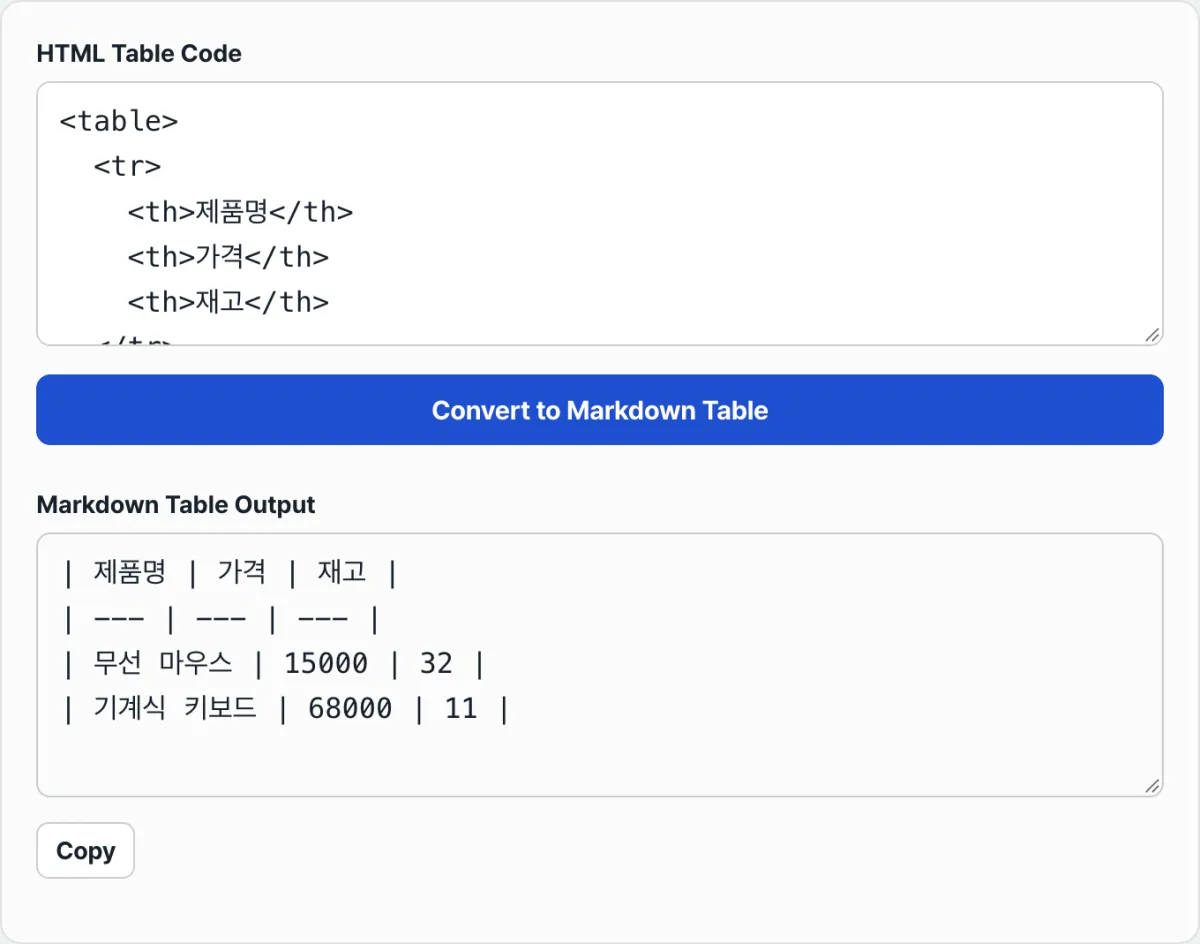
Contents
If you've ever copied a table from Wikipedia or a public data portal, or pasted an HTML table exported from Excel, and converted it to Markdown, you may have seen the output come out wrong.
The first cell of each row—usually where the item name goes—comes out completely empty, or the remaining cell values shift over by one and only the last cell ends up blank.
The original HTML table code looks fine and there are no typos, but only the converted result is off, so it's hard to find the cause. This isn't a bug in the conversion. There's a verifiable cause, and it comes down to a single tag in the table code.
Summary ① This converter reads only the first row of the table as a header row, and in every row below it, it counts only
<td>tags as values. ② If the first cell of a body row is written as<th scope="row">, that cell isn't counted as a value and is skipped entirely. ③ The skipped slot is filled with an empty cell at the end of the row, not the beginning, so all the remaining values look like they shifted one cell to the left.
The problem: you copied the table as-is, but the first cell disappears
Tables built with accessibility in mind—like country-by-country statistics tables on Wikipedia or comparison tables from public agencies—use <th scope="row"> instead of <td> in the first cell of each row. It's a markup convention that tells screen readers to read that cell as the row's heading first.
On screen it usually just looks slightly bold, so you can't tell it apart from a regular cell by eye. That's why, when you copy a table, you paste the code as-is without checking whether that cell is a <td> or a <th>.
The cause: the converter reads header rows and body rows differently
In the first row of the table (<tr>), this converter doesn't distinguish between <th> and <td>—it reads every cell as a header row cell. In every row below, though, it reads only <td> tags as values and doesn't count <th> at all.
So if a body row starts with <th scope="row">, the text in that cell doesn't appear in the result. The missing cell is filled with an empty cell at the end of the row, not the beginning, so all the remaining values look like they were pulled one cell to the left.
The fix: find where the th is in the source code before you paste
Before you move the table, right-click on it and choose "Inspect" to open the <table> code in the developer tools. Then look for any tag starting with <th inside the <tr> rows after the first one.
If you find one, just change that <th ...> and its closing </th> to <td> and </td> before you paste. You're only changing the tag name and leaving the text inside alone, so you don't need to rebuild the whole table.
Check it with our tool. Instead of hunting down and swapping tags by hand, you can paste the table code as-is and start by checking the result: does each row have the same number of cells as the header row, and is the first cell not empty?
Free · no sign-up · paste your HTML table code and get a Markdown table instantly
Common places people get stuck
| Situation | What actually happens |
|---|---|
The first cell of a body row is marked <th scope="row"> | The text in that cell disappears from the result, and the remaining values shift left by one |
A cell is missing from the row because of rowspan | For the same reason, the end of the row is filled with an empty cell, so it looks shifted |
| A cell contains a pipe character | It's escaped automatically so it doesn't collide with the table separator |
| The table starts with data and has no header row | The first row is used as the header row unchanged, so one row of data is wrongly treated as the header |
Recap
- This converter reads only the first row of the table as a header row, and in every row below it, it counts only
<td>tags as values. - If the first cell of a body row is written as
<th scope="row">, that cell disappears and the remaining values look shifted over by one. - Cells omitted by
rowspancause the same kind of shift at the end of the row. - To prevent it, open the source code in the developer tools before pasting, find the
<thtags, and change them to<td>. - After converting, it's a good habit to check that every row has the same number of cells as the header row.
Free · no sign-up · paste your HTML table code and get a Markdown table instantly
Frequently asked questions
How do I check whether the original table has th tags when I copy it?
On the page with the table, right-click the table and choose "Inspect" to open that <table> code in the developer tools. Then look inside the code for any tag starting with <th from the second <tr> onward.
Do tables exported from Excel or Google Sheets have the same problem?
Tables exported from Excel or Google Sheets with "Save as web page" mostly use only <td> for every cell. Cells where <th> shows up in body rows appear mainly in tables that were hand-marked up for accessibility, like Wikipedia tables or public agency statistics tables.
Does this tool split and restore cells merged with colspan or rowspan?
No. With merged cells, the text goes into one cell only, and the remaining cells are either filled in automatically or cut off. Markdown table syntax can't express cell merging, so you need to unmerge the cells in the source first and then paste.
This article was adapted from our Korean original. Read the Korean original