
Hashtag Generator Guide: Turn Keywords Into Instagram Tags
Contents
If you dread deciding which hashtags to add every time you post on Instagram, TikTok, Twitter, or Naver Blog, a tool that builds a related hashtag set from just a keyword and a category can help. This post covers how the set is built, the formatting rules, and some practical tips.
Summary ① Type in a main keyword and the tool adds the hash (#) symbol and separators to build hashtags for you. ② Related hashtags pre-sorted by category get bundled in too, up to 30 of them. ③ Rather than repeating the same tag set, swap in some tags that match each post.
Why picking hashtags by hand is such a chore
Deciding which hashtags to attach to every post on Instagram, TikTok, Twitter, or Naver Blog takes more time than you'd think. You think up related words, type the hash (#) symbol, and remember the category tags — and then you repeat the same work every single time.
How keywords turn into a hashtag set
Building a hashtag set isn't complicated math. It's just string concatenation. The tool puts a hash (#) in front of your keyword to make the base tag, then bundles it with derivative tags made by adding a category suffix, plus the fixed common tags for that category.
For example, if you pick the keyword "Jeju" and the "Travel" category, you get derivative tags like #Jeju and #JejuTravel, plus common tags such as #DomesticTravel and #TravelAddict. These formatting rules apply along the way.
- Strip special characters: Special characters and spaces other than Korean, English letters, and numbers are removed so everything fits the correct Instagram hashtag format.
- Category tag bundles: There are 8 categories — daily life, travel, food and dining, fashion and beauty, fitness and health, pets, parenting, and business and marketing — each with its own suffixes and common tags combined in.
- Count limit: To match Instagram's recommended limit, you get up to 30 hashtags.
Build it yourself in JavaScript
Here's the same approach written as a small piece of JavaScript.
const CATEGORIES = {
  travel: {
    suffixes: ["여행", "여행스타그램", "여행에미치다"],
    commons: ["#여행에미치다", "#여행스타그램", "#국내여행", "#travel", "#trip"],
  },
  food: {
    suffixes: ["맛집", "맛집추천", "존맛"],
    commons: ["#먹스타그램", "#맛스타그램", "#맛집투어", "#foodstagram"],
  },
};

function generateHashtags(inputKeyword, categoryKey) {
  const base = inputKeyword.trim().replace(/#/g, '');
  if (!base) return "";

  const { suffixes, commons } = CATEGORIES[categoryKey];
  const tags = ['#' + base];

  // 1. Derivative tags with the category suffix attached
  suffixes.forEach(suf => {
    if (!base.includes(suf)) tags.push('#' + base + suf);
  });

  // 2. Add the fixed common tags for the category
  tags.push(...commons);

  // 3. Build the single-line, space-separated text
  return tags.join(' ');
}
This code takes one keyword, attaches the category suffixes and the fixed common tags, and returns a single line of text. Once you have several keywords or more categories, managing it by hand gets annoying — check it with our tool, which handles the whole process for you.
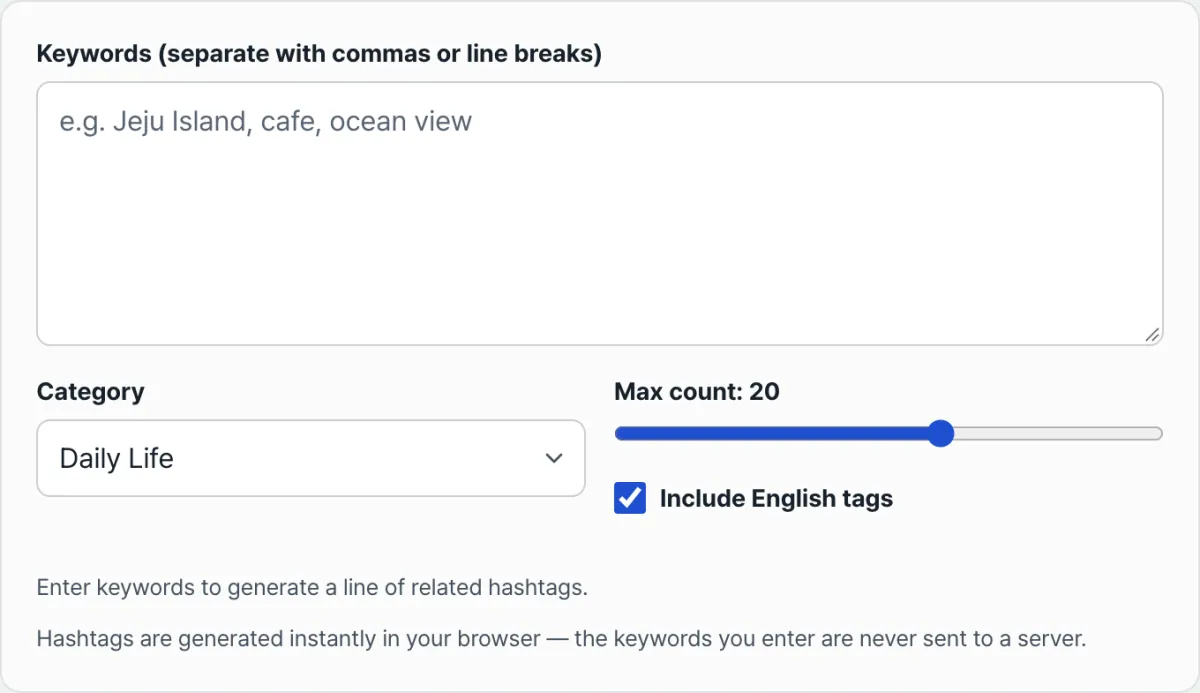
Pick a main keyword and a category, then copy your finished one-line hashtag set right away.
Key details at a glance
| Item | Details |
|---|---|
| Max generated | 30 (adjustable with a slider) |
| English tags | Include or exclude with the "Include English tags" option |
| Data handling | Generated instantly in your browser, nothing sent to or stored on a server |
Practical tips for reach
Where to put your hashtags and how often to change them are two questions that come up a lot in day-to-day posting.
- Caption vs. first comment: Word is that there isn't much difference in reach between putting hashtags at the bottom of your caption and putting them in the first comment. If you want to keep the caption clean, dumping them all in the first comment works fine.
- Mix fixed and rotating tags: Instead of copy-pasting the exact same set every time, swapping in a few keywords that directly relate to the post helps with account management.
Wrap-up
Hashtags aren't some complicated formula. They come from a simple rule: put a hash (#) in front of a keyword, then add category suffixes and common tags. Rather than repeating the same set, swapping some tags to match each post helps with account management.
Just pick a main keyword and a category, and let a tool that applies these rules automatically build the single-line set for you.
Pick a main keyword and a category, then copy your finished one-line hashtag set right away.
FAQ
How many hashtags can I generate at most?
Up to 30, matching Instagram's recommended limit, and you can lower it to whatever number you want with the slider.
I want to drop the English hashtags and keep only Korean ones.
Uncheck "Include English tags" and any tag containing letters gets filtered out, leaving only Korean tags.
Are my keywords sent to a server?
No. Hashtags are generated instantly in your browser, and the keywords you type are never sent to or stored on a server.
This article was adapted from our Korean original. Read the Korean original