
JSON Escape Explained: Turn Multi-line JSON Into One Line
Contents
If you paste multi-line JSON straight into a CLI argument or a .env file value, it breaks — because a handful of characters (backslash, double quote, newline) collide with the syntax of the place you're pasting into.
Replace each of those characters with its designated escape sequence, and you get a safe single-line string that carries the original content unchanged. This post walks through those substitution rules character by character.
In short ① Pasting JSON straight into a CLI argument or a
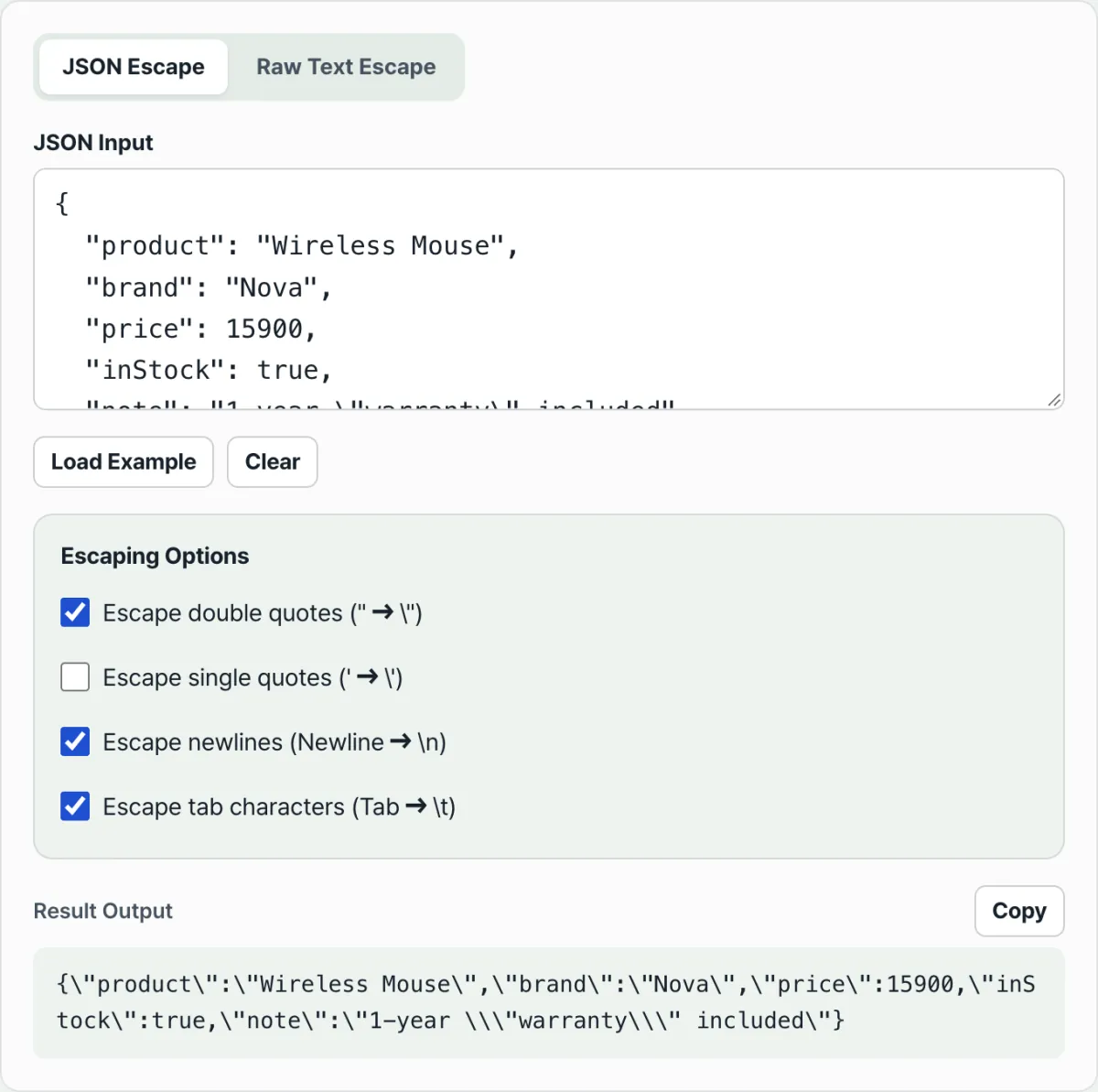
.envvalue breaks because backslashes, double quotes, and newlines collide with the destination's syntax. ② "JSON escape" mode validates withJSON.parseand then compresses the input to one line, while "Raw text escape" mode skips validation and escapes the input as-is. ③ Double quotes, newlines, and tabs are on by default and single quotes are off by default, so flipping the checkboxes makes the same input produce a different string.
Why does JSON break when you put it straight into a CLI argument or .env value?
Picture taking JSON you got from an API response or a config file and pasting it straight into a .env file after APP_CONFIG=. The original JSON is multi-line text with newlines and indentation, because that's easier for a human to read.
Drop that text into a spot that needs a single-line value, and it breaks in three places.
- Newlines:
.envfiles and shell variables read one line as one value. If there's a real newline in the middle of the value, the value ends there. - Double quotes: the convention is to wrap the whole value in double quotes, but the JSON inside is full of double quotes too. The parser sees the inner quote and decides the value is over.
- CLI arguments wrapped in single quotes: if a JSON string value contains an apostrophe (
'), a POSIX shell has no way to escape a single quote inside single quotes, so the argument closes right there.
So every destination that needs JSON as a single-line string — CLI arguments, .env values, a string field nested inside other JSON, string literals in source code — asks for the same rules.
Turn control characters like newlines and tabs into visible sequences. And put an extra backslash in front of the quote characters used as delimiters and in front of the backslash that does the escaping itself, to say "this character is just data, not syntax."
How to escape by hand without a tool
The escape rules aren't a secret known only to one program. They're a common character substitution table followed by JSON.stringify and most languages.
Run the code below in your browser dev tools console and you can reproduce by hand what the tool described in this post does.
To validate JSON syntax and minify at the same time, do this.
// Step 1: validate JSON syntax + minify to one line (strip indentation and newlines)
const minified = JSON.stringify(JSON.parse(rawInput));

// Step 2: character substitution. Backslashes have to go first, otherwise the
// backslashes you add later get substituted again.
const escaped = minified
  .replace(/\\/g, "\\\\")  // backslash → \\
  .replace(/"/g, '\\"')     // double quote → \" (optional)
  .replace(/\n/g, "\\n")    // newline → \n (optional)
  .replace(/\t/g, "\\t");   // tab → \t (optional)
If rawInput doesn't need to be valid JSON — say you just want to escape a log fragment or plain text as-is — skip step 1 and run only the step 2 substitution chain on the original string.
That's all "Raw text escape" mode does.
Wrap the result in double quotes and paste it into a CLI argument or a .env value, and it travels as one line with the original JSON's meaning intact.
Check it with our tool.
JSON mode validates and parses your input, then compresses it to one line. Plain text is escaped as-is, with no validation. Free to use, no install or sign-up.
Common points of confusion
Here's how the two modes differ, in a table.
| Item | JSON escape mode | Raw text escape mode |
|---|---|---|
JSON.parse validation | Yes (shows an error if it fails) | No |
| Minification (removing newlines and indentation) | Minified with JSON.stringify | Left exactly as input |
| Invalid JSON input | "Not valid JSON" error | Processed as-is, no error |
| What it applies to | Valid JSON text only | Any text |
Why toggling the checkboxes doesn't change the result
Of the four escape option checkboxes, which combinations actually change the output depends on the mode.
In JSON escape mode, the input goes through JSON.stringify first, and at that step JSON syntax has already turned newlines and tabs inside string values into two-character sequences like \n and \t.
So in JSON mode, the "Escape newlines" and "Escape tab characters" checkboxes don't change the result whether they're on or off. There are no real newline or tab characters left to replace.
Double quotes, single quotes, and Raw mode behave differently
By contrast, "Escape double quotes" does have an effect in JSON mode. The structural double quotes that wrap keys and values are ones JSON.stringify leaves in place.
"Escape single quotes" is also a character JSON syntax doesn't have, so JSON.stringify doesn't touch it — which means if a value contains an apostrophe, the checkbox state changes the result.
In Raw text escape mode there's no JSON.stringify step; the tool scans the input characters directly, so all four options show up in the result exactly as you toggle them.
One more thing: JSON mode parses the input into a value and then serializes it again with JSON.stringify, so a pointless decimal like 1.0 comes out as 1 and other formatting can shift slightly. If you need to preserve the literal text exactly, Raw mode is the safer choice.
When you see the "Not valid JSON" error
This error shows up when JSON.parse can't read the input as JSON syntax. The usual causes:
- A leftover comma after the last item (trailing comma)
- Keys or string values wrapped in single quotes (JSON allows double quotes only)
- Keys written without quotes
- Comments (
//,/* */) mixed in, which JSON doesn't have - Opening and closing brackets that don't match up
If any of these apply, JSON mode won't produce a result — it just shows the error. If you don't want to fix the syntax, switch to Raw text escape mode and it escapes the input as-is with no validation.
Summary
- Backslashes are always escaped, double quotes, newlines, and tabs are escaped by default, and single quotes only get escaped when you turn the option on.
- JSON escape mode validates with
JSON.parseand minifies too, but that process has already turned newlines and tabs inside string values into\nand\t, so those two checkboxes do nothing in JSON mode. - Raw text escape mode does no validation and no minification; it scans the input characters directly, so all four options show up in the result and it works on text that isn't JSON.
- The "Not valid JSON" error comes from JSON syntax violations like trailing commas, single quotes, or unquoted keys.
- You can reproduce the same rules yourself with nothing but
JSON.stringifyand a chain of regex replacements.
JSON mode validates and parses your input, then compresses it to one line. Plain text is escaped as-is, with no validation. Free to use, no install or sign-up.
Frequently Asked Questions
Should I use JSON escape or Raw text escape?
Use JSON escape mode if your input is valid JSON and you want it compressed while also checking that the syntax is correct.
Use Raw text escape mode if the input isn't valid JSON (a log fragment, a piece of code, broken JSON) or if you just want the original line breaks and indentation escaped without compression.
The result has double backslashes: is that an error?
No. Every escape sequence starts with a backslash ().
If the original already contained a backslash, that backslash is itself escaped and becomes \\. When the character that follows it (a double quote, for example) is escaped too, you can end up seeing backslashes in a row. Each backslash represents one separate escape, so the result is correct.
Why isn't a single quote escaped by default?
Because JSON syntax only wraps strings in double quotes and gives single quotes no special meaning.
That's why double quotes, line breaks, and tabs are on by default, while single quotes are off — they're only needed for specific destinations like shell scripts that wrap values in single quotes. Turn on the checkbox if you need them.
Do I have to add quotes myself when I put the result in a .env file or a CLI argument?
Yes. The tool only replaces characters inside the string. It doesn't add the outer quotes that wrap the whole value. When you put the result in a .env file or a CLI argument, wrap it in double quotes (or single quotes) yourself so it's read as a single value.
This article was adapted from our Korean original. Read the Korean original