
How to Flatten Nested JSON: Key-Merging Rules Explained
Contents
To move deeply nested JSON objects into Excel or CSV, you have to turn a hierarchy wrapped in several layers into a one-dimensional key-value structure that fits in a single table. That conversion is called flattening, and the reverse — turning a one-dimensional structure back into the original nested object — is called unflattening. Both are mechanical calculations that follow fixed rules, so once you know the rules you can reproduce them by hand without any tool.
Summary ① Keys of nested objects are joined into a "parent key + separator + child key" form to produce a one-dimensional structure. ② Arrays are not objects, so they are excluded from flattening and kept as the original value. ③ If the character you pick as the separator already appears inside an original key, unflattening will split that key apart unintentionally.
The problem with moving nested JSON into a table
API responses and config files often nest objects inside objects. For example, {"user": {"name": "John Smith", "address": {"city": "Seoul"}}} wraps address information one more level inside user information.
Copying that structure straight into Excel or CSV causes trouble. A table can hold only one value per cell, so an item like address, whose value is an entire object, either prevents the columns from being built properly or shows up as broken data.
That's why you need a one-dimensional structure where the parent and child keys are merged into a single column name, like address.city. Flattening is how you apply that conversion with exact rules instead of rebuilding it by hand every time.
The rules for converting by hand, without a tool
Flatten and unflatten each work by a single recursive rule. Follow the rule and you can convert small JSON by hand.
Flatten rules
If a key's value is a plain object (a {} shape that is not an array and not null), you go inside it and pull each child key up to the top level under a new name: "parent key + separator + child key." If the value is not an object (arrays included), you write it to the result under its original key.
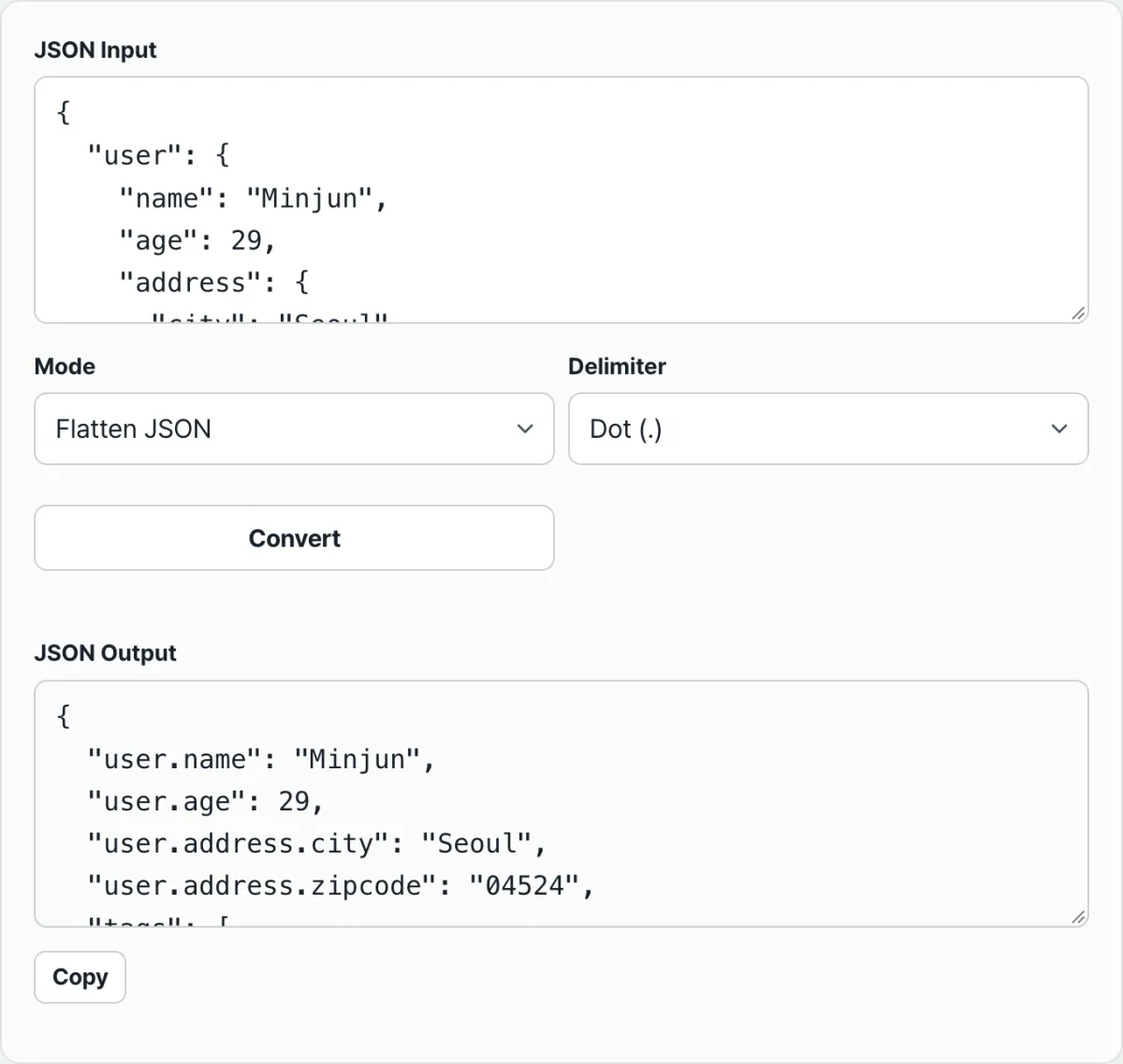
Say we flatten the following JSON with the dot (.) separator.
{"user": {"name": "John Smith", "address": {"city": "Seoul"}}, "tags": ["a", "b"]}user is an object, so we go inside. user.name becomes "John Smith", and user.address is another object, so we go in once more and user.address.city becomes "Seoul". tags is an array, not an object, so it stays as is.
{"user.name": "John Smith", "user.address.city": "Seoul", "tags": ["a", "b"]}Unflatten rules
The other direction splits each key on the separator, then walks those pieces in order to rebuild the nested object. As you follow the pieces one by one from the front, you create any level that doesn't exist yet, and you put the original value into the last piece.
Unflattening the flat data above splits user.address.city into the three pieces user, address, and city, creates an address object under user, and puts city: "Seoul" inside it. user.name joins the same user object, restoring the original nested structure exactly.
Check it with our tool.
The JSON you enter is never sent to a server. Flattening and unflattening happen entirely inside your browser.
The two easy places to get confused: arrays and separator choice
Two things trip people up most often. One is getting a different result than expected when an array is present, and the other is an unflattened result that doesn't match the original because of the separator you chose.
What happens when there's an array
Arrays first. Even when an array contains objects, as in {"users": [{"name": "John Smith"}, {"name": "Jane Doe"}]}, the value of users is itself an array, so it is excluded from flattening. It does not dig into the {"name": "John Smith"} object and expand it with an index like users.0.name; the array stays under the users key exactly as it was.
| Value type | How flattening handles it |
|---|---|
Plain object {} | Recurses into it and merges child keys as parent key + separator + child key |
Array [] (even with objects inside) | Does not recurse; keeps the original array as the value |
| String, number, boolean, null | Kept as is under the original key |
When the separator changes the result
Now separators. The character used to join keys during flatten is also used to split them again during unflatten. If that separator character already exists inside an original key, unflatten will break that key into more pieces than you intended.
For example, suppose you have flat data where the key itself contains a dot, like {"price.won": 15000}. Unflattening it with the dot (.) separator splits it into price and won, creating the nested object {"price": {"won": 15000}}, which was never part of the original intent.
This comes up often with keys that contain dots, such as version numbers (1.2.3), file extensions, or domain names. In those cases, pick a character that doesn't appear in the original keys — an underscore (_) or a slash (/), for instance — and you avoid the problem.
Recap
- Flattening recurses only into plain objects and creates new keys in the "parent key + separator + child key" form.
- Arrays aren't objects, so they aren't flattened; even when they contain objects, they stay as the original value.
- Unflattening is the reverse: it splits each key on the separator and rebuilds the nested object in order.
- Choose a separator that doesn't appear in the original keys so unflattening won't split them unintentionally.
- Malformed text is caught at the
JSON.parsestep and shown as an error instead of a conversion.
The JSON you enter is never sent to a server. Flattening and unflattening happen entirely inside your browser.
Frequently asked questions
Are objects inside an array flattened too?
No. If the value is an array, it's judged not to be an object, so it's excluded from recursion. Even if the array contains an object like {"name": "John Smith"}, it isn't expanded with an index like users.0.name; the array stays as the original value.
Which separator should I choose?
You can pick a dot (.), a slash (/), or an underscore (_), and the default is a dot. If that character already appears in the original key names, unflattening may split them unintentionally, so it's safer to choose a character that doesn't appear in your keys.
What happens to null values?
null isn't judged to be a plain object, so it isn't recursed into and stays as is under its original key. It isn't broken into child keys.
What happens if I paste invalid JSON?
If the format fails JSON.parse — a missing quote, a comma error, and so on — the conversion doesn't run. A red error message appears and the output panel is cleared. Check first that your source text is valid JSON.
This article was adapted from our Korean original. Read the Korean original