
Mesh gradient overlap order: which color shows on top
Contents
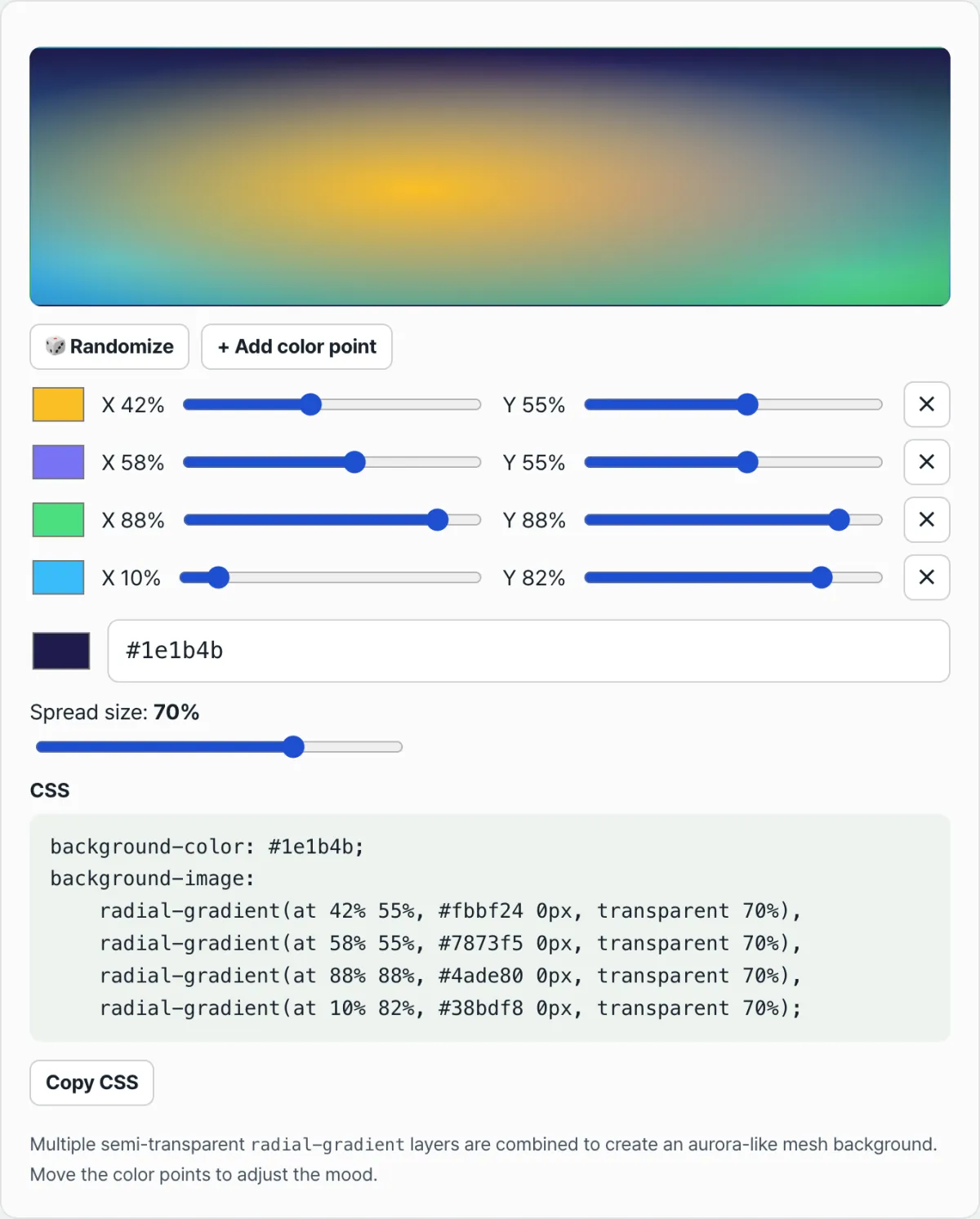
When you're building a mesh gradient background and move two color points close together, you'll notice the overlap always shows one color while the other seems to vanish. It's not random. Browsers follow a fixed order when they layer multiple background gradients. Once you know that rule, you can predict which point will end up on top.
Quick summary ① When you list multiple gradients in a background separated by commas, the first one is drawn on top, and the rest are layered beneath it in order. ② The Mesh Gradient Background Generator copies the order of the color point list on screen directly into that comma order, so points higher in the list actually appear on top. ③ Newly added color points always go at the end of the list (the bottom layer), so they can be hidden if they overlap existing points.
Why Colors Disappear Where Points Overlap: and Why It Matters
As you build a mesh gradient with 4 or 5 color points and nudge them around, two points will eventually overlap. At that spot, you often see one color clearly instead of a blend of both.
The tricky part is that "which color survives" feels different every time. In some combinations, the point you added later appears on top. In others, the point you added first does. But this isn't random. The result is already determined by the order in which you added the color points.
How Background Layers Stack: and How to Check
You can check this without any tool by using CSS itself. When you list multiple gradients or images in background-image, separated by commas, the browser paints the list from top to bottom. The first value is drawn on top (the layer closest to you), and later values are layered beneath it.
To see it yourself, paste two circles at the same center into Notepad or the Styles panel in your browser's developer tools, like this:
background-image:
  radial-gradient(circle at center, red 0%, transparent 60%),
  radial-gradient(circle at center, blue 0%, transparent 60%);
Save it, and the whole circle looks red, because the red line comes first. Swap the two lines, move blue to the front, and save again. The position hasn't changed, but now the whole circle turns blue. You didn't touch the colors or positions—only the order—and the result flipped.
Check it with our tool. Instead of writing this CSS by hand every time, you can overlap points with sliders and see the result instantly.
Free · no sign-up · generates CSS right in your browser
Where People Get Stuck
| Symptom | Cause |
|---|---|
| The same color always shows at the overlap | That color point is earlier in the list, so it's drawn on top of the other background layers. |
| I added a new color point but can't see it | New points are appended to the end of the list and sit on the bottom layer, so they're hidden wherever they overlap existing points. |
| The overlap pattern stays the same when I click Randomize | It only randomizes colors and positions. The order of the points—and therefore the stacking order—stays the same. |
| Increasing the spread size makes overlaps more obvious | Spread size is the radius each point's color expands to. A larger value increases the area where it overlaps neighboring points. |
The Takeaway
- When you list multiple gradients in a background separated by commas, the first one is drawn on top, and the rest are layered beneath it in order.
- The Mesh Gradient Background Generator copies the order of the color point list on screen directly into the CSS comma order, so you can tell which color will show at an overlap just by looking at the list.
- Newly added color points always go at the end of the list, on the bottom layer.
- This isn't specific to our tool. It's how CSS
background-imageworks, so you can confirm it with your own code by changing only the order.
Free · no sign-up · generates CSS right in your browser
Frequently Asked Questions
How do I know which color will appear on top where points overlap?
In the background-image list, the gradient listed first is drawn on top, and the ones after it are layered beneath it in order. The Mesh Gradient Background Generator copies the order of the color point list on screen directly into that comma order, so a point higher in the list is also drawn on top on screen.
Why can't I see a color point I just added?
New color points are always added to the end of the list. In a comma-separated background list, the end is the bottom layer, so if the new point overlaps an existing point, it can be hidden behind it. Move it to an empty spot where it doesn't overlap, and it will appear right away.
How can I change the top-to-bottom order in an overlapping area?
Change the order of the lines listed in background-image in the CSS you copied. Comma-separated background lists stack from top to bottom in any CSS, so move the line with the color you want to the front, and that color will rise to the top. The tool doesn't have a drag-to-reorder feature on screen, but you can delete a point that's on top and recreate it. It gets pushed to the back, which effectively changes the order.
This article was adapted from our Korean original. Read the Korean original