
Markdown Comment Removal: Regex Formula and Build-Time Stripping
Contents
When you're polishing an open-source README.md on GitHub or collaborating on a translation of technical docs, it's common to hide internal notes or translator reference sentences in Markdown comments.
But when you build the final static build and ship it, or publish the Markdown document to regular readers, those internal HTML comments sometimes stay in the text source and get exposed. This post covers the regex logic for picking out and removing only the HTML comments inside a Markdown document, plus the edge cases people often miss.
1. How the Regex for Removing Markdown HTML Comments Works
The comment format in the Markdown spec is the same <!-- comment content --> structure as HTML. Here's the regex that matches only that structure and removes it from the whole document.
/<!--[\s\S]*?-->/gWhat the Regex Does
<!--,-->: The opening and closing boundaries of a comment.[\s\S]*?: Matches both newline characters (\s) and non-newline characters (\S), so it also catches multi-line comments that contain line breaks.- The question mark (
?) makes the match non-greedy. Without it, when a document has several comments, you get a nasty bug: everything from the start of the first comment to the end of the last comment gets wiped out in one go.
Pass this regex to a string replace function and you get a result with only the comments removed.
cleanedText = originalText.replace(/<!--[\s\S]*?-->/g, "")2. Adding Comment Removal to Your Build Process
In practice, you automate this by putting the replace step into the build stage that converts Markdown to HTML.
// Example Markdown pipeline for a static site such as Next.js
function markdownLoader(content) {
  // Strip HTML comments right before compiling
  // so internal wording never ends up in the build output.
  const cleanContent = content.replace(/<!--[\s\S]*?-->/g, "");
  return marked.parse(cleanContent);
}
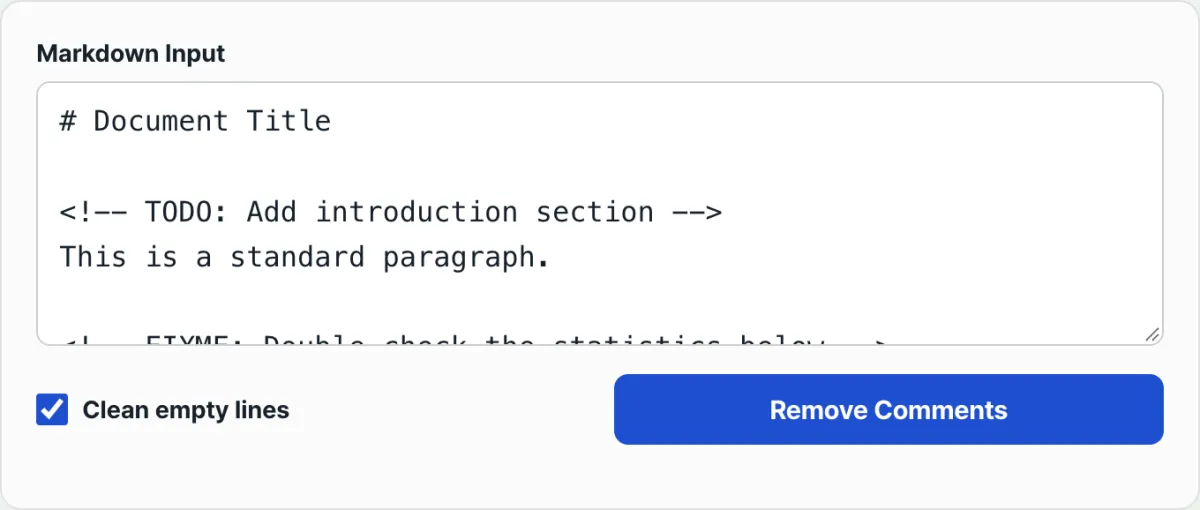
You don't need to hunt down comments by eye with Ctrl+F in your editor every time, or manually check before pushing to Git. Paste your source text into Markdown Comment Remover below, and it uses the same regex to pick out and remove only the comments, ready to copy. If you don't want blank lines left behind where comments were removed, just turn on the "Clean up blank lines" option, and the screen also shows you how many comments were removed.
Paste in the Markdown you want to clean up, click Remove Comments, and get a publish-ready copy that's safe to share outside your team.
3. Edge Cases People Often Miss When Removing Comments
| Situation | What to watch out for |
|---|---|
When example code contains the literal string <!-- | The <!-- string you wrote to demonstrate code gets deleted too. Set aside the code block areas first, then restore them after removing comments. |
Front matter in Jekyll, Astro, etc. (the --- section at the top of a document) | The YAML metadata at the very top of the document can fall inside the comment regex range, so you need to identify the front matter area line by line and exclude it. |
| Documents with several comments scattered apart | If you leave out the non-greedy (?) match, then as explained above, everything from the first comment to the last comment is deleted in one sweep. |
Summary
You can remove Markdown HTML comments with the /<!--[\s\S]*?-->/g regex. Don't forget the non-greedy match, or you risk losing the body text in between when a document has multiple comments. And handle the <!-- strings inside code examples and the front matter area separately to stay safe. If running the regex yourself is a hassle, paste your source into the tool and see the result right away.
Paste in the Markdown you want to clean up, click Remove Comments, and get a publish-ready copy that's safe to share outside your team.
Frequently Asked Questions
Does it still get removed if the comment contains Markdown syntax?
Yes. Whatever is between <!-- --> is removed as a whole, regardless of format. Even if it mixes Markdown syntax with plain text, it's deleted based on the comment boundaries (<!--, -->).
Can I use the same regex on HTML files?
Yes. HTML uses the same comment syntax, so the same pattern works as-is. That said, HTML can contain similar strings inside <script> and <style> tags, so it's safer to double-check the edge cases there than you would with Markdown.
This article was adapted from our Korean original. Read the Korean original