
async vs defer: how script loading and execution differ
Contents
When you're optimizing web page performance and improving Core Web Vitals like Largest Contentful Paint (LCP), there's no more effective approach than controlling how the browser reads and executes JavaScript files.
The three most common options for controlling the parsing flow of an HTML document and when external JS files are downloaded and executed — default, async, and defer — differ decisively in whether they block page rendering. This article compares the execution mechanics of each loading method.
How each script loading method controls the timeline
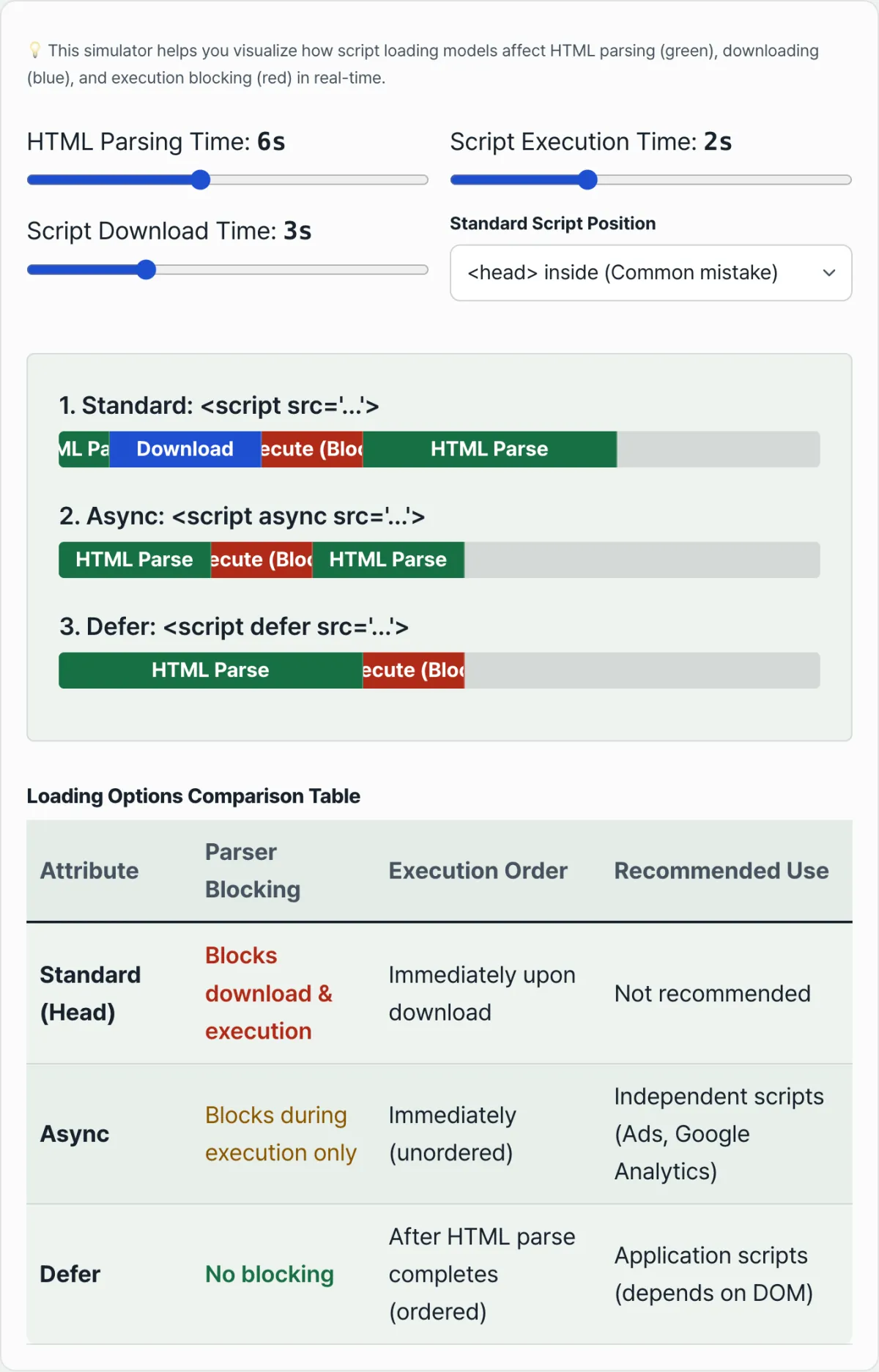
When the browser parses HTML and hits a <script> tag, the parsing thread takes one of three paths depending on the attribute on that tag (default, async, or defer).
① Normal script (<script src="app.js">)
HTML parsing stops immediately (parser block), the JavaScript file downloads from the network, and then the code runs right away. Parsing only resumes after execution finishes completely, so if the script is large or the network is slow, the page appears late — that's the bottleneck.
② Async script (<script async src="app.js">)
The script downloads in parallel with HTML parsing. However, as soon as the download finishes, HTML parsing stops and the JavaScript runs. Parsing only continues after execution completes, so scripts run in whatever order they finish downloading. In projects with tangled dependencies, that's a real risk of breakage.
③ Defer script (<script defer src="app.js">)
The download happens alongside HTML parsing, but execution is postponed until parsing finishes and the DOM tree is complete (right before DOMContentLoaded). It doesn't block HTML rendering, and scripts run in the order they appear in the code, so there's the least chance of execution order breaking.
A side-by-side comparison of the loading options
Here's a summary of how the browser behaves with each option.
| Attribute | Download timing | Execution timing | Parser blocking | Execution order guaranteed |
|---|---|---|---|---|
| Normal | Pauses parsing, then downloads | Runs immediately after download | Yes (blocks both download and execution) | Guaranteed in markup order |
| Async | Downloads in parallel with parsing | Runs immediately after download | Partially (blocks only at execution) | Download completion order (non-sequential) |
| Defer | Downloads in parallel with parsing | Runs after HTML parsing completes | No (fully non-blocking) | Safely guaranteed in markup order |
If the table alone doesn't make the differences clear, it's faster to drag sliders for parse, download, and execution time and watch the timeline change.
Try it yourself with our tool. Move the sliders for parse, download, and execution time and compare in real time how the timeline bars change across Normal, Async, and Defer.
Run the live simulation that visually renders HTML parsing plus script download and execution, and feel the real difference in script loading speed.
When to use which in practice
- Independent third-party scripts: async
Statistics-collection JS files that don't touch the page's core DOM structure and work on their own — Google Analytics (GA4), ad pixels, heatmap analytics tools — should load with the
asyncattribute. Even if the load is a bit delayed, they run in parallel without blocking other scripts. - Core framework files like jQuery or React: defer
When lower-level business logic scripts depend entirely on a shared framework library, a broken execution order throws errors like
Uncaught ReferenceError: $ is not defined. With thedeferattribute, everything binds safely in declaration order after parsing finishes.
Summary
- Normal scripts block parsing for both download and execution.
- Async parallelizes only the download; parsing stops at execution time, and execution order isn't guaranteed.
- Defer parallelizes the download and postpones execution until parsing finishes, so scripts run safely in the order written in the markup.
- Which attribute to use depends on whether the script depends on other scripts or on the DOM.
Run the live simulation that visually renders HTML parsing plus script download and execution, and feel the real difference in script loading speed.
Frequently asked questions
What happens if I use async and defer together?
If async is present, defer is ignored. The browser treats it as an async script, stopping parsing and running it as soon as the download completes.
Do type="module" scripts behave differently by default?
<script type="module"> runs deferred by default, the same as defer, even without any attribute. If you explicitly add async, modules switch to async behavior too.
This article was adapted from our Korean original. Read the Korean original