
SameSite cookie setup: 6 attributes and how each one works
Contents
No matter how many times you write HttpOnly into document.cookie, it never makes it into the real cookie. That isn't a mistake — it's the spec. HttpOnly can't be set from browser JavaScript at all, because it's only valid in the HTTP response header the server sends.
This article covers how the six attributes — Domain, Path, Max-Age, SameSite, Secure, and HttpOnly — actually combine inside a cookie string, and why a document.cookie assignment and a Set-Cookie header produce different results, following exactly how the code behaves.
Summary ① HttpOnly is only valid in the server's Set-Cookie header, and you can never set it through document.cookie. ② Domain and Path decide where the cookie gets sent, while Max-Age sets the expiration time in seconds. ③ When parsing a cookie string, split it on semicolons (;), then cut each segment at only the first equals sign (=) so an "=" inside a value doesn't get broken.
Where people get stuck building a session cookie
If you've ever built a login session cookie by hand, you've probably hit this. You type document.cookie = "session=abc123; HttpOnly" into the browser devtools console, then read document.cookie again, and the word HttpOnly is nowhere to be found.
It's not a typo, and it's not a browser bug. document.cookie only works inside the JavaScript execution context, while HttpOnly is defined as "keep JavaScript from reading or writing this cookie."
If a script could put that restriction on itself, the restriction would mean nothing. So the browser silently ignores any HttpOnly marker that comes in through document.cookie.
When a SameSite=None cookie isn't sent
A similar snag happens when the cookie goes missing on cross-site requests. If you set SameSite to None for a payment widget or an external iframe and the cookie still isn't sent, the usual cause is a missing Secure attribute.
Modern browsers won't store or send a SameSite=None cookie at all if Secure isn't there too.
How to build a cookie string by hand, without a tool
Once you know the rules, you can build a cookie string by hand and get it exactly right. Here's the order.
- Encode key=value first. Cookie strings use the semicolon (;) and the equals sign (=) as delimiters, so if a value contains either one, a space, or Korean text, you need to run it through URL encoding to keep the string intact.
- Join only the attributes you need with "; ". Add them as name=value pairs like
Domain=example.com,Path=/, andMax-Age=3600. Attributes with no value (Secure, HttpOnly) are just the name. - HttpOnly has a different destination. If you want to run the string in JavaScript, assign it as
document.cookie = "...", but in that case HttpOnly is a server-header-only attribute that gets ignored even if you include it. If you want to send it as a server response, put it straight into an HTTP header asSet-Cookie: ..., and HttpOnly works as intended.
How to choose Max-Age, Domain, and Path values
You only need one of Max-Age or Expires. Max-Age takes an integer for how many seconds from now the cookie expires, and if you leave the value out, the cookie becomes a session cookie that disappears when you close the browser window. Expires requires an absolute date as a string, so you have to get the format right, which is why Max-Age is more common.
If you omit Domain, you get a host-only cookie tied exactly to the host you're on, so it isn't sent to subdomains. Set it explicitly, like Domain=example.com, and the cookie rides along on requests to example.com and to subdomains such as sub.example.com.
If you omit Path, the browser calculates a default from the path of the request that created the cookie. Set Path=/ and the cookie is sent on every path under the domain; narrow it to something like Path=/account and it's only sent on that path and its subpaths. You can check this calculation right in our free tool.
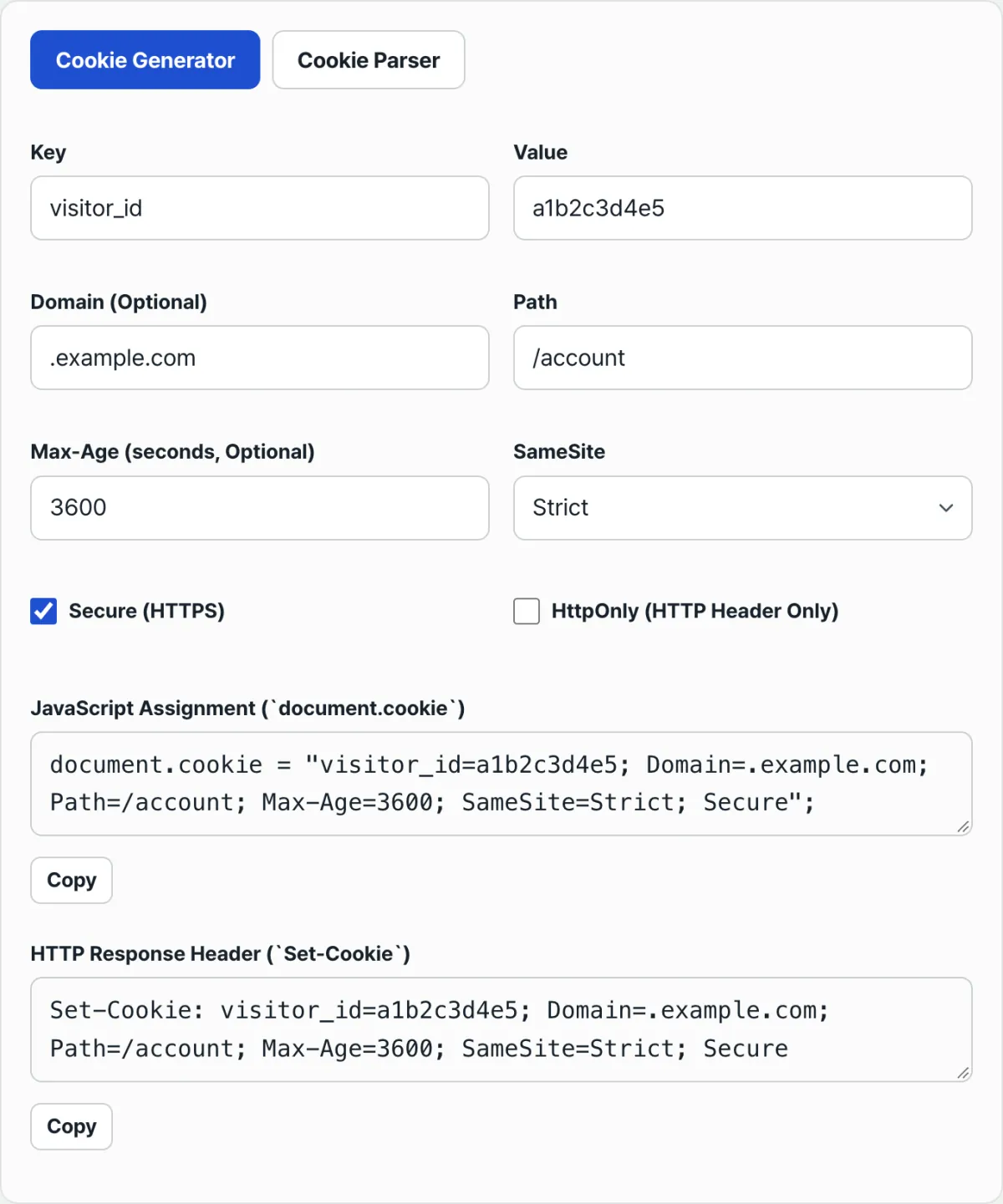
Enter the key/value plus Domain, Path, Max-Age, SameSite, Secure and HttpOnly, and the tool generates the document.cookie statement and the Set-Cookie header string at the same time.
Common points of confusion
SameSite and Secure move as a set. Using SameSite=None means you're willing to send the cookie on cross-site requests, which also means more chances for the cookie to be exposed. That's why browsers reject a cookie that has SameSite=None and no Secure.
It's normal for the document.cookie output line to show no trace of HttpOnly even after you tick the HttpOnly box. HttpOnly exists to keep JavaScript out, so putting it in a string that JavaScript will execute is pointless to begin with.
| Attribute | What it controls | Value format | If omitted |
|---|---|---|---|
| Domain | Which hosts the cookie is sent to | example.com | Sent only to the exact host you're on (subdomains excluded) |
| Path | Which URL paths the cookie is sent to | /account | Limited based on the request path that created the cookie |
| Max-Age | How many seconds until it expires | 3600 (in seconds) | Session cookie (deleted when the browser closes) |
| SameSite | Whether to send it on requests from other sites | Strict / Lax / None | Varies by browser, but most modern browsers treat it as Lax |
| Secure | Whether to send it only over HTTPS | Name only, no value | Sent over HTTP too |
| HttpOnly | Whether JavaScript can read the cookie | Name only, no value; header only | Readable through document.cookie |
Easy-to-miss details when parsing a cookie string
Values copied from browser devtools sometimes come with a Cookie: prefix. Strip that prefix before parsing, or the first key gets misread as Cookie itself.
When you split each segment on the equals sign (=), cut at only the first one. Some token values use equals signs as padding, and splitting at every equals sign chops the value off in the middle.
Recap
- Domain and Path set where the cookie gets sent; Max-Age sets when it expires, in seconds.
- To use SameSite=None, turn on Secure too, or the browser will reject the cookie.
- HttpOnly is only valid in the server's Set-Cookie header. You can't set it or clear it through document.cookie.
- When parsing a cookie string, drop the
Cookie:prefix first, split on semicolons, then cut each segment at only the first equals sign so values stay intact.
Enter the key/value plus Domain, Path, Max-Age, SameSite, Secure and HttpOnly, and the tool generates the document.cookie statement and the Set-Cookie header string at the same time.
Frequently asked questions
Can I read or modify an HttpOnly cookie with JavaScript?
No. HttpOnly is defined as the attribute that blocks JavaScript access, so the cookie won't appear in document.cookie and overwriting its value won't take effect. Only the server can set or change an HttpOnly cookie, through the Set-Cookie header in an HTTP response.
I set SameSite=None and the cookie still isn't being sent. Why?
Check whether the Secure attribute is there too. Modern browsers won't store or send a SameSite=None cookie if Secure is missing. Turning on Secure in an HTTPS environment fixes it.
What's the difference between Max-Age and Expires?
Max-Age is relative: you write an integer for how many seconds from now the cookie expires. Expires is absolute: you write the expiration time as a date string. If you set neither, the cookie becomes a session cookie and is deleted when you close the browser.
Can I put spaces or non-English characters in a cookie value as-is?
If you put them in as-is, they can collide with delimiters like the semicolon (;), the equals sign (=), and spaces, breaking the string. It's safer to run the value through URL encoding, put the safe characters into the cookie string, and decode it again when you read the value back.
This article was adapted from our Korean original. Read the Korean original