
How to Split People Into Teams: Team Sizes and Remainders
Contents
You may have been asked to split people into groups of five for a gathering or field day. You ran a team generator, and the results included a team of four. That can be confusing.
Here's the short answer: it's not a bug. The tool first converts the team size you set into a number of teams. Then it divides everyone as evenly as possible across those teams. That's why this is a normal result.
Summary ① Even if you set a team size, the tool first calculates how many teams are needed. Then it redistributes everyone evenly across those teams. ② If the headcount doesn't divide evenly by the number of teams, the remaining people are added one at a time to the first teams. ③ Who ends up on which team is separate from this calculation. It is randomized fresh every time.
Why you get a different result even when you set an exact team size
Take 22 people and choose “5 people per team.” At first glance, you'd expect four teams of five and one team of two left over.
But the actual result is two teams of five and three teams of four. The tool first works out how many teams are needed to hit the target size of five. Then it divides the full group evenly across that many teams.
How it works: check the math by hand before you use the tool
Whether you start with the number of teams or the team size, all you need is the quotient and remainder from division. If you can tell which of the two cases below applies, you can figure out how many people will be on each team before you assign any names.
When splitting by number of teams
Divide the total headcount by the number of teams. The quotient is the base size of each team. The remainder is handed out one person at a time, starting with the first teams.
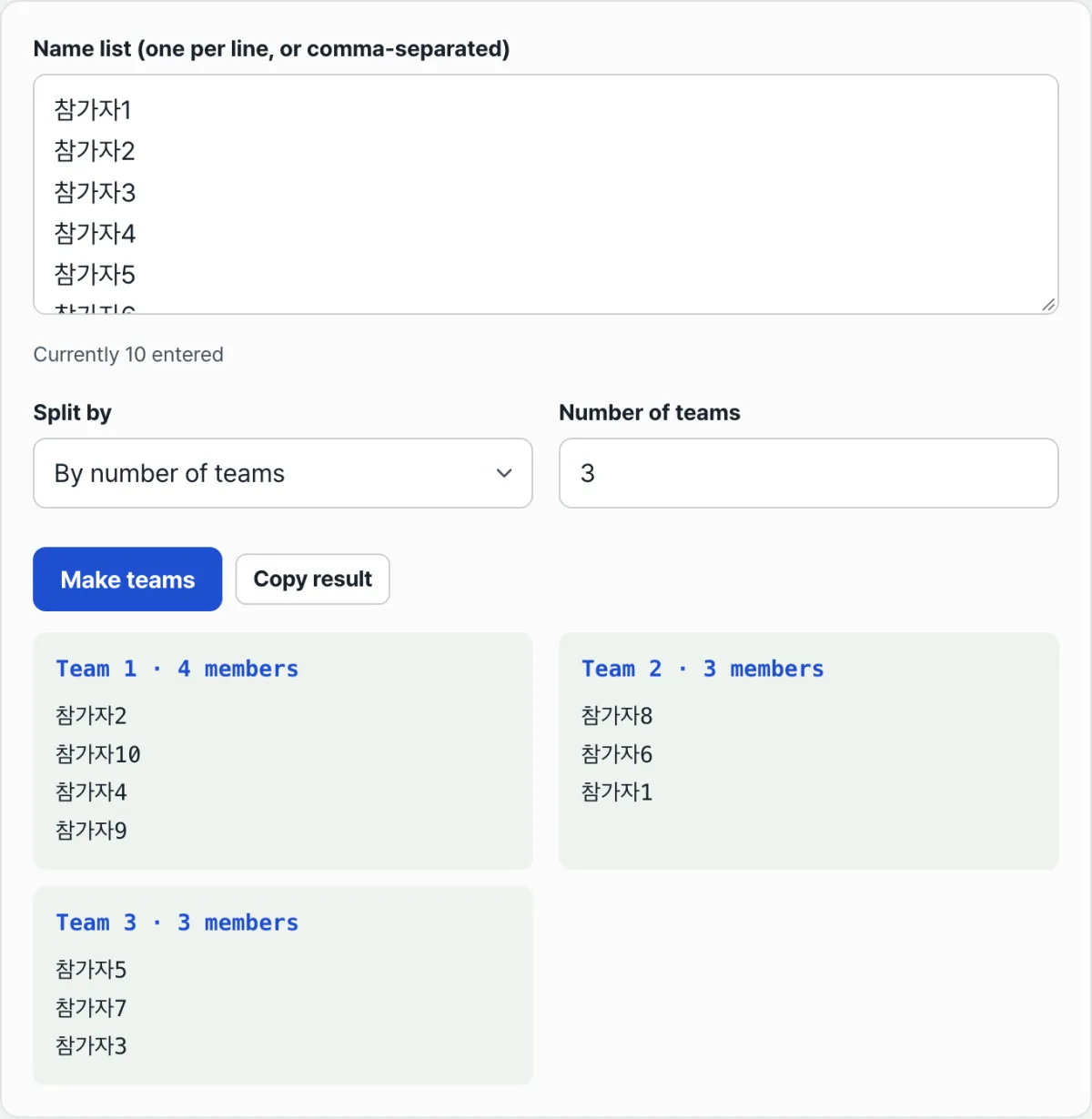
For example, 10 people in 3 teams: 10 ÷ 3 has a quotient of 3 and a remainder of 1. The first team gets 4 people, and the other two teams get 3 each.
When splitting by team size
This takes one extra step. First, divide the total headcount by your target team size and round up to get the number of teams.
Then apply the same quotient-and-remainder rule to that number of teams. For 22 people at “5 people per team,” 22 ÷ 5 rounded up gives 5 teams. Dividing 22 across 5 teams gives a quotient of 4 and a remainder of 2, so you get two teams of 5 and three teams of 4.
Check it with our free Random Team Generator. Once you're dealing with dozens of people, figuring out the quotient and remainder is the easy part. Placing each name in order is the tedious part.
Free · No sign-up · Works right in your browser
Common sticking points
| Situation | What actually happens |
|---|---|
| You set 5 people per team, but some teams have 4 | The tool rounds up to determine the required number of teams, then splits everyone evenly within that count, so some teams end up one person short. |
| You enter more teams than people (for example, 3 people in 5 teams) | The number of teams is automatically reduced to the total headcount (each team is guaranteed at least 1 person). |
| You mix commas and line breaks when entering names | Names are recognized the same way whether they are separated by commas or line breaks. |
| You enter the same name twice | Both entries are treated as separate people; duplicates are not removed. |
The bottom line
Dividing people into teams — whether you start with the number of teams or the team size — comes down to the quotient and remainder of division.
The remaining people are always added one at a time to the first teams. No matter how the teams are formed, the difference in size between any two teams is never more than one person.
Who goes on which team is separate from this headcount rule. It is randomized fresh every time.
Free · No sign-up · Works right in your browser
Frequently asked questions
Can I lock the team size to the exact number I enter?
No. This method is designed for even distribution, keeping the difference between teams to at most one person. The number you enter will not stay fixed through the last team.
If you need exact groups of 5 with the last team taking whoever is left, you'll need to copy the results and split them yourself in order.
Can I see right away how many people have been entered?
Yes. The number of people currently recognized is shown in real time below the name list input. Blank lines and lines with only spaces are not counted.
Can I paste the results directly into KakaoTalk or a document?
Yes. Press the Copy Results button, and the team numbers, headcounts, and name lists are copied as line-separated text. You can paste it straight into a messenger app such as KakaoTalk or WhatsApp, or into a document.
Are the names I enter saved on a server?
No. Entering the list, splitting the teams, and copying the results all happen in your browser. No names are sent to or stored on a server.
This article was adapted from our Korean original. Read the Korean original