
Twitter Thread Splitter: Why 1/n Numbering Breaks 280
Contents
When you split a long piece of writing into a Twitter (X) thread, the first idea that often comes to mind is, "Why not just cut it mechanically every 280 characters?" In practice, you run into two problems right away. Words get cut in half and carry over awkwardly into the next tweet. And if you add a number like "(1/12)" at the end, a tweet you just filled to the limit goes over.
The second problem is especially tricky. The moment you add numbering, the character count itself changes.
Summary ① Cutting every N characters splits words in half and makes the break into the next tweet feel unnatural. ② A number added later, such as "(9/9)", also takes up characters, so some tweets can go over the limit after you add it. ③ When the tweet count goes from one digit to two, the length of the number label itself changes. This creates a circular problem: how many tweets you'll have and how many characters fit in each tweet determine each other.
Why you shouldn't cut words in half
If you chop mechanically to fit the character limit, the last character of one tweet and the first character of the next split a word that used to be whole. To the reader, the sentence feels abruptly cut off. And if someone pulls out a single tweet for search or quotation, it may not make sense on its own.
The principle of natural splitting is simple. If adding the next whole word to the tweet you're filling would go over the limit, leave that word out and move it to the next tweet. In other words, change the cutoff rule from "character count" to "word boundaries." There is one exception: a single very long URL or hashtag with no spaces that is itself longer than the limit. In that case, you have no choice but to force a break inside that word, character by character.
Why adding numbers means recalculating
Splitting the text along word boundaries isn't the end. If you plan to add a sequence number like "(1/12)" to the end of each tweet, that label takes up characters just like the tweet body. Add 6–7 characters for the number to a tweet you just filled to the limit, and that tweet goes over.
So the order has to be reversed. Instead of splitting first and adding numbers afterward, subtract the characters the number will take from the limit in advance, then split again using that smaller limit. But there's a subtler problem here. If you have 9 tweets, the number is 6 characters, like "(9/9)". If splitting again increases the count to 10 tweets, the number becomes 7 characters, like "(9/10)", so you need one more character. A longer number label means a smaller limit. A smaller limit can mean more tweets. And if the count crosses from two digits to three, the number label can get longer again.
In other words, you need to know "how many tweets the text will split into" to know "how many characters the number will take." But you also need to know "how many characters the number will take" to accurately calculate "how many tweets the text will split into." It's a circular relationship. In practice, after a few rounds these values reliably settle at a point where they no longer change (a fixed point). So it's enough to repeat the process a few times: split, check the number length, and split again with that length accounted for.
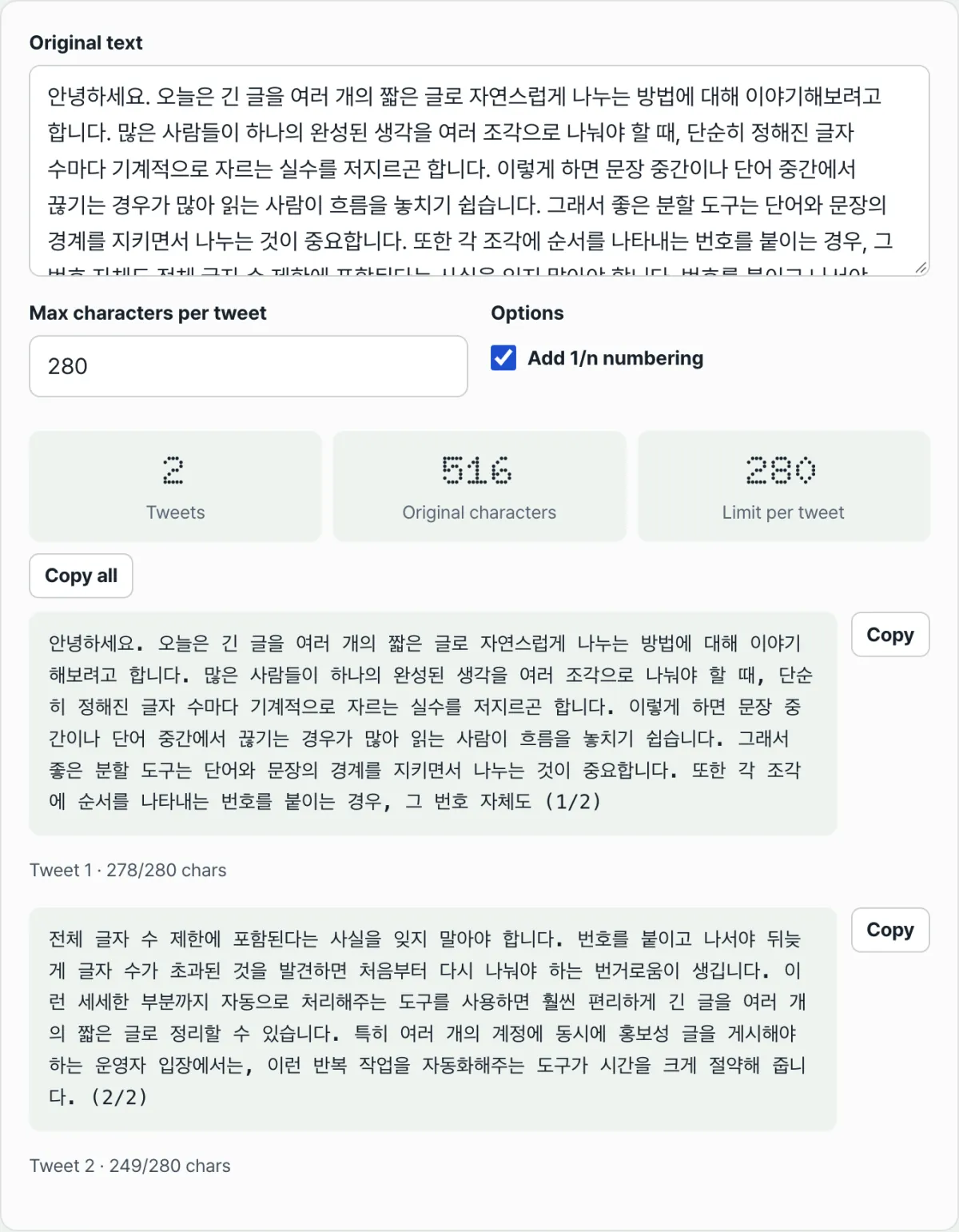
A Twitter Thread Splitter that takes your pasted text, splits it at word boundaries automatically, and factors in the 1/n numbers so you can see right away whether any tweet goes over the limit
What this tool actually does
Twitter Thread Splitter implements the two principles described above exactly. Paste text into the "Original text" box, and it splits the text into tweets within the per-tweet limit while respecting word boundaries. It breaks a word character by character only when a single word is longer than the limit.
Turn on "Add 1/n numbering," and it calculates the length of the number label based on the tweet count, subtracts that from the limit, and splits again. If that changes the tweet count or the number of digits in the label, it repeats the process until the values stop changing. As a result, no tweet goes over the limit after numbering is added.
One thing to be clear about: "Max characters per tweet" in this tool is a plain character count that you set yourself. The default is 280, but the tool does not fully reproduce the detailed weighting Twitter (X) actually applies to links, emoji, and Korean text. To find out exactly how many characters a tweet will count as when you actually post it, the most accurate method is to check Twitter's own character counter. This tool only deals with the splitting problem: given a character limit you already know, how do you split the text naturally? On the results screen, each tweet shows "Tweet n · actual characters/limit characters," and any tweet over the limit is immediately shown in red. If you want to copy everything at once, click the "Copy all" button. If you want to copy tweets one at a time, click the copy button next to each tweet.
Recap
- If you cut mechanically to fit the character limit, words get split in half and carry over awkwardly into the next tweet, so split along word boundaries instead.
- Numbers like "(1/12)" also take up characters, so adding them after splitting can push tweets over the limit.
- When the number of digits in the tweet count changes, the length of the number label changes too. This creates a circular relationship where the count and the label length determine each other — you need a few rounds of calculation to find a stable value.
- The character limit in this tool is a plain character count that you set. It does not reproduce Twitter's actual weighting for links and emoji.
- Twitter Thread Splitter handles word boundaries and number-length recalculation automatically, and immediately highlights any tweet that goes over the limit in red.
A Twitter Thread Splitter that takes your pasted text, splits it at word boundaries automatically, and factors in the 1/n numbers so you can see right away whether any tweet goes over the limit
Frequently asked questions
Does this tool account for Twitter's actual character counting rules, including weighting for Korean, emoji, and links?
No. This tool counts plain characters against the "Max characters per tweet" value you set. It does not reproduce Twitter's detailed rules, such as replacing links with a fixed-length URL or counting some characters differently. To get the exact character count for a real post, the most accurate method is to check Twitter's own character counter.
Can adding numbers push a tweet over the limit?
Not in this tool. It subtracts the length of the number label from the limit in advance and splits again, repeating until the values stabilize. So the final results include the numbers and stay within the limit. If you split the text by hand without the tool and add numbers at the end, however, the problem can still happen.
Why do some tweets end short of the limit?
Because it respects word boundaries. If adding the next whole word would go over the limit, it moves that word to the next tweet instead of forcing it in. As a result, a tweet may end slightly short of the limit. That's intentional, to keep words from being cut.
Can I change the character limit per tweet from 280 to another number?
Yes. The "Max characters per tweet" field defaults to 280, but you can change it to another number. Adjust it when you want shorter tweets with some room to spare or need to match another platform's limit.
This article was adapted from our Korean original. Read the Korean original