
X (Twitter) 280-Character Limit: How the Count Actually Works
Contents
This is for anyone who's been writing in Korean on X (formerly Twitter) and hit the wall at "half of 280 characters" with plenty of room to spare. Here's the short answer: X's 280 is a weighted total, not a character count. Every Korean character counts as 2.
So if you write only in Korean, you hit the limit at 140 characters. Links follow a different rule and count as 23 characters no matter how long the address is.
Summary ① X's limit is a weighted 280. The default weight is 2, and only certain ranges—Latin letters, numbers, basic punctuation, and similar—count as 1. ② Korean, Chinese characters, kana, and emoji all count as 2, so if you write only in Korean you're capped at 140 characters. ③ URLs are wrapped in t.co, so they always count as 23 characters regardless of their real length.
Why does it stop at half when the limit is 280?
The classic case: you're writing an announcement in Korean, the input box stops accepting text, and you count it—about 140 characters. Type the same content in English and you get the full 280.
It's not a bug. It's by design. X assigns a weight to each character and checks whether the total stays at or under 280. It's not counting characters; it's adding up weights.
The default weight is 2. Only a few defined ranges count as 1. Korean falls outside those ranges, so it counts as 2.
This 280 limit applies to standard accounts. With a paid X subscription you can post much longer content per post, and in that case only the beginning shows in the timeline while the rest collapses behind a "Show more." The rules below cover cases where the 280 limit applies.
How to count by hand, no tool needed
There are only three rules, so once you know them you can estimate by hand.
Step 1: Decide whether each character is 1 or 2
According to the character weight configuration file X has published, there are only four code point ranges with a weight of 1. Everything else defaults to 2.
| Code point range | What's included |
|---|---|
| U+0000 to U+10FF | English letters, numbers, basic punctuation, spaces, Latin Extended, Greek, Cyrillic, etc. |
| U+2000 to U+200D | Various space characters, zero-width combining characters |
| U+2010 to U+201F | Hyphens and dashes, curly quotes |
| U+2032 to U+2037 | Prime symbols |
The thing to notice here is that the first range cuts off at U+10FF. The Hangul Jamo block starts right after that, at U+1100, and the precomposed Hangul we actually type ('가' is U+AC00) sits much later. In other words, Korean doesn't fall into any range that counts as 1.
Chinese characters, hiragana, katakana, and emoji count as 2 for the same reason. English letters, numbers, spaces, periods, and commas count as 1.
Step 2: Swap each URL for 23
X wraps every link in your post in a t.co short URL. So whether the original address is short or long, it counts as 23 characters each.
https://example.com is 23, and so is an address with a long path tacked onto it. Two links make 46.
Step 3: Emoji count as 2, combined or not
Each emoji counts as 2. An emoji with a skin tone, or a family emoji built by combining several emoji, still counts as 2 even though it looks like a single character.
Here's what these three rules look like in code. Paste this into the console in your browser's developer tools (usually F12) and you can check right away.
const W = (c) =>
  (c <= 0x10FF || (c >= 0x2000 && c <= 0x200D) ||
   (c >= 0x2010 && c <= 0x201F) || (c >= 0x2032 && c <= 0x2037)) ? 1 : 2;

const weighted = (s) => [...s].reduce((n, ch) => n + W(ch.codePointAt(0)), 0);

weighted("안녕하세요");   // 10  (5 Korean characters × 2)
weighted("Hello");        // 5   (5 English letters × 1)
This short snippet only handles the 1-versus-2 distinction. If you want to manually convert links to 23 and collapse combined emoji into one, you'll have to slice and count the text every time.
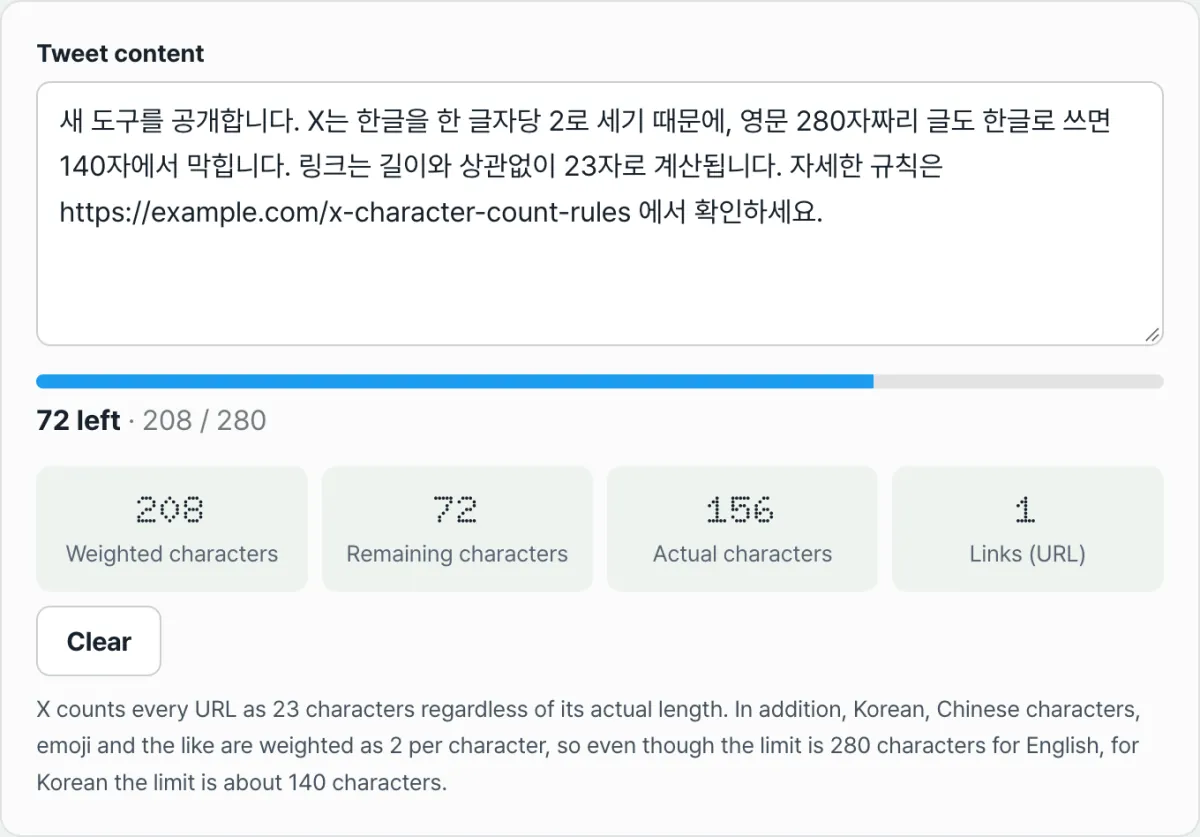
Check it with our tool. Paste your text and the weighted character count, remaining characters, actual character count, and the number of links detected all show on one screen. When your remaining characters drop to 20 or below, the bar changes color.
No install and no sign-up — it counts right in your browser, and the text you type is never sent to a server.
Where the numbers usually go wrong
When your count doesn't match what you expected, it's usually one of these.
| Input | How it's counted |
|---|---|
Ellipsis … (U+2026) | Outside the weight-1 ranges, so 2 |
Em dash — and en dash – (U+2014, U+2013) | Inside the dash range, so 1 |
Curly quotes “ ” ‘ ’ (U+201C, U+2018, etc.) | Same range, so 1 |
Three periods ... | Each period is 1, so 3 total |
| Hashtags | The # and the following text follow the normal rules |
| Photo or video attachments | Media attached in the official app count as 0 |
| Auto-mention at the start of a reply | The part added automatically counts as 0; mentions you type yourself count normally |
A single ellipsis and three periods look similar on screen, but they come out as 2 and 3. Dashes and curly quotes, on the other hand, count as 1 even when they're mixed into Korean text.
One more thing. X normalizes text to Unicode NFC form when it counts. Even if Korean is pasted in a decomposed state (NFD), X counts it based on the precomposed form.
The bottom line
- X's 280 is a weighted total, not a character count. The default weight is 2.
- Only four ranges count as weight 1: U+0000–U+10FF, U+2000–U+200D, U+2010–U+201F, and U+2032–U+2037.
- Korean, Chinese characters, kana, and emoji count as 2, so Korean-only text hits the limit at 140 characters.
- Links are wrapped in t.co, so they count as 23 characters each no matter how long they really are.
- Emoji count as 2 each, regardless of skin tone or combining.
- Punctuation varies: an ellipsis is 2, while dashes and curly quotes are 1.
No install and no sign-up — it counts right in your browser, and the text you type is never sent to a server.
Frequently asked questions
Is 140 characters the exact limit for Korean?
That's the limit when you write only in Korean. The actual rule is "a weighted total of 280," and since each Korean character is 2, 280 ÷ 2 = 140. Spaces, numbers, English letters, and periods count as 1, so mixing those in lets you write more than 140 characters.
Does shortening a link reduce the character count?
No. X wraps every link in t.co, so it's fixed at 23 characters per link no matter how many characters the original address has. Running it through a URL shortener first gives you the same result. Conversely, pasting a very long address as-is only costs you 23 characters.
Can this tool's emoji count differ from X's?
It can differ for some emoji. X treats emoji joined with skin tones or combining characters as one and assigns 2, but this tool counts by code point, so those emoji show up higher. The same goes for emoji followed by a color-indicating character (like hearts). The tool errs on the strict side, so you won't get cut off for exceeding the limit after trusting its number.
Is my text sent to a server?
No. All of this tool's calculations happen inside your browser, and the text you enter is never sent to or stored on a server. You can paste in a draft you haven't posted yet and check its length without it leaving your device.
Can I also save photos and videos from other people's posts?
Separate from character counting, if you have a post's URL you can save photos at their original upload resolution with X Image Downloader, or pick a quality and save videos with X Video Downloader.
This article was adapted from our Korean original. Read the Korean original