
Work Hours Calculator: Why 8 Hours 30 Minutes Is 8.5 Hours
Contents
This article is for anyone who knows their clock-in and clock-out times and wants to see, all at once, how many hours and minutes they actually worked and what that comes to in decimal hours (for example, 8.5 hours) for payroll. The short answer: 8 hours 30 minutes is 8.5 hours, not 8.3. The "minutes" part of hours:minutes runs on base 60, not base 100, so when you convert it to a decimal you divide 30 by 60, not by 100.
Summary ① To convert the minutes part of hours:minutes into decimal hours, divide by 60. 30 minutes is 30÷60 = 0.5 hours, so 8 hours 30 minutes is 8.5 hours. ② Total minutes is the difference in milliseconds between the two times divided by 60,000 and rounded down; the quotient and remainder of that number divided by 60 are the hours and minutes. ③ If you subtract hours:minutes only for work that runs past midnight into the next day, the result can be off. Enter the start date and end date separately to get it right.
The common mistake when converting work hours to decimals
To put a shift written as "8:30" on a time sheet into an hourly pay calculation or payroll program, you need a decimal number. It's common to carry the 30 over as-is and write 8.3 hours.
That amounts to dividing 30 by 100 to get 0.3, but the "minutes" of time run on base 60, not base 100. Since 60 minutes make an hour, 30 minutes is half of 60 minutes, or 0.5 hours. The difference between 8.3 hours and 8.5 hours turns straight into a difference in pay once it's multiplied by the hourly rate.
This mistake repeats just the same with tidy amounts like 30, 45, and 15 minutes. It's an error that disappears once you're clear that the basis for converting minutes to a decimal is 60.
How to calculate it yourself without a tool
Working out elapsed time takes three steps.
Getting total minutes and splitting them into hours:minutes
Step 1 — Get the total minutes. Convert the start time and end time each into "minutes since midnight," then subtract the start from the end. 9 a.m. is 9×60 = 540 minutes and 5:30 p.m. is 17×60 + 30 = 1,050 minutes, so the difference, 510 minutes, is the total time worked.
Step 2 — Split the total minutes into hours:minutes. Divide 510 minutes by 60 and the quotient is 8 with a remainder of 30. The quotient is hours and the remainder is minutes, so 8 hours 30 minutes.
Decimal hours and the midnight adjustment
Step 3 — Divide the total minutes by 60 to get decimal hours. 510÷60 = 8.5. That value is the decimal hours (decimal hours) used for payroll and so on, and it's written rounded to two decimal places.
If the shift crosses midnight, you need one more step. When the end time looks earlier on the clock than the start time (for example, starting at 22:00 and ending at 6:00 the next day), you have to add 24 hours (1,440 minutes) to the end. Subtract hours:minutes as-is with no adjustment and you'll get a value that doesn't match reality.
Check it with our tool.
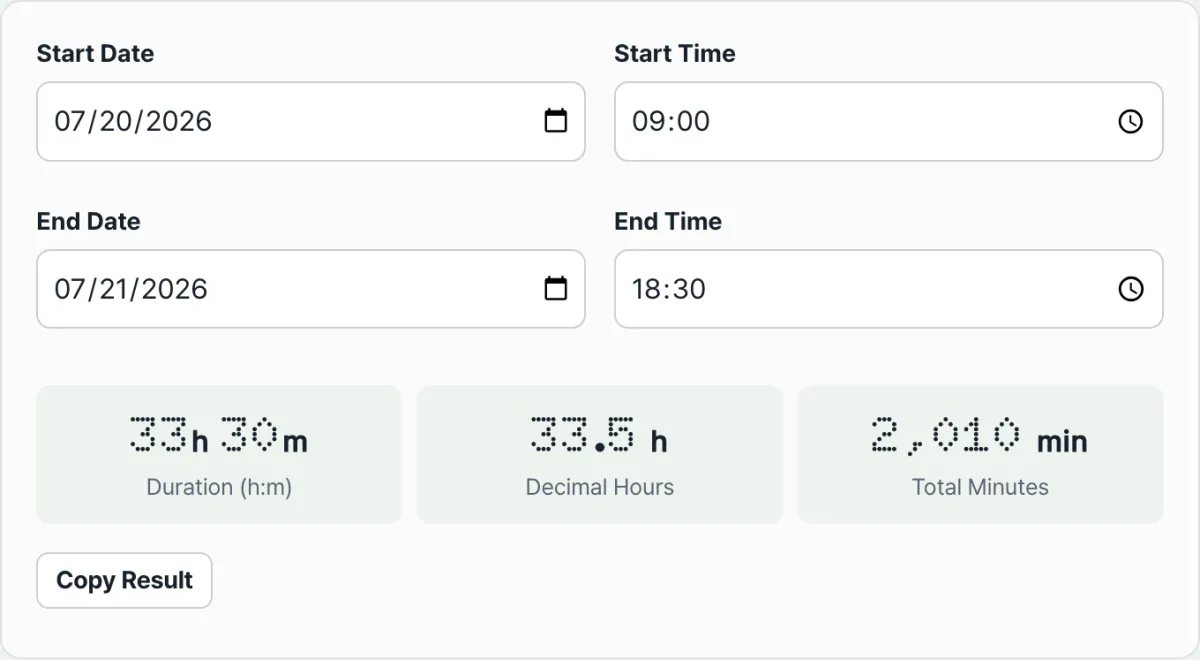
Enter a start date and time and an end date and time, and hours:minutes, decimal hours, and total minutes are calculated at once. Free, no login.
Parts people often get confused
Total minutes is a whole number: the difference in milliseconds between the two times, divided by 60,000 and rounded down. Decimal hours is that total minutes divided by 60 again and rounded to two decimal places. The two are used in different places.
Sometimes 60 doesn't divide evenly by 3. The decimal hours for 8 hours 20 minutes (500 minutes) is 500÷60 = 8.333..., so it shows as 8.33 hours after rounding, not exactly 8.3 or 8.35.
| Minutes | Decimal hours |
|---|---|
| 15 minutes | 0.25 hours |
| 20 minutes | 0.33 hours |
| 30 minutes | 0.5 hours |
| 45 minutes | 0.75 hours |
When you're calculating a shift that crosses midnight, enter the end date differently from the start date, meaning the next day. If you leave the end date alone and just enter an hours:minutes value earlier than the start, the end time ends up earlier than the start time, and instead of a result you'll see a message asking you to check your input.
The bottom line
- The "minutes" of hours:minutes run on base 60, so convert them to a decimal by dividing by 60 (not 100).
- Total minutes is the difference in milliseconds between the two times divided by 60,000 and rounded down.
- Decimal hours is total minutes divided by 60 and rounded to two decimal places.
- For shifts that cross midnight, enter the end date separately as the next day to get an accurate calculation.
- If the end is entered earlier than the start, you'll see a message instead of a calculation.
Enter a start date and time and an end date and time, and hours:minutes, decimal hours, and total minutes are calculated at once. Free, no login.
Frequently asked questions
Why is 8 hours 30 minutes 8.5 hours instead of 8.3?
Because the "minutes" of time run on base 60. 30 minutes is half of an hour (60 minutes), so 30÷60 = 0.5 hours, and adding that to 8 hours gives 8.5 hours. Calculating 30÷100 = 0.3 uses base 100 and doesn't match the real value.
What's the difference between total minutes and decimal hours?
Total minutes is the entire time between start and end expressed as a single whole number of minutes. Decimal hours is that total minutes divided by 60 and rounded to two decimal places, used for calculations that need a number in hour units, like hourly pay. They're just the same elapsed time shown in different units.
How do I enter work hours that cross midnight?
Enter the start date and end date separately. For example, if you enter a start of July 17 at 22:00 and an end of July 18 at 06:00, the dates are factored in automatically and it calculates 8 hours. If you leave the end date on the same day as the start, the end ends up earlier than the start, and you'll see a message instead of a calculation.
Can I enter seconds too?
This calculator takes a date and hours:minutes for both the start and the end, and there's no separate field for seconds. As soon as you enter the values, the hours:minutes, decimal hours, and total minutes all update and display together.
This article was adapted from our Korean original. Read the Korean original