
APA, MLA & Chicago Citation Generator: Auto-Format References
Contents
- The Three Big Citation Styles: APA, MLA, and Chicago
- How It Works: the Academic Metadata Structuring Pipeline
- APA vs. MLA vs. Chicago: A Detailed Comparison Table
- 5 Common Mistakes When Writing References
- A 5-Step Workflow for Building a Perfect Reference List
- 7 Tips for Writing a Reference List
- Final Decision Tree: Which Citation Style Should You Choose?
- Cheat Sheet: Key Terms for Academic Citation & Bibliography Management
- Frequently Asked Questions
One of the trickiest parts of writing a college paper, an academic essay, or a research article is putting together the bibliography (or references) list.
A misplaced period, a missing comma, or the wrong use of italics can cost you points — or get your manuscript rejected by a journal for not meeting its formatting requirements. That's why following citation rules exactly matters so much.
Key takeaways ① Academic citation styles mostly break down by field: APA 7th (social sciences, business), MLA 9th (humanities, language and literature), and Chicago 17th (history, art). ② Each style handles author names, the placement of the publication year, which titles get italicized, and punctuation (periods, commas) in a completely different way. ③ Doing it by hand invites frequent human error, so it's safer to use an automatic generator that follows the current official specifications.
The Three Big Citation Styles: APA, MLA, and Chicago
Different fields expect different bibliographic citation styles. Here's what sets each one apart.
APA 7th Edition (American Psychological Association)
Psychology, education, business, and the social sciences use APA as the global standard. You write the author's last name and reduce the first name to initials, and the publication year goes in parentheses right after the author's name.
The move to APA 7th Edition brought some important changes.
- Publisher city is gone: The 6th edition required the city of publication for books (for example, New York, NY: Academic Press). The 7th edition drops the city entirely and lists only the publisher name (for example, Academic Press).
- More authors listed: The number of authors you can list in the references without shortening to "et al." jumped from 7 to up to 20.
- Standardized DOIs: The old text format, "doi:10.xxxx," was replaced by a live link, "https://doi.org/10.xxxx."
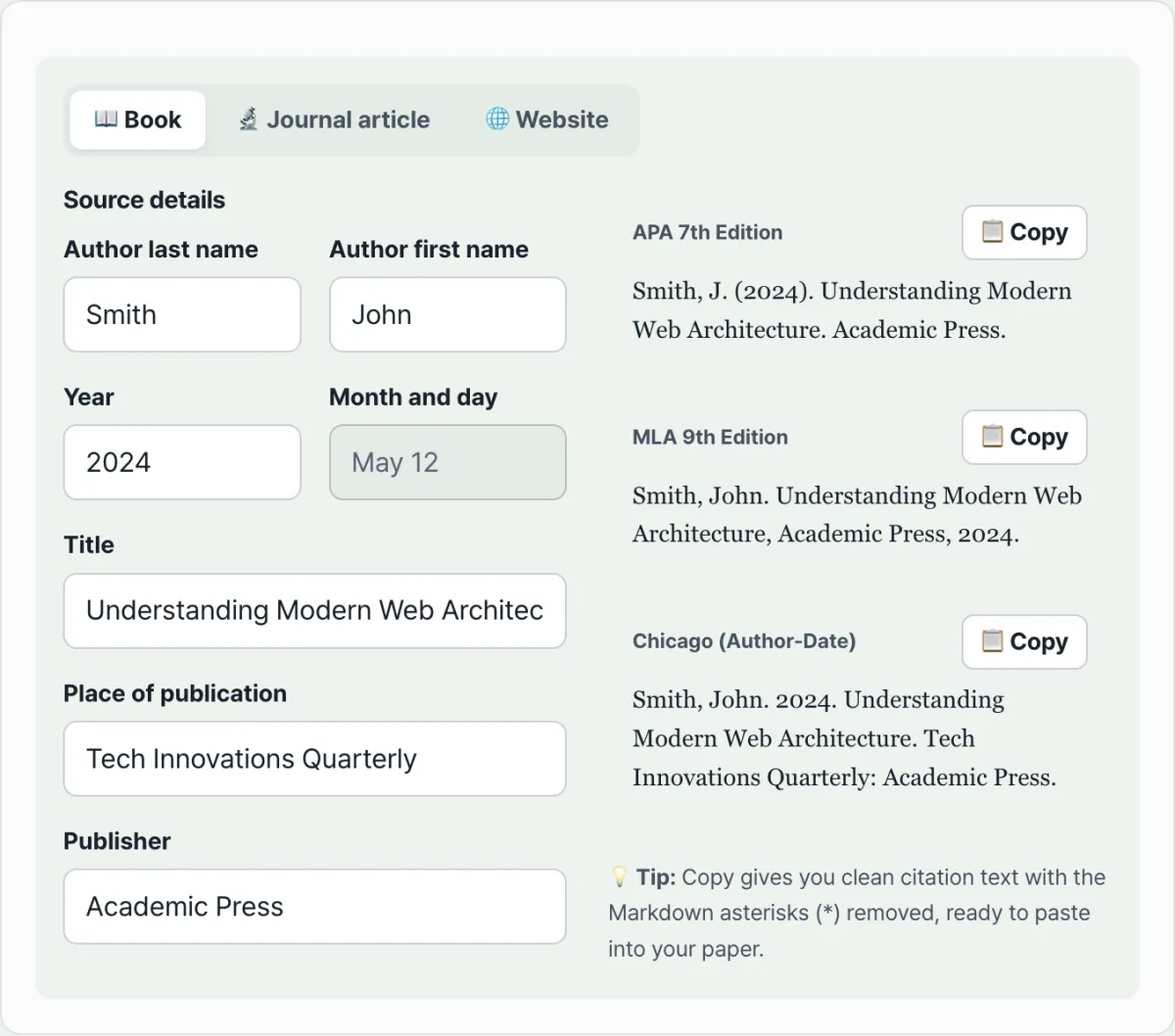
- Example (book): Smith, J. (2024). Understanding Modern Web Architecture. Academic Press.
MLA 9th Edition (Modern Language Association)
Literature, linguistics, art, and philosophy use MLA as their standard. The biggest difference is that you spell out the author's full name, and the publication year goes at the very end of the entry, after the publisher.
In MLA 9th Edition, the idea of the "container" became even more firmly established. The larger unit that holds a journal article or book chapter — the journal title, the website — is clearly identified and italicized.
- Example (book): Smith, John. Understanding Modern Web Architecture. Academic Press, 2024.
Chicago 17th Edition (Author-Date)
This is the style of choice in history, anthropology, and some of the natural sciences. You write out the full first and last name, with the publication year after the author followed by a period. Chicago comes in two forms — notes and bibliography, and author-date — and this tool converts using the author-date form, which is widely used in professional practice around the world.
- Example (book): Smith, John. 2024. Understanding Modern Web Architecture. Academic Press.
Free · no install · enter just the author and title to convert to APA, MLA, and Chicago
How It Works: the Academic Metadata Structuring Pipeline
Here's a look at the algorithm a citation generator uses to assemble author names, publisher, year, volume, and page metadata into a standard style.
1. Author Name Parsing and Locale Conversion Rules
- Single author:
- APA: Last, F. M. (last name first, then first and middle names as capitalized initials followed by periods)
- MLA: Last, First Middle. (comma after the last name, first and middle names spelled out)
- Chicago: Last, First Middle.
- Two authors:
- APA: Smith, J., & Doe, A. (uses the ampersand)
- MLA: Smith, John, and Alex Doe. (the second author goes first name then last name, joined with "and")
- Chicago: Smith, John, and Alex Doe.
- Three or more authors:
- For in-text citations, both APA and MLA shorten to the first author followed by et al. starting at three authors.
2. The Core Volume/Issue Formula for Journal Articles
- APA 7th: Journal Title, Volume(Issue), Page–Page. https://doi.org/xxxx (only the journal title and volume are italicized; the issue number sits in parentheses in upright text)
- MLA 9th: Journal Title, vol. Volume, no. Issue, Year, pp. Page–Page, https://doi.org/xxxx. (the "vol.," "no.," and "pp." prefixes are written out)
- Chicago 17th: Journal Title Volume, no. Issue (Year): Page–Page. https://doi.org/xxxx.
APA vs. MLA vs. Chicago: A Detailed Comparison Table
| Category | APA 7th Edition | MLA 9th Edition | Chicago 17th (Author-Date) |
|---|---|---|---|
| Main fields | Psychology, business, social sciences, nursing | Literature, language and literature, art, cultural studies | History, anthropology, pure sciences, humanities |
| References page heading | References | Works Cited | References or Bibliography |
| Where the year goes | Right after the author: Author. (2024). | At the very end of the entry: Publisher, 2024. | Right after the author: Author. 2024. |
| Author name format | Last name + initials (Smith, J.) | Last name + full first name (Smith, John) | Last name + full first name (Smith, John) |
| City of publication for books | ❌ Removed entirely in the 7th edition | ❌ Not included | ⭕ City required (New York:) |
| DOI link format | https://doi.org/... (standard URL) | https://doi.org/... | https://doi.org/... |
5 Common Mistakes When Writing References
- Mixing APA 6th and 7th: Following an old template and accidentally putting the city of publication before the publisher (New York, NY:).
- Italicizing the journal issue along with the volume: Applying italics to the issue number too, which violates the journal formatting rules.
- Overusing "Retrieved from" for web pages: In APA 7th, you don't use "Retrieved from" unless the source is a wiki or a site that updates in real time and genuinely needs a retrieval date — you just give the URL.
- Swapping first and last names: Confusing the first and last name on Western names and putting the given name where the surname belongs.
- Using a hyphen (-) instead of an en dash (–): Page ranges in academic papers (for example, 45–58) take an en dash (–), not a hyphen (-), under standard print conventions.
A 5-Step Workflow for Building a Perfect Reference List
- Step 1 (Choose the source type): Select the source: Book, Journal article, or Web page/online article.
- Step 2 (Enter the core bibliographic metadata): Enter the author name, publication year, article or book title, journal name, volume/issue, pages, and DOI in the input fields.
- Step 3 (Choose the target citation style): Click the APA 7th, MLA 9th, or Chicago 17th tab to match the guidelines for your department or journal.
- Step 4 (Review the 1-second real-time rendering): Visually check that punctuation, italics, and parenthesis placement were generated to the required format.
- Step 5 (Copy to the clipboard and paste in one click): Click the "Copy" button and paste the citation into the reference page at the end of your paper in Word, Hangul (HWP), LaTeX, or Google Docs.
7 Tips for Writing a Reference List
- Always use a DOI (Digital Object Identifier) instead of a URL when one is available: Web page URLs can break, but DOIs are preserved permanently, so this maximizes scholarly credibility.
- Always use a hanging indent in the reference list: In Word or Hangul, apply a 0.5-inch (1.27 cm / 5 characters) hanging indent to the second and subsequent lines of each reference entry.
- Sort automatically in alphabetical order: The absolute rule is to arrange the reference list alphabetically (A-Z) by the first author's last name.
- Capitalization (Title Case vs. Sentence Case): APA uses sentence case for article and book titles, capitalizing only the first letter, while MLA uses title case, capitalizing all major words.
- Use academic search engines: When you pull bibliographic information from Google Scholar or RISS, it may include older versions instead of the latest edition (APA 7th), so it's safer to verify it again with the Academic Citation Builder (APA, MLA, Chicago).
- When citing multiple papers by the same author, order them by year: Papers by the same author in the same year are labeled 2024a and 2024b so the in-text citations and reference list match.
- Cite non-print sources (YouTube, podcasts, Twitter) in the official format: The latest APA 7th and MLA 9th editions fully support YouTube videos and social media posts in their official citation formats.
Final Decision Tree: Which Citation Style Should You Choose?
- Scenario A (Business, psychology, education, nursing, and social science reports) ➔ APA 7th Edition
- Scenario B (Essays in English literature, Korean literature, linguistics, philosophy, and the performing arts) ➔ MLA 9th Edition
- Scenario C (History, anthropology, and archaeology papers and published books) ➔ Chicago 17th Edition
- Scenario D (Computer science and electrical/electronics IEEE conference papers) ➔ IEEE Style (numeric citation)
Cheat Sheet: Key Terms for Academic Citation & Bibliography Management
- DOI (Digital Object Identifier): A unique, permanent digital identifier assigned to academic papers and electronic publications.
- Hanging Indent: A standard bibliography layout in which the first line is flush left and the second and subsequent lines are indented by a fixed amount.
- In-text Citation: A citation format that puts the author and year in parentheses in the middle or at the end of a sentence (e.g., Smith, 2024).
- et al.: An abbreviation of the Latin "et alia" ("and others"). It is used to omit the names of additional authors when there are many co-authors, after the lead author is named.
Frequently Asked Questions
What are the biggest differences between APA 6th and 7th editions?
The biggest differences are that book citations no longer include the publication city (such as New York or London) and list only the publisher name; the maximum number of authors in a reference entry has increased substantially, from 7 to 20; and DOI formatting is now standardized as the URL "https://doi.org/".
How do I cite a paper by an author with a Korean name?
For a Korean-language paper, you can keep the author's name in its original form, for example, "Hong Gildong. (2024). Understanding Web Architecture...". When you submit to an English-language journal, romanize the name and enter it in the Academic Citation Builder (APA, MLA, Chicago) as "Hong, G. (2024)" or "Hong, Gildong (2024)".
Does the Academic Citation Builder (APA, MLA, Chicago) store the research data I enter on an external server?
No, not at all. All the bibliographic information and paper metadata you enter are converted into text immediately in your browser's memory, and no data remains on any external server.
This article was adapted from our Korean original. Read the Korean original