
Base64 Encoding and Decoding: 6-Bit Mapping and Padding Rules
Contents
- Why Base64 Exists: A Survival Tactic for 7-Bit Email Networks
- Base64 Encoding by Hand: "Cat"
- The Core Mechanics: 3 Bytes ➔ 4 Characters, Bit Operations, and the Padding (=) Formula
- Standard Base64 vs Base64URL vs Hex (Base16): Comparison Matrix
- 5 Common Mistakes When Working With Base64
- A Flawless 5-Step Base64 Workflow
- 7 Practical Base64 Tips
- Final Decision Tree: Which Encoding Should You Use?
- Cheat Sheet: Core Base64 & Network Communication Terms
- Frequently Asked Questions
When you do web development or spend time poking at API responses, you run into the same mystery strings every day — JWT tokens starting with 'eyJhbGciOiJIUzI1NiJ9...' or long, unreadable stretches of alien text like 'data:image/png;base64,iVBORw0KGgo...'.
Because the characters look random and unreadable, plenty of people assume it's password encryption. It isn't. It's Base64 encoding, a way to move binary data safely across computer networks.
Here's the full picture: the math behind Base64 — how it splits 8-bit data into 6-bit chunks and grows the payload by 33%, the rules for those equals signs (==) at the end, the UTF-8 conversion that keeps non-English text from breaking, and the decisive difference between encoding and encryption.
Key takeaways ① 6-bit mapping across 64 characters: 3 bytes (24 bits) of data are split into four 6-bit groups and converted into 64 safe ASCII characters: A-Z, a-z, 0-9, +, and /. ② 33% size growth: Because 8 bits of information go into a 6-bit character, encoded data is exactly 4/3 the original size (about +33%). ③ Padding equals sign (=) rules: When the original byte count isn't a multiple of 3, the empty slots get filled: '==' for 1 leftover byte, '=' for 2 leftover bytes. ④ Encoding is not encryption: Anyone can decode it back to the original in 0.1 seconds without a secret key, so never use it to hide passwords or personal data.
Why Base64 Exists: A Survival Tactic for 7-Bit Email Networks
Early computer networks and the email transfer standard (SMTP) were designed to support only 7-bit English ASCII. If you sent 8-bit binary (images, compressed files, non-English characters) as-is, the most significant bit (MSB) could get truncated to 0 and the data would be corrupted.
The fix was to wrap binary data in 64 common ASCII characters (A-Z, a-z, 0-9, +, /) that never get mangled no matter which old network device or mail server it passes through. That's Base64.
Base64 Encoding by Hand: "Cat"
Here's the bit-level pipeline for the three-letter word "Cat" (3 bytes = 24 bits):
- Convert to bytes: 'C' (67 = 01000011), 'a' (97 = 01100001), 't' (116 = 01110100)
- Join into a 24-bit stream: 010000110110000101110100
- Split into four 6-bit groups:
- 010000 (decimal 16) ➔ Q
- 110110 (decimal 54) ➔ 2
- 000101 (decimal 5) ➔ F
- 110100 (decimal 52) ➔ 0
- Final encoded output: Q2F0 (exactly 4 characters)
Free · Paste your text and convert to and from Base64 losslessly in about a second, Hangul and emoji included
The Core Mechanics: 3 Bytes ➔ 4 Characters, Bit Operations, and the Padding (=) Formula
Let's look at the math the Base64 engine uses when it manipulates bits in memory.
1. The 24-Bit Least Common Multiple (LCM) Mapping
- Data growth rate: 4 Characters × 8 Bits/3 Bytes × 8 Bits = 4/3 ≈ 133.33% (+33.3% growth)
2. Padding (=) Decision Algorithm
- R = 1 (1 byte left): 8 bits ➔ one 6-bit char + one 2-bit slot (zero-filled) ➔ 2 valid chars + padding '==' (2)
- R = 2 (2 bytes left): 16 bits ➔ two 6-bit chars + one 4-bit slot (zero-filled) ➔ 3 valid chars + padding '=' (1)
- R = 0 (multiple of 3 bytes): 24 bits ➔ 4 valid chars + no padding (0)
3. The Lossless Korean-to-UTF-8 Pipeline
// Safe modern Base64 encoding for non-ASCII text
function safeBase64Encode(text) {
  const bytes = new TextEncoder().encode(text);
  let binary = "";
  bytes.forEach(b => binary += String.fromCharCode(b));
  return btoa(binary);
}
Standard Base64 vs Base64URL vs Hex (Base16): Comparison Matrix
| Metric | Standard Base64 (RFC 4648) | Base64URL (RFC 7515) | Hex / Base16 |
|---|---|---|---|
| 62nd character | + (Plus) | - (Minus) | N/A |
| 63rd character | / (Slash) | _ (Underscore) | N/A |
| Padding equals (=) | Required (add 1-2) | Omitted (No Padding) | None |
| URL parameter safety | Unsafe (+, / are URL reserved characters) | Safe (URL-Safe) | Safe |
| Size growth | +33% | +33% | +100% (doubles) |
| Typical uses | Email attachments, image Data URIs | JWT tokens, OAuth2 URL parameters | Hash digests, encryption keys |
5 Common Mistakes When Working With Base64
- Mistaking Base64 for password encryption: Anyone can decode it, so never use it on its own for security.
- Calling btoa() directly on non-ASCII text: The browser's Latin1 exception crashes it (TextEncoder is required).
- Dropping standard Base64 straight into a URL query string: '+' turns into a space, or '/' gets split off as a path, and you get a bug.
- Embedding multi-MB images in HTML as Data URIs: Your HTML balloons to tens of MB and rendering lags (stick to icons under 10KB).
- Not handling line breaks or whitespace when decoding: A stray CRLF picked up during copy-paste throws a decoder error.
A Flawless 5-Step Base64 Workflow
- Step 1 (Pick a direction): Choose whether to turn text into Base64 (encode) or unpack Base64 back into text (decode).
- Step 2 (Enter the string): Put the source text, JWT token, or hash string you want to convert into the input field.
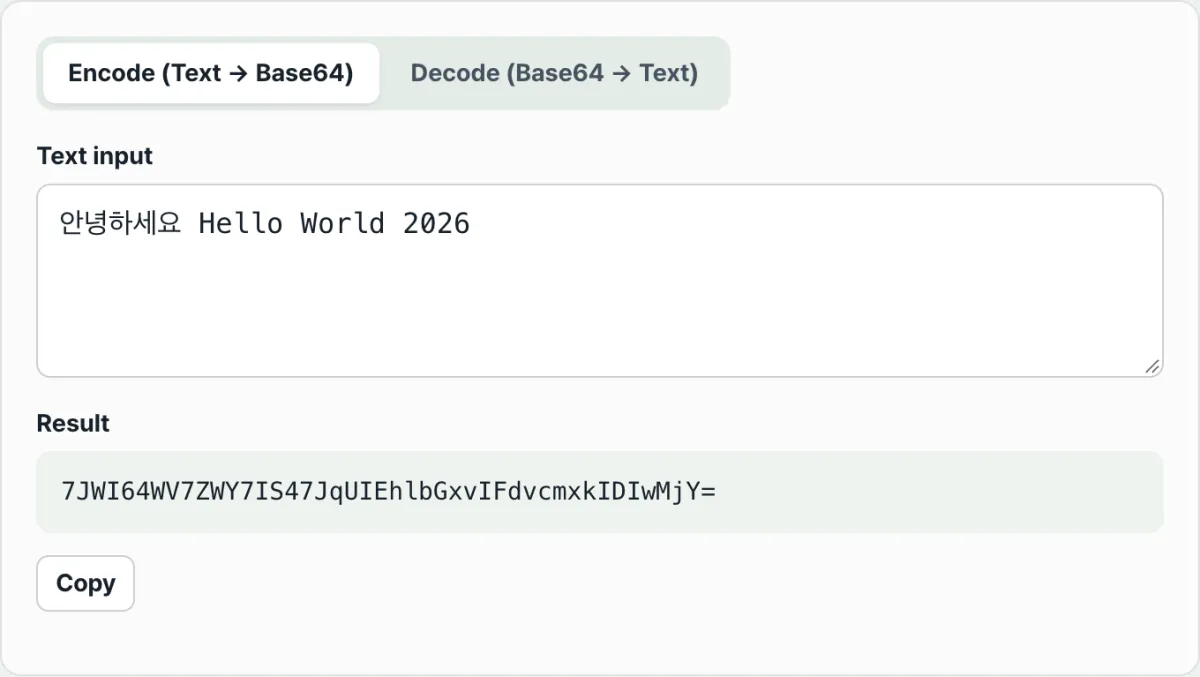
- Step 3 (Automatic UTF-8 byte handling): Our tool normalizes non-English text, emoji, and special characters into UTF-8 binary for you.
- Step 4 (Real-time output in a second): The 6-bit shift operation runs instantly, and the Base64 result plus any equals-sign padding appears on screen.
- Step 5 (Copy and paste into code): Copy the finished, safe Base64 text with one click and drop it into your API request or source code.
7 Practical Base64 Tips
- Decode JWT (JSON Web Token) structure: In a JWT shaped like xxxx.yyyy.zzzz, the first two pieces split by the dot (.) can be Base64URL-decoded to instantly reveal the header and payload JSON.
- Inline Data URIs only for small icons under 10KB: This reduces HTTP requests and speeds up first render, but anything 50KB or larger is better split into a separate file for caching.
- Manual URL-Safe Base64 conversion: str.replace(/+/g, '-').replace(///g, '_').replace(/=+$/, '')
- Native conversion in Node.js: Buffer.from(text, 'utf-8').toString('base64') and the reverse Buffer.from(b64, 'base64').toString('utf-8')
- Preserve emoji (4-byte UTF-8) perfectly: An encoder built on UTF-8 byte arrays restores even composite emoji like 🔥 and ❤️ without corruption.
- Auto-filter line breaks: Base64 copied from an email body has a line break every 76 characters ( ) that you must strip with the regex /s/g before decoding.
- Bookmark our tool in your browser: When you need to debug an API or decode a token mid-development, solve it in your browser in one second.
Final Decision Tree: Which Encoding Should You Use?
- Case A (issuing JWT tokens, passing OAuth parameters, REST API queries) ➔ Base64URL (URL-Safe, no padding)
- Case B (inlining a small logo inside HTML/CSS, email attachments) ➔ Standard Base64 (Data URI)
- Case C (storing user passwords, keeping sensitive data) ➔ No encoding ➔ bcrypt / Argon2 one-way hashing is required
- Case D (sending and receiving secret messages, transmitting payment data) ➔ AES-256-GCM symmetric encryption, then package as Base64
Cheat Sheet: Core Base64 & Network Communication Terms
- Base64: A 6-bit encoding standard that replaces 8-bit binary data with 64 printable ASCII characters.
- Padding (=): A symbol that fills the last empty space in data that doesn't divide evenly into 3-byte blocks, bringing the total to a multiple of 4 characters.
- Data URI: A technique for embedding image or font data directly in HTML as data:image/png;base64,... instead of linking to an external file.
- JWT (JSON Web Token): A web standard token serialized with Base64URL to safely transmit information between parties as a JSON object.
Frequently Asked Questions
Why does a Base64 string end with an '=' sign?
When the original data's byte count doesn't divide evenly by 3, the standard specifies a padding character that fills the leftover slots so the whole Base64 string's length lands on a multiple of 4.
Is Base64 encryption?
Absolutely not. Encryption requires a secret key to decrypt, but Base64 is a simple data representation transform that anyone can reverse to the original using rules published openly around the world.
Does the text or token I enter into your tool get saved in server logs?
Not at all. Every Base64 encoding and decoding runs instantly in your browser's local JavaScript engine, and no data is ever sent to an external server.
This article was adapted from our Korean original. Read the Korean original