
bcrypt Hash Generator: 60-Character Structure Explained
Contents
- A Close Look Inside the 60-Character bcrypt Hash
- Why Is the Hash Different Every Time?: Random Salts and How Verification Works
- Under the Hood: Eksblowfish Key Expansion and the Cost Formula
- The Big Four Password Hashing Algorithms, Compared
- 5 Common bcrypt Mistakes
- A Flawless 5-Step Workflow for Generating and Verifying bcrypt Hashes
- 7 Practical bcrypt Tips
- The final decision tree: which hashing setup should you use?
- Cheat sheet: key bcrypt and auth security terms
- Frequently asked questions
Open the user table in your database and you've probably seen a strange 60-character string sitting in the password column, something like $2b$10$N9qo8uLOickgx2ZMRZoMyeIjZAgcfl7p92ldGxad68LJZdL17lhWy.
One of the most common questions newer developers ask is: "I hashed the same password, '1234', but the hash comes out completely different every time. Is that a bug?"
It's not a bug. It's bcrypt's core security design: a fresh 128-bit random salt is injected on every hash, which shuts down rainbow table attacks before they start.
Here's a full breakdown of the internal structure of the 60-character bcrypt hash, the math behind why the cost factor 2cost slows things down, the 72-byte limit, and the correct way to verify with 'bcrypt.compare()'.
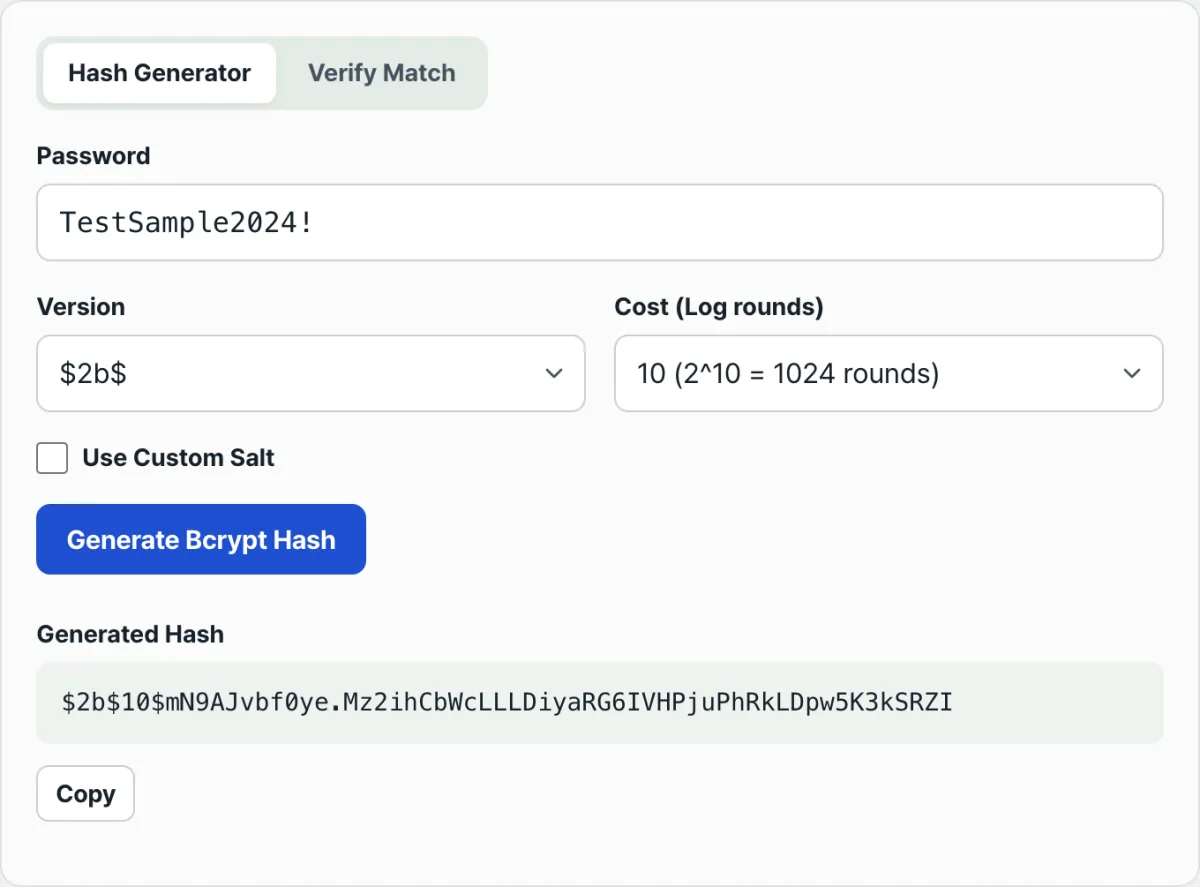
Quick summary ① Fixed 60-character format: exactly 60 characters in the form 'version (4 chars)cost (2 chars)$salt (22 chars)+hash (31 chars)'. ② Exponential cost: every +1 on the cost factor doubles the work (2cost), which makes brute-force attacks useless. ③ Salt built in: the 22-character salt lives inside the hash string itself, so 'bcrypt.compare()' verifies perfectly without a separate salt column in your database. ④ With this simulator you can change the cost factor and version and walk through bcrypt hash generation and verification live in your browser, safely.
A Close Look Inside the 60-Character bcrypt Hash
A bcrypt hash string isn't just a blob of random characters. It's a tightly specified format made of four parts:
- Version identifier ($2b$): the revision of the bcrypt algorithm (2a, 2b, 2y, and so on — 2b is the global standard today).
- Cost factor (10$): means the key expansion loop ran 210 = 1,024 times.
- Salt (22 chars): a unique salt, made by encoding a 16-byte (128-bit) random value in base64.
- Hash body (31 chars): the final 184-bit digest produced by running the salt and password through the Eksblowfish engine 1,024 times.
Why Is the Hash Different Every Time?: Random Salts and How Verification Works
Every time bcrypt creates a hash, it generates a fresh 22-character salt using a CSPRNG (cryptographically secure pseudorandom number generator).
So even with the same password, 'password123':
- First run: $2b$10$e8w...hWy
- Second run: $2b$10$9Kq...7zQ
You get a completely different string. To verify, you don't hash again with a new salt. You pull the first 22-character salt out of the hash stored in your database and recompute with it plus the password the user typed, then check whether the 31-character hash body matches (constant-time compare).
Free · Enter a password and get a 60-character bcrypt hash in one second, with real-time checks for each cost factor
Under the Hood: Eksblowfish Key Expansion and the Cost Formula
Here's the math behind why bcrypt, unlike fast hashes like MD5/SHA-256, neutralizes GPU cracking.
1. Iteration Count as a Function of the Cost Factor (R)
- R = 10: 210 = 1,024 rounds (about 0.08 seconds, recommended for web services)
- R = 12: 212 = 4,096 rounds (about 0.32 seconds, recommended for high security)
- R = 14: 214 = 16,384 rounds (about 1.30 seconds, admin-only)
- R = 16: 216 = 65,536 rounds (about 5.20 seconds, risk of overloading the server)
2. How bcrypt Defends Against GPU Brute-Force Attacks
- SHA-256 is so cheap to compute that a hacker with a few dozen RTX 4090 GPUs can try hundreds of billions of passwords per second.
- bcrypt forces memory-hungry 4 KB S-box tables and thousands of loops, knocking GPU parallel efficiency down to 1/100,000 and making cracking economically impossible.
The Big Four Password Hashing Algorithms, Compared
| Metric | bcrypt (RFC and global standard) | Argon2id (latest PHC winner) | PBKDF2 (government/finance standard) | SHA-256 (plain hash) |
|---|---|---|---|---|
| Design goal | One-way password hashing | Next-gen memory-hard hashing | Legacy standard for key derivation | Data integrity checks |
| GPU resistance | Excellent (Eksblowfish) | Extreme (memory control) | Moderate (CPU iteration) | Weak (tens of billions of guesses per second) |
| Salt built in | Fully embedded in the hash string | Fully embedded | Must be managed separately | No salt support (manual) |
| Input length limit | 72 bytes | Unlimited | Unlimited | Unlimited |
| Ecosystem support | #1 worldwide (Node, Spring, Django) | Spreading fast | Built into standard libraries | Built into every language |
5 Common bcrypt Mistakes
- Comparing strings with === when checking a login: not knowing the salt changes every time, so you use a simple comparison instead of 'bcrypt.compare()'.
- Setting the cost factor to 15 or higher: it bottlenecks server CPU and can cause a denial-of-service (DoS) outage.
- Ignoring the 72-byte password limit: characters past the 72nd are cut off, so a login passes even when the trailing characters differ — a real security hole.
- Storing passwords with plain SHA-256/MD5: no salt, so a leaked database falls to a rainbow table in one second.
- Blocking the Node.js event loop with sync functions: using bcrypt.hashSync() so other users' web requests stall while the hash computes.
A Flawless 5-Step Workflow for Generating and Verifying bcrypt Hashes
- Step 1 (enter the password): type the plaintext password you want to test into the input field.
- Step 2 (set the cost factor): choose Cost 10 or 12, the standard for web services.
- Step 3 (generate and watch the progress): click [Generate Hash] and the engine inside your browser runs 2cost iterations, then outputs a 60-character hash.
- Step 4 (check the 60-character structure): confirm the version ($2b$), the cost (10), the 22-character salt, and the 31-character hash body all look right.
- Step 5 (try verification): enter a matching password and a wrong password to see 'bcrypt.compare()' pass and fail side by side.
7 Practical bcrypt Tips
- A cost factor of 10–12 is the sweet spot: it keeps server response times in the 100–300ms range while completely shutting down brute-force attacks.
- Use Node.js async promises: call the async method
await bcrypt.hash(password, 10)so it runs in the multithreaded worker pool and your main loop doesn't get blocked. - Beat the 72-byte limit with pre-hashing: wrap it like this — bcrypt.hash(crypto.createHash('sha256').update(pw).digest('hex'), 10).
- Prevent timing attacks: 'bcrypt.compare()' does a constant-time comparison internally, which blocks attacks that guess the password from differences in response time.
- Make your DB column VARCHAR(60) or VARCHAR(255): bcrypt output is always exactly 60 characters, so give the column at least 60 characters of room.
- Raise the cost as server performance improves: as server hardware gets faster, bump the cost by 1 every 3–5 years to keep the same security strength.
- Bookmark Bcrypt Hash Generator & Verifier: use it to instantly check whether a bcrypt hash stored in your DB matches the correct password while you're developing.
The final decision tree: which hashing setup should you use?
- Case A (typical web/mobile B2C service with high-volume sign-ups) ➔ bcrypt (cost 10, response speed above all)
- Case B (fintech, e-commerce, enterprise admin accounts) ➔ bcrypt (cost 12) or Argon2id
- Case C (mandatory compliance with government/financial regulations) ➔ PBKDF2 (HMAC-SHA256, 100,000 iterations or more)
- Case D (systems that support very long passphrases) ➔ SHA-256 pre-hashing ➔ combined with bcrypt
Cheat sheet: key bcrypt and auth security terms
- bcrypt: an adaptive one-way hash function based on the Blowfish cipher, published in 1999 by Niels Provos and David Mazières.
- Salt: a 128-bit random value added to the input so the same password still produces a different hash.
- Rainbow table: a huge reverse-lookup attack dictionary of hundreds of millions of passwords and their corresponding plain hashes, all precomputed.
- Key stretching: repeating the hash operation thousands to tens of thousands of times to physically slow down how fast an attacker can guess passwords.
Frequently asked questions
Why do I get a different hash every time I hash the same password?
bcrypt generates a fresh 128-bit random salt and combines it with the password on every run, so getting a different 60-character hash each time is completely normal and exactly how it's supposed to work.
Can I decrypt a bcrypt hash back to the original plaintext password?
No. bcrypt is a one-way cryptographic hash, so a decryption function that reverses it to plaintext doesn't exist mathematically.
Does the test password I enter get logged or collected by the web server?
Not at all. All hashing in this simulator runs locally in the JavaScript engine inside your browser, so your password is never sent to an external server.
This article was adapted from our Korean original. Read the Korean original