
A record vs CNAME: the difference and how to validate the format
Contents
- Why A and CNAME get confusing
- The structure of A and CNAME in zone file notation
- How to check the format by hand
- Common input mistakes
- Recap
- Under the Hood: How DNS Records Are Structurally Constrained
- DNS Record Type Comparison Matrix
- 5 DNS Mistakes That Break Things
- Zero-Downtime DNS Migration in 5 Steps
- 7 Practical DNS Tips
- Decision Tree: Pick the Right DNS Record for Your Situation
- DNS Essentials Cheat Sheet at a Glance
- Deep FAQ
- Frequently Asked Questions
When you're figuring out which record to add to a domain, A and CNAME always show up together. Here's the short version: an A record maps a domain name directly to an IPv4 address (a number), while a CNAME record maps a domain name to another domain name as an alias. That's the structural difference.
This post explains that difference using zone file notation, and also shows you how to check whether the value you're about to enter actually matches the format.
Summary ① An A record maps a host to an IPv4 address (a number); a CNAME record maps a host to another domain name (an alias). ② Both records are written in a zone file in the order "host TTL IN type value," and only the type slot changes: A or CNAME. ③ The validator does not query a DNS server. It only checks, with regular expressions, whether the value you entered matches IP format, domain format, and the TTL range.
Why A and CNAME get confusing
In a domain registrar's or hosting provider's control panel, the record type dropdown lists A, AAAA, CNAME, MX, TXT, SRV, and NS side by side.
One hosting setup guide says, "Enter 192.0.2.1 in the A record." Another says, "Enter xxxx.hosting.com in the CNAME."
You end up hitting Save without really knowing why the two instructions differ or what belongs in the value field for the format to be correct. Some control panels don't flag a format error when you save, so you only find out the value was wrong later, when your site won't load.
The structure of A and CNAME in zone file notation
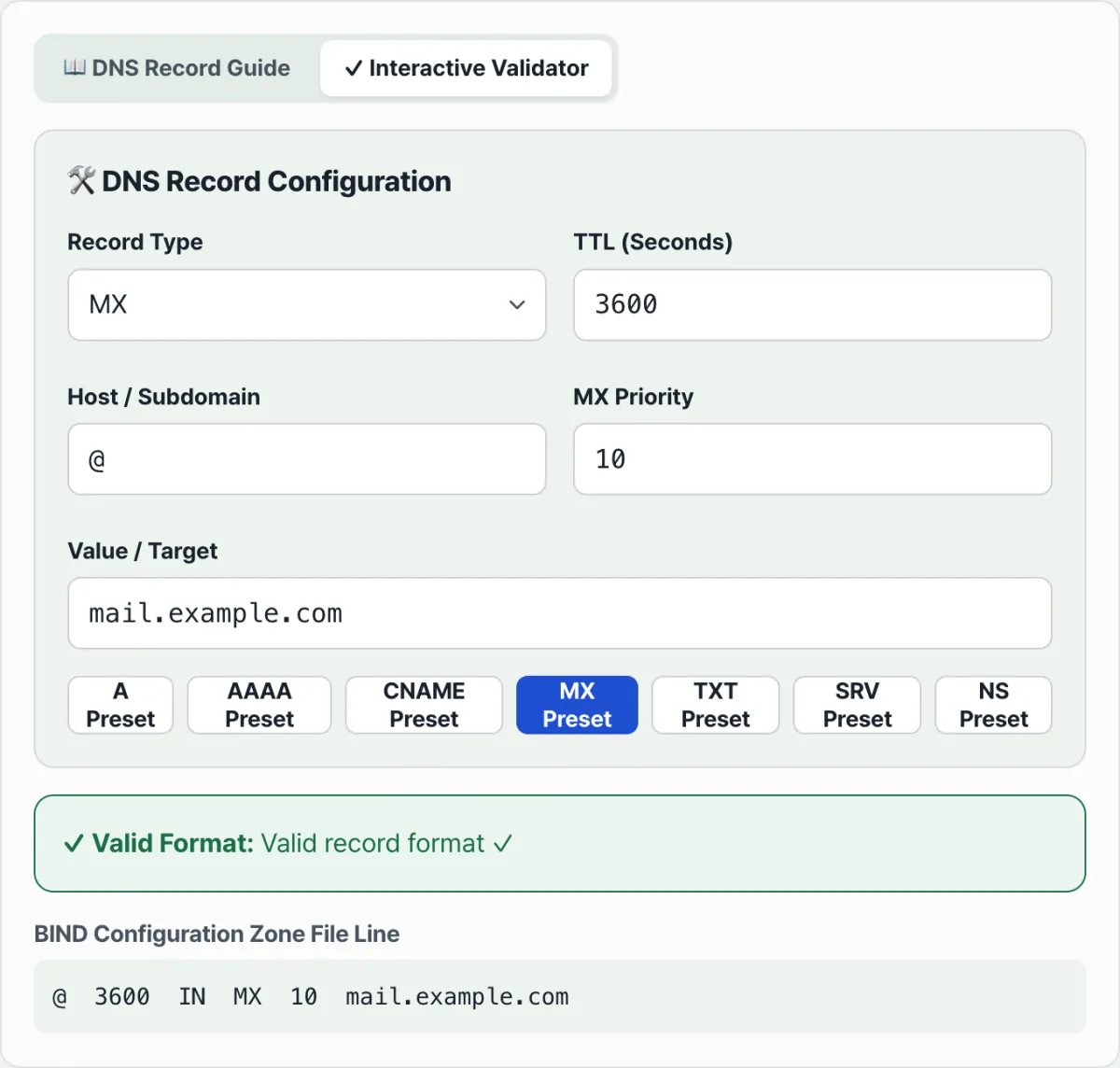
By convention, a DNS record is written as a single line in a zone file. The order is always the same.
host TTL IN type value- host: the name the record applies to. Use "@" when it points to the domain itself, and "www" when it points to a subdomain such as www.example.com.
- TTL: how long (in seconds) to keep this record in cache.
- IN: a fixed value meaning the internet class.
- type: the record type, such as A or CNAME.
- value: the meaning depends on the type.
Of these five slots, the value slot means something completely different for A and for CNAME.
The value slot: an IP number or a domain name?
For an A record, you put the IPv4 address straight into the value slot. For example, www 3600 IN A 192.0.2.1 means that when someone visits www.example.com, go directly to the numeric address 192.0.2.1. The value must be 4 numbers (0–255) separated by 3 dots.
For a CNAME record, you put another domain name in the value slot, not an IP. www 3600 IN CNAME example.hosting.com means that requests coming to www.example.com get handed off to another domain name, example.hosting.com.
The final IP only appears after you look up that alias domain again. In other words, an A record "tells you the numeric address directly," and a CNAME record "puts a different name tag on in its place."
Whether the value slot holds a numeric IP or a domain name is the fundamental difference between the two records.
How to check the format by hand
You can check this yourself without any tool. What you need to verify depends on the record type.
- IPv4 format (A record): 4 numbers separated by dots, and each number must be between 0 and 255. If there are 3 or 5 octets, or even one number of 256 or higher, the format is wrong.
- Domain name format (CNAME, MX, NS, SRV values): a string of labels made of letters, numbers, and hyphens, joined by periods. If a protocol (http://), a path (/path), or a space is mixed in, it's outside domain name format.
- TTL: an integer from 0 to 2147483647. Decimals or negative numbers are out of range. If you don't specify one, 3600 (1 hour) is the usual choice.
- TXT value: a single string segment can't exceed 255 characters. If you need to register long text like SPF or DKIM, split it into 255-character chunks and join them as multiple segments.
You could count these four things out by eye, one at a time, but the longer the value gets, the more tedious and error-prone it is to count octets or characters.
Check it with our free tool.
A free tool that checks the format of what you type right away, with no real DNS lookup.
Common input mistakes
The same mistakes come up again and again.
| Mistake | Example | Why it's wrong |
|---|---|---|
| IP octet out of range | 192.168.1.256 | Octets must be 0–255, and 256 is outside that range |
| Including a protocol in the host or value | https://www.example.com | There's no place for http:// or slashes in label or domain name format |
| Decimal or negative TTL | 3600.5, -1 | TTL only accepts integers from 0 to 2147483647 |
| Using quotes inside a TXT value as-is | A " character in the middle of the value with no escape | If you write the zone file by hand, the syntax breaks at the quote position |
| TXT value longer than 255 characters | An entire long SPF record on one line | It goes past the rule that requires splitting in 255-character chunks |
Mixing up CNAME and A is common too. You put a domain name in the value slot when it should be a numeric IP, or you put an IP in the CNAME value slot when it should be a domain name.
The two formats have completely different regular expression checks, so the safe order is to pick the type (A or CNAME) correctly first, then enter a value that matches that type.
Recap
- An A record maps a host directly to an IPv4 address (a number); a CNAME record maps a host to another domain name.
- Zone files are written in the order "host TTL IN type value," and the value slot means something different for each type.
- The validator doesn't query a real DNS server. It only uses regular expressions to check whether your input matches IP format, domain format, the TTL integer range, and the TXT length rules.
- Common mistakes include IP octets out of range, a protocol in the host or value, decimal or negative TTL, and missing quote escapes in TXT.
- The safe approach is to pick the type correctly first, then enter a value in the format that type expects.
A free tool that checks the format of what you type right away, with no real DNS lookup.
Under the Hood: How DNS Records Are Structurally Constrained
If you understand how DNS records actually work and what the IETF standards say, you can prevent the failures described above before they happen.
The Core DNS Standards: RFC 1034 / 1035
- A record (Address Record): Maps an FQDN (fully qualified domain name) directly to a 32-bit IPv4 address. (Example: Host TTL IN A 192.0.2.1) Because it hands back the IP address itself, communication needs only a single round-trip.
- CNAME (Canonical Name): Maps an FQDN to another canonical domain name (an alias). (Example: Host TTL IN CNAME target.com.)
- The apex CNAME restriction (RFC 1034 Section 3.6.2): "If a CNAME record exists at a node, no other data can exist at that node, including SOA, NS, MX, and TXT." A root domain (@ or example.com) must have SOA and NS records in order to run its nameservers, so putting a CNAME at an apex domain is illegal by definition.
ALIAS / ANAME / CNAME Flattening (the modern workaround)
As cloud computing took over, people increasingly needed to point their root domain at a load balancer's or CDN's dynamic hostname instead of a static IP (A record). To solve this, modern DNS providers such as Cloudflare, AWS Route 53, and DNSimple support a non-standard virtual record type called ALIAS or ANAME. Here the authoritative nameserver resolves the target CNAME's IP internally, then answers the client (the DNS edge) with an A or AAAA record. This technique is called CNAME Flattening.
How DNS Resolution Works and Where the Latency Comes From
- Direct A record lookup: Gets the final IP with one round-trip query.
- CNAME lookup: The recursive resolver has to find the target FQDN and then look up that target's IP, so query latency multiplies. A long CNAME chain causes serious loading delays.
DNS Record Type Comparison Matrix
A comparison table that shows at a glance what value each record type holds and how it behaves.
| Record type | Target value format | Apex/root (@) support | Multiple values | Performance (latency) | Typical cloud use case |
|---|---|---|---|---|---|
| A | IPv4 address (e.g., 192.0.2.1) | Supported (required) | Allowed (round-robin) | 🚀 Fastest (1 RTT) | Bare-metal servers, static IP hosting |
| AAAA | IPv6 address (e.g., 2001:db8::1) | Supported (required) | Allowed | 🚀 Fastest (1 RTT) | IPv6-capable servers, next-gen networking |
| CNAME | Domain name (e.g., app.vercel.app.) | ❌ Not supported (impossible) | Not allowed | 🐢 Slightly slower (multiple queries) | Subdomain to CDN, Vercel/Netlify |
| ALIAS/ANAME | Domain name | Supported (workaround) | Depends on provider | 🚀 Fast (resolved server-side) | Pointing the root domain at an AWS ALB or CDN |
| MX | Mail server domain + priority | Supported | Allowed (multiple mail servers) | - | Google Workspace, mail routing |
| TXT | Arbitrary text string | Supported | Allowed | - | SPF, DKIM, site ownership verification |
5 DNS Mistakes That Break Things
These are the five most common DNS accidents and what causes them.
- Putting a CNAME at the root apex (@): The most common and most damaging mistake. It overwrites the MX records that receive your email and the TXT (SPF) records used for authentication, crippling the entire mail system for the domain.
- Leaving TTL too high right before a server migration: If you change the IP while the TTL is still set to 86400 seconds (24 hours), traffic gets split between the old and new servers for a full day until ISP caches around the world refresh.
- Creating a circular CNAME that loops forever: A CNAME that bounces back and forth like foo.com ➔ bar.com ➔ foo.com makes the browser throw a timeout error (ERR_TOO_MANY_REDIRECTS).
- Dropping the trailing dot in a BIND zone file: If you type cdn.example.com without a dot (.) at the end, the nameserver treats it as a subdomain and produces the ugly result cdn.example.com.example.com.
- Mixing up A and AAAA records: Trying to put an IPv6 address in an A record field, or the reverse, triggers a regex validation error and the server can't be reached.
Zero-Downtime DNS Migration in 5 Steps
A standard five-step process for changing an IP or moving to the cloud without any downtime.
- Identify the target and pick the record type: Figure out whether the target is a static IP or a cloud FQDN. For an IP, use an A record. For a cloud hostname, use a CNAME on subdomains and an ALIAS on the root domain.
- Lower the TTL ahead of time (D-48 hours): At least 48 hours before the migration, drop the existing A record's TTL all the way to 300 seconds (5 minutes). This is the window you wait out for old caches to expire.
- Prepare the subdomain and apex records: For subdomains like www or api, prepare the CNAME target value. For the apex (@), either turn on ALIAS flattening or have the new IP ready to enter directly.
- Migrate and switch the records (D-Day): Change the prepared record values to the new IP/domain all at once. Because the TTL is 5 minutes, traffic worldwide moves over to the new server smoothly within 5 minutes.
- Verify propagation and restore the TTL: Check that the new records have spread using the dig or nslookup commands, or a web-based DNS record validator. Once things are stable, raise the TTL back to 3600 seconds (1 hour) or more.
7 Practical DNS Tips
Seven tips from senior engineers for fast, stable network infrastructure.
- Use ALIAS/ANAME on apex domains: If you need to point your root domain at a cloud load balancer or CDN, make full use of ALIAS (Route 53, Cloudflare, and others) to work around the limits of CNAME.
- Adjust TTL flexibly around migrations: Lower the TTL to 300 seconds (5 minutes) while you're moving traffic so you can react quickly, and raise it to 3600–86400 seconds once things are stable to cut DNS query cost and latency.
- Keep CNAME chains to two levels or fewer: Excessive CNAME chaining like a ➔ b ➔ c ➔ IP multiplies DNS lookup latency exponentially, so avoid it at all costs.
- Use multiple A records for simple round-robin load balancing: If you want to spread traffic without an L4 switch, register several A records on the same hostname to get DNS round-robin.
- Treat the trailing dot as a mandatory safeguard: When you edit zone file text by hand, get in the habit of always ending domains with a period (.) so they're explicitly treated as absolute paths (FQDNs).
- Verify TXT (SPF/DKIM) integrity whenever you change DNS: Any time you touch a domain's settings, cross-check that your email authentication records haven't broken.
- Run your records through a syntax validator before deploying: To prevent whitespace and special-character errors from manual copy-paste, always run a regex-based DNS syntax checker before you go live.
Decision Tree: Pick the Right DNS Record for Your Situation
A guide to choosing the right record type in one second, even when the situation gets complicated.
- Question 1: Is the destination you're pointing to a numeric IP?
- Yes ➔ Use an A record (IPv4) or an AAAA record (IPv6)
- No (it's a domain name, like Vercel or AWS ALB) ➔ Go to question 2
- Question 2: Is the host you're configuring the root domain (@, apex)?
- Yes ➔ You can't use a CNAME here, period. Either use a nameserver that supports ALIAS / ANAME, or hard-code the fixed IP with an A record.
- No (it's a subdomain like www or api) ➔ Use a CNAME record
DNS Essentials Cheat Sheet at a Glance
- A record (Address Record): The most basic and fastest record, mapping a domain name to an IPv4 address (for example, 192.168.0.1).
- CNAME (Canonical Name): A record that points a domain name to another domain name (an alias).
- Apex / root domain (Apex Domain): The bare top-level domain with no subdomain attached (for example, example.com).
- ALIAS / ANAME (CNAME flattening): A convenience feature that works around the rule against CNAMEs on apex domains: the DNS server resolves the IP for you and hands it back as if it were an A record.
- TTL (Time To Live): How long, in seconds, DNS resolvers and browsers cache (remember) the IP information for that domain.
- FQDN (Fully Qualified Domain Name): A name that spells out the domain's absolute full path, including the trailing root dot, like www.example.com.
- BIND zone file (Zone File): A text configuration file that lists DNS records one per line in the form Host TTL IN Type Value.
- DNS cache poisoning: A network attack that plants forged IP information in a DNS cache and sends users to a bogus, malicious site.
Deep FAQ
Three deeper questions practitioners get stuck on most when setting up records, with answers.
Q1. Why shouldn't you use a CNAME on the root domain (@)?
A1. Because of a rule spelled out in RFC 1034, the international standard. The principle is: "if a CNAME is specified for a node, no other record types can exist at that node." A root domain always has to carry nameserver (NS) and authority (SOA) records, so adding a CNAME there collides with that absolute principle. Force it anyway and your MX records for receiving email get ignored, which can knock out company mail entirely.
Q2. What's the real difference between an ALIAS record and a CNAME?
A2. A CNAME hands the browser an alias domain and basically says "go look over there," leaving the client to resolve the IP itself. An ALIAS (or ANAME) record looks like a CNAME when you set it up, but what actually happens is different: the nameserver looks up the target domain's IP on its own and then answers the browser as if it were an A record (an IP address) (CNAME flattening). From the client's side, it's the same 1 round-trip result as querying an A record, so it's faster.
Q3. How much does stacking multiple CNAMEs (chaining) slow down page loads?
A3. Every extra step in a CNAME chain triggers a new DNS query. On mobile networks or 3G/LTE, a single DNS lookup can take 50ms to 100ms or more. If it takes 3 CNAMEs to reach the final IP, you've burned 300ms or more on DNS traffic before the page even starts rendering. Keeping your routing path flat to within 1–2 hops is therefore key to improving Core Web Vitals (CWV) performance.
Frequently Asked Questions
Can I set an A record and a CNAME record on the same host?
Under standard DNS rules, once you put a CNAME on a host, you can't have other records such as an A record on that same host. That's why the usual setup is an A record on the top-level domain (for example, example.com itself) and a CNAME on subdomains like www.
Does the validator also check whether the domain actually connects?
No. The DNS Record Guide & Validator is pure client-side computation; it doesn't send lookup queries to a DNS server. It only checks whether what you entered follows the syntax rules, like IP format, domain name format, and TTL range. Whether the record is actually registered and has propagated is something you have to verify separately.
What TTL value should I use?
The validator only checks that the TTL is an integer between 0 and 2147483647. It doesn't judge which value suits your situation. By default it fills in 3600 (1 hour), which is the conventional choice.
Does it check MX or SRV record values the same way?
The value fields for MX, SRV, and NS records go through the same domain name format check as CNAME. MX also takes a priority number, and SRV takes priority, weight, and port numbers, and those are inserted into the zone file line alongside the value.
This article was adapted from our Korean original. Read the Korean original