
Remove null and empty values from JSON: what stays and what goes
Contents
- Why this cleanup becomes necessary
- How to clean it up yourself, without a tool
- Common points of confusion
- Recap
- The Core Technical Mechanism: Recursive Tree Traversal and Value Checks
- JSON Cleaning Methods Compared by Situation (Comparison Table)
- 5 Critical Mistakes People Commonly Make
- A 5-Step Production-Level Workflow That Boosts Real-World Productivity
- 7 Tips for Cleaning Up JSON Payloads
- The Final Decision Tree: Which Strategy and Tool Should You Choose?
- Key Terminology Cheatsheet
- Frequently Asked Questions
To filter out null, empty strings (""), empty arrays ([]), and empty objects ({}) that are mixed into API responses or config files all at once, you really only need to know one rule. Which values count as "empty," and the fact that this test is applied from the innermost value outward. This post explains that rule exactly as it works in code.
Summary ① Only empty strings, null, undefined, empty arrays, and empty objects are removed. 0, false, and non-empty strings stay as they are. ② Children are cleaned first and then the parent is judged, so when a nested object becomes empty, it gets removed at the higher level too. ③ Because it uses standard JSON.parse, a trailing comma, an unquoted key, or a literal undefined makes the whole run fail.
Why this cleanup becomes necessary
Sometimes you save API response JSON to a file and reuse it on the next run, or collect the results of several requests and keep them as a log. When an optional field is empty, the response comes back with null, an empty string, or an empty array sitting right in that spot.
As the files pile up, keys with empty values can outnumber keys with real values. When you diff those files or skim them by eye, empty values filling the screen make the values you actually need hard to find.
The problem is that empty values don't sit only at the top level. They're often nested inside objects, inside objects inside arrays. Delete them one level at a time by hand and you'll miss spots and easily wreck the structure.
How to clean it up yourself, without a tool
This cleanup rule isn't anything special. It fits in a single recursive function. Paste it into your browser's developer console and you get the same result without a tool.
function isEmpty(v) {
  if (v === "" || v === null || v === undefined) return true;
  if (Array.isArray(v) && v.length === 0) return true;
  if (v && typeof v === "object" && Object.keys(v).length === 0) return true;
  return false;
}

function cleanValues(value) {
  if (Array.isArray(value)) {
    return value.map(cleanValues).filter((v) => !isEmpty(v));
  }
  if (value !== null && typeof value === "object") {
    const result = {};
    for (const [key, val] of Object.entries(value)) {
      const cleaned = cleanValues(val);
      if (!isEmpty(cleaned)) result[key] = cleaned;
    }
    return result;
  }
  return value;
}

const data = JSON.parse(rawJsonString);
console.log(JSON.stringify(cleanValues(data), null, 2));
Here's the order, laid out:
- Parse the original JSON string with JSON.parse. If the syntax is wrong, this step throws an error, so check for syntax problems first.
- If the value is an array, recursively clean each item first, then filter out only the items whose cleaned result is an empty string, null, undefined, an empty array, or an empty object.
- If the value is an object, recursively clean each property value first, then drop the key itself from the result when the cleaned value is empty by the same standard.
- Values that are neither arrays nor objects (strings, numbers, booleans) pass through untouched. 0 and false don't match any part of this test, so they stay.
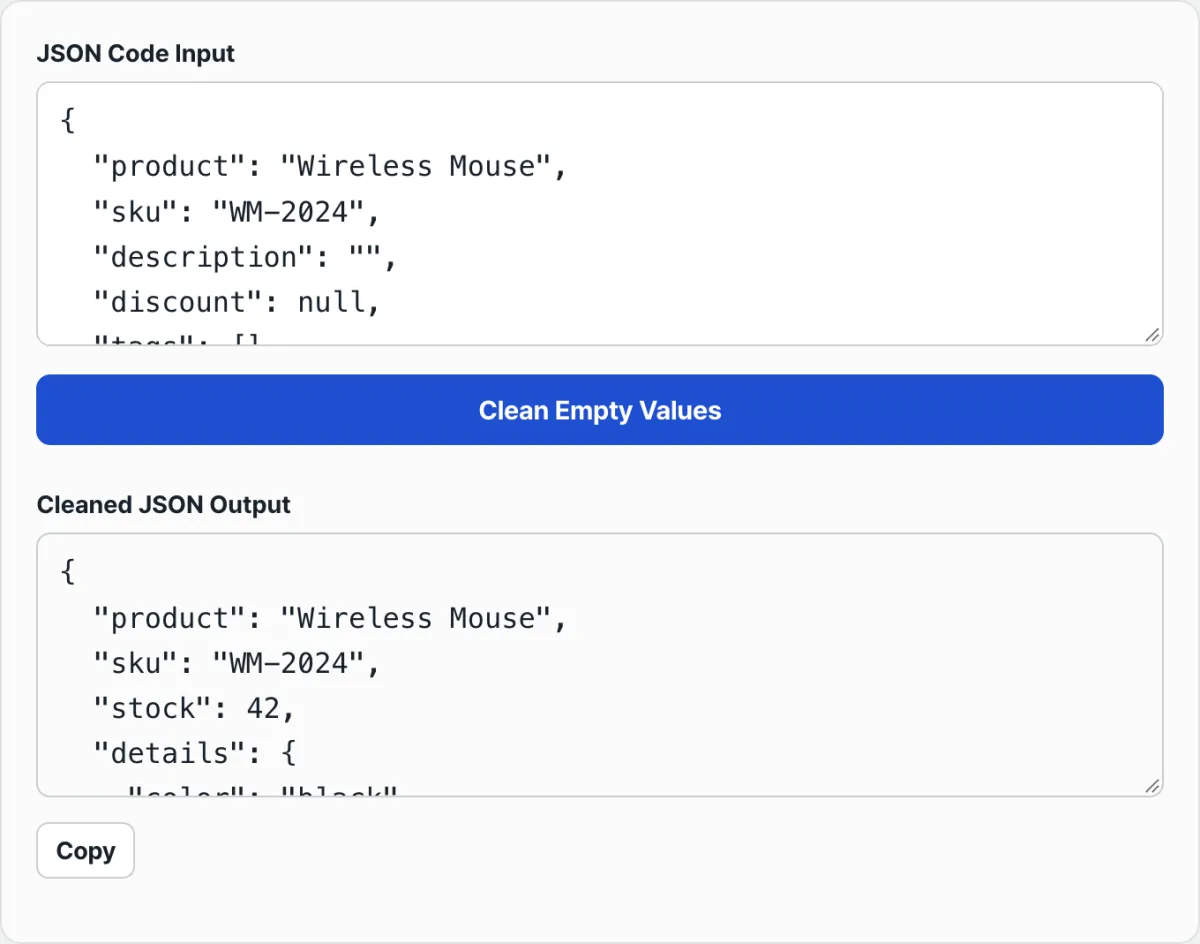
Check it with our free tool, JSON Empty Values Cleaner.
Paste in your JSON and the empty values get cleaned right away, with no signup or install.
Common points of confusion
The test isn't a vague "this looks empty" — only values that match a specific list are removed. The table below lays it out.
| Value | Result |
|---|---|
| "" (empty string) | Removed |
| null | Removed |
| undefined | Removed |
| [] (empty array) | Removed |
| {} (empty object) | Removed |
| 0 | Kept |
| false | Kept |
| " " (a single space) | Kept (it isn't an empty string) |
| "0" (a string) | Kept |
0 and false stay because the test function compares values against exactly five things: "", null, undefined, an empty array, and an empty object. 0 and false don't belong to any of those five, so they pass the test untouched.
A single space (" ") works the same way. An empty string ("") and a string holding one character are different values, so a string with nothing but whitespace isn't removed. It stays.
If no output appears at all and you only get a red error message, that has nothing to do with the cleanup rule — the input itself isn't valid JSON syntax. The usual causes:
- A comma left after the last item (trailing comma):
{"a": 1,} - A key without quotes:
{a: 1} - A literal undefined used directly as a value:
{"a": undefined}— JSON has no such value as undefined; only null is valid - Strings or keys wrapped in single quotes:
{'a': 'b'}
JSON.parse follows a stricter standard than a JavaScript object literal. If any one of these slips in, parsing stops with an error and the empty-value filtering logic never runs at all.
Recap
- Exactly five things get removed: empty strings, null, undefined, empty arrays, and empty objects.
- 0, false, and non-empty strings, arrays, and objects (including strings with whitespace) stay as they are.
- Cleanup runs from child values up to the parent, so if a child empties out and makes the parent an empty object, the parent gets removed in the next step too.
- Input is validated by standard JSON.parse, so a trailing comma, an unquoted key, or a literal undefined throws an error before any cleanup happens.
Paste in your JSON and the empty values get cleaned right away, with no signup or install.
The Core Technical Mechanism: Recursive Tree Traversal and Value Checks
Plain string replacement or regular expressions alone can't completely remove empty values from nested JSON when the depth is unpredictable. That's because JSON data is fundamentally a tree structure. Let's look closely at the internal algorithm a JSON empty-value cleaner uses, its mathematical complexity, and the limits of the standard.
1. Tree Traversal Algorithms
The most important concept when cleaning JSON data is bottom-up post-order traversal.
- Why bottom-up post-order traversal is essential: You evaluate and process child nodes first, then evaluate the parent based on the result. It runs in the order 'cleanValues(child) -> isEmpty(cleanedChild)'. Suppose you have '{"parent": {"child": {"grandchild": ""}}}'. The innermost 'grandchild' is an empty string, so it gets removed. That leaves 'child' as an empty object, '{}'. Now you evaluate 'child', see that it's empty, and remove it too. Eventually 'parent' is also an empty object, and every empty shell is gone.
- The limits of top-down pre-order traversal: This approach evaluates the parent first. In the example above, when you first check 'parent' or 'child', they contain keys, so you wrongly decide they're "not empty." After you remove the child values later, the parent is left as an empty object, but you've already evaluated it. This creates a critical flaw: meaningless empty shell objects stay in the data.
2. Precise Value Identification Logic
Don't delete a value just because it's falsy. You need to pick out only the "truly meaningless empty values" that don't affect your application's business logic.
- Values to prune:
- '""' (empty string)
- 'null'
- 'undefined' (can appear when you modify an object after parsing JSON)
- '[]' (an empty array with no elements)
- '{}' (an empty object with no keys)
- Values you must preserve (preserved falsy primitives):
- '0' (the number 0 is critical data, such as a bank balance, quantity, or index)
- 'false' (a boolean false represents a clear state, such as no permission, disabled, or unpaid)
- '" "' (a whitespace string may be an intentional space the user typed)
3. Time and Space Complexity
- Time complexity: O(N) — here, N is the total number of nodes (key-value pairs) in the JSON tree. Every node is traversed and checked exactly once, so time grows linearly with the size of the data.
- Space complexity: O(D) — here, D is the tree's maximum nesting depth. Each recursive call adds a frame to the call stack, so extremely deep JSON can cause a stack overflow. However, typical API responses are no deeper than 10 levels, so this is very safe and fast in practice.
4. Constraints in the RFC 8259 JSON Standard
This cleaning algorithm must always start with 'JSON.parse()'. The RFC 8259 standard requires very strict syntax to protect the integrity of data exchange. Here are the elements that JavaScript allows but standard JSON never does (they cause a SyntaxError):
- Trailing commas after the last property in an array or object
- Single quotes around strings or object keys (''')
- Object keys without quotes
- Special numeric literals such as 'NaN', 'Infinity', and '-Infinity'
- Using the 'undefined' keyword directly
So for a complete cleanup, always parse a serialized string that conforms to the spec first.
JSON Cleaning Methods Compared by Situation (Comparison Table)
Here's a quick comparison of how different environments and libraries handle JSON empty-value removal, along with their strengths, weaknesses, and scope.
| Comparison item | Pure Recursive JS (Recommended) | JSON.stringify(obj, replacer) | Lodash (_.omitBy / _.pickBy) | jq Shell Filter (CLI) |
|---|---|---|---|---|
| How it works | Full post-order recursive algorithm | Filters during serialization | Shallow object property filtering | Tree traversal with a 'walk' function |
| Nested empty parent removal | ✅ Full support (bottom-up) | ❌ Not possible (top-down limitation) | ❌ Not possible (only applies at 1 level) | ✅ Full support (recursive walk function) |
| Preserves 0 and false | ✅ Full support (explicit type checks) | ✅ Supported (conditional handling possible) | ⚠️ Care needed (lost when using _.identity) | ✅ Full support ('!= null') |
| Empty array element handling | ✅ Filters and compacts them cleanly | ⚠️ Replaced with 'null' (array length preserved) | ❌ Can't apply to array elements | ✅ Possible with 'map' and 'select' |
| Speed and performance | Very fast (O(N) linear scan) | Fast (optimized native C++ engine) | Somewhat slow (library overhead) | Fast (compiled C-based binary) |
| Best fit | Browser frontend, Node.js backend | Log formatting, simple one-dimensional data | Projects already using Lodash as a dependency | Server SSH access, Bash shell scripting automation |
As the table shows, the 'replacer' function—the second argument to 'JSON.stringify'—works top-down. It can't detect and remove a parent object that has become empty because its children were removed, and if you try to remove an array element, the slot is filled with 'null' instead of disappearing. That makes a custom recursive function (Pure Recursive JS) far superior for data integrity.
5 Critical Mistakes People Commonly Make
Even experienced senior developers overlook edge cases and make mistakes that seriously hurt a service.
- Overusing simple truthy/falsy checks ('if (!value)') Trust JavaScript's loose type casting and check with 'if (!value)', and a database value of '0' (for example, a balance of 0 won) or 'false' (for example, opted out of marketing messages) can vanish entirely, breaking your business logic.
- Leaving empty shell objects behind with top-down filtering If your logic checks the parent object first, it can't handle the new empty parent object ('{ "user": {} }') created after empty child values are removed, so your payload size optimization fails.
- Mutating the original object in place and causing side effects If you use 'delete obj[key]' inside a recursive function to modify the original object directly, other modules that reference that object can hit unexpected memory reference errors and state inconsistency bugs. Always preserve immutability by returning a new object.
- No protection against circular references If you pass a structure where object A references object B and B references A back (for example, a bidirectional ORM model) to your cleaning function, it will recurse forever, throw a 'Maximum call stack size exceeded' error, and take down your entire Node.js server.
- Calling JSON.parse() without exception handling If you feed incoming text from an external source into 'JSON.parse()' without validating it first and a syntax error occurs, your application crashes. Always wrap it in a 'try-catch' block or use a safe wrapper function.
A 5-Step Production-Level Workflow That Boosts Real-World Productivity
This is a systematic 5-step pipeline for safely processing and storing JSON in enterprise environments, going beyond simple cleaning.
- Step 1: Upfront schema and syntax validation First, try parsing the incoming string with 'try-catch' to confirm it complies with RFC 8259. If needed, run it through a schema validator such as Ajv or Zod to build a first line of defense that checks the data's basic skeleton matches what you expect.
- Step 2: Run bottom-up recursive pruning Call a recursive function like the 'cleanValues' from this article to strip out meaningless 'null', '""', '[]', and '{}' nodes completely, starting from the deepest level.
- Step 3: Cross-check integrity to preserve critical falsy data ('0', 'false') Use unit tests to verify that business-critical 0 or false values weren't lost from the cleaned object. This step should never be skipped, especially for financial or authentication payloads.
- Step 4: Serialize with the optimization that fits your environment Convert the cleaned plain JavaScript object into a string for transmission or storage. For network transfer in production, use the compact 'JSON.stringify(cleaned, null, 0)' with no whitespace. If humans need to read the logs, use 'JSON.stringify(cleaned, null, 2)' for readability.
- Step 5: Persist and safely deploy to downstream APIs Load the trimmed, lightweight JSON payload into PostgreSQL or MongoDB, or send it safely as a client/server API response.
7 Tips for Cleaning Up JSON Payloads
These are senior developers' advanced techniques for squeezing out millisecond-level performance in systems that handle heavy traffic.
- Strip indentation entirely when sending production API responses: Unless you're debugging, apply compact serialization to your API responses and drop every unnecessary line break ('\n') and space. In large JSON, whitespace can account for more than 20% of the total payload size.
- Strip nulls right before you send GraphQL and REST responses: Hollow 'null' fields padded in by the schema do nothing but eat bandwidth. Apply your cleaning function at the middleware or interceptor level so the response size stays as small as possible.
- Use schema-based serialization tools for service-to-service communication: In a Node.js environment, swap the native 'JSON.stringify' for a library based on precompiled schemas, such as 'fast-json-stringify', for internal service calls. It can cut CPU overhead dramatically.
- Always sanitize webhook payloads before persisting them to the database: If you dump a giant webhook blob from an external payment provider or partner API straight into an RDBMS JSON column, your storage costs will spike. Only load the concentrated data after cleaning it.
- Avoid and detect circular references with WeakSet: To prevent call stack explosions when converting or cleaning complex in-memory objects to JSON, store the current object in a 'WeakSet' when you enter the recursive function and check whether you've already visited it. That's the defensive code you need.
- Control when ISO 8601 Date objects get serialized: Make sure your empty-value cleaner doesn't mistake a JavaScript 'Date' object for an empty '{}' and delete it. Either add a 'value instanceof Date' exception inside the 'typeof value === "object"' branch, or serialize dates to strings before cleaning.
- Test edge cases and complex data with this web tool: Before you apply your code to thousands of lines of tangled JSON, paste it into the cleaning tool on this page. Get in the habit of eyeballing that '0', 'false', and objects inside arrays survive exactly as intended.
The Final Decision Tree: Which Strategy and Tool Should You Choose?
Here's how to pick the best empty-value removal approach for your environment and requirements in about one second.
- Case A (shell environment, CI/CD pipeline, DevOps log analysis) ➔ Use the 'walk' filter in the 'jq' command: In the CLI, you get the most efficiency by skipping the browser, piping data with '|', and running a cleanup script like 'walk(if type == "object" then ...)' right away.
- Case B (simple one-dimensional config files, data without deep nesting) ➔ Use lodash's '_.omitBy' or a 'JSON.stringify' replacer function: If your objects are flat and don't need deep recursion, reduce boilerplate by using the utility library already installed in your project or the native feature.
- Case C (deeply nested structures, compressed API responses, financial data where integrity is everything) ➔ Implement the bottom-up recursive 'cleanValues' function shown in this article: When you have to carve out empty objects nested inside objects, and preserving '0' and 'false' is the absolute top priority, custom recursion is the only right answer.
- Case D (immediate one-off data cleanup with great visualization, no coding) ➔ Use the JSON Empty Values Cleaner on this website: This is the perfect choice when you don't have time to install a library and you need clean JSON data for a spreadsheet or report right now.
Key Terminology Cheatsheet
Six key terms so you don't get lost in the complex data engineering ecosystem.
- Bottom-up post-order traversal: A tree traversal algorithm that processes the deepest child nodes first and then gradually evaluates the parent nodes. This is the core principle behind removing nested empty objects.
- Falsy value: A value that evaluates to 'false' when JavaScript encounters it in a boolean context. ('false', '0', '-0', '0n', '""', 'null', 'undefined', 'NaN')
- RFC 8259: The latest official IETF standard specification for the JavaScript Object Notation (JSON) format, the foundation of internet data exchange worldwide.
- JSON.stringify replacer: A callback function or array passed as the second argument to convert a JavaScript object into a JSON string, used to filter out or transform specific properties.
- Circular reference: A state where an object refers back to itself, directly or indirectly. Running JSON serialization or a recursive function on it leads to an infinite loop and a fatal error.
- Payload optimization: The work of removing unnecessary whitespace and meaningless hollow keys from the data payload exchanged between client and server over the network, dramatically improving transfer speed and cost.
Frequently Asked Questions
Three deeper questions and answers that go past simple curiosity and get to the how and why.
Q1. Why shouldn't "0" and "false" be removed, and how do you handle them as exceptions?
A1. In API communication, '0' is data with core business meaning — a 0% discount rate, a balance of 0 won, index 0 of an array. 'false' likewise means failed authentication or a disabled feature. If you wipe them, the system misreads them as 'null' or 'undefined', which means "this data hasn't been collected yet," and that can cause missing payments or permission-bypass bugs. To prevent this, your check function (isEmpty) should skip broad negation like 'if (!value)' and instead name exactly what gets removed, e.g. 'v === "" || v === null || v === undefined', using strict equality to avoid type coercion.
Q2. I have a parent object nested five levels deep. I deleted the empty values on the last child, and all the parents ended up empty too. How do I delete them all at once?
A2. You have to traverse "bottom-up," not "top-down." JavaScript's native replacer walks from the top down, so it never notices when a parent object it already passed through becomes empty afterward. The 'cleanValues' function in the article, by contrast, waits for the return value of the recursive call before deciding whether to assign it to the parent key ('if (!isEmpty(cleaned)) result[key] = cleaned;'). In other words, when the deepest child disappears and its parent becomes '{}', the grandparent's 'isEmpty' check catches it and deletes it too.
Q3. Can I get the same perfect recursive cleanup with the 'jq' command in a Bash shell?
A3. Yes, absolutely! Use the built-in 'walk' function, available in 'jq' 1.5 and later. Inside, 'walk' does a proper post-order traversal. Type this into your shell: 'jq 'walk(if type == "object" then with_entries(select(.value != null and .value != "" and .value != [] and .value != {})) else . end)' input.json' With that one powerful line, multi-gigabyte dump files from Linux server monitoring logs or Cron jobs get compressed perfectly in an instant.
This article was adapted from our Korean original. Read the Korean original