
Base64 to Hex: How 4-Bit and 6-Bit Encoding Works
Contents
- What Hex and Base64 Really Are: 4-Bit vs. 6-Bit Encoding
- Convert Hex to Base64 by Hand: "48656c6c6f" (Hello)
- The Core Mechanism: 3 Bytes = 6 Hex Characters = 4 Base64 Characters
- Base64 vs. Hexadecimal (Hex / Base16): Full Comparison
- Five Common Base64–Hex Conversion Mistakes
- A Foolproof 5-Step Base64 ⟷ Hex Workflow
- 7 Tips for Converting Hex and Base64
- Final decision tree: which format should you use?
- Cheat sheet: base conversion and cryptography terms
- Frequently asked questions
You've probably been there: you're working with the same SHA-256 hash or encryption key, but one developer tool prints it as '48656c6c6f' (hexadecimal), while a cloud API returns 'SGVsbG8=' (Base64). They look like completely different pieces of data, and that can be confusing.
The two strings look nothing alike, but they're just the same binary byte array stored in computer memory, written in two different numbering systems.
This guide covers the math behind rearranging bits between hexadecimal (Hex, 4 bits) and Base64 (6 bits), the rule that Hex strings must have an even number of characters, and a technique for converting between the two formats in one second when verifying cryptographic signatures.
Key takeaways ① Same data, different notation: Hex writes 1 byte (8 bits) as two hexadecimal characters. Base64 writes 3 bytes (24 bits) as four base-64 characters. That's the only difference. ② The even-length rule for Hex: Two Hex characters always make 1 byte. If the string length is odd, the last byte is incomplete, and the conversion fails. ③ The size difference: Hex expands data to 2x its original size (200%). Base64 expands it only about 1.33x (+33%), which makes Base64 much better for network transfer. ④ With our converter, you can convert between Hex and Base64 in both directions in real time and normalize whitespace and letter case in one second.
What Hex and Base64 Really Are: 4-Bit vs. 6-Bit Encoding
A byte, the basic unit of computer memory, consists of 8 bits (each one a 0 or 1):
- Hexadecimal (Hex / Base16): Splits 8 bits into two 4-bit groups and writes each group as one character (0–9, a–f), for 2 characters total. (1 byte = 2 characters)
- Base64: Splits 24 bits (3 bytes) into four 6-bit groups and writes each group as one character (A–Z, a–z, 0–9, +, /), for 4 characters total. (3 bytes = 4 characters)
In other words, 6 Hex characters (3 bytes) hold exactly the same original data as 4 Base64 characters.
Convert Hex to Base64 by Hand: "48656c6c6f" (Hello)
Here are the five bit-operation steps for converting the hex string 48 65 6c 6c 6f (5 bytes) to Base64:
- Convert Hex to binary bytes:
- 48 ➔ 01001000, 65 ➔ 01100101, 6c ➔ 01101100, 6c ➔ 01101100, 6f ➔ 01101111
- Join them into a 40-bit stream: 01001000 01100101 01101100 01101100 01101111
- Split into 6-bit groups (pad the last group with zeros):
- [010010] [000110] [010101] [101100] [011011] [000110] [111100] (7 groups)
- Map each group to a Base64 character index:
- 18(S), 6(G), 21(V), 44(s), 27(b), 6(G), 60(8) ➔ SGVsbG8
- Add padding equals signs (=): 5 bytes is 1 byte short of a multiple of 3, so add one '=' at the end to get the final result, SGVsbG8=.
Free · Lossless, real-time conversion between Base64 and hex in both directions, in one second, just by typing text
The Core Mechanism: 3 Bytes = 6 Hex Characters = 4 Base64 Characters
Here's how the two formats line up bit for bit from a computer architecture standpoint.
1. Byte alignment and the base conversion formula
- Example (SHA-256 hash = 32 bytes):
- Hex: 32 × 2 = 64 characters (e.g., e3b0c44298fc1c149afbf4c8996fb92427ae41e4649b934ca495991b7852b855)
- Base64: 4 × ⌈ 32/3 ⌉ = 4 × 11 = 44 characters (e.g., 47DEQpj8HBSa+/TImW+5JCeuQeRkm5NMpJWZG3hSuFU=)
2. Why odd-length Hex strings cause errors
- Each hexadecimal character carries exactly 4 bits (a nibble).
- If the string length is odd (for example, 5 characters = 20 bits), the last 4 bits can't form a full 8-bit byte, so the string can't be converted to binary data at all.
- The length must be even, or you need to pad the front with a '0' to make it even.
Base64 vs. Hexadecimal (Hex / Base16): Full Comparison
| Comparison | Hexadecimal (Hex / Base16) | Base64 (RFC 4648) |
|---|---|---|
| Information per character | 4 bits (nibble) | 6 bits |
| Character set | 16 characters (0–9, a–f / A–F) | 64 characters (A–Z, a–z, 0–9, +, /) |
| Size to represent 1 byte | 2 characters | About 1.33 characters |
| Size increase vs. original | +100% (2x expansion) | +33.3% (1.33x) |
| Readability at byte boundaries | Best (1 byte = 2 characters, an intuitive 1:1 mapping) | Fair (3 bytes are grouped into 4 characters) |
| Padding character | None | Equals sign (=, ==) |
| Common uses | Cryptographic hashes (SHA/MD5), memory dumps, MAC addresses | Web tokens (JWT), email attachments, image data URIs |
Five Common Base64–Hex Conversion Mistakes
- Entering a Hex string with an odd number of characters: This breaks the two-characters-per-byte rule and throws a "length must be even" parsing error.
- Leaving the '0x' prefix or colons (:) in Hex: Special characters such as 0x or AA:BB:CC get mistaken for hex digits and produce the wrong value.
- Ignoring case in Base64: Hex is case-insensitive (0xAB == 0xab), but Base64 treats 'A' and 'a' as completely different values, so case must be preserved.
- Comparing hash strings directly: Two identical hashes can fail a direct == comparison if one is a Hex string and the other is Base64.
- Losing the '+' character in Base64 in URL environments: Before converting to Hex, people forget to check whether a '+' inside the Base64 was corrupted into a space.
A Foolproof 5-Step Base64 ⟷ Hex Workflow
- Step 1 (Prepare your input): Copy the hexadecimal Hex hash or Base64 string you need to convert.
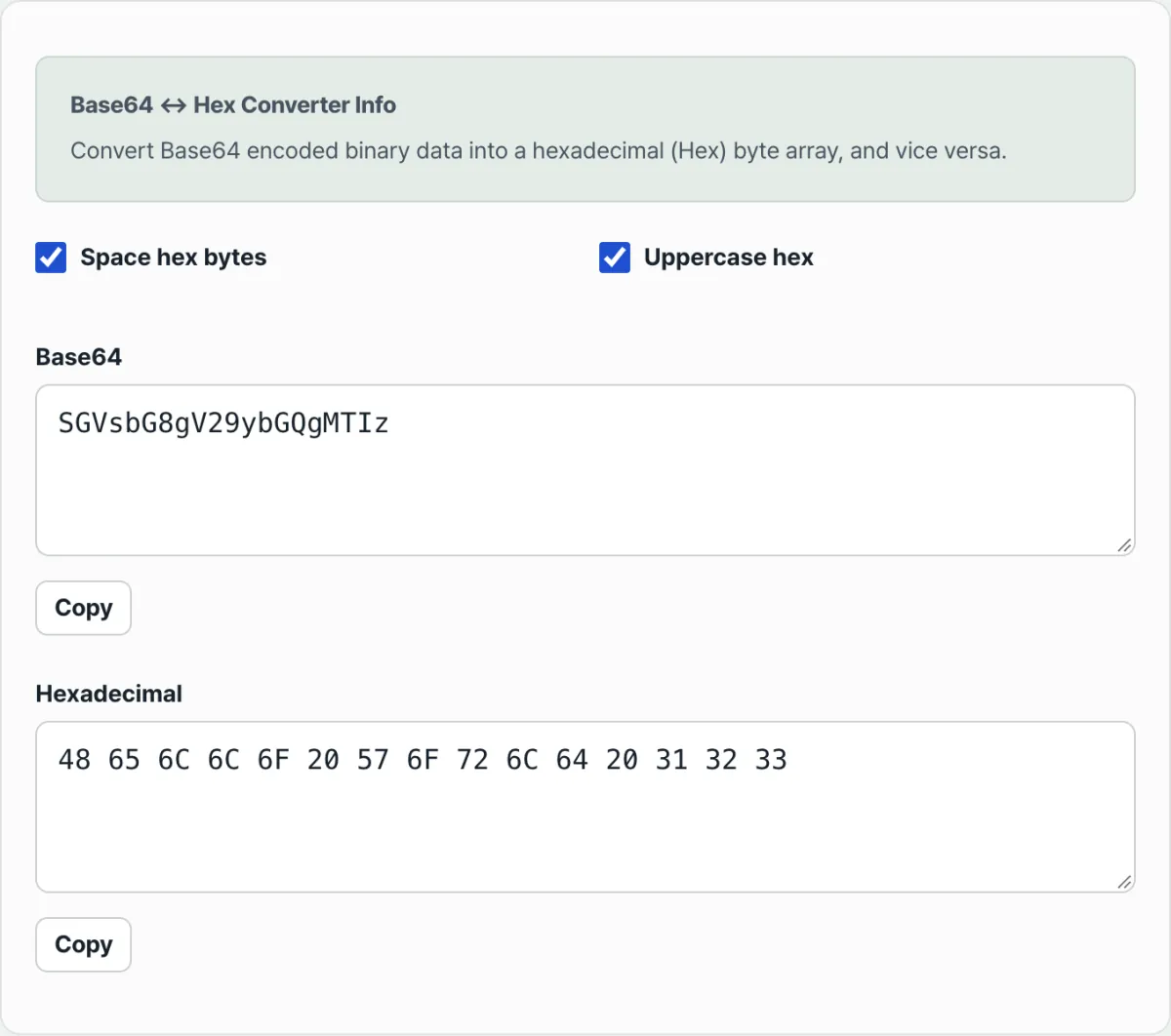
- Step 2 (Paste it into the converter): Put the value in either the Base64 or the Hex input field.
- Step 3 (Convert automatically in real time): As soon as you type in one field, the other format updates in 0.001 seconds.
- Step 4 (Customize the formatting options): When outputting Hex, check 'Space between bytes' or 'Uppercase (A-F)' to make it easier to read.
- Step 5 (Copy the result and use it in your code): Copy the converted string and use it in an OpenSSL command, an API request, or your encryption code.
7 Tips for Converting Hex and Base64
- Convert in one second with an openssl command: echo -n "SGVsbG8=" | base64 -d | xxd -p (Base64 ➔ Hex)
- A one-line Node.js conversion: Buffer.from('48656c6c6f', 'hex').toString('base64') and the reverse, Buffer.from('SGVsbG8=', 'base64').toString('hex')
- The 64-character Hex ➔ 44-character Base64 formula for SHA-256: a 64-character Hex hash always becomes exactly 44 characters in Base64 (with a single '=' at the end).
- The 32-character Hex ➔ 24-character Base64 formula for MD5: a 32-character Hex MD5 always becomes exactly 24 characters in Base64 (with '==' at the end).
- Normalize case: standardize Hex to lowercase (toLowerCase()) before comparing, so comparisons don't break between systems.
- Save network bandwidth: when you send a large list of binary hashes through an API, Base64 cuts traffic by 33% compared to Hex.
- Bookmark this converter: when you're debugging API encryption keys or verifying blockchain transaction hashes, it clears the format barrier in a second.
Final decision tree: which format should you use?
- Case A (you need to check byte offsets by eye or dump memory) ➔ Hexadecimal Hex (intuitive 1:1 mapping)
- Case B (you're sending lots of hashes or binary over a network API) ➔ Base64 (33% less data)
- Case C (OpenSSL CLI or Linux command-line tool parameters) ➔ Hex (-K, -iv options)
- Case D (JSON payloads, HTTP headers, JWT tokens) ➔ Base64 / Base64URL
Cheat sheet: base conversion and cryptography terms
- Hexadecimal: a base-16 notation that expresses the numbers 0 through 15 using 0–9 and A–F.
- Nibble: a 4-bit unit, half of one byte (8 bits) — it maps exactly to one Hex character.
- Digest: the fixed-length binary output produced by a hash function such as SHA-256.
- Byte buffer: a contiguous array of raw 8-bit binary bytes stored sequentially in computer memory.
Frequently asked questions
Why do I get a "length must be even" error when I enter a Hex string?
In hexadecimal notation, two characters must always be combined to form one byte (8 bits) of data. With an odd number of characters, the last byte can't be completed, so the conversion isn't possible. Add a leading '0' to make the length even.
Does converting between Base64 and Hex corrupt or alter the original data?
Not at all. The only difference is whether the binary bits are grouped in 4-bit units or 6-bit units. It's a reversible conversion with no bit loss.
Is the encryption key or secret hash I enter sent to a server?
Never. All of this converter's Hex and Base64 bit operations run locally in the JavaScript engine inside your browser, so there's no risk of your security keys being exposed externally.
This article was adapted from our Korean original. Read the Korean original