
CSV Quoting Rules: Why Splitting on Commas Shifts Columns
Contents
This post is for anyone who pulled a CSV out of Excel, split it on commas in code, and found that some rows have their columns shifted by one. Here's the short version: not every comma in a CSV is a column separator, and a comma inside double quotes is just a character.
CSV lets values contain commas, double quotes, and line breaks, and there's a quoting rule that applies only in those cases. Learn these three lines and you can point straight at why your columns shifted.
Summary ① If a value contains a comma, double quote, or line break, wrap the whole value in double quotes. ② A double quote inside a wrapped value is escaped by writing it twice in a row.
""is a single quote character. ③ Commas and line breaks inside quotes are value, not separators, sosplit(",")or reading line by line can't handle them.
Your columns aren't shifting because the file is broken
Say your product list CSV looks like this.
name,memo,price
"연필, 2B","겉면에 ""HB"" 표기",1200
The second line has three commas. So split(",") produces four pieces, but the row actually has three columns: name, memo, price. The moment "연필 and 2B" get split apart, every value in that row slides over by one.
The same thing happens when you read line by line.
"노트","가로 210mm
세로 297mm",3500
That looks like two lines in the file, but it's one record. If you count lines, you register an extra row, and everything after it is off.
The CSV quoting rules: three lines, that's all
CSV is an old format, but it spread around without a formal spec. RFC 4180, published in October 2005, documented those conventions and registered the text/csv MIME type. The document itself notes that "while there are various specifications and implementations ... there is no formal specification in existence."
Here are the quoting rules it lays out.
- Each field may or may not be enclosed in double quotes. However, a field that is not enclosed cannot contain a double quote.
- Fields containing line breaks, double quotes, or commas must be enclosed in double quotes.
- If a double quote appears inside an enclosed field, escape it by preceding it with another double quote.
So "" is not two quote characters but one quote character. Read "겉면에 ""HB"" 표기" by the rules and the value becomes 겉면에 "HB" 표기.
There's one more thing. RFC 4180 states that "spaces are considered part of a field and should not be ignored." The second value in a, b isn't b — it's b, with a leading space. Your spreadsheet may look like it tidied things up, but by the rules the space is still there.
How to parse it yourself, without a tool
The key is to walk through the characters one at a time while keeping a single piece of state: are you inside quotes or outside. If you try to split everything at once with a regex, you'll get stuck on consecutive "" pretty fast.
There are four rules to follow.
- Outside quotes, hitting a
"puts you inside a quoted section. - Inside a quoted section, if you hit a
"and the next character is also", add one quote character to the value and skip both characters. - Inside a quoted section, if a
"is followed by any other character, you leave the quoted section. - Only commas outside a quoted section separate columns, and only line breaks outside separate rows. Inside, they're all just characters.
Paste the following into the console in your browser's developer tools (usually F12) and you'll have a working parser that follows these rules exactly.
function parseCSV(text, delim) {
  const rows = []; let row = []; let field = ""; let inQuotes = false;
  for (let i = 0; i < text.length; i++) {
    const c = text[i];
    if (inQuotes) {
      if (c === '"') {
        if (text[i + 1] === '"') { field += '"'; i++; }   // "" → one " character
        else inQuotes = false;
      } else field += c;                                   // commas/line breaks inside are value
    } else if (c === '"') inQuotes = true;
    else if (c === delim) { row.push(field); field = ""; }
    else if (c === "\n") { row.push(field); rows.push(row); row = []; field = ""; }
    else if (c !== "\r") field += c;
  }
  row.push(field); rows.push(row);
  return rows;
}
If the file ends with a line break, this function adds one more row at the end containing a single empty value. When you count rows, just leave that one out.
The problem is that every time you check a CSV you have to paste this function in again and eyeball the resulting array to see whether the columns line up. And if you want to turn the first row into keys and produce JSON, that's more code on top.
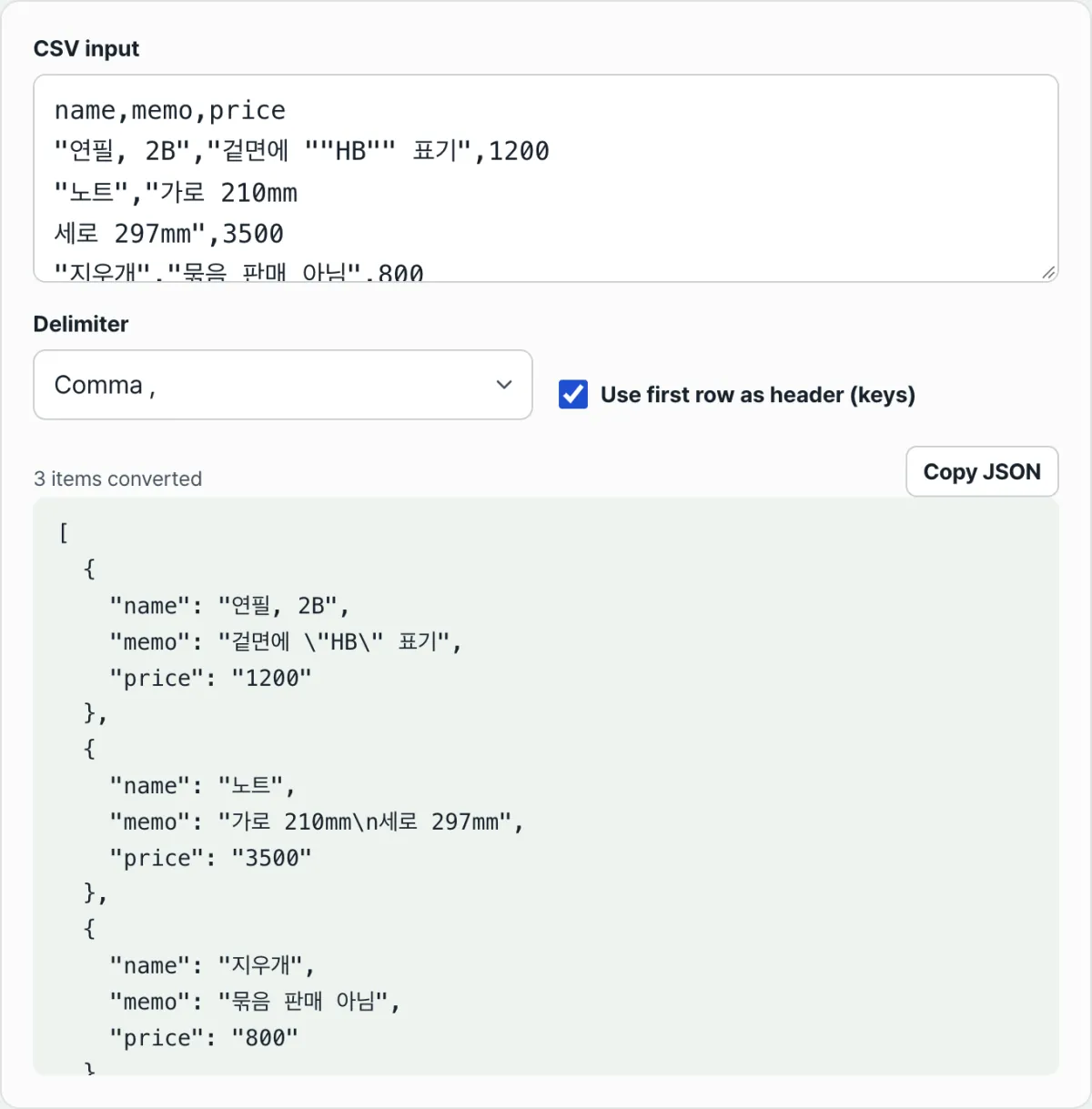
Check it with our tool. Paste your data into the CSV input and it parses with the same quoting rules, then shows you a JSON array using the first row as keys right away.
It converts right in your browser, with no install and no sign-up, and the CSV you paste is never sent to a server.
Where people get stuck with the converted result
| Situation | What happens |
|---|---|
| A comma inside a value | If it's within the quoted section, it stays as a character |
"" inside a value | It's merged into a single double quote character |
| A line break inside a value | It stays inside one value and shows as \n in the JSON |
| A value that looks like a number | It always comes out as a string ("1200") |
| A row with too few columns | The missing keys are filled with empty strings |
| An empty header cell | A name like col1 or col2 is used instead |
Every value comes out as a string because CSV itself has no data types. The file only contains the characters 1200; there's nowhere in it to record whether that's a number or a product code. If you need it as a number, convert it on the receiving end.
Files whose delimiter isn't a comma are common too. In the tool's Delimiter option you can pick comma, tab, semicolon, or pipe, and only the delimiter changes — the same quoting rules apply.
If the first row is data rather than a title, just uncheck Use first row as header (keys). Then you get a two-dimensional array with an array per row instead of an array of objects.
Wrapping up
- Not every comma in a CSV is a separator. A comma inside a double-quoted section is part of the value.
- If a value contains a comma, double quote, or line break, wrap it in double quotes and write any inner double quote twice in a row.
- Because of line breaks inside values, the number of lines in a file and the number of records can differ. Reading line by line throws the rows off.
- When you parse it yourself, don't reach for a regex — walk the characters with a single "inside quotes or outside" state.
- Treat spaces as part of the field. The second value in
a, bkeeps its leading space. - Every converted value is a string. Data types are information CSV can't carry.
It converts right in your browser, with no install and no sign-up, and the CSV you paste is never sent to a server.
FAQ
Why do two quotes turn into one?
Because there has to be a way to tell the quotes wrapping the field apart from the quotes inside the value. RFC 4180 says that when a double quote appears inside a quoted field, you escape it by putting another double quote in front of it. When the reader hits a " inside a quoted section, it only checks whether the next character is also a ". If it is, one character goes into the value; if not, the quoted section closes.
Is a CSV with line breaks inside a value a broken file?
No. It's allowed by the rules, which specify that any value containing a line break must be wrapped in double quotes. It shows up often in values like notes or addresses that span multiple lines. Open the file in a text editor and check whether that value is wrapped in quotes — that tells you whether the file is actually broken or the reader is just reading it line by line.
Do files separated by semicolons or tabs follow the same rules?
Only the delimiter differs; the quoting rules are exactly the same. If a value contains that delimiter, a double quote, or a line break, it gets wrapped in double quotes, and any quotes inside are written twice. In our tool, you can change the delimiter setting from comma to tab, semicolon, or pipe and convert it the same way.
Is the CSV I paste sent to a server?
No. All conversion in this tool happens inside your browser. The CSV you enter and the result are never sent to or stored on a server. It's calculated on the same screen the moment you type, and you can put the result on your clipboard with the "Copy JSON" button.
This article was adapted from our Korean original. Read the Korean original