
Date Calculator: Days Between Dates and Weekday Rules
Contents
1. How Computers Do Date Subtraction
Humans look at a calendar and count days on their fingers, but the operating system (OS) and JavaScript engine inside a computer treat every date as an absolute number of milliseconds (ms) that have passed since the starting point, Unix Epoch Time (January 1, 1970, 00:00:00 UTC).
Formula for days between two dates: days apart = |timestamp of date A − timestamp of date B| ÷ 86,400,000 ms (the 86,400,000 in the denominator is the combined physical quantity of one day: 24 hours × 60 minutes × 60 seconds × 1000 ms.)
Formula for adding days (the date N days later): target date timestamp = base date timestamp + (N × 86,400,000 ms)
With this formula, you don't have to work through every irregular calendar structure one by one, whether that's a February that ends on the 28th or an August with 31 days. Plain linear addition and subtraction of absolute integers is enough to do the calculation.
2. Two Rules for Counting Days: Does Day One Count?
When you set a date, the rule for whether the starting day counts depends on legal standards or on how casual the situation is, so pay attention to the setting.
The "Don't Count the First Day" Principle (Korean Civil Act, Article 157)
- Definition: When a period is set in days, weeks, months, or years, the first day is not counted, and the period runs from the following day.
- Example: If something is set to run for three days from May 1, the first day, May 1, is excluded, and May 2, 3, and 4 become the deadline.
- How to set the calculator: Since the first day is excluded, enter your start date as the base date, then enter the number of days (N) you want in the "Add days (+)" tab as-is.
The "Count the First Day" Principle (Anniversary Counting)
- Definition: A method that counts the day you started dating or the day a baby was born as "day 1" right away.
- Example: If the start date is May 1 and today is May 1, today is "day 1."
- How to set the calculator: To count the current day as day 1, enter one less than the number of days you want (N−1) in the "Add days (+)" tab to correct for that one day.
How to Use the Date Calculator
If it's a hassle to count calendar squares by hand and repeat the finger arithmetic, or to write complicated date-format mapping functions in an Excel sheet, try a module built for date conversion.
Free · no sign-up · instantly get the date and weekday N years/months/weeks/days before or after your start date
The steps for using the tool are laid out very clearly.
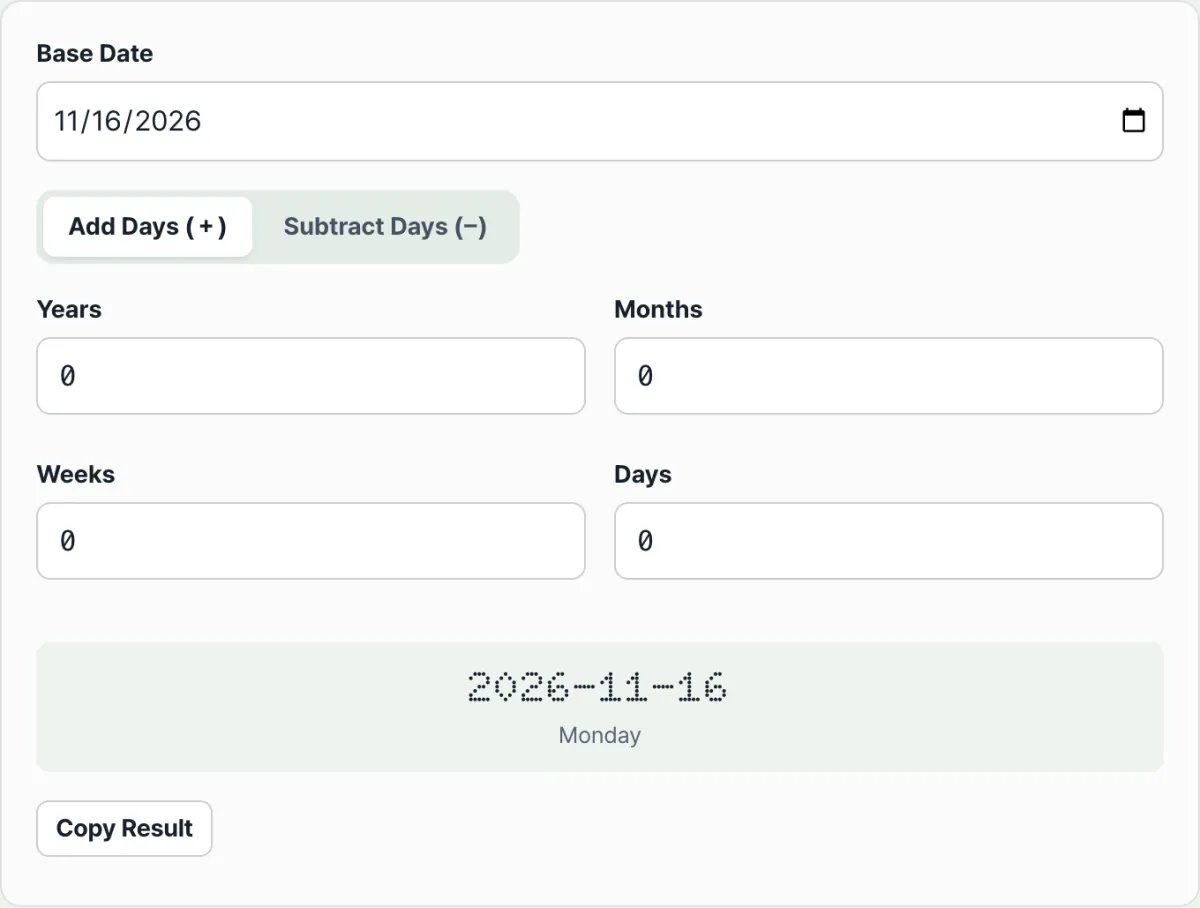
- Select a base date: Pick the date your calculation starts from on the calendar. If you don't pick one, today's date is used by default.
- Choose the add/subtract tab and enter numbers: Choose the "Add days (+)" or "Subtract days (−)" tab, then enter the numbers you want in the year, month, week, and day fields. You can combine all four units in one entry.
- As soon as you type, the result area shows the target date's year, month, day, and matching weekday in bold, and you can copy the result right away with the copy button.
The Bottom Line
Day counting is a basic part of keeping our daily life and business accurate, whether you're managing project deadlines or planning anniversaries. Don't eyeball it on a calendar. Use the Date Calculator (D-Day) to confirm the exact date and weekday, leap year rules included, in one second, and build a schedule with no mistakes.
Free · no sign-up · instantly get the date and weekday N years/months/weeks/days before or after your start date
Frequently Asked Questions
How do computers handle leap year rules internally?
A solar year isn't exactly 365 days. It's about 365.2422 days.
- To correct for this tiny error, the Gregorian calendar established a three-step rule: "A year divisible by 4 is a leap year, a year divisible by 100 is a common year, and a year divisible by 400 is again a leap year."
- For example, 2000 was a leap year because it's a multiple of 400, while 2100 is a common year because it's a multiple of 100 but not of 400. The Date Calculator (D-Day) computes using the Gregorian rules of JavaScript's standard Date object, so it's worth consulting even for long-term deadlines measured in centuries.
Does it count only weekdays (business days) and leave out weekends (Saturday and Sunday)?
No. The current Date Calculator (D-Day) doesn't offer a business-day-only filter that automatically screens out weekends or public holidays.
- The result does show the weekday of the target date, though, so you can check for yourself whether a Saturday or Sunday is included.
- If your work requires hitting a delivery date based on business days, check the resulting weekday and adjust the number of days, then recalculate.
This article was written with reference to the standard period-calculation provisions in Articles 155 through 161 of the Civil Act of the Republic of Korea and the ISO 8601 international standard date notation guide.
This article was adapted from our Korean original. Read the Korean original