
font-display swap vs block: timeline and comparison table
Contents
The five font-display values differ in two ways: how long they hide text (the block period) and how long after showing a fallback font they can still swap in the custom font (the swap period).
The swap value is especially confusing because the table lists its swap period as "infinite (∞)." That doesn't mean the text is invisible. It means the opposite: the fallback font is showing from the very start.
This post covers what the block period and swap period mean for each of the five values, and where FOUT and FOIT fall on the timeline, based on the CSS spec and how our tool displays it.
Which value you should pick depends on your site, so this post doesn't cover that.
Summary ① The block period is the stretch where text is invisible (FOIT), and the swap period is the stretch where the fallback font is showing and can still be replaced (FOUT). ② The "infinite (∞)" swap period of the
swapvalue doesn't mean the font never shows. It means that no matter how late the font loads, it gets swapped in the moment it arrives. ③ The font name and URL you enter only affect the generated code at the bottom. The block/swap durations and timeline proportions are fixed reference data for thefont-displayvalue you selected.
Why font-display values are confusing
While working on the front end, you've probably seen Lighthouse's "Ensure text remains visible during webfont load" warning and added font-display: swap to your CSS.
Then you reload the page and watch the text appear briefly in a fallback font before switching to the custom font.
If you open the table in MDN or the CSS spec at that point, you'll find terms like "Block Period" and "Swap Period" sitting next to numbers like 3s, 100ms, and ∞ (infinite). Without an explanation, it's easy to lose track of which value hides text longer.
"Infinite" in particular invites a backwards reading. A shorter block period is the good direction — text shows sooner. But the phrase "infinite swap period" alone makes people think "invisible forever."
How to check the spec yourself, without a tool
How font-display behaves follows the font display timeline defined by the W3C CSS Fonts Module Level 4 spec. That timeline splits into three periods from the moment the font is requested.
- Font block period: During this period, if the font hasn't loaded yet, the text stays invisible. If the load finishes inside this period, the custom font is rendered immediately.
- Font swap period: This period starts when the block period ends. From here on, the text is shown in a fallback font even if the font still isn't available, and if the load finishes inside this period, the custom font replaces it.
- Font failure period: If the font hasn't loaded by the end of the swap period, the load is treated as a failure, and the fallback font is used for the rest of this page view.
The spec defines recommended values for how long each value sets the block and swap periods.
| font-display value | Block period (spec recommendation) | Swap period (spec recommendation) |
|---|---|---|
| auto | Browser's own policy (usually similar to block) | Browser's own policy |
| block | Short (about 3 seconds) | Infinite |
| swap | Extremely short (about 100ms or less, effectively immediate) | Infinite |
| fallback | Extremely short (about 100ms or less) | Short (about 3 seconds) |
| optional | Extremely short (about 100ms or less) | None (0 seconds) |
Even this table alone lets you work out the differences between the five values by hand.
Both block and swap have an infinite swap period, so once the font loads it always gets swapped in eventually. The difference is that block hides text for up to 3 seconds first, while swap barely hides it at all and shows the fallback font right away.
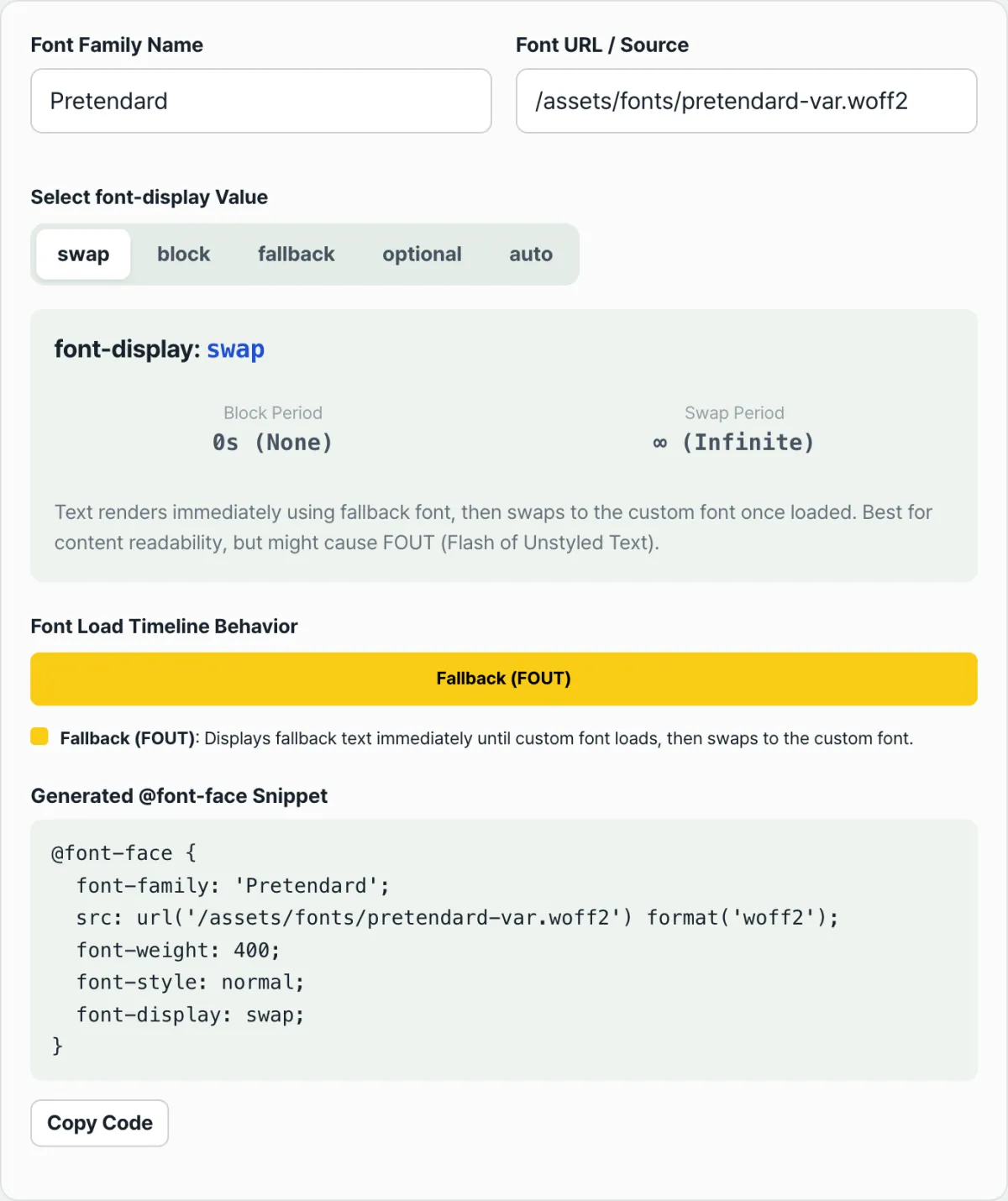
Note that the tool below shows the block period for swap as "0s" and the block period for block as "3s." It rounds the spec's recommended "100ms or less" down to effectively zero.
Check it with our tool.
Just enter a font name and URL to see the block and swap periods, timeline, and @font-face code for each font-display value for free.
The spots people usually trip on when reading the timeline
These four points are the easiest to get wrong when reading the table and the timeline.
- "Infinite swap period" does not mean "invisible": With the
swapvalue, the block period is effectively gone (0s), so text shows in the fallback font from the start. An infinite swap period means the door stays open to swap in the custom font the moment it loads, however late that is. It does not mean the text stays invisible forever. - FOIT and FOUT happen in different periods: FOIT (Flash of Invisible Text) happens in the block period, when the text isn't rendered at all. FOUT (Flash of Unstyled Text) happens in the swap period, when text that was showing in the fallback font changes to the custom font.
- "0s" for
optionaldoes not mean "instant swap": It means "no swap happens at all during this page view," not "it swaps instantly in 0 seconds." Once the block period (about 100ms) passes, the fallback font is locked in, and a custom font that finishes downloading after that is applied on the next visit. - The input values and the reference numbers are unrelated: Changing the font name or URL only changes the
@font-facecode text at the bottom of the screen. The Block Period and Swap Period numbers and the timeline bar proportions above are fixed reference data for the selectedfont-displayvalue, so they look the same no matter what you enter.
| font-display value | How text appears with this value | Common point of confusion |
|---|---|---|
| swap | Shown in the fallback font right away (FOUT possible) | Reading the "infinite" swap period as "invisible" |
| block | Invisible for up to 3 seconds (FOIT), then switches to the fallback font | The fallback font only appears once the block period ends |
| fallback | Invisible very briefly, then the fallback font; after 3 seconds it's locked in for this load | Reading "locked in" as "load failed" |
| optional | Checked very briefly, then locked to the fallback font with no swap | Reading the "0s" swap period as "instant swap" |
Recap
- The block period is the stretch where text is invisible (FOIT), and the swap period is the stretch where the fallback font is showing and can still be replaced (FOUT).
- With the
swapvalue, the block period is effectively 0, so text shows in the fallback font immediately, and the infinite swap period means it can be swapped in the moment it loads. - With the
blockvalue, text is hidden for up to 3 seconds before the fallback font appears, and after that it can be swapped in indefinitely, just likeswap. fallbackandoptionalput a cap on the swap period (about 3 seconds and 0 seconds respectively), so once that time passes, nothing more is swapped in for this page view.- The font name and URL you enter only affect the generated code text. The block/swap durations and timeline proportions are fixed reference data for the selected value.
Just enter a font name and URL to see the block and swap periods, timeline, and @font-face code for each font-display value for free.
Frequently Asked Questions
If the swap period is "infinite (∞)," does that mean the font never shows up?
No. An infinite swap period doesn't mean the text stays invisible forever. It means that no matter how late the custom font loads, the fallback font can switch to the custom font the moment it loads.
In fact, the swap value has essentially no block period, so the text is visible right from the start.
What exactly is the difference between FOUT and FOIT?
FOIT (Flash of Invisible Text) is when the text itself isn't rendered during the block period, so you can't see it.
FOUT (Flash of Unstyled Text) is what happens during the swap period, when text shown in the fallback font switches to the custom font. The block value makes FOIT more noticeable, and the swap value makes FOUT more noticeable.
Which value does auto behave the same as?
By spec, auto is defined to follow the browser's own policy, so it isn't fixed to any one value. That said, most major browsers — Chrome, Safari, Firefox, and others — are known to handle auto much like block.
Does the generated @font-face code also reflect the font-weight or font-style I entered?
No. In the generated code, font-family and src (the URL) reflect exactly what you entered, but font-weight is fixed at 400 and font-style at normal.
If you're using a font with a different weight or style, you'll need to edit those values directly in the code you copied.
This article was adapted from our Korean original. Read the Korean original